
Inleiding
Welcome to the user manual for your new Redmi Xiaomi 13 4G LTE smartphone. This guide provides essential information on setting up, operating, maintaining, and troubleshooting your device to ensure optimal performance and user experience. Please read this manual thoroughly before using your phone.
Wat is in die boks
Upon unboxing your Redmi Xiaomi 13, verify that all the following items are included:
- Redmi Xiaomi 13 Smartphone
- 33W muurlaaier
- Adapter
- Vinnige motorlaaier
- SIM Skinkbord Ejector
Opstelling
1. SIM-kaart en MicroSD-kaart Installasie
Your Redmi 13 supports Dual Nano SIM cards or one Nano SIM and one MicroSD card in a hybrid slot. Ensure your SIM card is activated by your carrier before installation.
- Vind die SIM-laai aan die kant van jou foon.
- Plaas die SIM-laai se uitwerpgereedskap in die klein gaatjie langs die laai en druk stewig totdat die laai uitspring.
- Carefully place your Nano SIM card(s) and/or MicroSD card into the designated slots on the tray. Ensure the gold contacts face downwards.
- Gently push the tray back into the phone until it is flush with the device.
Beeld: Sykant view of the Redmi Xiaomi 13, illustrating the location of the SIM tray and camera module.
2. Aanvanklike aanskakeling en opstelling
Om jou toestel vir die eerste keer aan te skakel:
- Press and hold the Power button (located on the right side of the phone) until the Redmi logo appears on the screen.
- Follow the on-screen instructions to select your language, region, connect to a Wi-Fi network, and set up your Google account.
- You will be prompted to set up security features such as a PIN, pattern, password, fingerprint, or face unlock.

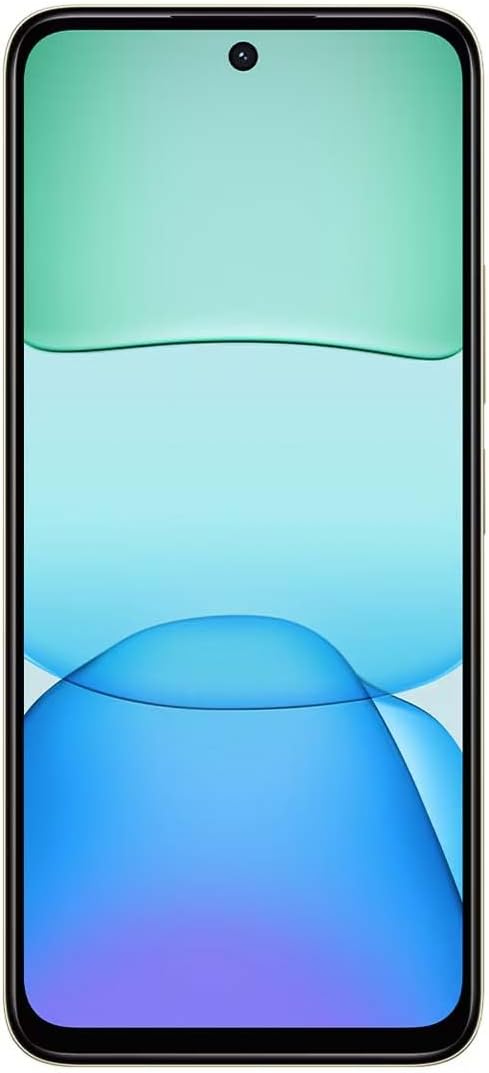
Beeld: Voorkant view of the Redmi Xiaomi 13, showing the display and front camera.
3. Netwerkopstelling
Your device is designed for 4G LTE connectivity. For USA users, it is compatible with Tello and Mint Mobile. For global users, it supports various GSM carriers. Ensure your APN settings are correctly configured if you experience network issues. These settings are usually automatically detected upon SIM insertion.
Bedien jou toestel
1. Vertoonkenmerke
The Redmi 13 features a 6.79-inch Dot Drop HD+ display with a resolution of 1650 x 720. It supports Sunlight display for better visibility in bright conditions and Reading mode to reduce eye strain. You can adjust color temperature in the display settings.
2. Kameragebruik
Your phone is equipped with a powerful camera system:
- Agterste kamera: 108MP main camera (f/1.8 with 4-in-1 pixel binning) and a 2MP depth camera (f/2.4).
- Voorste kamera: 13MP vir selfies en video-oproepe.
Om 'n foto te neem:
- Maak die kamera-toepassing oop.
- Kies die verlangde modus (Foto, Portret, Video, ens.).
- Tik die sluiterknoppie om 'n beeld vas te lê.
The camera features HDR mode for improved dynamic range and quick snap functionality for capturing moving moments efficiently.

Beeld: Agterkant view of the Redmi Xiaomi 13, highlighting the 108MP dual camera system.
3. Konnektiwiteit
The device supports Wi-Fi for internet access, GPS for navigation (including AGPS, GLONASS, Beidou, Galileo), and Bluetooth for connecting wireless accessories. It also includes a 3.5mm headphone jack for wired audio.
4. Sekuriteitskenmerke
Protect your device and data using the following security options:
- Agterste vingerafdruksensor: Registreer jou vingerafdrukke vir vinnige en veilige ontsluiting.
- KI-gesigontsluiting: Use your face to unlock the device.
- PIN/Patroon/Wagwoord: Standard lock screen security methods.
Onderhoud
1. Batteryversorging
The Redmi 13 is equipped with a 5030mAh (typ) battery. To prolong battery life:
- Vermy uiterste temperature.
- Use the provided 33W charger for optimal charging speed and safety.
- Moenie die battery gereeld heeltemal laat leegloop nie.
2. Sagteware-opdaterings
Kontroleer gereeld vir sagteware-opdaterings en installeer dit om te verseker dat jou toestel die nuutste kenmerke, sekuriteitsopdaterings en werkverrigtingverbeterings het. Navigeer na Instellings > Meer oor foon > Stelselopdatering om te kyk vir opdaterings.
3. Skoonmaak van jou toestel
Use a soft, lint-free cloth to clean your phone. Avoid using harsh chemicals or abrasive materials that could damage the screen or finish.
Probleemoplossing
If you encounter issues with your Redmi 13, try the following common troubleshooting steps:
- Toestel reageer nie: Druk en hou die aan/af-knoppie vir ongeveer 10-15 sekondes in om 'n herbegin te forseer.
- Netwerkprobleme: Check if your SIM card is properly inserted. Toggle Airplane Mode on and off. Reset network settings via Instellings > Verbinding en deel > Herstel Wi-Fi, mobiele netwerke en Bluetooth.
- App stort neer: Vee die toepassing se kasgeheue en data uit via Instellings > Programme > Bestuur programme > [Programnaam] > Vee data uitIndien die probleem voortduur, deïnstalleer en herinstalleer die toepassing.
- Battery raak vinnig leeg: Review batteryverbruik in Instellings > Battery to identify power-hungry apps. Reduce screen brightness and disable unnecessary features like GPS or Bluetooth when not in use.
- Stoorplek vol: Skrap onnodig files, photos, and videos. Uninstall unused apps. Consider moving media to a MicroSD card if installed.
- Fabrieksinstelling: As 'n laaste uitweg vir aanhoudende sagtewareprobleme, kan jy 'n fabrieksterugstelling uitvoer. Waarskuwing: Dit sal alle data op jou foon uitvee. Rugsteun belangrike data voordat jy voortgaan. Gaan na Instellings > Oor foon > Fabrieksterugstelling.
Spesifikasies
Below are the key technical specifications for the Redmi Xiaomi 13 4G LTE:
| Model Naam | Redmi 13 |
| Bedryfstelsel | Android 14 HyperOS |
| Verwerker | MediaTek Helio G91 Ultra Octa-core (2x2.0 GHz Cortex-A75 & 6x1.8 GHz Cortex-A55) |
| GPU | Mali-G52 MC2 |
| Vertoon | 6.79 Inches Dot Drop HD+ (1650 x 720) |
| RAM | 6 GB |
| Interne berging | 128 GB |
| Agterste kamera | 108MP (hoof) + 2MP (diepte) |
| Voorste kamera | 13MP |
| Battery kapasiteit | 5030 mAh (tipies) |
| Laai | 33W Vinnige Laai (USB Tipe-C) |
| Konnektiwiteit | 4G LTE, Wi-Fi, Bluetooth, GPS (AGPS, GLONASS, Beidou, Galileo) |
| Klankaansluiting | 3.5 mm |
| Sekuriteit | Agterste vingerafdruksensor, KI-gesigontsluiting |
| Pakket afmetings | 7 x 4 x 2 duim |
| Gewig | 6 onse |
Note: Specifications are subject to change without prior notice. Please refer to the official Redmi webwebwerf vir die mees onlangse inligting.
Waarborg en Ondersteuning
For warranty information, please refer to the warranty card included with your product or visit the official Redmi/Xiaomi website. For technical support, software updates, or service inquiries, please contact Xiaomi customer service or visit their official support channels. Keep your proof of purchase for warranty claims.
Official Redmi/Xiaomi Support: https://www.mi.com/global/support