
Docooler Transparent Wireless Dual-Mode Mouse
Docooler Transparent Wireless Dual-Mode Mouse User Manual
Model: Transparent Wireless Dual-Mode Mouse
Inleiding
This user manual provides comprehensive instructions for the Docooler Transparent Wireless Dual-Mode Mouse. It covers product features, setup, operation, maintenance, and troubleshooting to ensure optimal performance and user experience. Please read this manual carefully before using the product.
Pakketinhoud
Nadat u die pakkie oopgemaak het, maak asseblief seker dat al die volgende items ingesluit is:
- 1 x Docooler Transparent Wireless Dual-Mode Mouse
- 1 x Tipe-C-laaikabel
- 1 x USB Dongle (2.4G Receiver)
- 1 x Gebruikershandleiding (hierdie dokument)
Produk Kenmerke
The Docooler Transparent Wireless Dual-Mode Mouse offers advanced features for enhanced productivity and gaming:
- Dubbelmodus-konnektiwiteit: Supports both 2.4G wireless and Bluetooth 5.0 for versatile connection options.
- Deursigtige ontwerp: Unique transparent casing with visible internal components and RGB lighting.
- Verstelbare DPI: Three-level DPI settings (800/1200/1600) for precise cursor control.
- RGB Water-Cooled Lights: Dynamic RGB lighting effects for aesthetic appeal.
- Magnetic PC Cover: Easy access to the USB dongle and secure closure.
- Herlaaibare battery: Built-in 400mAh battery with Type-C charging.
- Battery vlak vertoon: Integrated indicator for real-time power monitoring.
- Een-knoppie skakeling: Seamless transition between connected devices.

Prent: The Docooler Transparent Wireless Mouse showcasing its vibrant RGB water-cooled lighting. The transparent design allows visibility of the internal components, enhancing its unique aesthetic.
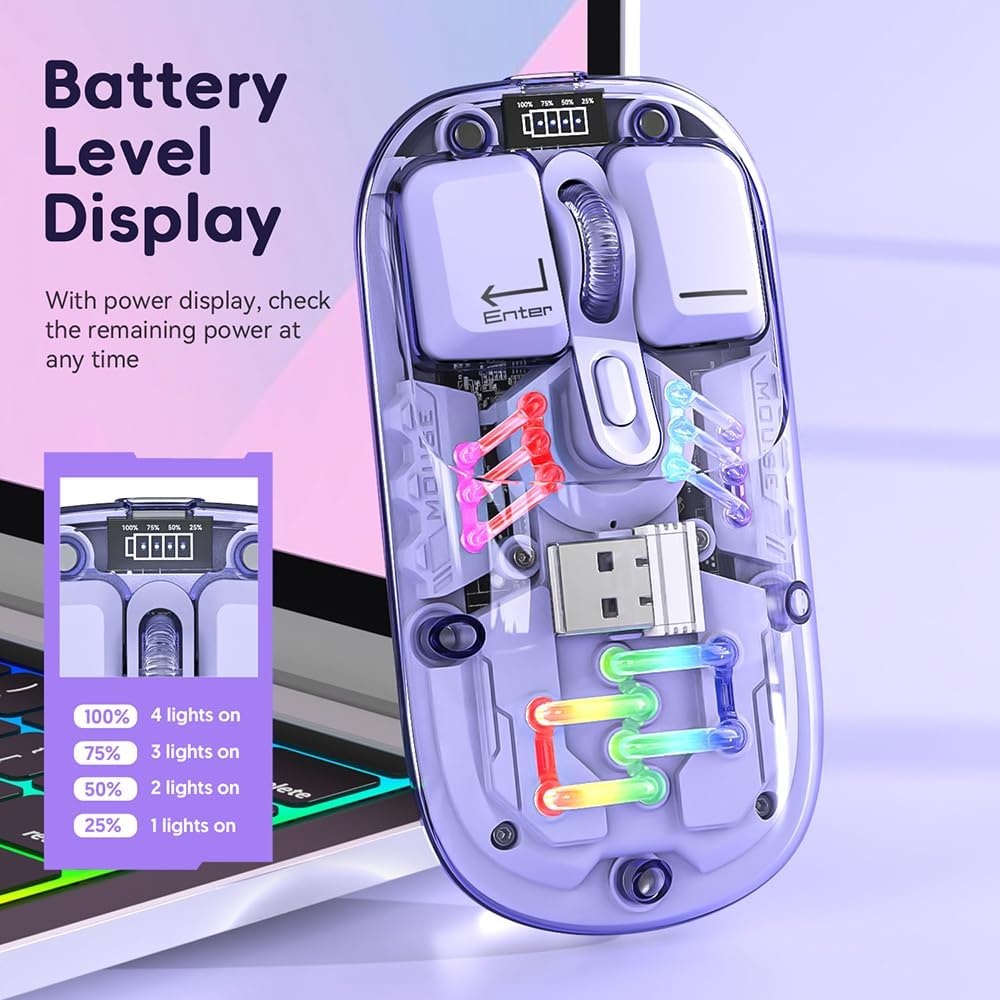
Prent: ’n Nabyskoot view of the Docooler Transparent Wireless Mouse highlighting its battery level display. The display shows the remaining power with four indicator lights representing 100%, 75%, 50%, and 25% charge levels.

Prent: The Docooler Transparent Wireless Mouse demonstrating its strong magnetic adsorption design. The top cover can be easily removed and reattached, ensuring the USB dongle is securely stored and accessible.
Opstelling
Laai die muis
Before first use, it is recommended to fully charge the mouse. Use the provided Type-C charging cable.
- Connect the Type-C end of the charging cable to the mouse's charging port.
- Koppel die USB-A-punt van die laaikabel aan 'n USB-kragbron (bv. rekenaar se USB-poort, USB-muuradapter).
- The battery indicator lights will show charging progress. A full charge typically takes 2-3 hours.

Prent: The Docooler Transparent Wireless Mouse connected via its Type-C charging port, illustrating the charging process. The image highlights the convenience of Type-C charging and indicates a typical charging time of 2-3 hours.
Verbind die muis
The mouse supports two connection modes: 2.4G Wireless and Bluetooth (BT).
2.4G draadlose modus
- Locate the USB dongle inside the mouse, under the magnetic cover.
- Remove the USB dongle and plug it into an available USB port on your computer.
- Slide the mode switch on the bottom of the mouse to the "2.4G" position.
- Die muis behoort outomaties aan jou rekenaar te koppel.
System Requirements for 2.4G: Windows XP, Windows 7, Windows 8, Windows 10 and above, Android 4.4 and above, iOS 13 or later, MacOS X 10.5 or later, Linux Kernel 2.6+2, Chrome OS.
Bluetooth (BT) modus
- Slide the mode switch on the bottom of the mouse to the "BT" position.
- Press and hold the left, middle (scroll wheel), and right buttons simultaneously for 3 seconds to enter Bluetooth pairing mode. The mouse's lights may flash to indicate pairing mode.
- Maak Bluetooth-instellings op jou toestel (rekenaar, tablet, slimfoon) oop en soek vir nuwe toestelle.
- Kies "BT5.0" uit die lys van beskikbare toestelle om te koppel.
- Once paired, the mouse's lights will stabilize, and it will be ready for use.
System Requirements for Bluetooth: Windows 8, Windows 10, Android 5.0 and above, iOS 13 and above, macOS X 10.10 and above. Requires BT 4.0 or later BT adapter.
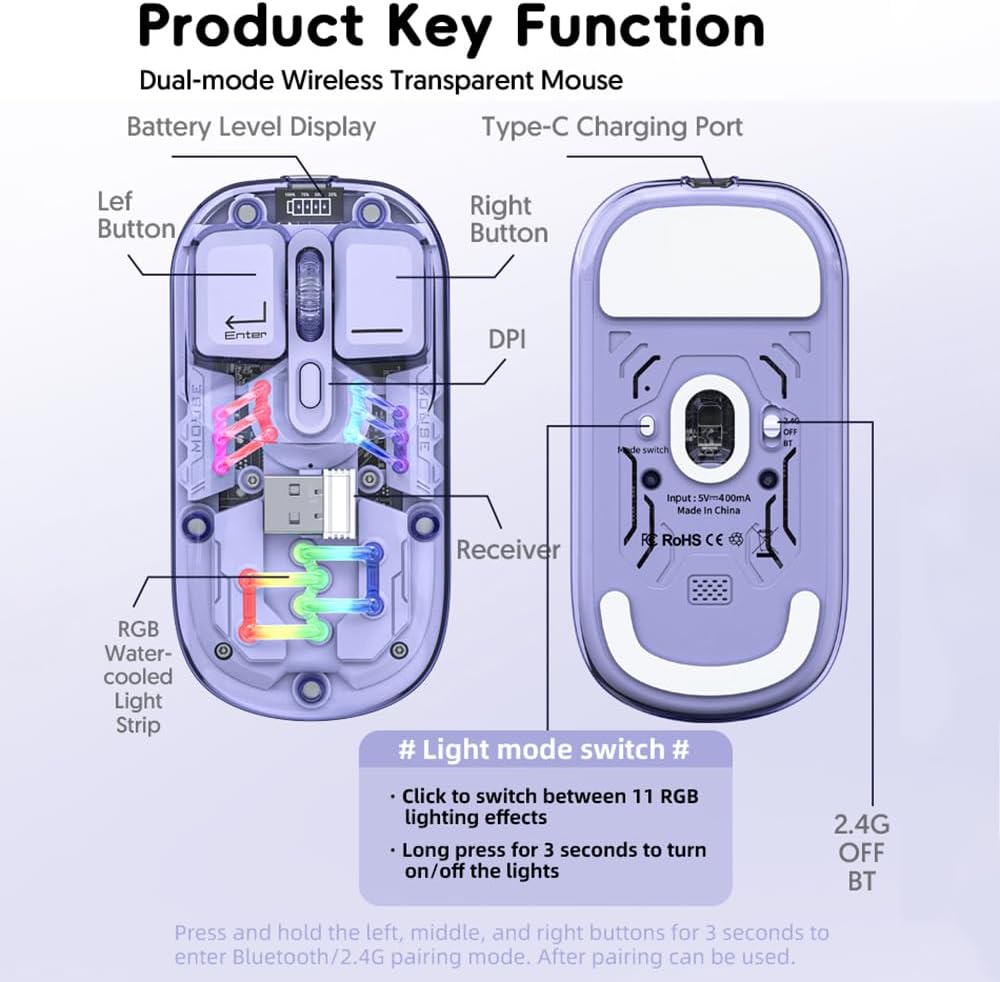
Prent: A detailed diagram illustrating the key functions and connection points of the Docooler Transparent Wireless Mouse. It shows the left and right buttons, DPI button, Type-C charging port, receiver storage, RGB light strip, and the mode switch (2.4G/OFF/BT) on the bottom. Instructions for light mode switching and pairing are also visible.
Bedryfsinstruksies
DPI aanpassing
The mouse features three adjustable DPI levels: 800, 1200 (default), and 1600. To cycle through DPI settings, press the DPI button located on the top of the mouse, near the scroll wheel. Each press will switch to the next DPI level.
RGB -beligtingskontrole
The mouse is equipped with RGB water-cooled lights. To control the lighting effects:
- Switch Lighting Effects: Click the dedicated light mode switch button (as indicated in the "Product Key Function" diagram) to cycle through 11 different RGB lighting effects.
- Skakel ligte aan/af: Long press the light mode switch button for 3 seconds to turn the RGB lights on or off.
Kragbesparingsmodus
To conserve battery life, the mouse enters different sleep states when inactive:
- Ligte slaap: After 60 seconds of no operation, the mouse enters a light sleep state.
- Diep slaap: After 10 minutes of no operation, the mouse enters a deep sleep state.
- Word wakker: To wake the mouse from any sleep state, simply move the mouse or press any button.
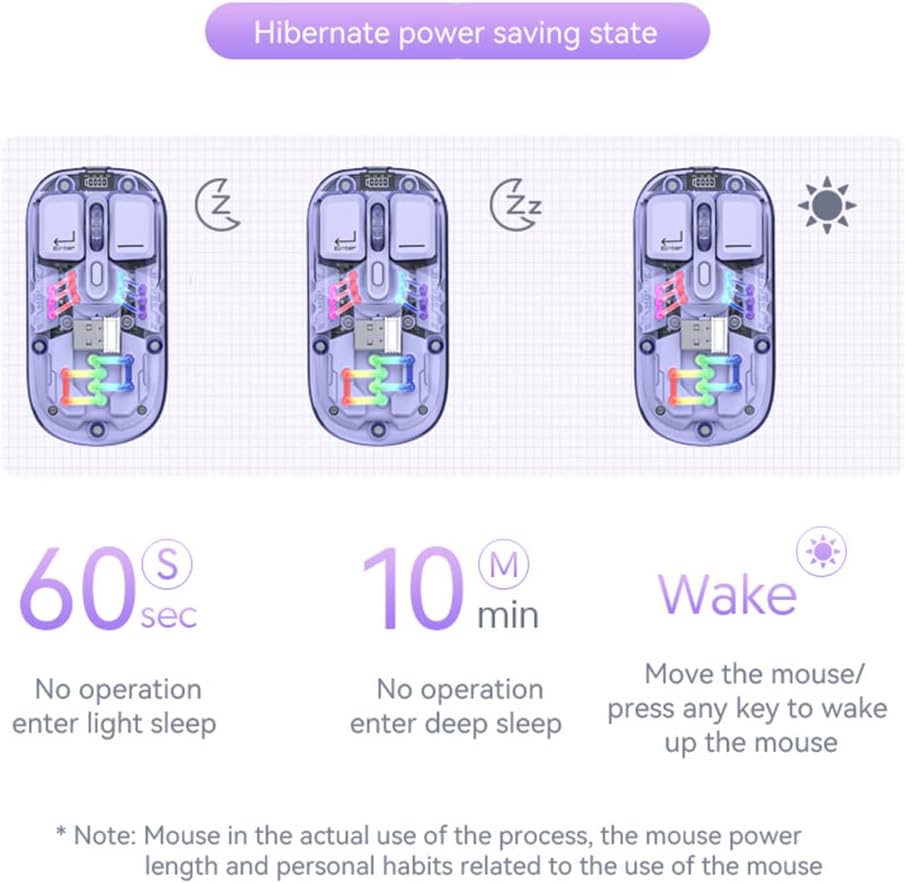
Prent: A visual representation of the Docooler Transparent Wireless Mouse's hibernate power saving states. It illustrates that the mouse enters light sleep after 60 seconds of inactivity, deep sleep after 10 minutes, and can be woken by moving the mouse or pressing any key.
Spesifikasies
Detailed technical specifications for the Docooler Transparent Wireless Dual-Mode Mouse:
| Kenmerk | Spesifikasie |
|---|---|
| Opsionele kleure | Purple, Yellow, White, Black, Pink |
| DPI-vlakke | 800 / 1200 (verstek) / 1600 |
| Laai Voltage/Stroom | DC 5V / ≤400mA |
| Battery kapasiteit | 400mAh |
| Laaimodus | Tipe-C |
| Transmissiemodus | Wireless 2.4G / Bluetooth (BT) |
| Bluetooth weergawe | 5.0 |
| Bluetooth Naam | BT5.0 |
| Werk Voltage | 3.3V - 4.2V |
| Working Current (Light On) | ≤25mA |
| Working Current (Light Off) | ≤8mA |
| Produk afmetings | 113.5 x 58 x 25 ±2mm (4.47 x 2.28 x 0.1 inches) |
| Produk Gewig | Approx. 70g (including 2g receiver) / 2.47 ounces |
| Compatible OS (2.4G) | Windows XP/7/8/10+, Android 4.4+, iOS 13+, MacOS X 10.5+, Linux Kernel 2.6+, Chrome OS |
| Compatible OS (BT) | Windows 8/10, Android 5.0+, iOS 13+, macOS X 10.10+ (BT 4.0+ adapter required) |

Prent: A summary table of the Docooler Transparent Wireless Mouse's key product parameters, including BT version, connection method, DPI range, mouse size, product weight, battery capacity, voltage, system support, available colors, and version type.

Prent: A technical drawing illustrating the precise dimensions of the Docooler Transparent Wireless Mouse, showing its length (113mm), width (58mm), and height (25mm).
Probleemoplossing
If you encounter issues with your Docooler Transparent Wireless Dual-Mode Mouse, please refer to the following common solutions:
- Muis reageer nie:
- Ensure the mouse is charged. Connect it to a power source using the Type-C cable.
- Check the mode switch on the bottom of the mouse. Make sure it's set to the correct mode (2.4G or BT) for your connection.
- For 2.4G mode, ensure the USB dongle is securely plugged into your computer's USB port. Try a different USB port.
- For Bluetooth mode, ensure Bluetooth is enabled on your device and the mouse is paired. Try re-pairing the mouse (hold left, middle, right buttons for 3 seconds).
- Herbegin jou rekenaar/toestel.
- Wyserbeweging is wisselvallig of stadig:
- Adjust the DPI setting by pressing the DPI button on the mouse.
- Maak seker dat die muis op 'n skoon, nie-reflektiewe oppervlak gebruik word.
- Check for low battery. Charge the mouse if necessary.
- RGB lights are off or not changing:
- Long press the light mode switch button for 3 seconds to toggle the lights on/off.
- Click the light mode switch button to cycle through different lighting effects.
- Maak seker dat die muis voldoende batterylading het.
- Bluetooth pairing fails:
- Maak seker dat jou toestel se Bluetooth geaktiveer en opspoorbaar is.
- Make sure the mouse is in Bluetooth pairing mode (lights flashing after holding left, middle, right buttons).
- Check if your device meets the Bluetooth system requirements (BT 4.0 or later adapter).
- Remove any previous pairings of "BT5.0" from your device's Bluetooth list and try pairing again.
Onderhoud
To ensure the longevity and optimal performance of your Docooler Transparent Wireless Dual-Mode Mouse, follow these maintenance guidelines:
- Skoonmaak: Gebruik 'n sagte, droë lap om die muisoppervlak af te vee. Vir hardnekkige vuiligheid, liggies droog.ampMaak die lap met water skoon. Vermy die gebruik van harde chemikalieë, skuurmiddels of oplosmiddels.
- Berging: When not in use for extended periods, store the mouse in a cool, dry place. Ensure the USB dongle is securely stored within the mouse's magnetic compartment.
- Batterysorg: Avoid fully discharging the battery frequently. Charge the mouse regularly to maintain battery health. Do not expose the mouse to extreme temperatures.
- Hantering: Avoid dropping the mouse or subjecting it to strong impacts, as this can damage internal components.
Waarborg en Ondersteuning
Docooler products are designed for reliability and performance. This product comes with a standard manufacturer's warranty against defects in materials and workmanship. For specific warranty terms and conditions, please refer to the warranty card included in your product packaging or visit the official Docooler webwebwerf.
If you require technical support or have questions not covered in this manual, please contact Docooler customer service through the retailer where you purchased the product or via the contact information provided on the official Docooler webwebwerf.
Ask a question about this manual
Ask about setup, troubleshooting, compatibility, parts, safety, or missing instructions. Manuals+ will review the question and use this page’s manual context to help answer it.