
1. Inleiding
Thank you for choosing the SCHWAIGER RAFM0100 Bathroom Radio Plug. This device combines an FM radio, Bluetooth speaker, alarm clock, and an integrated light sensor into a compact plug-in unit. This manual provides essential information for the safe and efficient operation of your device. Please read these instructions carefully before use and retain them for future reference.
2. Veiligheidsinstruksies
- Ensure the device is connected to a properly grounded power outlet.
- Moenie die toestel blootstel aan uiterste temperature, direkte sonlig of hoë humiditeit nie.
- Avoid placing the device near water sources or in areas where it may be splashed.
- Moenie probeer om die toestel self oop te maak of te herstel nie. Verwys alle diens na gekwalifiseerde personeel.
- Hou buite bereik van kinders.
- Ontkoppel die toestel uit die kragaansluiting voordat dit skoongemaak word.
3. Pakketinhoud
- 1x SCHWAIGER RAFM0100 Bathroom Radio Plug
- 1x Gebruikershandleiding
4. Produk verbyview
The SCHWAIGER RAFM0100 is designed for convenience and functionality, featuring an integrated plug for direct power connection. It includes an LED display, control buttons, a rotary volume knob, a speaker, and a light sensor.

SCHWAIGER RAFM0100 Bathroom Radio Plug, front view showing the LED display and control buttons, with a German flag ribbon indicating 'Deutsche Marke'.
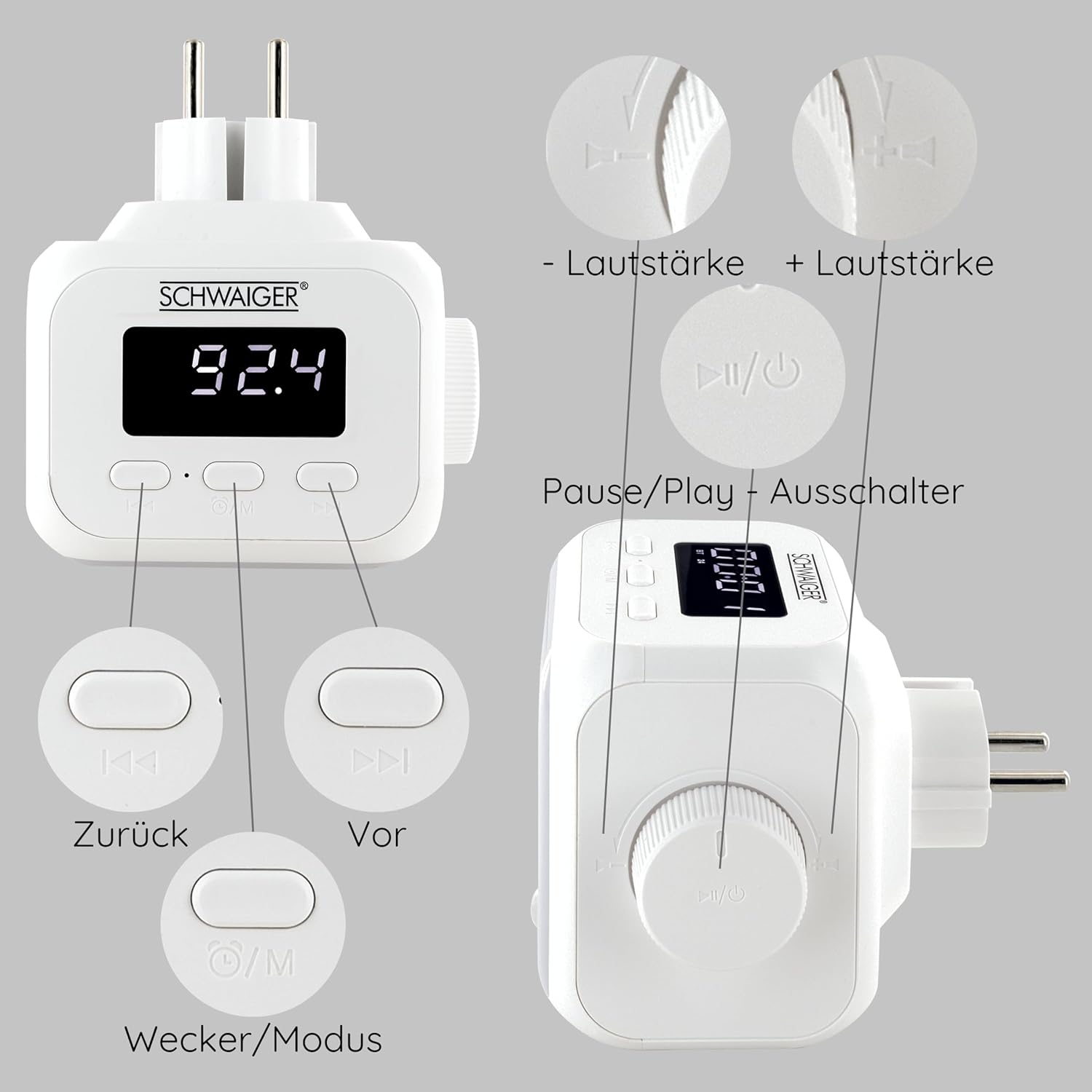
Detailed diagram of the SCHWAIGER RAFM0100 controls, showing buttons for volume, track navigation, power/mode, and alarm.
Kontroles en aanwysers:
- LED skerm: Shows time, FM frequency, and mode indicators.
- Volumeknop: Rotary control for adjusting audio volume. Press to Power On/Off or Play/Pause.
- Previous Button (<<): Skips to the previous track in Bluetooth mode or tunes down in FM mode.
- Next Button (>>): Skips to the next track in Bluetooth mode or tunes up in FM mode.
- Mode/Alarm Button (⏰/M): Switches between FM, Bluetooth, and AUX modes. Long press to enter alarm setting.
- Ligsensor: Automatically activates LED lighting in dark environments when noise is detected.
5. Opstelling
- Kragverbinding: Plug the device directly into a standard wall power outlet. The LED display will illuminate.
- Aanvanklike krag aan: Press the Volume knob (Power/Play/Pause button) to turn on the device.
6. Bedryfsinstruksies
6.1 Krag aan/af
- Om aan te skakel: Druk die volumeknop.
- Om af te skakel: Press and hold the Volume knob for a few seconds.
6.2 FM-radiowerking

The SCHWAIGER RAFM0100 radio plug highlighting its FM radio functionality, with a graphic representation of radio waves.
- Kies FM-modus: Press the Mode/Alarm button (⏰/M) until 'FM' is displayed.
- Outomatiese stasiesoektog: Press and hold the Play/Pause button (Volume knob) in FM mode to initiate an automatic scan for available stations. The radio will save found stations.
- Handmatige instelling: Briefly press the Previous (<<) or Next (>>) buttons to manually tune to the next available station.
6.3 Bluetooth -koppeling
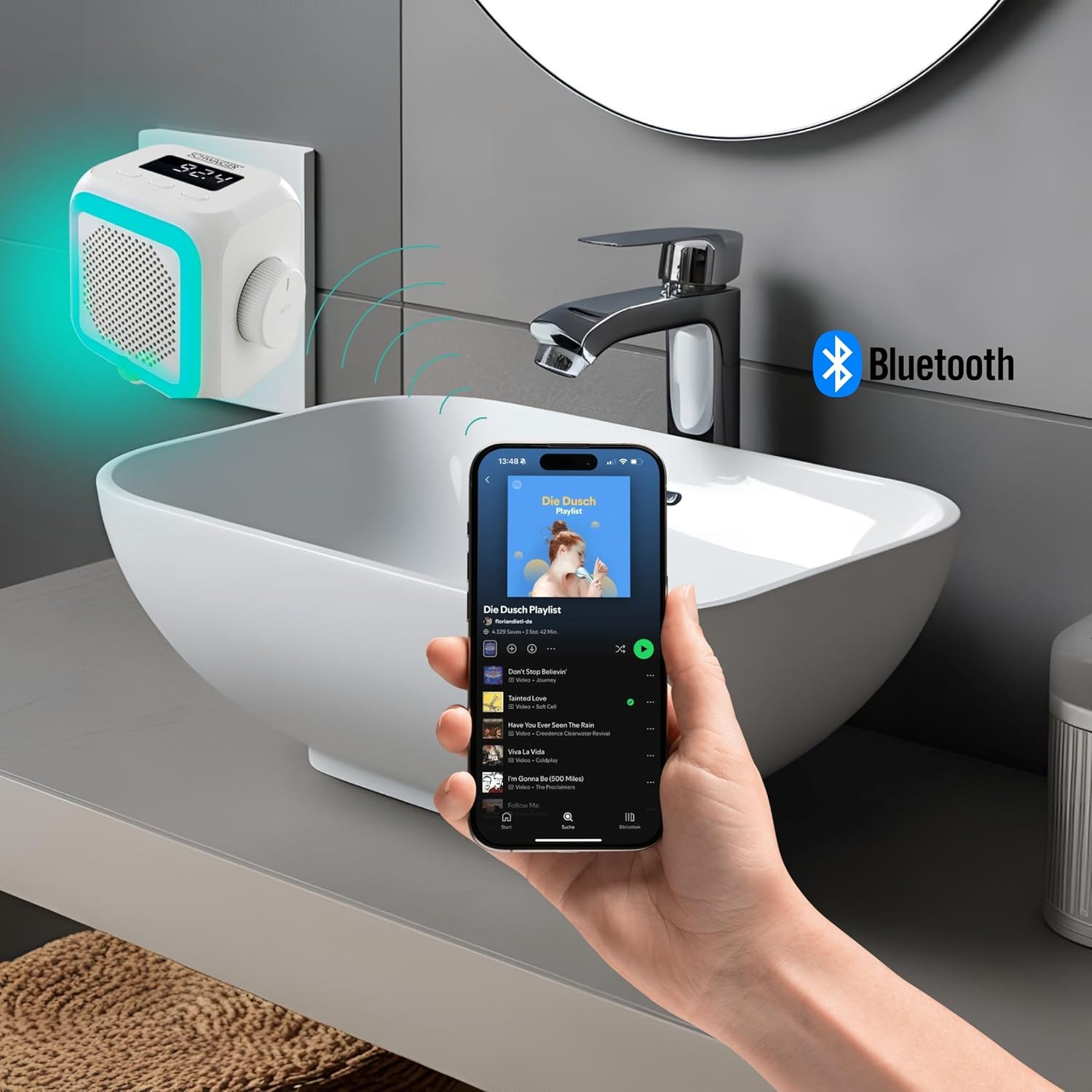
The SCHWAIGER RAFM0100 radio plug in a bathroom setting, connected via Bluetooth to a smartphone playing music.
- Kies Bluetooth-modus: Press the Mode/Alarm button (⏰/M) until 'BT' is displayed on the screen. The device will enter pairing mode.
- Aktiveer Bluetooth op jou toestel: Gaan na die Bluetooth-instellings en aktiveer Bluetooth op jou slimfoon, tablet of ander Bluetooth-geaktiveerde toestel.
- Koppel: Soek vir 'SCHWAIGER RAFM0100' in the list of available devices and select it to pair. A confirmation sound will indicate successful pairing.
- Speel Musiek: Once paired, you can play audio from your connected device through the radio's speaker. Use the Previous (<<), Next (>>), and Play/Pause (Volume knob) buttons to control playback.
6.4 Volume-aanpassing
- Draai die volumeknop kloksgewys om die volume te verhoog.
- Draai die volume-knoppie antikloksgewys om die volume te verlaag.
6.5 Alarm Funksie
- Stel alarm: Press and hold the Mode/Alarm button (⏰/M) to enter alarm setting mode. Use the Previous (<<) and Next (>>) buttons to adjust the hour and minute, and press the Mode/Alarm button to confirm each setting.
- Aktiveer/deaktiveer alarm: Briefly press the Mode/Alarm button to toggle the alarm on or off. An alarm icon will appear on the display when active.
- snooze: When the alarm sounds, press any button to activate snooze.
- Stop alarm: To stop the alarm completely, press and hold the Volume knob.
6.6 Integrated Light Sensor

Kant view of the SCHWAIGER RAFM0100 radio plug, showing the speaker grille and the integrated light sensor at the bottom.
The device features an integrated light sensor that, in dark environments, will automatically activate the LED display and ambient lighting when it detects noise. This provides a convenient night light function.
7. Onderhoud
- Skoonmaak: Disconnect the device from the power outlet before cleaning. Use a soft, dry cloth to wipe the surface. Do not use abrasive cleaners or solvents.
- Berging: If not in use for an extended period, unplug the device and store it in a cool, dry place.
8. Probleemoplossing
| Probleem | Moontlike oorsaak | Oplossing |
|---|---|---|
| Toestel skakel nie aan nie. | Not properly plugged in; Power outlet not active. | Ensure the device is securely plugged into a working power outlet. Test the outlet with another device. |
| Swak FM-radio-ontvangs. | Weak signal; Interference from other electronics. | Try repositioning the device. Move away from other electronic devices that may cause interference. |
| Kan nie via Bluetooth koppel nie. | Bluetooth not enabled on source device; Device already paired; Out of range. | Ensure Bluetooth is enabled on your device and it's in pairing mode. Make sure the radio is in 'BT' mode. Unpair from other devices if necessary. Keep devices within 10 meters. |
| Geen geluid of lae volume nie. | Volume too low; Muted; Incorrect mode selected. | Increase volume using the rotary knob. Check volume on the connected Bluetooth device. Ensure the correct mode (FM/BT) is selected. |
9. Spesifikasies
- Handelsmerk: SCHWAIGER
- Modelnommer: RAFM0100
- Kleur: Wit
- Verbindingstegnologie: Bluetooth
- Spesiale kenmerke: Bluetooth, Integrated Clock, Compact Size, Night Light (Light Sensor)
- Versoenbare toestelle: Smartphone, Tablet, MP3 Player, Laptop, Headphones
- Produk afmetings: 8.6L x 11.4W x 9.7H sentimeter
- Stemtegnologie: FM
- Styl: Moderne
- Kragbron: Elektries met koord
- Ondersteunde radiobande: FM
- Ingesluit komponente: Eienaarshandleiding
10. Waarborg en Ondersteuning
SCHWAIGER products are designed and manufactured to the highest quality standards. For information regarding warranty, returns, or technical support, please refer to the warranty card included with your product or visit the official SCHWAIGER website. Please have your model number (RAFM0100) and purchase details ready when contacting support.