
1. Inleiding
This manual provides essential information for the setup, operation, and maintenance of your AWOL VISION LTV-3500 Pro Ultra Short Throw Triple Laser Projector and 120" Motorized Floor Rising Screen. Please read this manual thoroughly before use to ensure optimal performance and safety.
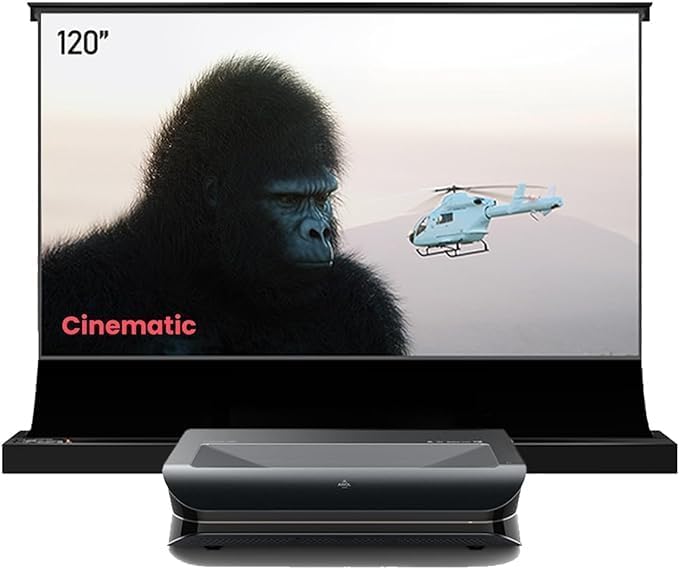
Image: AWOL VISION LTV-3500 Pro Projector positioned in front of its 120-inch Motorized Floor Rising Screen, displaying a cinematic scene.
2. Sleutel kenmerke
- 4K UHD Resolution & Triple Color Laser Technology: Delivers sharp, vibrant images with 107% BT.2020 color gamut coverage.
- HDR10+ & Dolby Vision Support: Dynamically optimizes color, contrast, and brightness for unparalleled image quality.
- Dolby Atmos-klank: Bied 'n meeslepende klankervaring.
- Cinematic 3D Display: Compatible with active shutter 3D glasses for immersive 3D films.
- Hoë helderheid: 3000 ISO lumens for clear viewing even in bright ambient light, especially when paired with an ALR screen.
- PJLink IP Control: Enables integration with home automation systems like Control 4.

Image: Close-up of the LTV-3500 Pro projector with key specifications like 3000 ISO lumens, 4K UHD, HDR10+, Dolby Atmos, and 3D capabilities highlighted.
3. Opstelling
3.1. Ontkoppel
Carefully remove all components from the packaging. Ensure the projector, motorized screen, remote control, power cables, and instruction manuals are present.
3.2. Projektorplasing
The LTV-3500 Pro is an ultra-short throw projector designed to be placed close to the projection surface. Refer to the table below for recommended throw distances based on screen size.

Image: Diagram and table illustrating recommended projector placement distances from the screen for various screen sizes (80"-150").
3.3. Screen Assembly & Installation
The 120" Motorized Floor Rising Screen requires assembly. Follow the detailed instructions provided in the screen's dedicated manual. Ensure the frame is securely assembled and the screen material is properly tensioned. For visual guidance, refer to the official setup videos.
Video: Official AWOL VISION video demonstrating the setup and operation of the Floor Rising ALR Screen.
Video: Official NothingProjector video providing guidance on creating a home theater with an ALR screen, including setup tips.
3.4. Konnektiwiteit
Connect your external devices (e.g., Blu-ray player, gaming console, streaming device) to the projector using HDMI cables. The projector supports HDMI connectivity.
4. Bedryf
4.1. Skakel aan/af
Press the power button on the remote control or the projector to turn it on or off. The motorized screen can be synchronized to rise/lower with the projector's power cycle.

Image: Diagram illustrating the synchronization of the motorized screen with the projector's power cycle.
4.2. Navigasie
Use the remote control to navigate the projector's Android operating system. Access settings, input sources, and installed applications.
4.3. Prentinstellings
The LTV-3500 Pro offers various picture modes and adjustments. Explore settings for color space (107% BT.2020), white balance, gamma, and HDR modes (HDR Standard, Vivid, Sport, Movie, User) to optimize your viewing experience. Dolby Vision is supported for enhanced dynamic range.
4.4. Klankinstellings
The projector features built-in 36W stereo speakers with Dolby Atmos and DTS Virtual X support. For a full cinematic experience, an external sound system is recommended.
4.5. 3D-terugspeel
To enjoy 3D content, you will need active shutter 3D glasses. The projector supports various 3D modes including Frame Packing, Side-by-Side, and Top-and-Bottom. Ensure your Blu-ray player and discs are 3D-capable.
Video: Official AWOL VISION video demonstrating how to watch 3D movies with AWOL VISION 3D glasses.
4.6. Speelmodus
Activate Turbo Mode for reduced input lag, offering 15ms at 4K@60Hz and 8ms at 1080P@120Hz, ideal for gaming.
4.7. Screen Share/Casting
The projector supports screen sharing features, allowing you to cast content from compatible devices.
5. Onderhoud
5.1. Skoonmaak
Use a soft, dry cloth to clean the projector's exterior. For the lens, use a specialized lens cleaning cloth and solution. Avoid abrasive materials. For the screen, follow the cleaning instructions provided in its dedicated manual.
5.2. Waaiersgeraas
The projector operates with a low fan noise level of ≤30dB, ensuring a quiet viewomgewing.
6. Probleemoplossing
- Geen beeld: Check power connections, input source selection, and HDMI cable integrity.
- Vervormde Beeld: Verify projector placement, focus settings, and keystone correction.
- Klankkwessies: Ensure audio cables are connected correctly and check projector/external audio device volume settings.
7. Spesifikasies
- Handelsmerk: AWOL VISIE
- Model: LTV-3500 Pro
- Vertoon tipe: Laser (Triple Color Laser Technology)
- Vertoon resolusie: 3840 x 2160 (4K UHD)
- Helderheid: 3000 ISO Lumen
- Kleurspektrum: 107% BT.2020
- HDR Ondersteuning: HDR10+, Dolby Vision
- Oudio-ondersteuning: Dolby Atmos, DTS Virtual X
- Verbinding: HDMI
- Waaiergeluid: ≤30dB
8. Waarborg en ondersteuning
Your AWOL VISION LTV-3500 Pro comes with 2 Years Product Support. For technical assistance or warranty claims, please contact AWOL VISION customer service:
- Foon / WhatsApp: +1 (888) 891-6866
- E-pos: support@awolvision.com