
Inleiding
The Dayton Audio M6 6-1/2" Powered Desktop Speakers are designed to deliver high-fidelity audio for various applications, including desktop use, music playback, and home audio systems. Featuring Bluetooth 5.0 with Qualcomm AptX, a built-in USB DAC, and multiple input options, these speakers offer versatile connectivity and rich stereo sound. This manual provides essential information for the proper setup, operation, and maintenance of your M6 speakers.
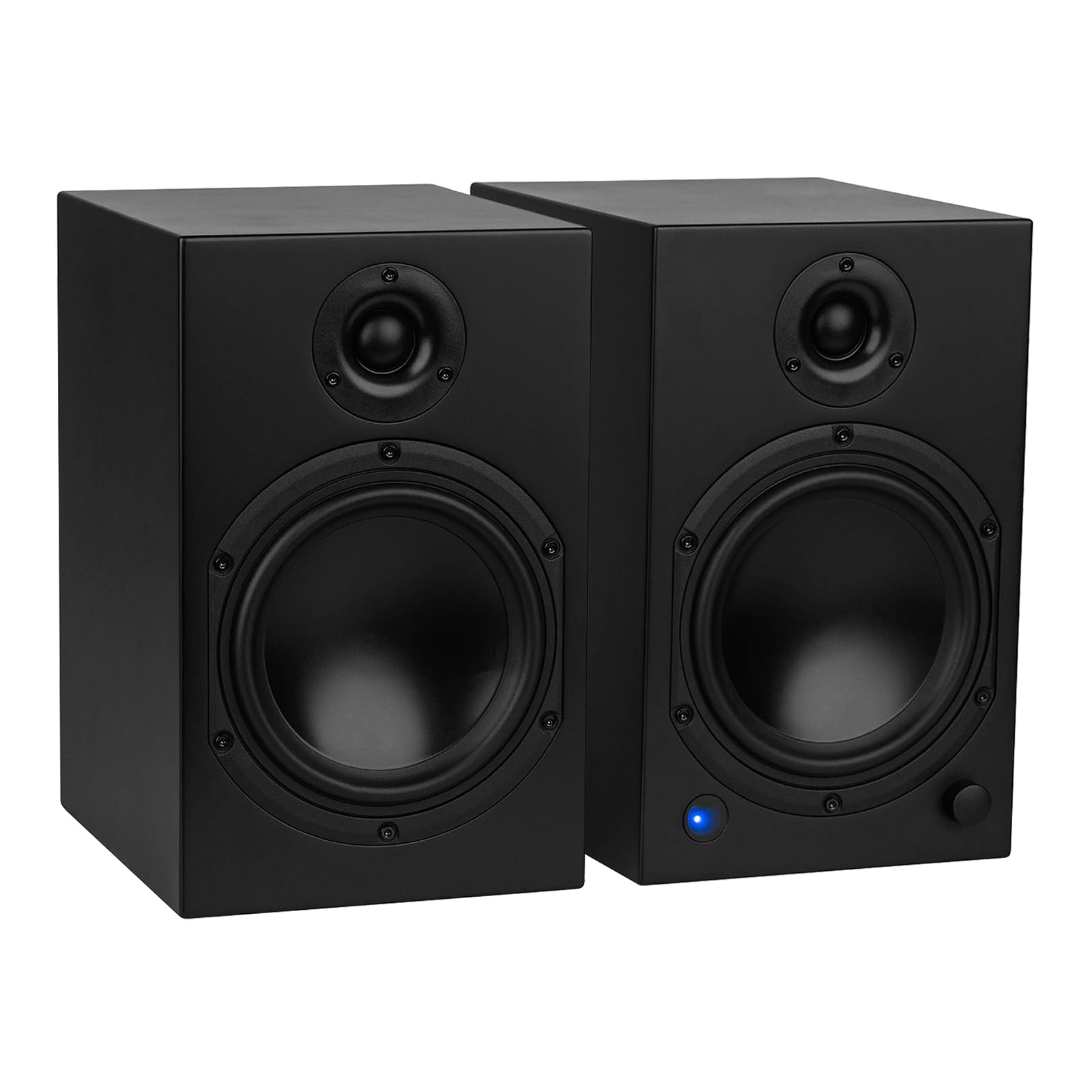
Wat is in die boks
Carefully unpack your Dayton Audio M6 speakers and ensure all components are present:
- Dayton Audio M6 Powered Desktop Speakers (Pair)
- Kragkabel
- USB-C-kabel
- Speaker Cable (for connecting passive speaker)
- 3.5 mm AUX na RCA kabel
- Afstandbeheer
- Rubber Voete

Opstel instruksies
1. Luidsprekerplasing
Position your M6 speakers on a stable, flat surface. The sealed cabinet design allows for flexible placement, including closer to walls, without significant changes in sound. For optimal stereo imaging, place the speakers equidistant from your listening position.
2. Koppel die luidsprekers
- Identify Active and Passive Speakers: One speaker is active (contains the amplifier and controls) and the other is passive.
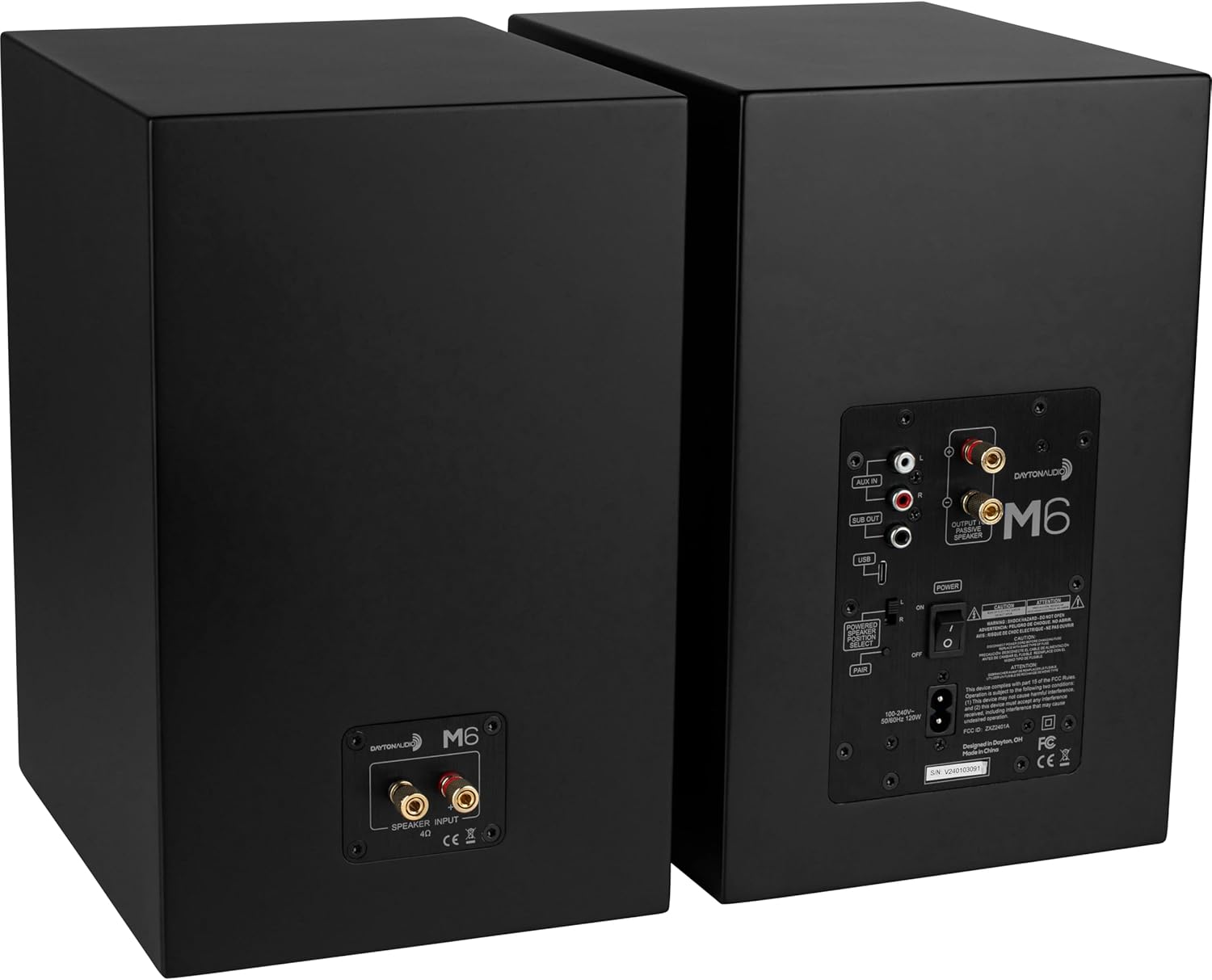
- Koppel passiewe luidspreker: Use the included speaker cable to connect the active speaker's "OUTPUT TO PASSIVE SPEAKER" terminals to the passive speaker's input terminals. Ensure correct polarity (red to red, black to black).
- Set Powered Speaker Position: On the rear of the active speaker, use the L/R switch to designate whether the active speaker will be on the left or right side of your setup.
3. Oudiobronverbindings
The M6 speakers offer multiple input options:
- USB DAC: Connect the included USB-C cable from your computer to the USB input on the active speaker for high-resolution audio playback (up to 192 kHz/32 Bit).
- AUX IN: Use the included 3.5mm AUX to RCA cable to connect devices with a 3.5mm output (e.g., smartphones, tablets) to the RCA "AUX IN" ports.
- Bluetooth: For wireless audio streaming, pair your device via Bluetooth 5.0 with Qualcomm AptX.
- Subwoofer -uitvoer: An RCA "SUB OUT" port is available for connecting an optional powered subwoofer.

4. Kragverbinding
Connect the power cable to the active speaker's power input and then to a wall outlet. Ensure the power switch on the rear panel is in the OFF position before connecting to power.
Bedryfsinstruksies
1. Skakel aan/af
Use the main power switch on the rear panel of the active speaker to turn the unit ON or OFF. The speakers will retain the last selected input and volume setting when powered off and on via this switch.
2. Invoerkeuse
The multi-function knob on the front of the active speaker or the remote control can be used to cycle through inputs (Bluetooth, USB, Line In). The LED indicator on the front will change color to indicate the active input:
- Blou: Bluetooth
- Groen: AUX In (Line)
- Oranje: Standby

3. Volumebeheer
Rotate the multi-function knob on the front of the active speaker to adjust the volume. Alternatively, use the VOL+ and VOL- buttons on the remote control.
4. Bluetooth-koppeling
- Select the Bluetooth input using the multi-function knob or the Bluetooth button on the remote. The LED will flash blue, indicating pairing mode.
- On your device (smartphone, tablet), search for Bluetooth devices and select "Dayton Audio M6".
- Once connected, the LED will glow solid blue.
5. Bass Boost Feature
To activate the bass boost, press the BAS HUPSTOOT button on the included remote. The indicator LED on the front of the speaker will flash twice to confirm bass boost is active. Press the BAS HUPSTOOT button again to return to the normal EQ setting; the LED will flash once to indicate bass boost is inactive. This setting will remain enabled after the speaker returns from standby.
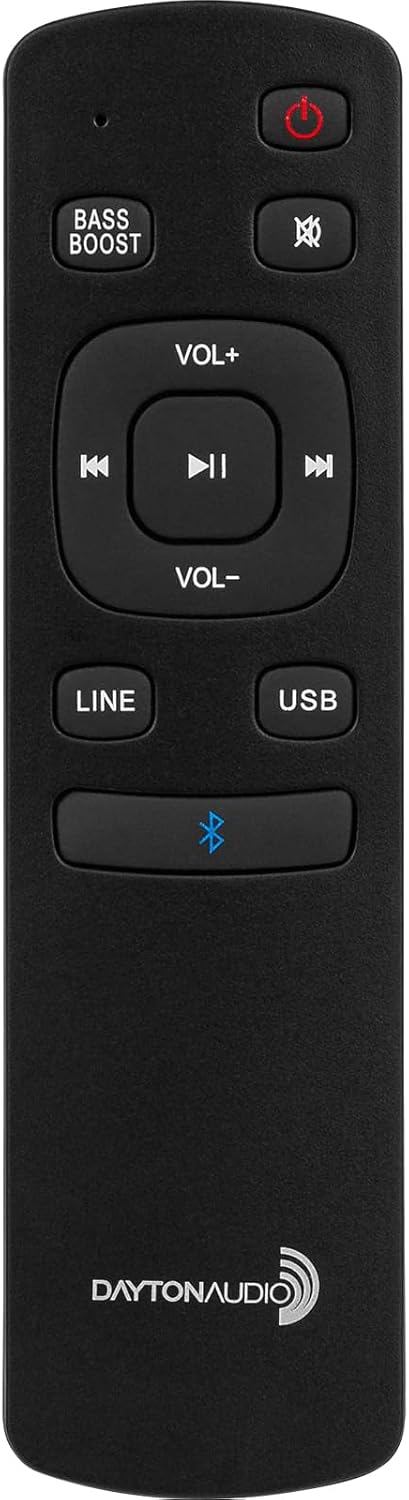
6. Afstandbeheer funksies
Die ingeslote afstandbeheerder bied gerieflike toegang tot verskeie funksies:
- Skakel aan / bystand
- Demp
- Volume op/af
- Spoor oorslaan (Vorige/Volgende)
- Speel / Pouse
- Input Selection (LINE, USB, Bluetooth)
- Basversterking Aan/Af
7. Sleep/Standby
The speakers will automatically enter standby mode after 1 hour of inactivity. To manually put the speakers into standby, press the power button on the remote control. To wake from standby, press the power button on the remote or select an input.
Onderhoud
To ensure the longevity and optimal performance of your Dayton Audio M6 speakers, follow these maintenance guidelines:
- Skoonmaak: Use a soft, dry cloth to wipe the speaker cabinets. Avoid abrasive cleaners or solvents.
- Stof: Regularly dust the speaker grilles and surfaces to prevent buildup.
- Omgewing: Keep speakers away from direct sunlight, excessive heat, moisture, and extreme temperatures.
- Diafragmabeskerming: The speaker diaphragms are exposed. Exercise caution to prevent physical damage, especially in environments with small children or pets.
- Kabelverbindings: Kontroleer gereeld alle kabelverbindings om te verseker dat hulle stewig is.
Probleemoplossing
If you encounter issues with your M6 speakers, refer to the following common problems and solutions:
| Probleem | Moontlike oorsaak | Oplossing |
|---|---|---|
| Geen geluid van luidsprekers nie | Power off; incorrect input; loose cables; low volume. | Ensure power switch is ON. Select correct input. Check all audio and speaker cables. Increase volume on speakers and source device. |
| Bluetooth verbind nie | Not in pairing mode; device too far; interference. | Ensure speakers are in Bluetooth pairing mode (flashing blue LED). Move device closer. Disconnect other Bluetooth devices. Try re-pairing. |
| Vervormde of swak klankgehalte | Poor source quality; damaged cables; incorrect settings. | Test with a different audio source. Replace damaged cables. Ensure source volume is not too high, causing clipping. |
| Speakers unresponsive (DSP freeze) | Tydelike sagtewareprobleem. | Turn off the active speaker using the physical power switch on the rear panel, wait a few seconds, then turn it back on. |
| No dedicated light for Bass Boost | Misunderstanding of indicator. | The front LED indicator flashes twice for ON and once for OFF when the Bass Boost button is pressed on the remote. |
Spesifikasies
| Kenmerk | Spesifikasie |
|---|---|
| Model Naam | M6 |
| Tipe luidspreker | Boekrak, Aangedryf |
| Luidsprekergrootte | 6.5 duim |
| Woofer deursnee | 6 duim |
| Luidspreker Maksimum uitsetkrag | 150 XNUMX watt (piek) |
| Frekwensierespons | 40 – 20,000 XNUMX Hz |
| Verbindingstegnologie | Bluetooth 5.0 with Qualcomm AptX, RCA, USB-C DAC |
| USB-C DAC Support | Up to 192 kHz/32 Bit |
| Klankuitvoermodus | Stereo (2.0) |
| Beheer metode | Remote, Multi-function Knob |
| Produk Afmetings (elke luidspreker) | 7.5" D x 11.75" B x 9" H |
| Item Weight (Pair) | 35 pond |
| Materiaal | Metaal, plastiek |
Amptelike Produkvideo's
For visual guidance on setup and features, please refer to the following official product videos:
Video 1: Dayton Audio M6 Product Overview (2:28)
Hierdie video bied 'n algemene oorsigview of the Dayton Audio M6 Powered Desktop Speakers, highlighting key features and design elements.
Video 2: M6 Connectivity and Features (1:46)
This video demonstrates the various connectivity options and operational features of the M6 speakers, including Bluetooth pairing and input selection.
Waarborg inligting
The Dayton Audio M6 Powered Desktop Speakers come with a 5 jaar waarborg covering parts and labor. Please retain your proof of purchase for warranty claims. For detailed warranty terms and conditions, refer to the documentation included with your product or visit the official Dayton Audio webwebwerf.
Ondersteuning
For further assistance, technical support, or service inquiries regarding your Dayton Audio M6 speakers, please visit the official Dayton Audio support webwebwerf of kontak hul kliëntediensafdeling. Kontakbesonderhede kan tipies op die vervaardiger se webwerf gevind word. webwebwerf of in die produkverpakking.