
Inleiding
The Shokz OpenSwim Pro is a versatile bone conduction headphone designed for both land and water activities. It seamlessly integrates two distinct modes: Bluetooth and MP3, allowing you to choose your listening experience based on your environment. Engineered with PremiumPitch 2.0+ bone conduction technology, these headphones deliver clear audio, powerful volume, and rich bass. Its open-ear design prioritizes safety by keeping your ears open to ambient sounds, making it ideal for outdoor sports and activities.
The OpenSwim Pro boasts an IP68 waterproof rating, ensuring durability and performance in various conditions, including submersion up to 2 meters for 2 hours. Physical buttons are optimized for easy control during intense workouts or while wet, preventing accidental touches. Enjoy your favorite music and stay connected without compromise.
Wat is in die boks
- Shokz OpenSwim Pro Headphones
- 4-pin Magnetic Charging Cable
- Swem Oorpluisies
- Silikoonrubber draagtas
- Gebruikershandleidings
- Waarborgkaart
Produk verbyview
Familiarize yourself with the components of your OpenSwim Pro headphones.
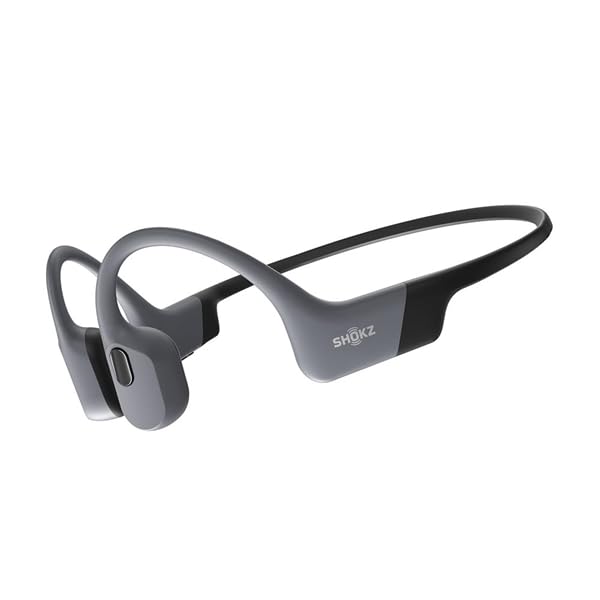
Figure 1: Shokz OpenSwim Pro Headphones (Grey)

Figure 2: Control Buttons and Charging Port
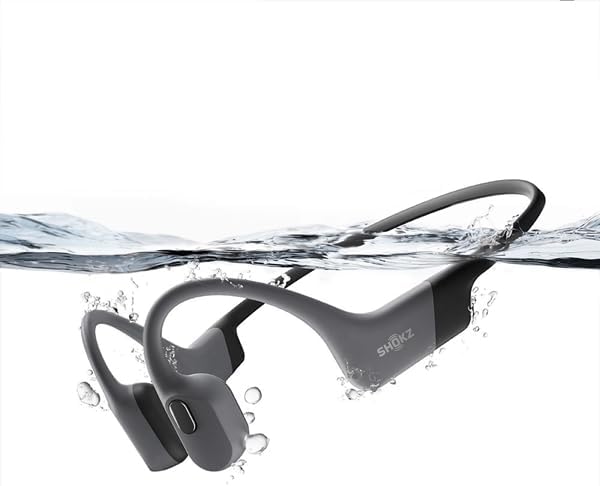
Figuur 3: Waterdigte Ontwerp
Opstelling
1. Laai jou koptelefoon
Before first use, fully charge your OpenSwim Pro headphones.
- Connect the 4-pin magnetic charging cable to the charging port on your headphones.
- Connect the USB end of the cable to a USB power adapter (not included) or a computer's USB port.
- The LED indicator will show charging status. A full charge typically takes approximately 1.5 hours.
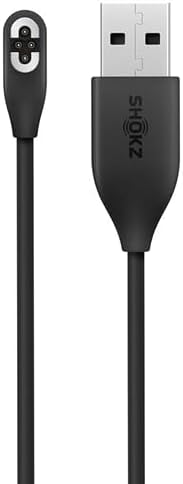
Figure 4: Magnetic Charging Cable
2. Transferring Music (MP3 Mode)
The OpenSwim Pro has internal storage for music playback without a connected device. It supports various audio formats including MP3, FLAC, WAV, AAC, M4A, APE, and WMA. You can store approximately 4,000 high-quality songs.
- Connect your OpenSwim Pro to a computer using the magnetic charging cable. The headphones will appear as a removable disk drive.
- Sleep en los jou verlangde klank files into the headphone's storage folder.
- Safely eject the device from your computer once the transfer is complete.
3. Bluetooth-koppeling
To use the OpenSwim Pro with your smartphone or other Bluetooth-enabled devices:
- Maak seker dat die oorfone afgeskakel is.
- Press and hold the Power/Mode button until the LED indicator flashes red and blue, indicating pairing mode.
- On your device, go to Bluetooth settings and select "OpenSwim Pro" from the list of available devices.
- Once connected, the LED will flash blue, and you will hear a voice prompt.
Bedryfsinstruksies
Krag aan/af
- Krag aan: Druk en hou die Aan/Aan/Modus-knoppie vir 2 sekondes in.
- Skakel af: Druk en hou die Aan/Aan/Modus-knoppie vir 3 sekondes in.
Wissel tussen Bluetooth- en MP3-modusse
The OpenSwim Pro allows for easy switching between its two modes:
- Press and hold the Mode button (often integrated with the Power button) for 2 seconds while the device is on to switch between Bluetooth and MP3 modes. A voice prompt will confirm the current mode.
Musiek afspeel kontroles
- Speel/pouse: Druk een keer op die Multifunksie-knoppie.
- Volgende snit: Druk en hou die Volume + knoppie vir 2 sekondes in.
- Vorige snit: Druk en hou die Volume - knoppie vir 2 sekondes in.
- Volume op: Druk die knoppie Volume +.
- Volume af: Druk die Volume - knoppie.
Call Controls (Bluetooth Mode Only)
- Beantwoord/beëindig oproep: Druk een keer op die Multifunksie-knoppie.
- Verwerp oproep: Druk en hou die multifunksieknoppie vir 2 sekondes in.
Using for Swimming
When swimming, it is recommended to use the MP3 mode for optimal performance as Bluetooth signals do not transmit well through water. Insert the included swimming earplugs to enhance sound quality underwater.
- Skakel oor na MP3-modus voordat jy die water binnegaan.
- Insert the swimming earplugs into your ears.
- Maak seker dat die oorfone stewig vas is.
Onderhoud
Proper care ensures the longevity and performance of your OpenSwim Pro headphones.
- Skoonmaak: After use, especially after swimming or heavy sweating, rinse the headphones with clean fresh water. Wipe them dry with a soft cloth. Ensure the charging port is completely dry before charging.
- Berging: Store the headphones in the silicone rubber carrying case in a cool, dry place away from direct sunlight and extreme temperatures.
- Laai: Only use the provided magnetic charging cable. Avoid using damaged cables or chargers.
- Waterblootstelling: While IP68 rated, avoid prolonged submersion beyond specified limits (2 meters for 2 hours). Do not expose to saltwater or chemicals without immediate rinsing.
Probleemoplossing
If you encounter issues with your OpenSwim Pro, refer to the following common solutions:
| Probleem | Moontlike Oplossing |
|---|---|
| Geen klank nie | Check volume levels. Ensure headphones are powered on and in the correct mode (Bluetooth or MP3). If in Bluetooth mode, ensure it's paired and connected to your device. If in MP3 mode, ensure music files is gelaai. |
| Kan nie via Bluetooth koppel nie | Ensure headphones are in pairing mode (red and blue flashing LED). Turn off and on your device's Bluetooth. Move closer to your device. Clear previous pairings on your device and try again. |
| Oorfone laai nie | Ensure the charging cable is securely connected to both the headphones and the power source. Check if the charging port is clean and dry. Try a different USB port or power adapter. |
| Sound quality issues underwater | Ensure you are in MP3 mode. Use the included swimming earplugs to improve sound clarity underwater. |
| Knoppies reageer nie | Ensure the headphones are not locked. If wet, dry the buttons thoroughly. Try restarting the headphones. |
If the issue persists, please refer to the official Shokz support webwebwerf of kontak kliëntediens.
Spesifikasies
| Kenmerk | Detail |
|---|---|
| Handelsmerk | SHOKZ |
| Model Naam | OpenSwim Pro (S710) |
| Kleur | Grys |
| Oorplasing | Open-Ear (Bone Conduction) |
| Koptelefoonvormfaktor | Ware draadloos |
| Geraasbeheer | Geen |
| Verbindingstegnologie | Draadloos (Bluetooth) |
| Waterdigte gradering | IP68 (Submersible up to 2 meters for 2 hours) |
| Interne berging | Supports approximately 4,000 high-quality songs |
| Ondersteunde oudioformate | MP3, FLAC, WAV, AAC, M4A, APE, WMA |
| Mikrofoon | Ingesluit |
Waarborg en Ondersteuning
Waarborg inligting
The Shokz OpenSwim Pro comes with a 2 jaar vervaardiger se waarborgHierdie waarborg dek defekte in materiaal en vakmanskap onder normale gebruik. Bewaar asseblief u bewys van aankoop vir waarborgeise.
Kliënte ondersteuning
For further assistance, technical support, or warranty claims, please visit the official Shokz website or contact their customer service department. Contact details can typically be found on the Shokz webwebwerf of op die waarborgkaart wat by u produk ingesluit is.