
Mibro XPEJ010WW
Mibro Earbuds AC1 Wireless Earbuds User Manual
Model: XPEJ010WW
1. Inleiding
Thank you for choosing the Mibro Earbuds AC1 Wireless Earbuds. These earbuds combine an elegant design with exceptional audio performance, offering clear, immersive sound for your favorite music. With stable Bluetooth connectivity and a comfortable ergonomic fit, they are designed for convenience and quality audio on the go. This manual provides detailed instructions to help you get the most out of your new earbuds.
2. Veiligheidsinligting
Please read all safety instructions before using this product.
- Moenie die oordopjes of laaikas aan uiterste temperature, humiditeit of vloeistowwe blootstel nie.
- Vermy om die toestel te laat val, te stamp of uitmekaar te haal.
- Hou weg van kinders en troeteldiere.
- Use only the provided or certified charging cable.
- Langdurige luister op hoë volume vlakke kan gehoorskade veroorsaak.
3. Pakketinhoud
Maak seker dat alle items in jou pakket teenwoordig is:
- Mibro Earbuds AC1 (Left and Right)
- Laaikas
- Laai kabel
- Gebruikershandleiding (hierdie dokument)
4. Produk verbyview
Familiarize yourself with the components of your Mibro Earbuds AC1.

Figuur 4.1: Mibro Earbuds AC1 removed from their open charging case, displaying the earbuds and the case.
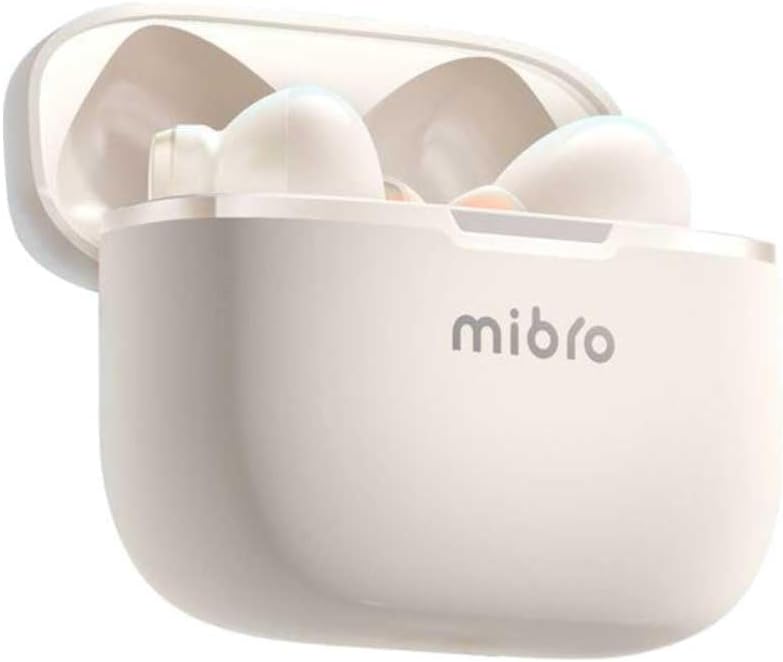
Figuur 4.2: Mibro Earbuds AC1 placed inside their open charging case, showing the compact design.
The earbuds feature an ergonomic design for a secure and comfortable fit. The charging case protects the earbuds and recharges them on the go.
5. Opstelling
5.1 Laai die oordopjes en houer
Laai die oordopjes en die laaikassie volledig voor die eerste gebruik.
- Plaas die oordopjes in die laaikas.
- Koppel die laaikabel aan die laaipoort op die kas en aan 'n USB-kragbron.
- The indicator light on the case will show charging status. A full charge may take up to 1 day (Note: This is an unusual specification, typically measured in hours. Please refer to product packaging for precise charging time).
- Sodra dit ten volle gelaai is, ontkoppel die kabel.
5.2 Koppeling met 'n Bluetooth-toestel
To connect your Mibro Earbuds AC1 to your smartphone or other Bluetooth-enabled device:
- Maak seker dat die oorfone gelaai is en in die laaikas geplaas is.
- Maak die laaikas se deksel oop. Die oorfone sal outomaties in paringsmodus gaan (aanwyserliggies sal flikker).
- Gaan na Bluetooth-instellings op jou toestel en skakel Bluetooth aan.
- Soek vir available devices and select "Mibro AC1" from the list.
- Sodra dit gekoppel is, sal die aanwyserliggies op die oordopjes ophou flikker.
- Die oorfone sal outomaties weer aan die laaste gekoppelde toestel koppel wanneer dit uit die houer verwyder word, indien Bluetooth op die toestel geaktiveer is.
6. Bedryfsinstruksies
6.1 Krag aan/af
- Krag aan: Maak die laaikas se deksel oop, of haal die oorfone uit die houer. Hulle sal outomaties aanskakel.
- Skakel af: Plaas die oorfone terug in die laaikas en maak die deksel toe. Hulle sal outomaties afskakel en begin laai.
6.2 Musiekweergawe
Use the touch controls on the earbuds to manage music:
- Speel/pouse: Enkele tik op enige van die oordopjes.
- Volgende snit: Dubbeltik op die regteroorfone.
- Vorige snit: Dubbeltik op die linker oordopje.
6.3 Oproepbestuur
Manage phone calls with the touch controls:
- Beantwoord/beëindig oproep: Enkele tik op enige van die oordopjes.
- Verwerp oproep: Druk en hou enige oordopjes vir 2 sekondes.
6.4 Geraasdemping
The Mibro AC1 Earbuds feature noise cancellation. Specific controls for activating or deactivating this feature are typically managed via a long press or a specific tap sequence. Refer to the quick start guide included in your package for precise instructions, as these can vary.
7. Onderhoud
7.1 Skoonmaak
- Vee die oorfone en laaikas af met 'n sagte, droë, pluisvrye lap.
- Moenie skuurmiddels, alkohol of chemiese oplosmiddels gebruik nie.
- Maak seker dat die laaikontakte skoon en droog is.
7.2 Berging
Wanneer dit nie gebruik word nie, bêre die oorfone in hul laaikassie om hulle te beskerm en gelaai te hou. Bêre op 'n koel, droë plek weg van direkte sonlig.
8. Probleemoplossing
If you encounter issues with your Mibro Earbuds AC1, try the following solutions:
| Probleem | Oplossing |
|---|---|
| Oorknoppies koppel nie |
|
| Geen klank van oordopjes nie |
|
| Oorknoppies laai nie |
|
9. Spesifikasies
| Kenmerk | Detail |
|---|---|
| Model Naam | XPEJ010WW (AC1) |
| Handelsmerk | Mibro |
| Verbindingstegnologie | Draadloos (Bluetooth) |
| Spesiale kenmerke | Geraasonderdrukking |
| Kleur | Warm Wit |
| Vormfaktor | In-Oor |
| Materiaal | Plastiek |
| Waterweerstandvlak | Nie waterdig nie |
| Laai tyd | Up to 1 day (Note: This is an unusual specification, typically measured in hours. Please refer to product packaging for precise charging time.) |
10. Waarborg en Ondersteuning
Mibro products are designed and manufactured to the highest quality standards. For detailed warranty information, please refer to the warranty card included with your purchase or visit the official Mibro webwebwerf.
For further assistance, technical support, or to explore other Mibro products, please visit the Mibro Store on Amazon.
Verwante Dokumente - XPEJ010WW
 |
Mibro Earbuds AC1 User Manual - Wireless Bluetooth Headphones Comprehensive user manual for Mibro Earbuds AC1 (XPEJ010), covering setup, features, safety, troubleshooting, and specifications. Learn how to connect and use your wireless earbuds. |
 |
TOZO NC9 ANC Draadlose Oordopjes Vinnige Gids 'n Omvattende vinnige gids vir die TOZO NC9 ANC draadlose oordopjes, wat die produkbeskrywing, paringsinstruksies, dra-stappe, oordopjebediening, geraasbeheermodusskakeling en 'n gedetailleerde funksielys dek. |
 |
COUMI ANC-860 Hibriede Aktiewe Geraaskansellasie-oordopjes Gebruikersgids 'n Omvattende gebruikersgids vir die COUMI ANC-860-oordopjes, wat die inhoud van die pakket, produkinhoud en meer dek.view, pasinstruksies, werking, tegniese spesifikasies, ligaanwysers en algemene vrae oor probleemoplossing. |
 |
EDIFIER TWS330 NB Ware Draadlose Stereo-oordopjes Gebruikershandleiding Gebruikershandleiding vir EDIFIER TWS330 NB Ware Draadlose Stereo-oordopjes met Aktiewe Geraaskansellasie. Dek opstelling, Bluetooth-paring, funksies, toepassingaanpassing en veiligheidswaarskuwings. |
 |
Edifier X5 Pro Ware Draadlose Oordopjes met Aktiewe Geraaskansellasie - Gebruikershandleiding Omvattende gebruikersgids vir die Edifier X5 Pro draadlose oordopjes, met besonderhede oor funksies soos aktiewe geraasonderdrukking, Bluetooth-paring, batterybestuur, aanraakkontroles, toepassingsintegrasie, probleemoplossing en onderhoudswenke. |
 |
TOZO NC9 Aktiewe Geraaskansellasie Oordopjes Vinnige Gids Learn how to wear, pair, and control your TOZO NC9 Active Noise Cancellation Earbuds with this quick guide. Includes instructions for auto pairing, resetting, and touch panel functions for both left and right earbuds. |
Ask a question about this manual
Ask about setup, troubleshooting, compatibility, parts, safety, or missing instructions. Manuals+ will review the question and use this page’s manual context to help answer it.