
1. Inleiding
This manual provides detailed instructions for the proper use and maintenance of your BOBLOV KJ25 Body Camera. Please read this manual thoroughly before operating the device to ensure optimal performance and longevity.
Package Contents: What's in the Box
- 1 x BOBLOV KJ25 Body Camera
- 1 x Short 360° Back Clip
- 1 x Long 180° Shoulder Clip
- 1 x Charging Plug
- 1 x USB-kabel
- 1 x Gebruikershandleiding (hierdie dokument)
- 1 x 128GB Mikro SD-kaart (vooraf geïnstalleer of apart ingesluit)

Image: The BOBLOV KJ25 Body Camera and its included accessories.
2. Produk verbyview
The BOBLOV KJ25 is a compact and versatile body camera designed for various recording needs. It features a durable casing, a clear display, and intuitive controls.
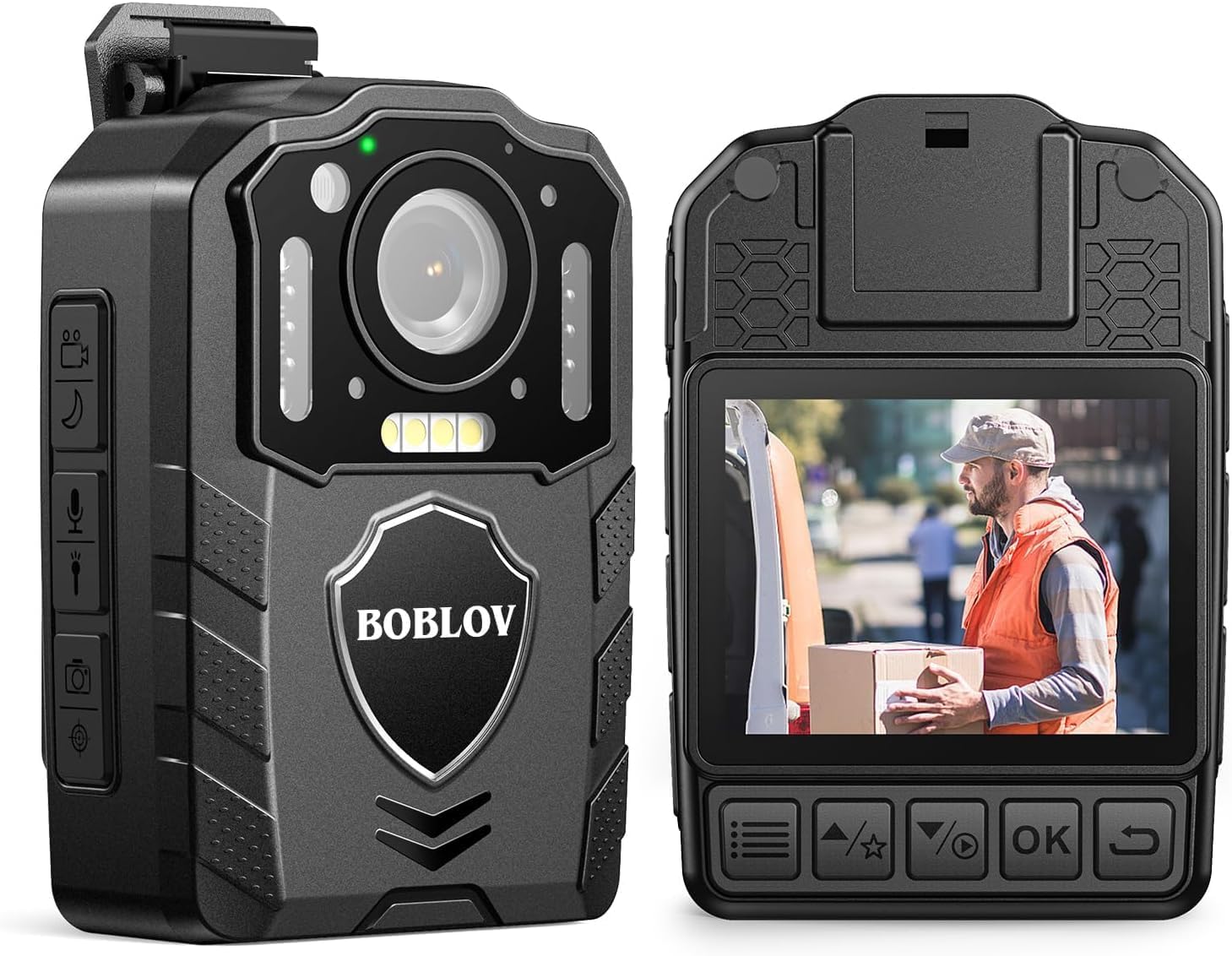
Beeld: Voor en agter views of the BOBLOV KJ25 Body Camera, highlighting its design and interface.
Sleutel kenmerke:
- Video resolusie: 1080P at 30fps for clear footage.
- Foto resolusie: Tot 48 megapixels.
- Batterylewe: Built-in 3000mAh battery provides up to 13 hours of continuous recording.
- Nagvisie: Equipped with 10 IR lights for clear recording in low-light conditions.
- Eksterne geheue: Supports Micro SD cards from 64GB to 512GB (128GB card included).
- Loop opname: Automatically overwrites oldest files wanneer die berging vol is.
- Pre/Post-recording: Captures events before and after the main recording trigger.
- Rooi laser: For quick aiming and location identification.
- White Filling Lights: Provides additional illumination when needed.
- Drabare ontwerp: Easily attaches to clothing using included clips.
3. Opstelling
3.1 Laai die battery
Before first use, fully charge the camera's internal 3000mAh battery. Connect the camera to the charging plug using the provided USB cable. The charging indicator light will show the charging status. A full charge typically takes approximately 5 hours.

Image: The BOBLOV KJ25 Body Camera being charged, illustrating its size and battery specifications.
3.2 Plaas die Micro SD-kaart
The BOBLOV KJ25 supports Micro SD cards from 64GB to 512GB. A 128GB card is included. Locate the Micro SD card slot on the side of the camera. Gently insert the card with the gold contacts facing down until it clicks into place. To remove, push the card in slightly until it springs out.

Image: Inserting a Micro SD card into the camera's dedicated slot.
3.3 Attaching the Clips
The camera comes with a short 360° back clip and a long 180° shoulder clip. Choose the appropriate clip for your intended use. Attach the clip to the camera's mounting point and secure it. The clips allow for hands-free operation by attaching the camera to your uniform, belt, or backpack strap.

Image: The BOBLOV KJ25 Body Camera worn on a uniform, illustrating its hands-free application.
4. Bedryfsinstruksies
4.1 Krag aan/af
- Om aan te skakel: Druk en hou die aan/af-knoppie in totdat die skerm verlig.
- Om af te skakel: Druk en hou die aan/af-knoppie in totdat die toestel afskakel.
4.2 Video-opname
The camera records video in 1080P resolution at 30 frames per second, ensuring clear and detailed footage.
- Begin opname: In standby mode, press the Video Record button once to begin recording.
- Stop opname: Press the Video Record button again to stop and save the current video file.

Image: Visual comparison highlighting the clear 1080P video quality of the camera.
Video: An official product video demonstrating the BOBLOV KJ25 Body Camera's 1080P video recording capabilities and features.
4.3 Foto's neem
Capture high-resolution still images up to 48MP.
- Neem foto: In standby mode, press the Photo button once to capture an image.

Image: The camera's 48MP photo and 1080P video resolution in a practical setting.
4.4 Nagvisie
The KJ25 features automatic and manual night vision capabilities, utilizing 10 IR lights to ensure clear recordings in dark environments.
- Activate Night Vision: Refer to the camera's on-screen menu or dedicated button for night vision activation. It can be set to automatic or manual mode.

Image: Demonstration of the camera's auto/manual night vision feature in a dark setting.
4.5 Loopname
When enabled, loop recording allows the camera to continuously record by overwriting the oldest files when the memory card is full. This ensures that you always have the most recent footage.
- Setting Loop Recording: Access the camera's settings menu to adjust loop recording duration (e.g., 3, 5, 10, 15, 20, 30 minutes) or to enable/disable the feature. The default setting is typically 10 minutes.

Image: Explanation of loop recording functionality and customizable video segment lengths.
4.6 Red Laser Quick Locate
The integrated red laser assists in quickly identifying the camera's aiming point, useful for precise recording.
- Aktiveer laser: Refer to the camera's controls for the dedicated laser activation button.

Image: The red laser quick locate feature in use by an officer.
4.7 White Filling Lights
For additional illumination in dark areas, the camera includes white filling lights.
- Activate White Lights: Refer to the camera's controls for the dedicated white light activation button.

Image: The white filling lights feature providing illumination for a delivery person.
4.8 Afspeel
Review recorded videos and photos directly on the camera's screen or by connecting it to a computer.
- Terugspeel op kamera: Use the navigation buttons to access the playback menu and select files.
- Rekenaarafspeel: Connect the camera to a computer using the USB cable. The camera will appear as a removable disk, allowing you to access and transfer files.
5. Onderhoud
5.1 Skoonmaak
- Gebruik 'n sagte, droë lap om die kamera se liggaam skoon te maak.
- Vir die lens, gebruik 'n gespesialiseerde lensskoonmaakdoek en -oplossing om skrape te voorkom.
- Moenie harde chemikalieë of skuurmiddels gebruik nie.
5.2 Berging
- Bêre die kamera op 'n koel, droë plek weg van direkte sonlig en uiterste temperature.
- Ensure the battery is partially charged (around 50%) before long-term storage to preserve battery health.
6. Probleemoplossing
Algemene kwessies en oplossings:
- Kamera skakel nie aan nie: Maak seker dat die battery gelaai is. Koppel aan 'n kragbron en probeer weer.
- Recording issues (e.g., freezing, errors): Check if the Micro SD card is properly inserted and has sufficient free space. Format the SD card if issues persist (this will erase all data).
- Swak video-/fotokwaliteit: Ensure the lens is clean and free from smudges. Check lighting conditions; use night vision or white lights if necessary.
- Computer not recognizing camera: Try a different USB port or cable. Ensure the camera is powered on when connected.
7. Spesifikasies
| Kenmerk | Detail |
|---|---|
| Handelsmerk | BOBLOV |
| Modelnommer | KJ25 |
| Video-opname-resolusie | 1080p |
| Effektiewe stilresolusie | 48 MP |
| Fotosensortegnologie | CMOS |
| Tipe flitsgeheue | Micro SD (Supports 64GB to 512GB) |
| Flash Memory geïnstalleerde grootte | 128 GB (ingesluit) |
| Video-opname-formaat | MOV |
| Ondersteunde oudioformaat | MP3 |
| Skerm grootte | 2 duim |
| Verbindingstegnologie | USB |
| Kleur | Swart |
| Kenmerke | Night Vision, Red Laser, White Filling Lights, Loop Recording |
| Waterweerstandvlak | Nie waterbestand nie |
| Beeldstabilisasie | Nee |
| Vormfaktor | Kompak |
| Bedryfstelselversoenbaarheid | Vensters |
| Itemafmetings (D x B x H) | 2.1" D x 1.1" B x 2.9" H |
| Aantal batterye | 1 litiumpolimeer (ingesluit) |
| Lens tipe | Wye hoek |
| Fokus Tipe | Handmatige fokus |
| Maksimum vertoonresolusie | 240×320 piksels |
| Skietmodusse | Nag |
| Beeld-aspekverhouding | 16:9 |
| Ondersteunde beeldformaat | JPG |
| Tipe blootstellingsbeheer | Handleiding |
| Versoenbare toestelle | Smartphone (for data transfer) |
8. Waarborg en ondersteuning
8.1 Waarborginligting
The BOBLOV KJ25 Body Camera comes with a 2 jaar waarborg vanaf die aankoopdatum. Hierdie waarborg dek vervaardigingsdefekte en verseker betroubare werking onder normale gebruik. Bewaar asseblief u bewys van aankoop vir waarborgeise.
8.2 Kliëntediens
For further assistance, technical support, or warranty inquiries, please refer to the official BOBLOV webwebwerf of kontak hul kliëntediens direk. Jy kan meer inligting en ondersteuningsbronne vind op die BOBLOV Store on Amazon.