
1. Veiligheidsinligting
Lees asseblief alle veiligheidsinstruksies sorgvuldig deur voordat u die toestel gebruik. Versuim om hierdie instruksies te volg, kan lei tot elektriese skok, brand of ernstige besering.
- Verseker die kragtoevoer voltage stem ooreen met die spesifikasies van die toestel.
- Moenie die toestel in water of ander vloeistowwe dompel nie.
- Hou ventilasie-openinge vry van obstruksies.
- Moenie die toestel gebruik as die kragkabel of prop beskadig is nie.
- Avoid touching internal components while the appliance is powered on.
- Hierdie toestel is nie bedoel vir gebruik deur persone met verminderde fisiese, sensoriese of geestelike vermoëns nie, tensy hulle onder toesig of opdrag ontvang.
- Ontkoppel die kragtoevoer voordat u skoonmaak of onderhoud uitvoer.
2. Produk verbyview
The ICECO VL35+PB1000 is a portable fridge freezer designed for various applications, including automotive, camping, and travel. It features a SECOP compressor for efficient cooling and comes bundled with a 1075Wh PB1000 portable power station for extended off-grid use.
Sleutel kenmerke:
- 35L kapasiteit: Verskaf ampberging vir kos en drankgoed.
- SECOP Compressor: Ensures reliable and efficient cooling performance.
- Multi-opening Lid Design: Allows for flexible lid opening direction without reassembly, convenient for tight spaces.
- Dubbele kragtoevoer: Operates on 12/24V DC and 110-240V AC.
- Integrated PB1000 Power Station: 1075Wh capacity with 1200W AC output and 9 outlets for powering various devices.
- USB laai poorte: Two USB outlets (USB-C PD100W Max, USB-A 18W Max) for mobile devices (available under DC power).
- Gehumaniseerde ontwerp: Includes a drain hole, waterproof baffle, LED lights, and removable handles.
- UPS-funksionaliteit: The PB1000 offers Uninterruptible Power Supply (UPS) with instant switching for emergency power.
Pakketinhoud:
- ICECO 35L Portable Fridge Freezer
- ICECO PB1000 Portable Power Station
- Verwyderbare mandjie
- Vervangende handvatsels
- Hoekbeskermers
- Dreineerproppe
- Wisselstroomkabel
- GS-kragkabel


3. Opstelling
3.1 Uitpak en Aanvanklike Inspeksie
- Verwyder alle komponente versigtig uit die verpakking.
- Inspect the fridge freezer and power station for any signs of damage during transit. Contact customer support if any damage is found.
- Clean the interior of the fridge freezer with a damp lap voor die eerste gebruik.
3.2 Aansluitkrag
The fridge freezer can be powered by either AC (home socket) or DC (car 12/24V) power. The PB1000 power station provides additional power options and portability.
AC Power Connection (110-240V):
- Locate the AC power input port on the fridge freezer.
- Connect the provided AC power cable to the fridge freezer and then to a standard wall outlet.
- The built-in AC transformer allows for direct connection to pre-cool the fridge.
DC Power Connection (12/24V):
- The fridge freezer has 12/24V DC ports on both sides.
- Connect the provided DC power cable to one of the DC ports on the fridge freezer and to your vehicle's 12V or 24V power outlet.

3.3 PB1000 Power Station Setup
The PB1000 power station can be used to power the fridge freezer or other electronic devices.
Charging the PB1000:
- Connect the PB1000 to an AC wall outlet using the provided charging cable for fast charging.
- The PB1000 supports 800W AC fast charging, achieving 0-100% in approximately 1.6 hours.

3.4 Multi-opening Lid Adjustment
The lid can be adjusted to open from different directions to suit your space requirements. No tools or reassembly are required for this adjustment.

4. Operasie
4.1 Powering On/Off and Temperature Control
- Connect the fridge freezer to a power source (AC or DC).
- Druk die aan/uit-knoppie op die beheerpaneel om die eenheid aan te skakel.
- Use the temperature adjustment buttons (usually '+' and '-') to set the desired temperature between 0℉ and 50℉ (approximately -18℃ to 10℃).
- The display will show the current internal temperature and the set temperature.
- Om af te skakel, druk en hou die kragknoppie in.
4.2 Using the PB1000 Power Station
The PB1000 power station can be used independently or in conjunction with the fridge freezer.
Aandryf toestelle:
- The PB1000 features multiple output ports: 1x Car Outlet (12V-10A), 2x DC Outlets (12V-5A), 2x USB-C (PD100W Max), 2x USB-A (18W Max), and 2x AC Wall Outlets (Total Output Power 2400W).
- Koppel jou toestelle aan die toepaslike uitsetpoorte.
- The power display on the PB1000 clearly shows charging and power status.
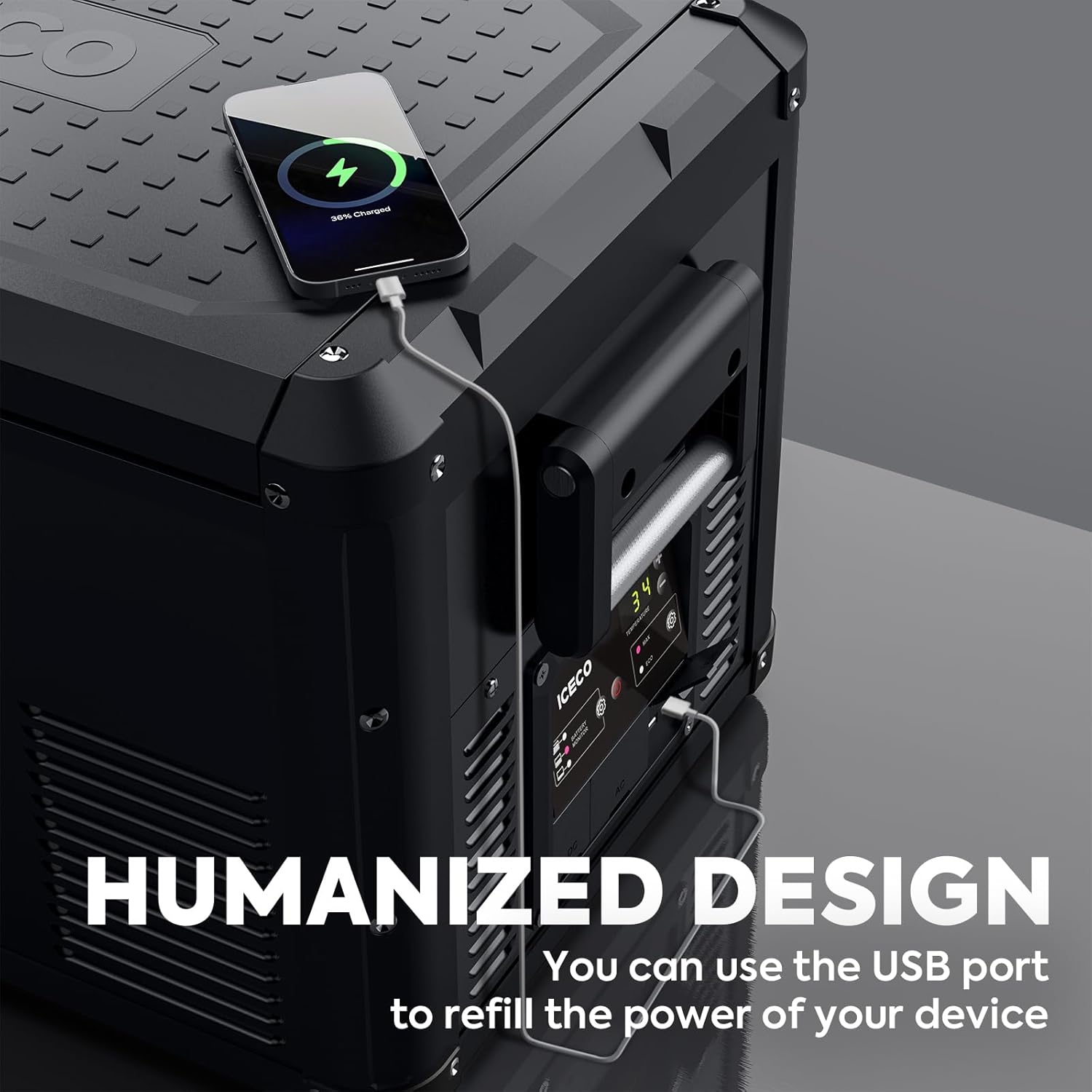
USB Charging from Fridge Freezer:
- The fridge freezer itself includes 2 USB outlets for charging mobile devices.
- These USB outlets are only available when the fridge freezer is powered by DC.

Uninterruptible Power Supply (UPS) Funksie:
- The PB1000 can function as a UPS, providing seamless emergency power.
- Power switches instantly (within 0.01s) when the main power source is interrupted.
- Waarskuwing: Test this function thoroughly before relying on it for sensitive data or medical equipment to prevent potential damage.

5. Onderhoud
5.1 Cleaning the Fridge Freezer
- Ontkoppel krag: Always unplug the appliance from all power sources before cleaning.
- Binne skoonmaak: Gebruik 'n sagte lap dampened with mild detergent and warm water to clean the interior surfaces. Avoid abrasive cleaners.
- Dreineer gat: The integrated drain hole allows for easy removal of melted ice or spilled liquids. Ensure the drain plug is securely in place during operation and removed for draining.
- Buitenste skoonmaak: Vee die buitekant met adamp lap. Moenie water direk op die eenheid spuit nie.
- Waterproof Baffle: The waterproof baffle helps protect internal components. Ensure it is properly seated after cleaning.
- Droog: Allow the interior to air dry completely before closing the lid or reconnecting power.
5.2 Algemene sorg
- Regularly check power cables for any signs of wear or damage.
- Keep the ventilation grilles clear of dust and debris to ensure proper airflow for the compressor.
- When not in use for extended periods, clean the unit, leave the lid slightly ajar to prevent odors, and store it in a dry, well-ventilated area.
6. Probleemoplossing
If you encounter issues with your ICECO fridge freezer or PB1000 power station, refer to the following common troubleshooting steps:
| Probleem | Moontlike oorsaak | Oplossing |
|---|---|---|
| Toestel skakel nie aan nie | No power supply; Damaged power cable; Blown fuse in vehicle | Check power connection; Inspect cable; Check vehicle fuse; Try different power source |
| Onvoldoende verkoeling | Ventilation blocked; Door not sealed properly; Ambient temperature too high; Overloaded with warm items | Clear vents; Ensure lid is closed tightly; Move to cooler area; Allow time to cool |
| Ongewone geraas | Appliance not level; Fan obstruction; Normal compressor operation | Place on a flat surface; Check for obstructions; Some noise is normal for compressors |
| PB1000 not charging devices | PB1000 battery low; Output port not activated; Device incompatible | Recharge PB1000; Ensure output port is turned on; Check device power requirements |
| Foutkode word vertoon | Internal fault; Sensor issue | Verwys na die spesifieke foutkode in 'n meer gedetailleerde handleiding (indien beskikbaar) of kontak kliëntediens. |
If the problem persists after attempting these solutions, please contact ICECO customer support for further assistance.
7. Spesifikasies
Detailed technical specifications for the ICECO VL35+PB1000 unit:
| Kenmerk | Spesifikasie |
|---|---|
| Handelsmerk | ICECO |
| Modelnommer | VL35+PB1000 |
| Kapasiteit | 35 liter (37 kwart) |
| Produk afmetings | 28.1 x 15.9 x 15.7 duim (71.4 x 40.4 x 39.9 cm) |
| Installasie tipe | Vrye staande |
| Spesiale kenmerk | Draagbaar |
| Kleur | Swart |
| Ontdooistelsel | Handleiding |
| Aantal deure | 1 |
| PB1000 Battery Capacity | 1075Wh |
| PB1000 AC Output | 1200W (Total Output Power 2400W) |
| PB1000 AC Fast Charging | 800W (0-100% in 1.6 hours) |
| Temperatuurreeks | 0℉ - 50℉ (approximately -18℃ - 10℃) |
| Power Consumption (Max mode at 0℉) | ~0.43 kWh/24h |
8. Waarborg en Ondersteuning
8.1 Waarborginligting
The ICECO VL35+PB1000 comes with a 5-year warranty on the SECOP compressor. For specific details regarding the full product warranty, please refer to the warranty card included with your purchase or visit the official ICECO webwebwerf.

8.2 Kliëntediens
For technical assistance, warranty claims, or general inquiries, please contact ICECO customer support through their official website or the contact information provided in your product packaging. Please have your model number (VL35+PB1000) and purchase date ready when contacting support.