
1. Produk verbyview
This manual provides essential information for the safe and effective use of your TUSA Complete Scuba Diving Gear Package. This package includes a Buoyancy Compensator Device (BCD), a primary regulator, an alternate air source (octopus), a submersible pressure gauge (SPG), and a wrist dive computer. All components are designed for recreational scuba diving.
1.1 Ingesluite komponente
- Liberator Jacket Style Weight Integrated BCD
- TUSA RS 1207 Primary Regulator
- TUSA RS 1207 Alternate Air Source (Octopus)
- Submersible Pressure Gauge (SPG)
- TUSA TC1 Wrist Dive Computer
2. Belangrike veiligheidsinligting
WARNING: Scuba diving carries inherent risks. Improper use of this equipment can lead to serious injury or death. This equipment should only be used by certified divers who have received proper training. Always dive within your training and experience limits.
- Always perform a thorough pre-dive safety check (BWRAF) before every dive.
- Never dive alone. Always dive with a buddy.
- Ensure all equipment is properly maintained and serviced by qualified technicians.
- Monitor your air supply and depth continuously.
- Ascend slowly and perform safety stops as required.
- Do not exceed the maximum operating pressure of any component.
- Consult a physician before diving if you have any medical conditions.
3. Opstelling en samestelling
3.1 Buoyancy Compensator Device (BCD)

Image: TUSA Liberator Jacket Style BCD, showing the integrated weight system and tank harness.
- Attach to Tank: Secure the BCD to your scuba tank using the tank band and buckle. Ensure the tank valve is accessible and the BCD is centered.
- Gewigsintegrasie: Load appropriate weights into the integrated weight pockets. Ensure they are securely latched and easily releasable.
- Inflator Hose Connection: Connect the BCD's low-pressure inflator hose to the low-pressure port on your regulator's first stage.
3.2 Regulator Set Assembly

Image: TUSA RS 1207 Primary Regulator and First Stage, illustrating the connection points.
- Eerste Stage to Tank Valve: Heg die eerste s aantage of the regulator to the scuba tank valve. For DIN valves, screw it directly. For Yoke valves, place it over the valve and tighten the yoke screw.
- Primary Second Stage: Ensure the primary second stage is connected to a low-pressure port on the first stage.
- Alternate Air Source (Octopus):

Image: TUSA RS 1207 Alternate Air Source (Octopus), typically yellow for high visibility.
Connect the octopus to another low-pressure port on the first stage. Position it for easy access by a buddy. - Submersible Pressure Gauge (SPG):
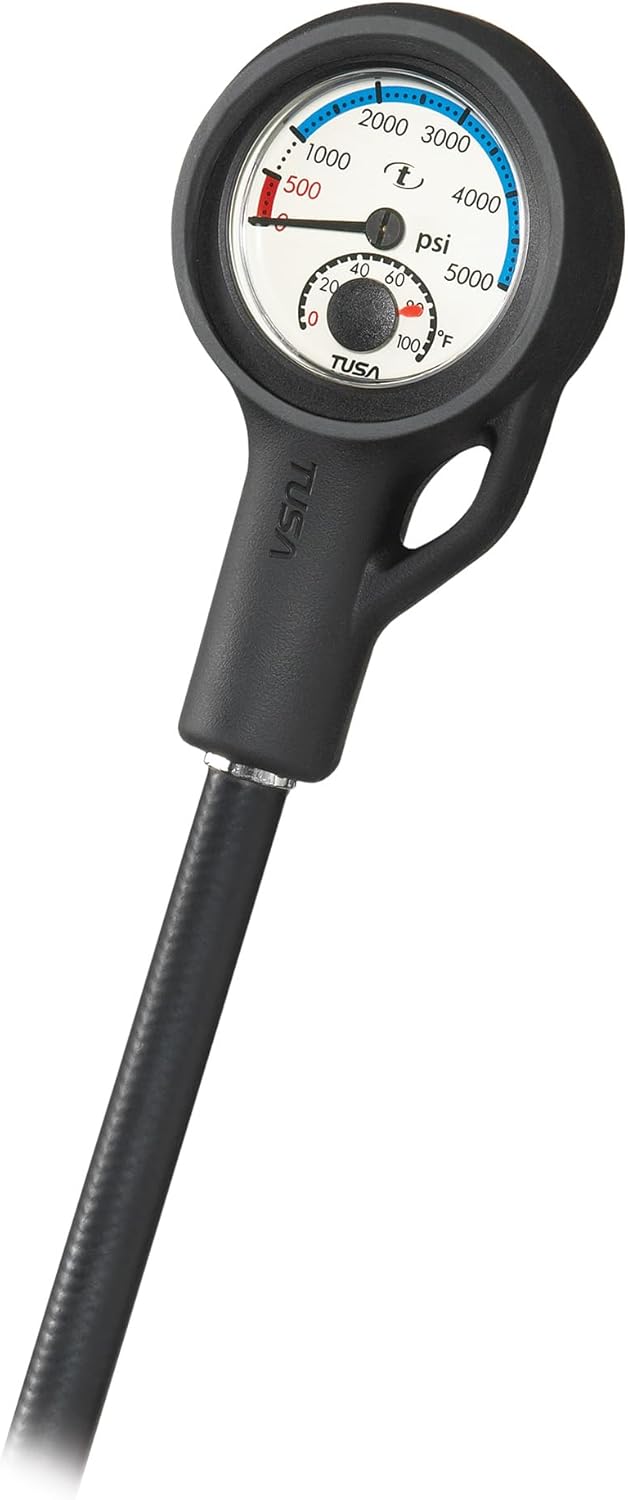
Image: TUSA Submersible Pressure Gauge (SPG), showing the pressure dial and hose connection.
Connect the SPG to a high-pressure port on the first stage.
3.3 Dive Computer Preparation

Image: TUSA TC1 Wrist Dive Computer, displaying depth, dive time, and N2 information.
- Aanvanklike heffing: Ensure the TC1 Wrist Dive Computer is fully charged before its first use. Refer to the separate TC1 manual for charging instructions.
- Instellings: Power on the computer and configure essential settings such as units (metric/imperial), time, date, and personal conservatism levels according to your training and dive plan.
4. Bedryfsinstruksies
4.1 Pre-Dive Check
- Lug toevoer: Slowly open the tank valve. Check the SPG for full tank pressure. Take a few breaths from both the primary and alternate regulators to ensure they function correctly.
- BCD: Inflate and deflate the BCD fully to check for leaks and proper operation of the inflator and dump valves.
- Duikrekenaar: Verify the computer is on, displaying correct surface information, and has sufficient battery.
4.2 In-Water Operation
- BCD Buoyancy Control: Use the inflator button to add air to the BCD for buoyancy. Use the dump valves (shoulder, kidney, or oral inflator) to release air and descend or reduce buoyancy.
- Regulator Breathing: Breathe calmly and continuously from the primary regulator. In an out-of-air emergency, switch to your alternate air source or signal your buddy for assistance.
- Dive Computer Monitoring: Continuously monitor your depth, dive time, no-decompression limits, and ascent rate on the TC1 dive computer. Pay attention to audible and vibration alarms.
5. Onderhoud en versorging
5.1 Post-Dive Care
- Spoel: Thoroughly rinse all equipment with fresh, clean water immediately after each dive. Ensure no salt or debris remains. Do not press the regulator purge button or BCD inflator button while rinsing unless the first stage is pressurized and attached to a tank, to prevent water entry.
- Droog: Allow all components to air dry completely in a shaded, well-ventilated area before storage. Avoid direct sunlight.
5.2 Berging
- Store equipment in a cool, dry place away from direct sunlight, heat sources, and chemicals.
- Avoid folding hoses sharply or placing heavy objects on the gear.
- Store the BCD partially inflated to prevent creasing.
- Ensure the dive computer is turned off or in standby mode to conserve battery.
5.3 Geskeduleerde Diens
Regular professional servicing is crucial for the safety and longevity of your diving equipment.
- Reguleerders: Have your regulators (first stage, primary second stage, and octopus) serviced by a TUSA-certified technician annually or every 100 dives, whichever comes first.
- BCD: Inspect your BCD annually for wear, leaks, and proper operation of valves and inflator.
- Duikrekenaar: Follow the manufacturer's recommendations for battery replacement and pressure testing, typically every 2-5 years depending on usage.
6. Probleemoplossing
| Probleem | Moontlike oorsaak | Oplossing |
|---|---|---|
| Regulator free-flows | O-ring issue, over-tightening, cold water, internal component issue | Check O-rings, do not overtighten, warm regulator in water, or have serviced by technician. |
| BCD slowly deflates | Leak in bladder, inflator, or dump valve | Inspect for visible damage, check inflator/dump valve seals. If leak persists, seek professional repair. |
| Dive computer not turning on | Low battery, water incursion, software issue | Charge battery fully. If issue persists, contact TUSA support. |
| SPG reads zero with tank open | Hose kinked, gauge malfunction, tank valve not fully open | Ensure tank valve is fully open. Check hose for kinks. If still zero, gauge may be faulty; do not dive. |
7. Tegniese spesifikasies
| Komponent | Spesifikasie |
|---|---|
| Handelsmerk | TUSA |
| Modelnommer | LANSCU-GE-0103TC1-XS |
| BCD Style | Liberator Jacket Style, Weight Integrated |
| Reguleerder Model | TUSA RS 1207 |
| Dive Computer Model | TUSA TC1 Wrist Dive Computer |
| Material (General) | Nylon (BCD), Tempered Glass or Polycarbonate (PC) (Lens) |
| Ouderdomsreeks | Volwasse |
| Item gewig | Approximately 13.4 Pounds (Total Package) |
8. Waarborg en Ondersteuning
8.1 Waarborginligting
TABATA USA warrants to the purchaser, consumer that the products TABATA USA manufacture or distribute are free from defects in materials or workmanship. This warranty is subject to specific terms and conditions. Please retain your proof of purchase.
8.2 Kliëntediens
For technical assistance, warranty claims, or to locate an authorized service center, please visit the official TUSA website or contact your local TUSA dealer. Do not attempt repairs on critical life support equipment yourself.