
LAMA LM220C
LAMA 64MP Digital Camera User Manual
Model: LM220C
1. Inleiding
This user manual provides comprehensive instructions for operating your LAMA 64MP Digital Camera (Model: LM220C). This compact point-and-shoot camera is designed for ease of use, offering high-resolution photos and Full HD video recording, making it suitable for various users including kids, students, and teenagers. It features a 2.8-inch LCD screen, 16X digital zoom, anti-shake technology, and Wi-Fi connectivity.

Image: The LAMA 64MP Digital Camera shown with its included accessories, highlighting its compact design and the 2.8-inch LCD screen.
2. Pakketinhoud
Kontroleer asseblief die inhoud van die pakket na uitpak om seker te maak dat alle items teenwoordig is:
- 1 x LAMA 64MP Digital Camera (Model: LM220C)
- 1 x Gebruikershandleiding
- 1 x 32GB geheue kaart
- 1 x Tipe-C-laaikabel
- 2 x Rechargeable Batteries (BL-5B type)
- 1 x Trekkoordsakkie
- 1 x Lanyard
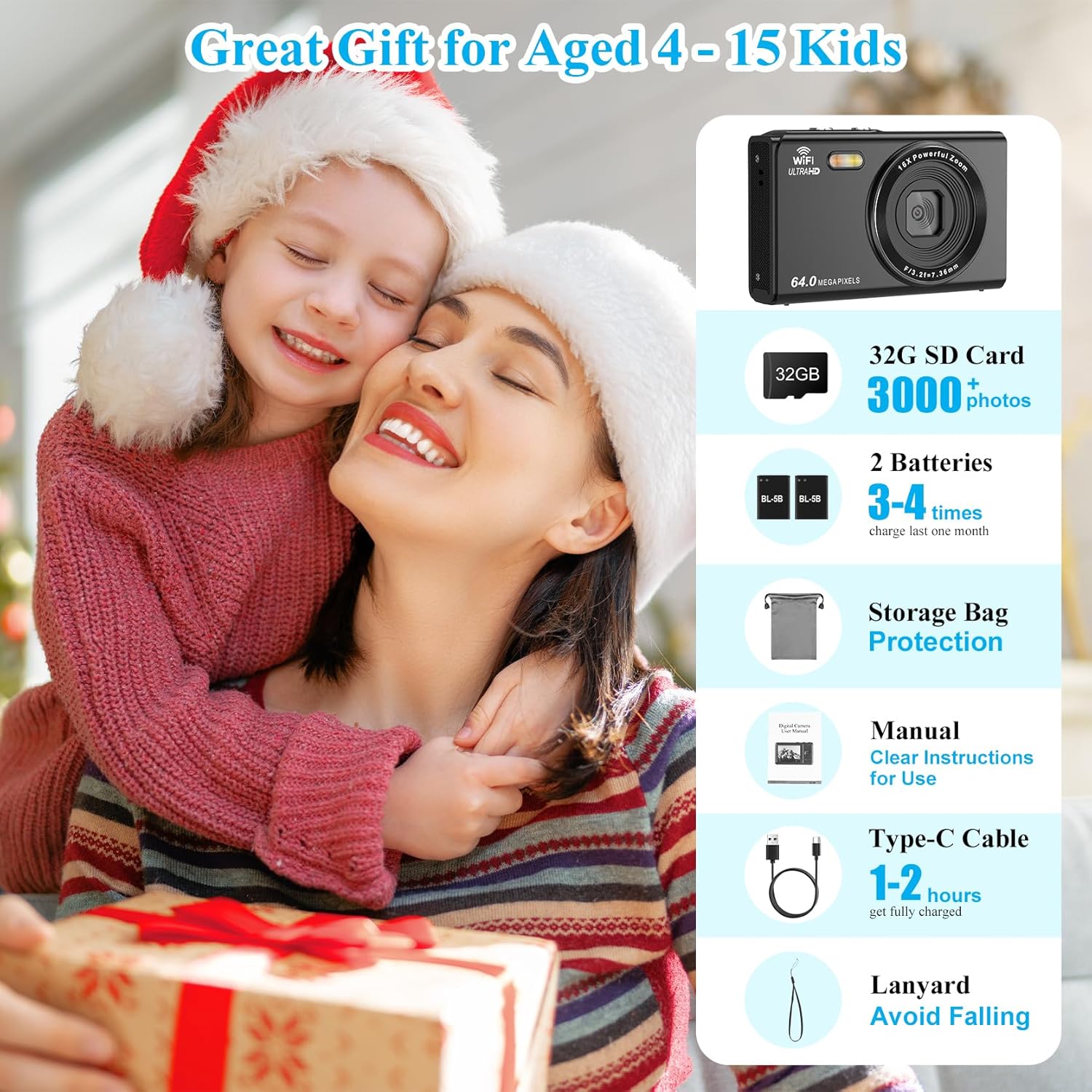
Image: A visual representation of the items included in the camera package, such as the camera, memory card, batteries, cables, and carrying pouch.
3. Opstelgids
3.1 Installasie van battery en geheuekaart
- Locate the battery and memory card compartment door on the bottom of the camera.
- Slide the latch to open the compartment door.
- Insert the BL-5B battery into the battery slot, ensuring the correct orientation as indicated inside the compartment.
- Insert the 32GB memory card into the SD card slot until it clicks into place.
- Close the compartment door securely until it latches.

Image: A detailed diagram illustrating the location of the battery and memory card slots, and how to insert them correctly.
3.2 Laai die battery
Before first use, fully charge the camera battery. Connect the camera to a power source (USB wall adapter or computer) using the provided Type-C charging cable. The indicator light will show charging status and turn off when fully charged. A full charge typically takes 1-2 hours.
3.3 Aanvanklike aanskakeling
Press and hold the Power Button located on the top of the camera until the LCD screen illuminates. The camera will display a "Welcome" message before entering shooting mode.
Video: An official product video demonstrating the unboxing, battery and memory card installation, and initial power-on sequence of the LAMA 64MP Compact Camera.
4. Bedryfsinstruksies
4.1 Basic Photo and Video Capture
- Fotos neem: In photo mode, frame your shot using the 2.8-inch LCD screen. Press the Shutter Button halfway to focus, then fully press to capture the image.
- Video's opneem: Switch to video mode using the Mode/Menu button. Press the Shutter Button to start recording, and press it again to stop.
4.2 Zoemfunksie
The camera features a 16X digital zoom. Use the T/W (Telephoto/Wide-angle) button to zoom in or out. 'T' zooms in, 'W' zooms out.
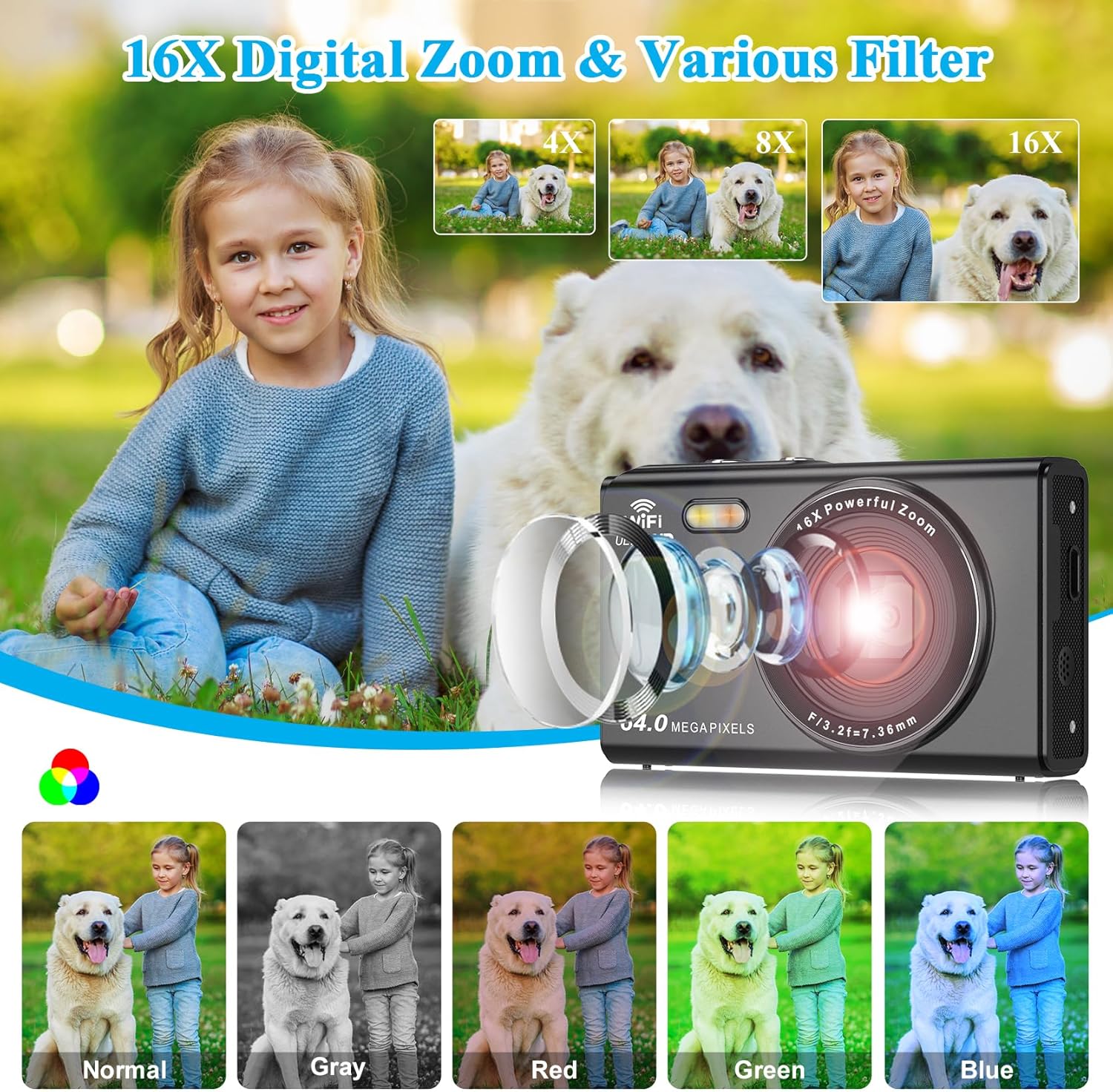
Image: Illustrates the camera's 16X digital zoom capability with examples at 4X, 8X, and 16X magnification, alongside various color filters (Normal, Gray, Red, Green, Blue).
4.3 Spesiale kenmerke
- Vul lig: The built-in fill light can be activated for improved illumination in low-light conditions. Use the UP button to toggle the fill light on/off.
- Anti-skud: The camera includes anti-shake technology to help reduce blur caused by camera movement, especially useful during video recording or in challenging lighting.
- Deurlopende skietery: Capture a rapid sequence of photos by holding down the shutter button in continuous shooting mode.
- Glimlag vang: When enabled, the camera can automatically detect smiles and capture photos.
- Selfontspanner: Set a delay (2s, 5s, 10s, 15s, 30s) before the camera takes a photo, allowing you to be in the shot.
- Filters: Apply various special filters (e.g., Normal, Gray, Red, Green, Blue) to your photos for creative effects.

Beeld: Visuele voorbeeldamples of the camera's advanced features including smile detection, selfie mode, anti-shake for clear motion shots, and continuous shooting.

Image: A comparison showing the effect of the built-in fill light, with examples of photos taken with the light off and on, demonstrating improved brightness.
4.4 Webcam Funksionaliteit
Die kamera kan gebruik word as 'n webcam for video calls or live streaming. Connect the camera to your computer using the Type-C cable. On the camera screen, select "PC Camera" mode when prompted. Note: In webcam mode, only the digital zoom button can be operated on the camera; other functions are disabled.
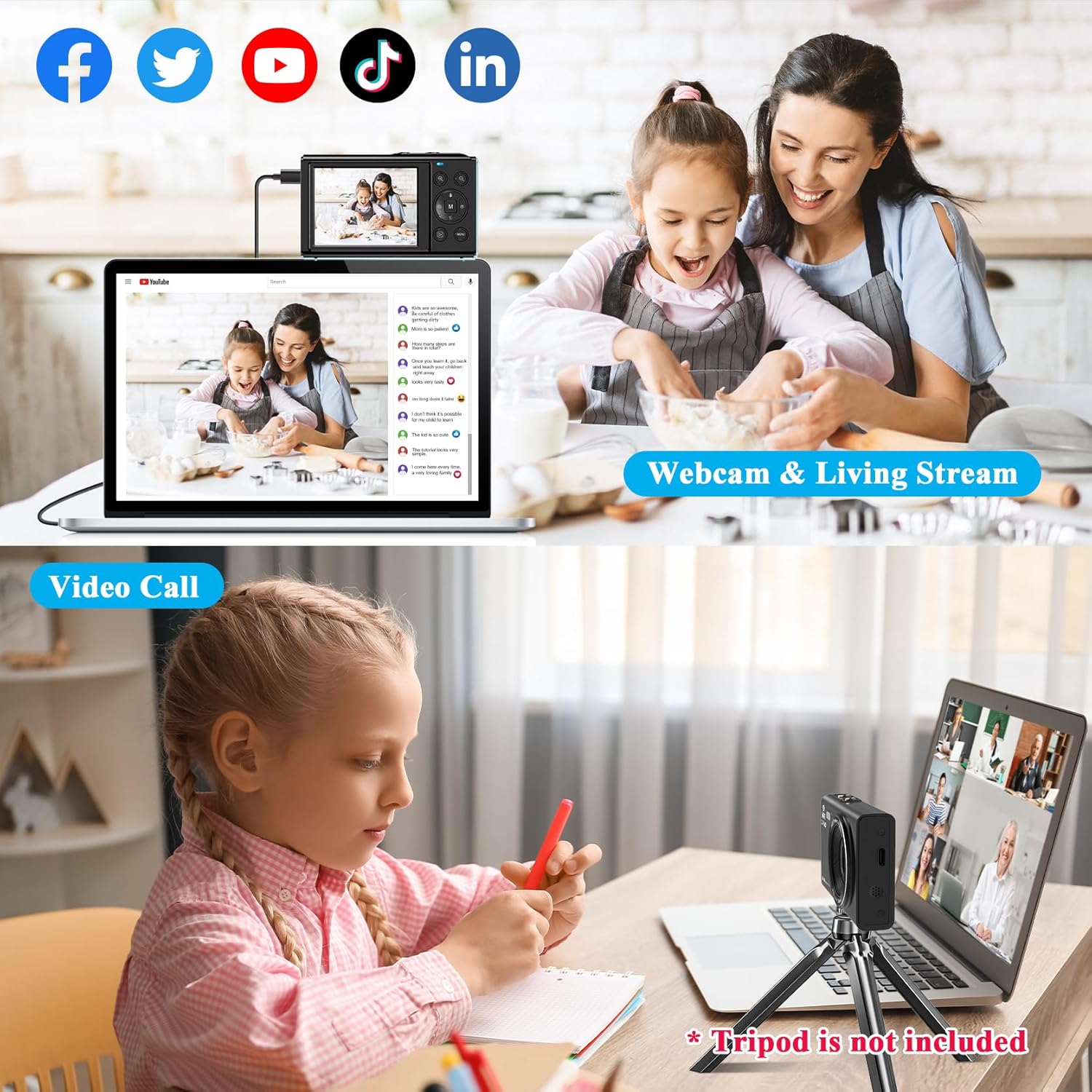
Image: Depicts the camera connected to a laptop, functioning as a webcam for video calls and live streaming on social media platforms.

Image: A visual guide showing the camera's menu option to select "PC Camera" mode when connected to a computer via USB.
4.5 Wi-Fi-verbinding en toepassinggebruik
The camera supports Wi-Fi connectivity for easy transfer of photos and videos to your mobile device. Download the "iDC CAM" app (scan the QR code provided in the product images or search your app store). Once connected, you can use your phone as a remote control for the camera, browse images, and download files for sharing.
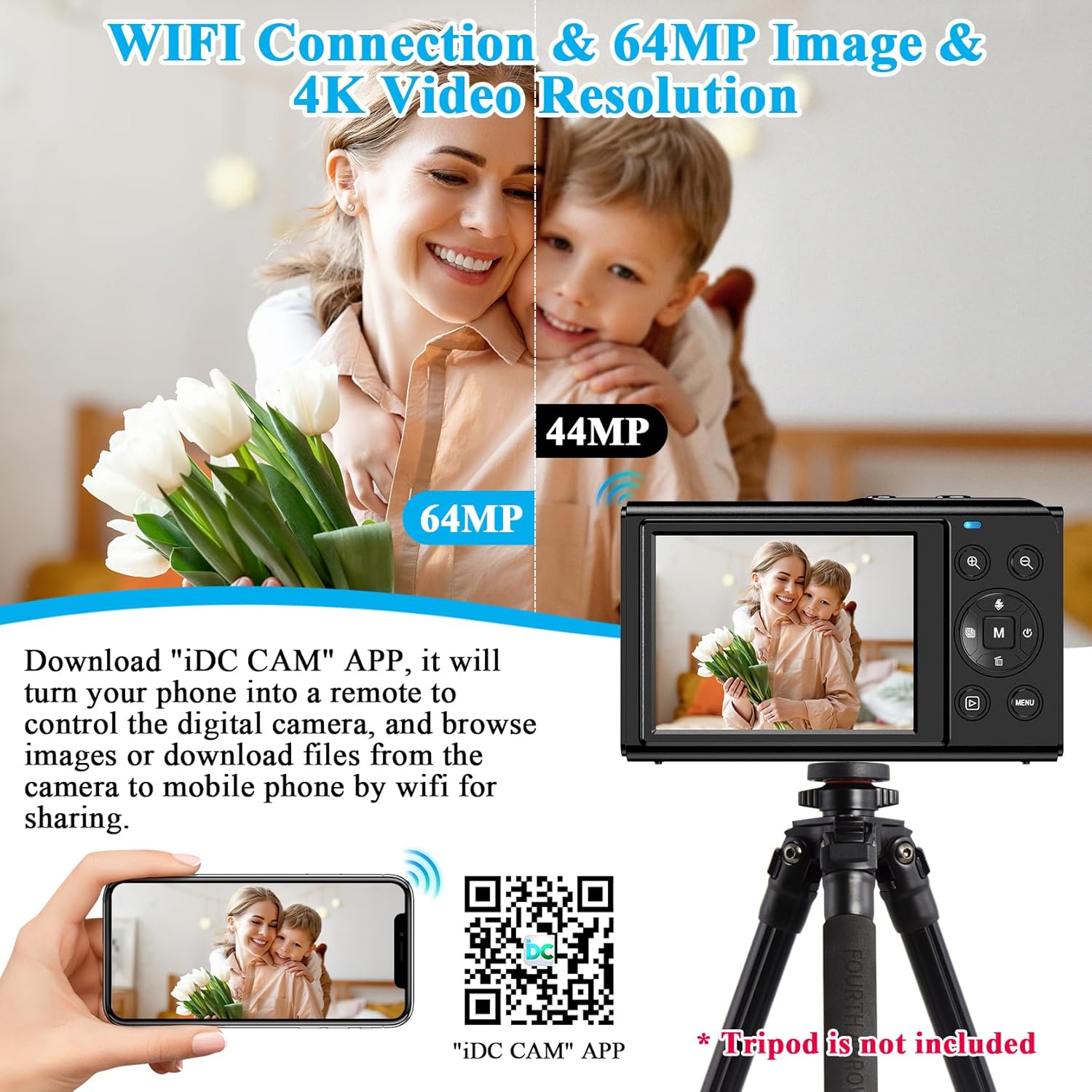
Image: Illustrates the camera's Wi-Fi function, showing a smartphone connected to the camera for image transfer and remote control via the "iDC CAM" app. A QR code for the app is also visible.
Download the "iDC CAM" app here: https://qr24.cn/FypBbk
5. Onderhoud
- Skoonmaak: Use a soft, dry cloth to clean the camera body. For the lens and screen, use a specialized lens cleaning cloth and solution. Avoid abrasive materials or harsh chemicals.
- Batterysorg: Store batteries in a cool, dry place when not in use. If storing for extended periods, charge them to about 50% capacity. Avoid fully discharging batteries frequently.
- Berging: When not in use, store the camera in its provided pouch to protect it from dust and scratches. Keep it away from extreme temperatures, humidity, and direct sunlight.
6. Probleemoplossing
| Probleem | Moontlike oorsaak | Oplossing |
|---|---|---|
| Kamera skakel nie aan nie. | Battery is pap of verkeerd geplaas. | Ensure battery is charged and inserted with correct polarity. |
| Kan nie foto's/video's neem nie. | Memory card full, not inserted, or corrupted. | Check memory card. Delete old files, reinsert, or try a different card. |
| Beelde is vaag. | Camera shake, dirty lens, or out of focus. | Hold camera steady, clean lens, ensure auto-focus engages. |
| Wi-Fi-verbinding misluk. | Incorrect password, camera too far from device, app issue. | Verify password, move closer, restart camera/app/device. |
7. Spesifikasies
| Kenmerk | Detail |
|---|---|
| Model Naam | LM220C |
| Fotosensorresolusie | 64 MP |
| Video-resolusie | 1080p FHD |
| Digitale zoom | 16x |
| Skerm grootte | 2.8 duim |
| Tipe vertoon | LCD |
| Beeldstabilisasie | Digitaal |
| Geheue berging kapasiteit | 32 GB (Eksterne geheuegrootte) |
| Verbindingstegnologie | Wi-Fi, USB Tipe-C |
| Item gewig | 113 gram |
| Battery Tipe | Lithium Polymer (BL-5B) |
| Ondersteun File Formaat | JPEG (Image), MP4 (Video) |
| Spesiale kenmerk | Draadloos, Webcam Functionality, Fill Light, Anti-Shake, Continuous Shooting, Face Detection, Smile Capture, Self-Timer |
8. Waarborg en Ondersteuning
LAMA products are designed for reliability and performance. For warranty information, please refer to the warranty card included in your product packaging or visit the official LAMA website. If you encounter any issues or require technical assistance, please contact LAMA customer support through the following channels:
- Amptelik Webwebwerf: Visit the LAMA Store on Amazon (for product information and updates)
- E-pos ondersteuning: Refer to your user manual or product packaging for specific email contact.
- Online FAQ/Troubleshooting: Check the LAMA website for frequently asked questions and detailed troubleshooting guides.
Behou asseblief jou aankoopbewys vir waarborgeise.
Ask a question about this manual
Ask about setup, troubleshooting, compatibility, parts, safety, or missing instructions. Manuals+ will review the question and use this page’s manual context to help answer it.