
Inleiding
Thank you for choosing the Glocusent Wingy Book Light. This manual provides detailed instructions for the setup, operation, and maintenance of your new reading light. Designed for comfort and convenience, the Wingy Book Light offers adjustable illumination to enhance your reading experience.

The Glocusent Wingy Book Light, designed for comfortable reading.
Produk verbyview
The Glocusent Wingy Book Light features a unique 'wingy' design with 48 dual-row LED beads, providing a wide and even light spread. It includes independent control for each wing, multiple brightness levels, three color temperatures, and a built-in timer with a sleep aid function. Its flexible gooseneck and sturdy clip ensure versatile use.

Gedetailleerd view of the Wingy Book Light's optical design for optimal illumination.
Opstelling
Laai die toestel
Before first use, fully charge your Wingy Book Light. The device is equipped with a 1000mAh battery and charges via a USB-C port. A full charge takes approximately 2.5 hours and provides up to 120 hours of use on the lowest setting.
- Connect the provided USB-C charging cable to the charging port on the clip base.
- Plug the other end into a compatible USB power source (adapter not included).
- The indicator lights on the clip base will show charging status. All four lights indicate a full charge.

The 1000mAh battery provides extended usage time.
Die heg van die Lig
The sturdy clip base is designed to securely attach to books, tables, or other surfaces. The clip features silicone pads to protect surfaces and ensure a firm grip.
- Open the clip by pressing the rear end.
- Attach the clip to your desired surface, ensuring the silicone pads make contact.
- Adjust the flexible gooseneck to position the light over your reading material.

The sturdy clip with silicone pads ensures secure attachment without damage.

The flexible gooseneck allows for precise light positioning.
Bedryfsinstruksies
The Glocusent Wingy Book Light features intuitive controls located on the top of each wing.

verbyview of the easy-to-use controls.
Power On/Off & Independent Wing Control
- Each wing has an independent power button. Short press the button on the left wing to turn it on/off.
- Short press the button on the right wing to turn it on/off.
- This allows for focused lighting, preventing disturbance to others, especially during bedtime reading.
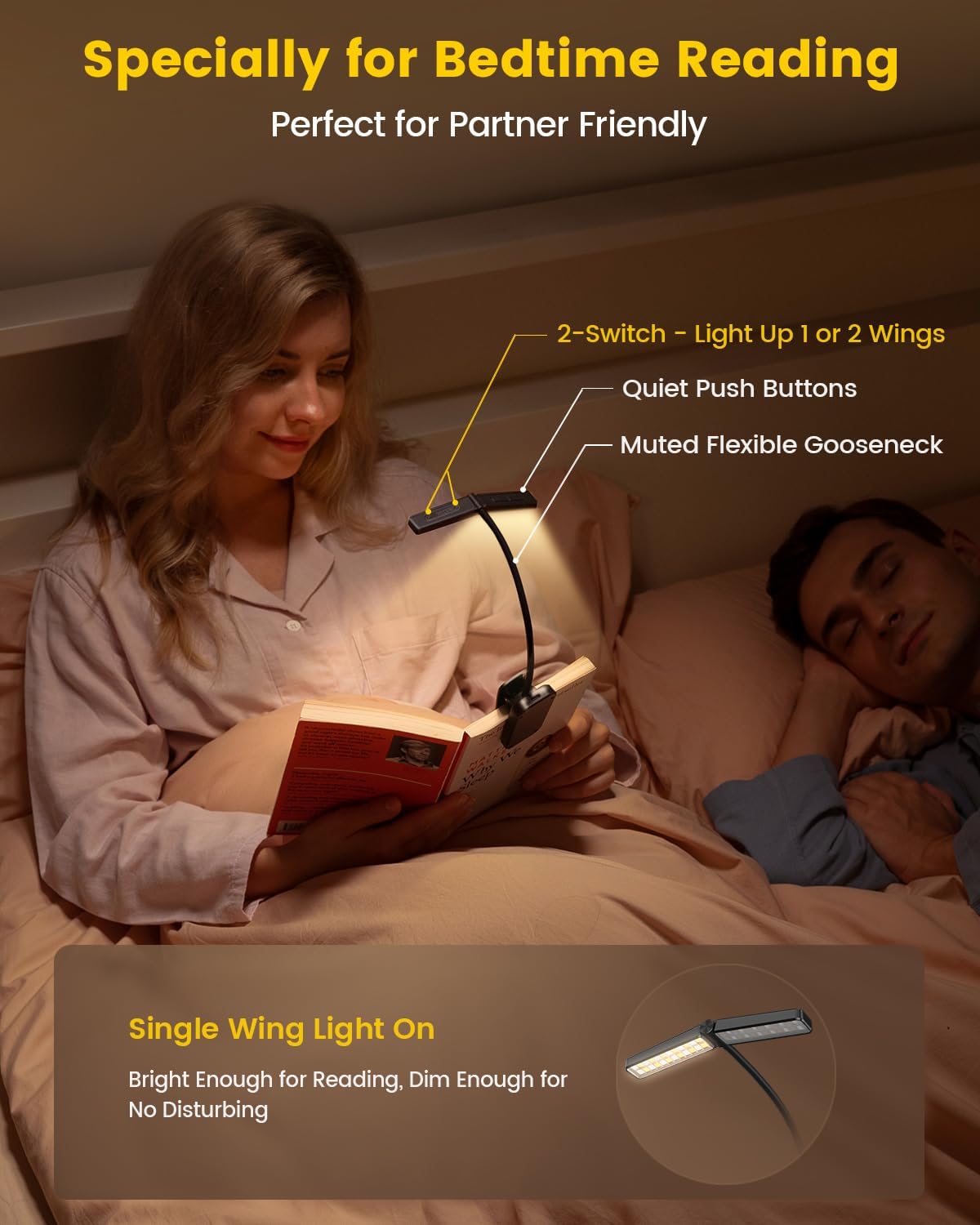
Independent wing control for undisturbed reading.
Helderheid aanpassing
- Use the brightness control button (usually marked with +/- or light icon) to cycle through 5 preset brightness levels.
- For stepless adjustment, long press the brightness button to gradually increase or decrease the light intensity. Release when the desired brightness is reached.
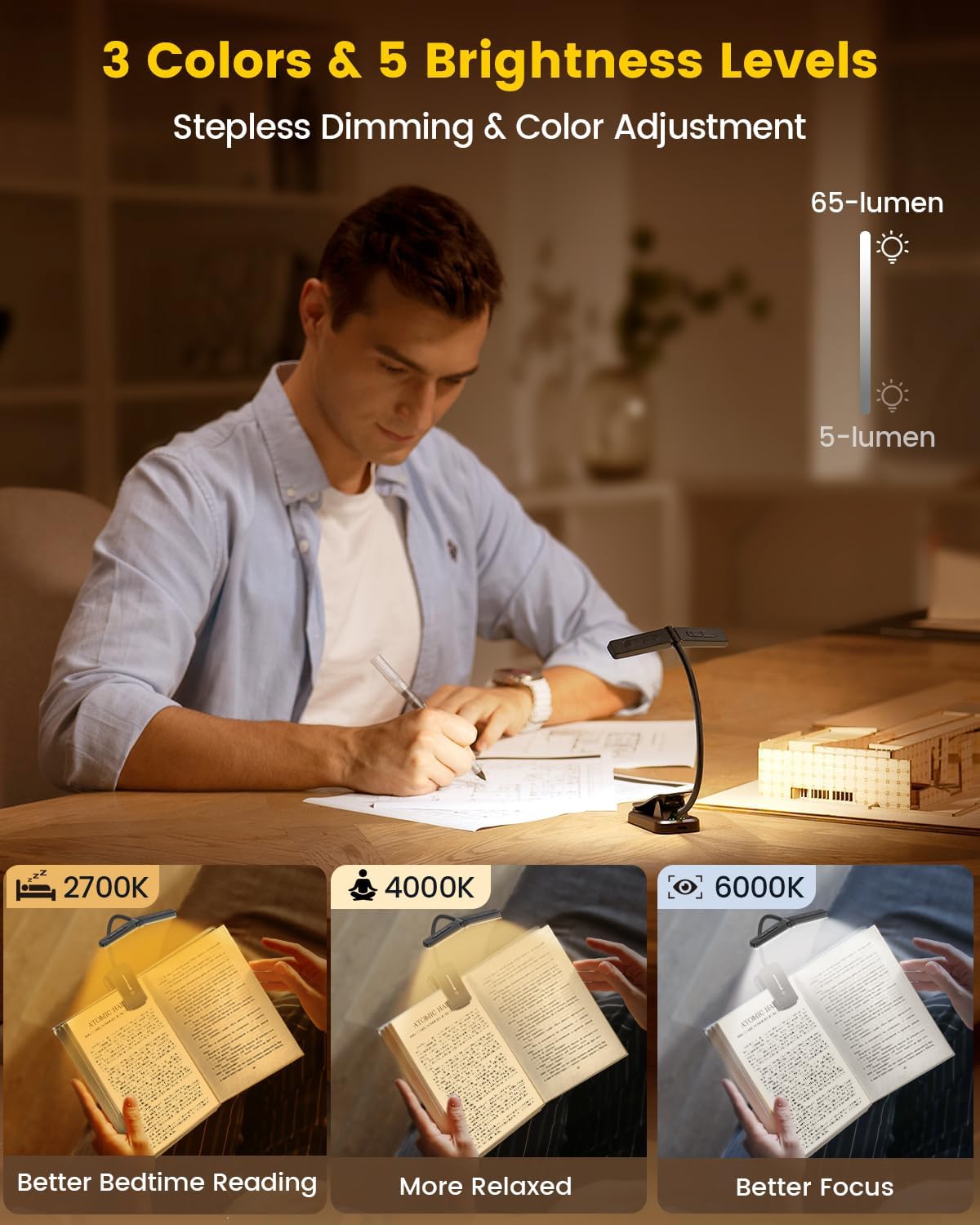
Adjustable brightness levels for various reading conditions.
Kleurtemperatuuraanpassing
- Press the color temperature button (usually marked with a color icon) to switch between three modes:
- 2700K (Warm Light): Ideal for bedtime reading, gentle on the eyes.
- 4000K (Neutraal Wit): Suitable for relaxed reading.
- 6000K (Koel Wit): Best for focused work or reading.

2700K Warm Light for comfortable night reading.

4000K Neutral White for relaxed reading.

6000K Cool White for enhanced focus.
Timer and Sleep Aid Function
- Afteller: Long press the left wing's power button to activate the 30-minute or 45-minute timer. The light will automatically turn off after the set time.
- Slaaphulp: When the timer is active, long press the right wing's power button to engage the sleep aid mode. The light will gradually dim, simulating a sunset, to gently guide you to sleep.

The timer and sleep aid function promote better sleep habits.
Onderhoud
- Hou die toestel skoon deur dit met 'n sagte, droë lap af te vee.
- Vermy die gebruik van skuur skoonmakers of oplosmiddels.
- Berg in 'n koel, droë plek wanneer dit nie gebruik word nie.
Probleemoplossing
- Lig gaan nie aan nie: Ensure the device is charged. Connect to a power source and check the indicator lights.
- Lig flikkerend: This may indicate a low battery. Recharge the device.
- Knoppe reageer nie: Try resetting the device by fully discharging and then recharging it.
Spesifikasies
| Model Naam | Wingy Book Light |
| Item Modelnommer | A29 |
| Ligbrontipe | LED |
| Aantal ligbronne | 48 |
| Helderheid | 65 Lumen (Maks) |
| Kleur temperatuur | 2700K, 4000K, 6000K |
| Kragbron | Battery-aangedrewe (1000mAh litiumpolimeer) |
| Item gewig | 2.4 onse |
| Produk afmetings | 10.6" D x 1.7" B x 1.3" H |
| Materiaal | Akriel-nitril-butadiëne-stireen |
| Spesiale kenmerk | Cordless, Timer, Sleep Aid |
Wat is in die boks
- 1x Glocusent Wingy Book Light
- 1x Book Mark
- 1x Gebruikershandleiding
- 1x Laaikabel (USB-C)
Waarborg en Ondersteuning
Glocusent products undergo rigorous quality control. We offer:
- 30-day return service.
- 24-maande-waarborg.
- 24/7 customer service from our Customer Experience Team.
For any inquiries or support, please refer to the contact information provided in your product packaging or visit the official Glocusent webwebwerf.
Amptelike Produkvideo
Amptelik verbyview of the Glocusent Wingy Book Light, demonstrating its features and design.