
1. Inleiding
This manual provides instructions for the Varmilo Koi 73 JIS Keyboard with Sakura Switches (Model: VMMA73A039SAKURA). This keyboard features a unique design inspired by traditional Chinese Koi fish and water elements, combined with a modern aesthetic. It is a compact 65% size keyboard with a Japanese Industrial Standard (JIS) layout, designed for both functionality and portability. The keyboard is equipped with Cherry-style stabilizers for a stable typing experience.
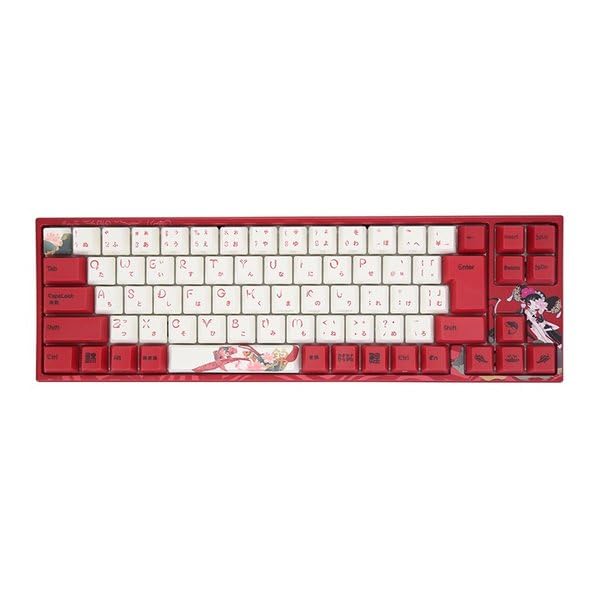
Image: Varmilo Koi 73 JIS Keyboard overview.
2. Sleutel kenmerke
- Unique Koi Design: Features vibrant koi fish illustrations and a red aesthetic, developed in collaboration with illustrator Li Huan.
- JIS Layout: 73-key Japanese Industrial Standard layout for specific regional input needs.
- Compact 65% Size: Optimizes desk space while retaining essential function and arrow keys.
- Customizable Switches: Offers a choice of Varmilo mechanical electrostatic capacity switches to suit individual typing preferences.
- Cherry-Style Stabilizers: Ensures consistent and stable key presses, especially for larger keys.
- USB-verbinding: Reliable wired connection for stable performance.
3. Opstelgids
3.1 Pakketinhoud
Voordat jy begin, maak asseblief seker dat alle items in die pakket teenwoordig is:
- Varmilo Koi 73 JIS Keyboard
- USB kabel
- Gebruikershandleiding (hierdie dokument)
3.2 Die sleutelbord koppel
To connect your Varmilo Koi 73 keyboard to your computer, follow these steps:
- Vind die USB-C-poort aan die agterkant van die sleutelbord.
- Koppel die een kant van die meegeleverde USB-kabel aan die sleutelbord se USB-C-poort.
- Koppel die ander kant van die USB-kabel aan 'n beskikbare USB-poort op jou rekenaar.
- Die sleutelbord behoort outomaties deur jou bedryfstelsel herken te word.
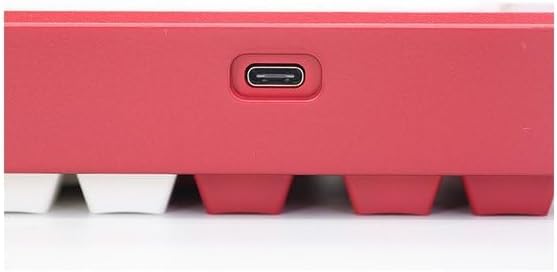
Image: USB-C port for keyboard connection.
3.3 Drywerinstallasie (Opsioneel)
For advanced customization and optimal performance, it is recommended to install the Varmilo driver software. This software allows you to remap keys, adjust performance settings, and customize lighting effects.
Video: This video demonstrates the driver installation process and software usage for Varmilo keyboards. While it features the Muse65 model, the steps for driver installation and basic software navigation are generally applicable to other Varmilo keyboards like the Koi 73.
Please visit the official Varmilo website for the latest driver downloads specific to your keyboard model. Follow the on-screen instructions during installation.
4. Bedryfsinstruksies
4.1 Basiese sleutelfunksies
The Varmilo Koi 73 keyboard features a standard JIS layout. Most keys function as labeled. For special functions, refer to the combination keys below.
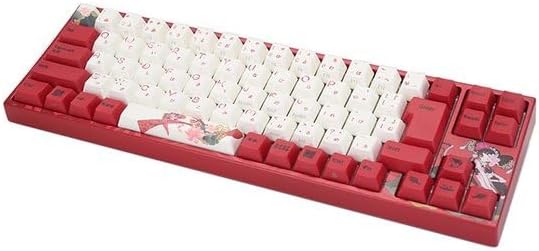
Beeld: Oorview of the Varmilo Koi 73 JIS Keyboard layout.
4.2 Funksie (Fn) Sleutelkombinasies
Since this is a 73-key layout, some functions are accessed via the Fn key. Hold down the Fn key and press the corresponding key to activate its secondary function. Common Fn combinations include:
- Fn + F1-F12: Multimedia controls (e.g., volume, play/pause).
- Fn + Pyltjiesleutels: Page Up/Down, Home/End (specific to model, refer to keycap legends).
- Fn + Win Key: Sluit/ontsluit die Windows-sleutel.

Image: Left side keys, often used with Fn for additional functions.
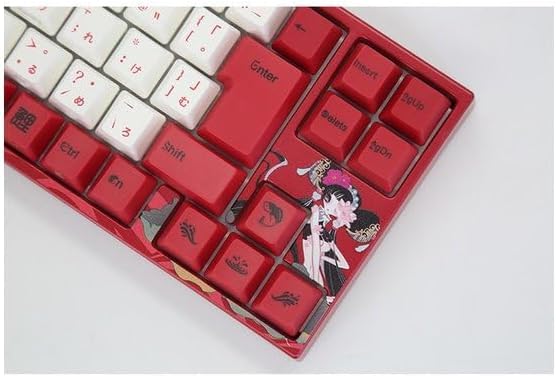
Image: Right side keys, including navigation and utility keys.
4.3 Beligtingseffekte
The Varmilo Koi 73 keyboard supports various RGB lighting effects. You can cycle through different modes and adjust brightness using specific key combinations. Refer to your keyboard's specific keycap legends or the driver software for detailed lighting controls.
Video: This video showcases various RGB lighting effects on a Varmilo keyboard. While the model shown is Muse65, it provides a general idea of the dynamic lighting capabilities available on Varmilo keyboards, including the Koi 73.
5. Onderhoud en versorging
Proper maintenance ensures the longevity and optimal performance of your Varmilo Koi 73 keyboard.
- Skoonmaak van sleutelkappe: Gently remove keycaps using a keycap puller. Clean the keycaps with a soft cloth dampmet sagte seep en water gewas. Maak seker dat hulle heeltemal droog is voordat hulle weer vasgemaak word.
- Skoonmaak van die sleutelbordliggaam: Use a soft, dry cloth to wipe down the keyboard body. For stubborn dirt, a slightly damp cloth with a small amount of isopropyl alcohol can be used. Avoid excessive moisture.
- Stofverwydering: Gebruik saamgeperste lug om stof en puin tussen die sleutels te verwyder.
- Vermy vloeistowwe: Keep liquids away from the keyboard to prevent damage.
- Kabelversorging: Moenie die USB-kabel te veel buig of krimp nie.
6. Probleemoplossing
If you encounter issues with your Varmilo Koi 73 keyboard, try the following solutions:
- Sleutelbord reageer nie:
- Maak seker dat die USB-kabel stewig aan beide die sleutelbord en die rekenaar gekoppel is.
- Probeer om die sleutelbord aan 'n ander USB-poort op jou rekenaar te koppel.
- Herbegin jou rekenaar.
- As jy 'n USB-hub gebruik, probeer om direk aan die rekenaar te koppel.
- Sleutels registreer nie:
- Check for any debris or foreign objects under the keycaps.
- If specific keys are not working, consider reinstalling the keyboard driver.
- Beligtingskwessies:
- Ensure the keyboard driver is installed and up to date.
- Use the Fn key combinations or driver software to adjust lighting modes and brightness.
- Windows Key Locked:
- Druk Fn + Win-sleutel to toggle the Windows key lock.
If the problem persists, please contact Varmilo customer support for further assistance.
7. Spesifikasies
| Handelsmerk | Varmilo |
| Modelnommer | VMMA73A039SAKURA |
| Sleutelborduitleg | 73-key JIS (Japanese Industrial Standard) |
| Konnektiwiteit | USB bedraad |
| Skakel Tipe | Mechanical (Linear) |
| Versoenbare toestelle | Skootrekenaar |
| Produk afmetings | 34.2 cm (L) x 34.2 cm (B) x 5.1 cm (H) |
| Ingesluit komponente | USB kabel |
8. Waarborg en Ondersteuning
Varmilo products typically come with a manufacturer's warranty. Please refer to the warranty card included with your product or visit the official Varmilo webwebwerf vir gedetailleerde waarborgbepalings en -voorwaardes.
For technical support, driver downloads, or further inquiries, please visit the official Varmilo support page or contact their customer service.
Official Varmilo Webwebwerf: www.varmilo.com