
1. Inleiding
The YXJPP Portable Insulin Cool Box is an intelligent electric refrigerator designed to maintain a safe temperature range for temperature-sensitive medications, such as insulin, during travel or outdoor activities. This device ensures that your medications remain effective by preventing spoilage due to high temperatures. It features precise temperature control, quiet operation, and multiple charging options for convenience.

Image 1.1: The YXJPP Portable Insulin Cool Box is suitable for various environments, including self-driving tours, offices, and home use, ensuring medication stability wherever you are.
2. Veiligheidsinstruksies
Lees en verstaan asseblief alle veiligheidsinstruksies voordat u die toestel gebruik om veilige en korrekte gebruik te verseker.
- Ventilasie: Do not block the ventilation openings of the device. Ensure adequate airflow around the unit to prevent overheating.
- Hantering: Avoid operating the small refrigerator forcefully or dropping it. Handle with care to prevent damage to internal components.
- Omgewing: Do not use the machine in high-temperature environments (e.g., direct sunlight for extended periods) or immerse it in water. This can cause damage or malfunction.
- Batterysorg: If using an external power supply for an extended period, it is recommended to remove the internal battery to prolong its service life.
- Medication Storage: Always ensure medications are placed correctly inside the cool box and that the lid is securely closed to maintain the desired temperature.
- Kinders: Hou die toestel buite bereik van kinders.
3. Pakketinhoud
Verifieer dat alle items in die pakket teenwoordig is:
- 1 x YXJPP Portable Insulin Cool Box
- 1 x Drasak
- 1 x USB-laaikabel
- 1 x Home Adapter
- Note: Battery is not included and must be purchased separately if portable operation is desired.
4. Opstelling
4.1 Laai die toestel
The cool box supports multiple charging methods. Ensure the device is fully charged before initial use or extended travel.
- Home Charging: Use the provided home adapter and USB charging cable to connect the device to a standard AC outlet.
- Motor laai: Connect the USB charging cable to a DC12V car charger port in your vehicle.
- Mobiele Kragbank: For portable charging, connect the USB charging cable to a compatible 3.7V USB mobile power bank.
- Other USB Sources: The device can also be charged via other USB interfaces, such as those found on airplanes or computers.

Image 4.1: The cool box offers versatile charging options including home, USB, car, mobile power bank, and airplane USB ports.
4.2 Inserting the Battery (if applicable)
If your model includes a removable battery or you have purchased one separately, insert it into the designated battery compartment. Ensure it is correctly oriented and securely seated. The device can operate without a battery when connected to an external power source.
4.3 Aanvanklike Plasing
Place the cool box on a stable, flat surface. Ensure that the ventilation openings on the sides are not obstructed to allow for proper heat dissipation.
5. Bedryfsinstruksies
5.1 Aan-/afskakel
To power on the device, press and hold the power button (often indicated by a universal power symbol) on the LCD touch screen until the display illuminates. To power off, press and hold the same button until the display turns off.

Image 5.1: The control panel features a touch screen button for power, temperature adjustment, and intelligent automatic mode.
5.2 Temperatuurinstelling
The device features an LCD touch screen for easy temperature control. The precise temperature control range is 0°C to 18°C.
- Outomatiese modus: Press the 'AUTO' button to set the temperature to a common default, such as 8°C, for insulin storage.
- Handmatige aanpassing: Use the heating button (up arrow) to increase the temperature up to 18°C, or the cooling button (down arrow) to decrease the temperature down to 0°C.
- Vertoon: The LCD screen will show the current temperature inside the cool box and the battery power level.

Image 5.2: The high-definition LCD touch screen displays power and temperature, allowing for easy adjustment and monitoring.
5.3 Alarmstelsel
The cool box is equipped with an intimate alarm reminder system to alert you to important conditions:
- Hoë temperatuur alarm: Alerts if the internal temperature exceeds the safe limit.
- Lae temperatuur alarm: Alerts if the internal temperature drops below the safe limit.
- Power Failure Alarm: Notifies you if the power supply is interrupted.
- Lae battery herinnering: Indicates when the battery level is critically low, prompting you to recharge.
6. Onderhoud
6.1 Skoonmaak
To clean the cool box, ensure it is powered off and unplugged. Use a soft, damp cloth to wipe the exterior and interior surfaces. Do not use abrasive cleaners or immerse the unit in water. Ensure the unit is completely dry before reconnecting to power.
6.2 Batterysorg
If you are using the device with an external power supply for an extended period (e.g., continuously plugged in at home), it is recommended to remove the internal battery to extend its lifespan. Store the battery in a cool, dry place when not in use.
6.3 Berging
When not in use, store the cool box in a clean, dry place away from direct sunlight and extreme temperatures. Ensure the unit is clean and dry before storage.
7. Probleemoplossing
If you encounter issues with your YXJPP Portable Insulin Cool Box, refer to the following common problems and solutions:
| Probleem | Moontlike oorsaak | Oplossing |
|---|---|---|
| Toestel kan nie aangeskakel word nie. | Geen krag, lae battery of foutiewe verbinding. | Ensure the device is connected to a power source or the battery is charged. Check all cable connections. |
| Device is not cooling. | Temperature setting incorrect, ventilation blocked, or ambient temperature too high. | Verify the temperature setting. Ensure ventilation openings are clear. Move the device to a cooler environment if ambient temperature is excessive. |
| Alarm klink gereeld. | High/low temperature, low battery, or power failure. | Check the display for the specific alarm indicator. Address the underlying issue (e.g., adjust temperature, charge battery, restore power). |
| Ongewone geraas tydens operasie. | Fan obstruction or internal component issue. | Ensure nothing is obstructing the fan. If the noise persists and is loud, contact customer support. |
8. Spesifikasies
Detailed technical specifications for the YXJPP Portable Insulin Cool Box:
| Kenmerk | Spesifikasie |
|---|---|
| Modelnommer | f2bdd191-0b18-44c1-b500-1dec49229402 |
| Handelsmerk | YXJPP |
| Produk Afmetings (D x B x H) | 1.46" x 7.28" x 1.46" (Inner: 185mm x 105mm x 37mm) |
| Eksterne afmetings (L x B x H) | 235 mm x 150 mm x 125 mm |
| Kapasiteit | 0.71 Liters (e.g., 6-9 injection pens, 25 insulin bottles, 60 refills) |
| Temperatuurbeheerreeks | 0°C tot 18°C |
| Verkoelingsmetode | termo |
| Geraasvlak | Minder as 30 dB |
| Battery Capacity (if applicable) | 10200 mAh |
| Nominale Voltage | 5V/12V/220V (environment dependent) |
| Ontdooistelsel | Outomatiese |
| Spesiale kenmerk | Portable, Adjustable Temperature Control |
| Tipe slot | Elektronies |

Beeld 8.1: verbyview of the cool box dimensions, temperature range, battery life, and capacity.
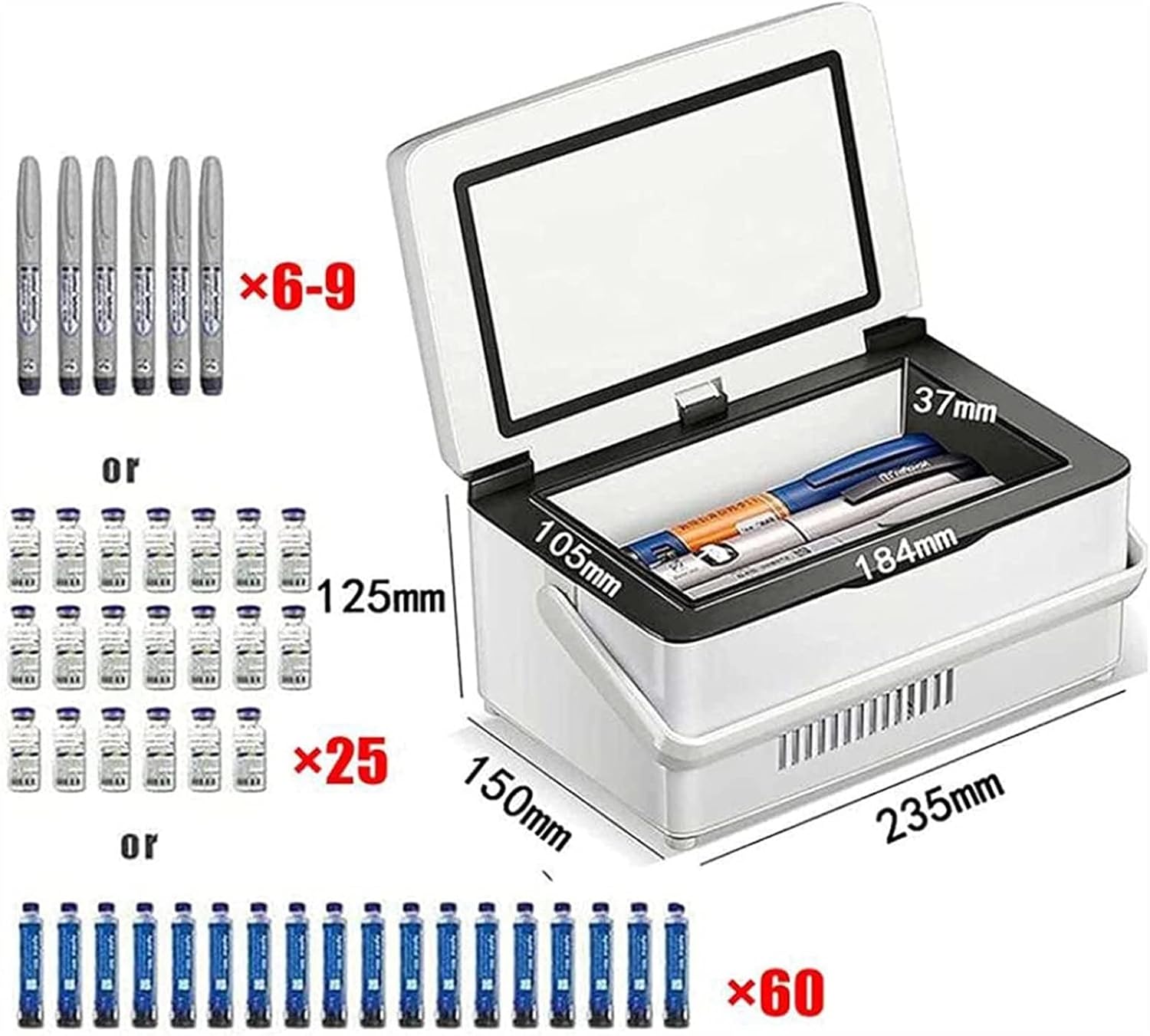
Image 8.2: Illustration of the internal dimensions and examples of medication capacity, such as insulin pens, bottles, and refills.
9. Waarborg en Ondersteuning
Information regarding product warranty and customer support is not available in the provided product details. Please refer to the product packaging or contact the retailer/manufacturer directly for warranty terms and support options.