
CRABCLAW U80A
CRABCLAW Automatic Upper Arm Blood Pressure Monitor
Model: U80A - User Manual
Inleiding
Thank you for choosing the CRABCLAW Automatic Upper Arm Blood Pressure Monitor. This device is designed for accurate and convenient measurement of systolic and diastolic blood pressure, as well as pulse rate, for home use. Regular monitoring of your blood pressure can provide valuable insights into your cardiovascular health. Please read this manual thoroughly before using the device to ensure correct operation and to obtain the most accurate results.
Belangrike veiligheidsinligting
- Raadpleeg u dokter voordat u hierdie toestel gebruik as u enige mediese toestande het.
- Do not use this device for diagnosis or treatment of any health problem or disease. Always consult a medical professional for diagnosis and treatment.
- Do not adjust medication based on measurements from this blood pressure monitor without consulting your doctor.
- Hou die toestel buite bereik van kinders en troeteldiere.
- Moenie die toestel in 'n bewegende voertuig gebruik nie.
- Avoid measuring blood pressure within 30 minutes after eating, exercising, smoking, or drinking alcohol.
- Ensure the cuff is applied correctly and comfortably to avoid inaccurate readings or discomfort.
Pakketinhoud
Merk asseblief die blokkie vir die volgende items:
- CRABCLAW Blood Pressure Monitor Unit
- Adjustable Upper Arm Cuff (9-17 inch)
- Instruksie Handleiding
- 4 x AAA-batterye
- USB-C-kabel
- Opbergsak

Image: The CRABCLAW Blood Pressure Monitor unit with its digital LED display and the adjustable upper arm cuff. This image shows the main components included in the package.
Produk verbyview
The CRABCLAW Blood Pressure Monitor features a large LED display for clear readings and intuitive controls for ease of use. It is designed for two users, storing up to 199 readings per user.
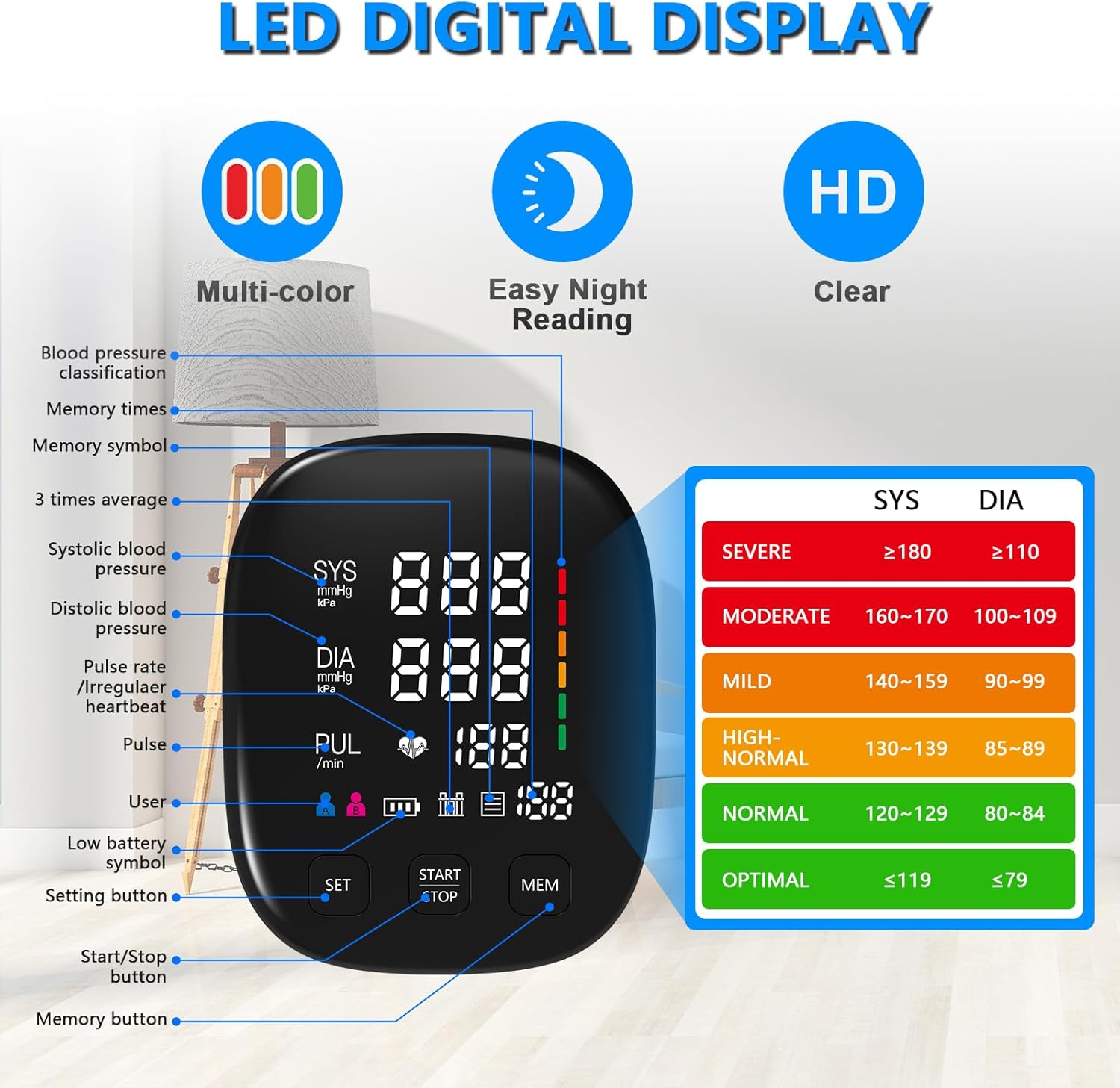
Image: A detailed diagram of the blood pressure monitor's LED digital display, highlighting various indicators such as systolic and diastolic pressure, pulse rate, user icons, memory symbols, and a color-coded blood pressure classification chart.
Sleutelkomponente:
- Hoof Eenheid: Houses the digital display, control buttons (SET, START/STOP, MEM), and internal components.
- Bo-arm manchet: Adjustable cuff (9-17 inches) for comfortable and accurate measurement.
- Lugbuis: Connects the cuff to the main unit.
- Battery kompartement: Geleë aan die onderkant van die eenheid.
- USB-C-poort: For alternative power supply.
Opstelling
1. Kragtoevoer:
The monitor can be powered by 4 AAA batteries (included) or via a USB-C cable (included).
- Battery installasie: Open the battery compartment cover on the bottom of the unit. Insert 4 AAA batteries, ensuring correct polarity (+/-). Close the cover securely.
- USB-C krag: Connect the USB-C cable to the port on the side of the monitor and the other end to a compatible USB power adapter (not included) or a computer USB port.

Image: The blood pressure monitor unit displaying its battery compartment with AAA batteries inserted and the USB-C charging port, illustrating the two power options.
2. Cuff Connection:
Insert the air tube connector from the cuff firmly into the air jack on the side of the main unit.
3. Applying the Cuff:
- Sit quietly and rest for at least 5 minutes before measurement.
- Place the cuff directly on your bare upper arm, about 1-2 cm above the elbow joint.
- Ensure the air tube runs down the center of your arm in line with your middle finger.
- Wrap the cuff snugly around your arm, but not too tight. The bottom edge of the cuff should be about 1-2 cm above the elbow.
- The center of the cuff should be at the same height as your heart.

Image: A person demonstrating the correct placement of the adjustable blood pressure cuff on their upper arm, emphasizing the comfortable fit and wide range of the cuff.
Bedryfsinstruksies
Neem 'n meting:
- Ensure the cuff is correctly applied and you are in a relaxed, seated position with your feet flat on the floor and your arm resting on a table.
- Druk die BEGIN/STOP knoppie. Die manchet sal outomaties opblaas.
- Bly stil en stil tydens die meting.
- Once the measurement is complete (approximately 40 seconds), the cuff will deflate, and your systolic pressure, diastolic pressure, and pulse rate will be displayed on the screen.
- The device will automatically save the reading to the current user's memory.
- Om die toestel af te skakel, druk die BEGIN/STOP button again, or it will automatically shut off after 60 seconds of inactivity.

Image: The blood pressure monitor showing a typical reading, illustrating its advanced accuracy technology and one-touch operation for fast and reliable measurements.
Dual-User Mode Switching:
This monitor supports two users (User A and User B), each with independent memory storage.
- To switch between User A and User B, press the STEL button when the device is off. The user icon will toggle between A and B.
- Ensure the correct user is selected before taking a measurement to store readings in the appropriate memory bank.

Image: Two blood pressure monitors side-by-side, illustrating the dual-user mode with separate displays for User A and User B, each capable of storing up to 199 readings.
Viewing Memory Records:
The monitor stores up to 199 sets of readings for each user.
- Met die toestel afgeskakel, druk die MEM knoppie.
- The most recent reading will be displayed first.
- Druk die MEM button repeatedly to scroll through previous readings.
- To clear all memory records for the current user, press and hold the MEM knoppie vir 5 sekondes terwyl viewing memory records.
Verstaan jou lesings
The monitor displays Systolic (SYS), Diastolic (DIA), and Pulse (PUL) readings. The color-coded indicator on the display helps you quickly understand your blood pressure status according to WHO/ISH classification.
| Kategorie | Sistolies (mmHg) | Diastolies (mmHg) |
|---|---|---|
| Ernstig | ≥180 | ≥110 |
| Matig | 160–179 | 100–109 |
| Sag | 140–159 | 90–99 |
| Hoog-normaal | 130–139 | 85–89 |
| Normaal | 120–129 | 80–84 |
| Optimaal | ≤119 | ≤79 |
Note: SYS lower than 100mmHg (13.3kPa) is considered as hypotension.
Irregular Heartbeat Indicator:
If the monitor detects an irregular heartbeat during measurement, an irregular heartbeat symbol (a heart icon with wavy lines) will appear on the display. If this symbol appears frequently, please consult your physician.
Onderhoud en versorging
- Skoonmaak: Vee die monitor en manchet af met 'n sagte, droë lap. Indien nodig, gebruik 'n effens droë lap.amp cloth with mild soap, then wipe dry. Do not use abrasive cleaners or immerse the device in water.
- Berging: Store the device in its storage pouch in a cool, dry place, away from direct sunlight, extreme temperatures, and humidity.
- Battery vervanging: Replace all 4 AAA batteries when the low battery indicator appears on the display. Remove batteries if the device will not be used for an extended period.
- Manchetversorging: Do not wash the cuff. If it becomes dirty, wipe it with a damp lap.
Probleemoplossing
| Probleem | Moontlike oorsaak | Oplossing |
|---|---|---|
| Geen skerm wanneer aangeskakel nie. | Batteries are dead or incorrectly inserted; USB-C cable not connected properly. | Check battery polarity and replace if necessary. Ensure USB-C cable is securely connected. |
| Manchet blaas nie op nie of blaas te min op. | Air tube not connected; air leakage from cuff; cuff not properly wrapped. | Ensure air tube is firmly connected. Check cuff for damage. Re-wrap cuff snugly. |
| Onakkurate of teenstrydige lesings. | Incorrect cuff placement; movement or talking during measurement; not resting before measurement. | Refer to "Applying the Cuff" section. Remain still and silent. Rest for 5 minutes before measuring. Wait 1-1.5 minutes between measurements. |
| "Err"-boodskap op skerm. | Measurement error; excessive movement; cuff too loose/tight. | Relax and re-take the measurement. Ensure proper cuff application. |
Spesifikasies
| Kenmerk | Detail |
|---|---|
| Modelnommer | U80A |
| Meetmetode | Ossillometries |
| Meetreeks | Druk: 0-299 mmHg; Puls: 40-199 slae/minuut |
| Akkuraatheid | Druk: ±3 mmHg; Pols: ±5% van lesing |
| Manchet Grootte | 9-17 duim (22-42 cm) |
| Geheue | 2 users x 199 readings each |
| Kragbron | 4 x AAA batteries (DC 6V) or USB-C (DC 5V) |
| Tipe vertoon | Digitale LED-skerm |
| Produk afmetings | 4.52"L x 3.85"B x 6.1"D |
| Gewig | Approx. 1.12 Pounds (without batteries) |
Waarborg en Ondersteuning
CRABCLAW provides a standard warranty for this product against defects in materials and workmanship under normal use. For specific warranty terms and conditions, please refer to the warranty card included in your package or contact CRABCLAW customer support.
If you encounter any issues or have questions regarding your CRABCLAW Blood Pressure Monitor, please contact our customer support team:
- Webwebwerf: Visit the CRABCLAW Store on Amazon
- E-pos: (Please refer to product packaging or warranty card for specific email address)
- Telefoon: (Please refer to product packaging or warranty card for specific phone number)
Please have your model number (U80A) and purchase date ready when contacting support.
Ask a question about this manual
Ask about setup, troubleshooting, compatibility, parts, safety, or missing instructions. Manuals+ will review the question and use this page’s manual context to help answer it.