
1. Veiligheidsinstruksies
Please read and understand all safety instructions before operating the OUPES Exodus 600 Plus portable power station. Failure to follow these instructions may result in electric shock, fire, or serious injury.
- Moenie die eenheid demonteer, herstel of verander nie.
- Do not expose the unit to fire, direct sunlight, or high temperatures.
- Moenie die eenheid in 'n badkamer of in areas wat aan water of vog blootgestel is, gebruik of bêre nie.
- Hou die eenheid weg van kinders en troeteldiere.
- Verseker behoorlike ventilasie tydens gebruik en laai om oorverhitting te voorkom.
- Gebruik slegs oorspronklike of gesertifiseerde laaikabels en -bykomstighede.
- Vermy om die eenheid te laat val of aan harde impakte bloot te stel.
- In case of abnormal operation, smoke, or unusual odors, immediately discontinue use and contact customer support.
2. Produk verbyview
The OUPES Exodus 600 Plus is a portable power station designed to provide reliable power for various applications, including outdoor camping, home backup, and emergency situations. It features a 512Wh LiFePO4 battery and delivers up to 600W of AC output.
2.1 Sleutelkenmerke
- Kapasiteit: 512Wh LiFePO4-battery
- Uitset: 600W AC (1200W Peak)
- Gewig: Ongeveer 12.35 lbs (5.6 kg)
- Poorte: 2x AC outlets, 1x USB-C (PD), 2x USB-A, 1x 12V DC port
- Batterybestuurstelsel (BMS): Built-in for multi-protection against short-circuit, over-current, over-voltage, lae voltage, over-load, and over-heating.
- Emergency Power Supply (EPS) Function: Rapid response to power outages.
2.2 Product Components and Ports
Familiarize yourself with the various ports and components of your OUPES Exodus 600 Plus.

Beeld: Voorkant view of the OUPES Exodus 600 Plus, highlighting the 2 AC outlets, 2 USB-A ports, 1 USB-C port, and 1 DC 12V port, capable of powering up to 6 devices simultaneously.

Image: Detailed diagram showing the location of the Car Charger Output Port, 600W AC Output Ports, LCD Screen, 18W Max USB-A Output Ports, 18W Max USB-C Output, Overload Protection, AC Charge Input, and PV Input (DC 7909 Input) on the OUPES Exodus 600 Plus.

Image: The OUPES Exodus 600 Plus, a compact powerhouse with 512Wh capacity and 600W output, shown powering a laptop, drone batteries, and a small TV, demonstrating its versatility for various devices.
3. Opstelling
3.1 Aanvanklike laai
Before first use, fully charge your OUPES Exodus 600 Plus. This ensures optimal battery performance and calibration.
- Connect the provided AC charging cable to the AC Charge Input port on the power station.
- Steek die ander kant van die AC-laaikabel in 'n standaardmuuraansluiting.
- The LCD screen will indicate charging status. Charge until the battery indicator shows 100%.
3.2 Connecting the Solar Panel (Optional)
The OUPES Exodus 600 Plus can be charged using the included 100W solar panel.
- Vou die 100W-sonpaneel oop en plaas dit in direkte sonlig.
- Connect the solar charging cable (7909 & MC4) to the solar panel's output.
- Connect the other end of the solar charging cable to the PV Input (DC 7909 Input) port on the power station.
- The LCD screen will display the solar charging input wattage.

Image: Illustration of the OUPES Exodus 600 Plus charging via AC (300W) in 2 hours to 80%, via PV (240W) in 2 hours to 80%, and combined AC+PV (540W) in 59 minutes to 80%, demonstrating fast charging capabilities.
4. Bedryfsinstruksies
4.1 Aan-/afskakel
- To power on the unit, press and hold the 'POWER' button for 3 seconds. The LCD screen will illuminate.
- To power off the unit, press and hold the 'POWER' button for 3 seconds again.
4.2 Gebruik van WS-aansluitings
- Maak seker dat die kragstasie aangeskakel is.
- Press the 'AC' button to activate the AC outlets. The AC indicator on the LCD screen will light up.
- Plug your AC-powered devices into the AC outlets.
- To turn off AC output, press the 'AC' button again.
4.3 Using DC and USB Ports
- Maak seker dat die kragstasie aangeskakel is.
- The DC and USB ports are typically active when the unit is on. Refer to the manual for specific model behavior.
- Plug your USB or 12V DC devices into the respective ports.
4.4 Noodkragtoevoer (EPS) Funksie
The OUPES Exodus 600 Plus features an EPS function, allowing it to switch to battery power within 20 milliseconds during a power outage, providing uninterrupted power to connected devices.
Video: An official OUPES video demonstrating the features and portability of the Exodus 600 power station, including its various ports, charging capabilities, and use in outdoor settings. It highlights the unit's compact size and ability to power multiple devices.
5. Onderhoud
Proper maintenance ensures the longevity and optimal performance of your OUPES Exodus 600 Plus.
- Gereelde herlaai: If the power station is not in use, recharge it every 3 months to maintain battery health.
- Bergingsvoorwaardes: Store the unit in a dry, well-ventilated area with a temperature range of 14°F to 113°F (-10°C to 45°C). Avoid extreme temperatures.
- Skoonmaak: Gebruik 'n droë, sagte lap om die buitekant van die eenheid skoon te maak. Moenie harde chemikalieë of skuurmiddels gebruik nie.
- Battery gesondheid: The LiFePO4 battery is designed for 3500+ cycles to 80% capacity.
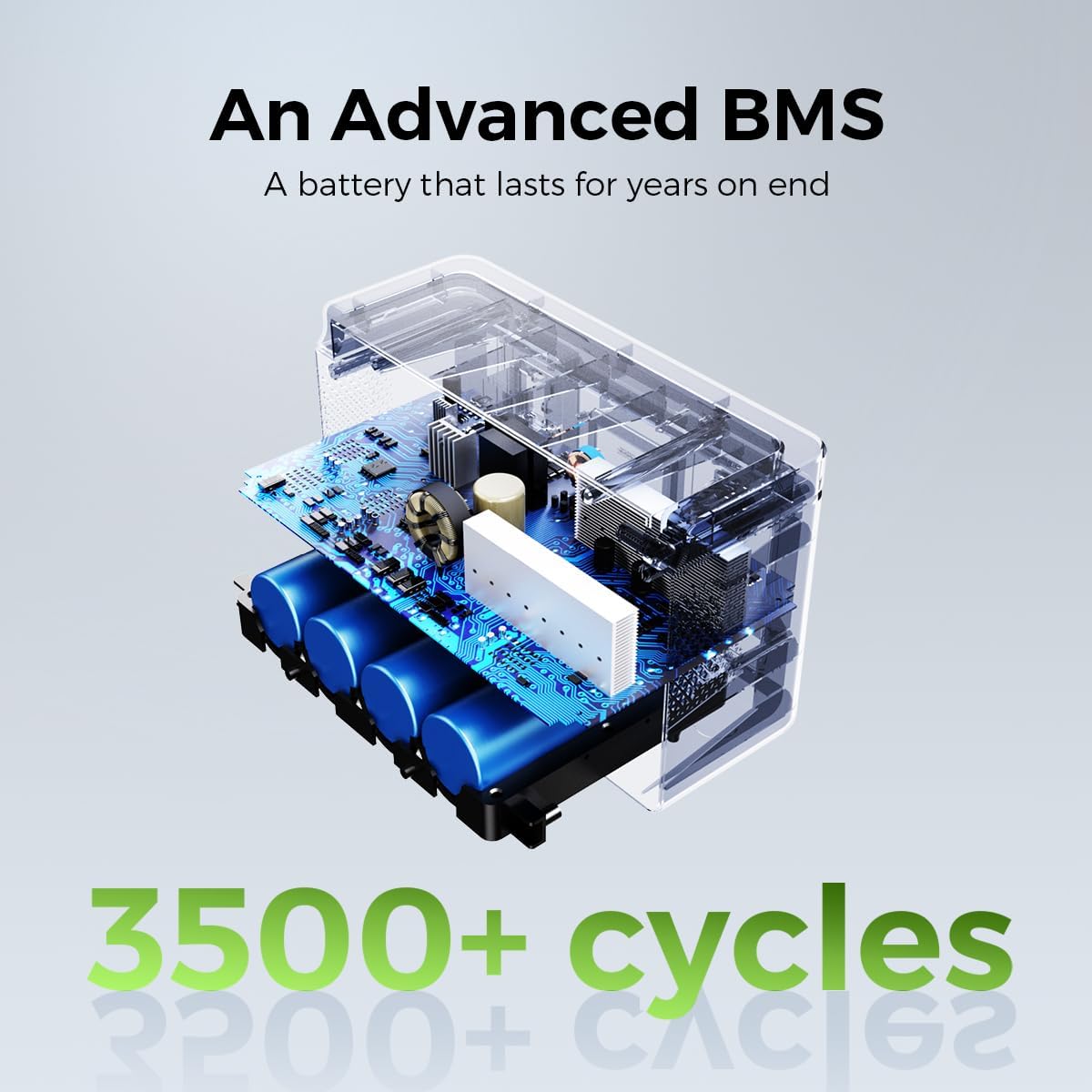
Beeld: 'n Interne view illustrating the advanced Battery Management System (BMS) and LiFePO4 battery cells of the OUPES Exodus 600 Plus, emphasizing its durability with 3500+ cycles.
6. Probleemoplossing
This section addresses common issues you might encounter with your OUPES Exodus 600 Plus.
| Probleem | Moontlike oorsaak | Oplossing |
|---|---|---|
| Eenheid skakel nie aan nie. | Battery is leeg. | Charge the unit using the AC adapter or solar panel. |
| WS-uitset werk nie. | WS-uitset nie geaktiveer of oorlaai nie. | Press the 'AC' button to activate. Reduce the load if overloaded. Check device wattage. |
| Unit goes into sleep mode / shuts off with low power devices. | Automatic power-saving feature for low power draw. | This model may have an automatic shutdown feature for very low power devices to conserve energy. For continuous power to low-draw devices, ensure the total output exceeds the minimum threshold to keep the unit active. Consider using devices with higher power consumption or contact OUPES support for specific thresholds. |
| Laai is stadig of werk nie. | Incorrect charger, poor solar panel placement, or high temperature. | Ensure you are using the correct charger. For solar charging, ensure the panel is in direct sunlight and free from obstructions. Move the unit to a cooler environment if overheating. |
| LCD screen shows an error code. | Internal fault or protection activated. | Note the error code and refer to the full user manual or contact OUPES customer service for assistance. |
7. Spesifikasies
Detailed technical specifications for the OUPES Exodus 600 Plus portable power station.
| Kenmerk | Spesifikasie |
|---|---|
| Handelsmerk | OUPES |
| Model Naam | Eksodus 600 Plus |
| Battery Tipe | LiFePO4 |
| Wattage (Capacity) | 512 Watt-ure |
| Uitset Wattage (AC) | 600 Watt (1200W Piek) |
| Voltage (AC) | 110 Volt |
| Item gewig | 12.35 pond (5.6 kg) |
| Produk afmetings | 7.28 cm L x 9.45 cm B x 7.7 cm H |
| Totale kragpunte | 6 (2x AC, 1x USB-C, 2x USB-A, 1x 12V DC) |
| Spesiale kenmerke | Easy to Install, Electric Brake, LiFePO4 Rechargeable Battery, MPPT, BMS System, EPS Rapid Response |
| Ingesluit komponente | Exodus 600w Plus power station, 100W Solar Panel & 7909 & MC4 Charging Cable, AC Charger, 3 Fuse 10A, Warranty Card & User Manual |
| Siklus lewe | 3500+ siklusse tot 80% kapasiteit |
8. Waarborg en ondersteuning
OUPES provides comprehensive support for your Exodus 600 Plus portable power station.
8.1 Waarborginligting
The OUPES Exodus 600 Plus comes with a 36 maande waarborg vanaf die aankoopdatum. Hierdie waarborg dek defekte in materiaal en vakmanskap onder normale gebruik. Bewaar asseblief u bewys van aankoop vir waarborgeise.
8.2 Kliëntediens
For any questions, technical assistance, or warranty claims, please contact OUPES customer service. Our friendly customer service team is available to help you.
- Refer to the contact information provided in your warranty card or on the official OUPES webwebwerf.
- When contacting support, please have your product model (Exodus 600 Plus) and purchase date available.