
1. Inleiding
This manual provides detailed instructions for the installation, operation, and maintenance of the Tomzn TOVPD1-80-EC Adjustable Over/Under Voltage and Over Current Protection Device. This device is designed to protect electrical appliances and circuits from damage caused by voltage fluctuations and excessive current. Please read this manual thoroughly before use to ensure safe and correct operation.
2. Veiligheidsinligting
- Installasie moet deur 'n gekwalifiseerde elektrisiën uitgevoer word.
- Maak seker dat die kragtoevoer ontkoppel is voor installasie of instandhouding.
- Do not operate the device in wet conditions or with wet hands.
- Verify that the device's specifications match your electrical system requirements.
- Hou kinders weg van elektriese installasies.
3. Produk verbyview
3.1. Sleutelfunksies
- Oorvoltage beskerming
- Onder-voltage beskerming
- Oorstroombeskerming
- Outomatiese herstel
- Intydse voltage vertoon
- Real-time current display
- Verstelbare voltage calibration (±10%)
- Fabrieksinstellingsfunksie
- Error inquiry function
3.2. Toestelkomponente
The device features a digital display for voltage and current, indicator lights for protection status, and control buttons for settings adjustment.
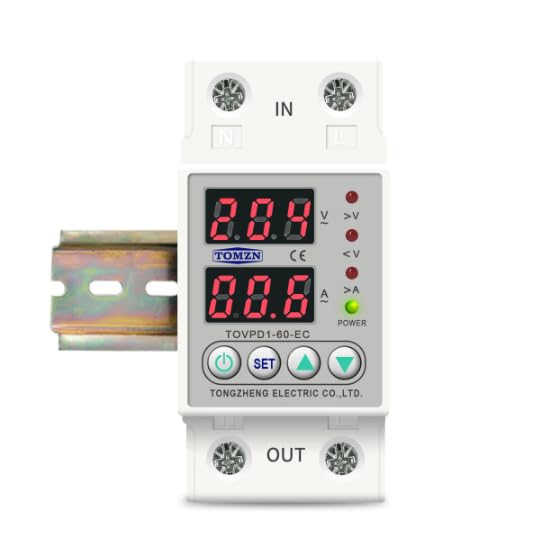
Figuur 1: Voorkant view of the Tomzn TOVPD1-80-EC protection device. Note: The image displays model TOVPD1-60-EC, but the instructions apply to the TOVPD1-80-EC model with an 80 Ampere gradering.
The device includes input terminals (IN) and output terminals (OUT) for electrical connections, along with a power indicator and status LEDs for over-voltage (>V), under-voltage (<V), and over-current (>A).
4. Installasie
The TOVPD1-80-EC device is designed for DIN rail mounting (35mm). Follow these steps for proper installation:
- Kragontkoppeling: Before starting, ensure the main power supply to the circuit is completely disconnected to prevent electrical shock.
- Montering: Snap the device onto a standard 35mm DIN rail in your electrical panel.
- Bedrading:
- Connect the incoming live (L) and neutral (N) wires from the power source to the "IN" terminals of the device.
- Connect the outgoing live (L) and neutral (N) wires to the load (appliances/circuit) from the "OUT" terminals of the device.
- Maak seker dat alle verbindings styf en veilig is.
- Verifikasie: Dubbelkontroleer alle bedradingsverbindings vir korrektheid en sekuriteit.
- Kragherstel: Restore power to the circuit. The device will power on and display the current voltage en huidige lesings.
5. Operating Instructions and Settings
The device displays real-time voltage and current. Use the control buttons to adjust protection parameters.
5.1. Knoppie Funksies
- Kragknoppie: Turns the device ON/OFF (if applicable, or for display cycling).
- SET -knoppie: Enters/exits setting mode and cycles through parameters.
- Opwaartse Pyltjie-knoppie (▲): Increases parameter values.
- Down Arrow Button (▼): Decreases parameter values.
5.2. Aanpassing van parameters
To adjust a parameter:
- Druk die STEL button to enter the setting mode. The first parameter will flash.
- Druk STEL repeatedly to cycle through the available parameters (e.g., Over-voltage protection threshold, Under-voltage protection threshold, Over-current protection threshold, recovery delays, etc.).
- When the desired parameter is flashing, use the ▲ (Op) en ▼ (Down) buttons to adjust its value.
- After setting the value, wait a few seconds for the device to automatically save the setting and exit the setting mode, or press STEL again to move to the next parameter.
5.3. Parameter Ranges and Default Values (for 220V/80A model)
| Parameter | Verstelbare Reeks | Verstekwaarde |
|---|---|---|
| Oorvoltage Beskerming (UVP) | 230V ~ 300V (OFF) | 270 V |
| Oorvoltage Recovery (UVR) | 225V ~ 295V | 250 V |
| UVP Action Time | 0.1s ~ 30s | 0.5s |
| UVP Recovery Delay | 1s ~ 500s | 30s |
| Onder-voltage-beskerming (LVP) | 140V ~ 210V (OFF) | 170 V |
| Onder-voltage Recovery (LVR) | 145V ~ 215V | 190 V |
| LVP Action Time | 0.1s ~ 30s | 0.5s |
| LVP Recovery Delay | 1s ~ 500s | 30s |
| Over-current Protection (OCP) | 1A ~ 80A (adjustable) | 40A (Note: Default may vary based on specific model variant.) |
| OCP Action Time | 0.1s ~ 30s | 0.5s |
| OCP Recovery Delay | 1s ~ 500s | 30s |
| Aanskakelvertragingstyd | 1s ~ 500s | 10s |
Note: The over-current adjustment range is inferred to be up to 80A for the TOVPD1-80-EC model, although the provided description mentions 40A and 63A variants. Always refer to the specific markings on your device.
5.4. Fabrieksterugstelling
To restore the device to its factory default settings, press and hold the ▼ (Down) button for more than 12 seconds. The display will indicate a reset.
5.5. Error Inquiry
To inquire about past error events, press and hold the ▲ (Up) button for more than 12 seconds. The device will display error codes or logs if available.
6. Onderhoud
- Regularly inspect the device for any signs of physical damage or loose connections.
- Hou die toestel skoon en stofvry. Gebruik 'n droë, sagte lap vir skoonmaak.
- Moenie skuur skoonmaakmiddels of oplosmiddels gebruik nie.
- Verseker behoorlike ventilasie rondom die toestel om oorverhitting te voorkom.
7. Probleemoplossing
| Probleem | Moontlike oorsaak | Oplossing |
|---|---|---|
| Toestel word nie aangeskakel nie | Geen kragtoevoer nie; verkeerde bedrading; interne fout. | Check main power supply. Verify wiring connections. If problem persists, contact support. |
| Toestel skakel gereeld af | Protection thresholds set too low; actual voltage/current exceeds limits. | Adjust protection parameters (UVP, LVP, OCP) to appropriate levels. Check load for faults. |
| Vertoning wys foutkode | Internal error or specific fault detected. | Refer to the error inquiry function (Section 5.5) for details. If unknown, contact support. |
| Device does not recover automatically | Automatic recovery feature disabled or recovery delay too long. | Ensure automatic recovery is enabled in settings. Check recovery delay times. |
8. Spesifikasies
| Kenmerk | Waarde |
|---|---|
| Modelnommer | TOVPD1-80-EC |
| Gegradeerde huidige | 80 Ampere |
| Kragbron | 220V AC 50/60Hz (Nominal) |
| Oorvoltage Beskermingsreeks | 230V ~ 300V (OFF) |
| Onder-voltage Beskermingsreeks | 140V ~ 210V (OFF) |
| Over-current Adjustment Range | 1A ~ 80A |
| Kragverbruik | <2W |
| Elektriese Lewe | 100,000 XNUMX XNUMX keer |
| Installasie tipe | DIN-railmontering (35 mm) |
| Afmetings (L x B x H) | 9.3 x 7.8 x 4.5 cm |
| Gewig | 200 gram |