
Inleiding
Thank you for choosing the Mastech MS8233D Digital Multimeter. This manual provides essential information for the safe and effective operation, maintenance, and troubleshooting of your device. Please read this manual thoroughly before use and keep it for future reference.
Veiligheidsinligting
WAARSKUWING: Om elektriese skok of persoonlike besering te voorkom, lees en verstaan alle veiligheidsinligting voordat u hierdie produk gebruik.
- Always ensure the multimeter is in the correct function and range before making measurements.
- Moenie meer as die gegradeerde voltage, as marked on the meter, between terminals or between any terminal and earth ground. The MS8233D has a Safety Rating of CATII 600V.
- Wees versigtig wanneer u met voltagbo 30V AC RMS, 42V piek, of 60V DC. Sulke volumestagdit hou 'n skokgevaar in.
- Keep your fingers behind the probe barriers during measurements.
- Do not use the meter if it is damaged or if the case is open. Inspect the meter and test leads before use.
- Vervang die battery onmiddellik wanneer die lae battery-aanwyser verskyn om akkurate lesings te verseker.
- Moenie die meter in plofbare gas-, damp- of stofomgewings gebruik nie.
Sleutel kenmerke
The Mastech MS8233D Digital Multimeter offers a range of functionalities for various electrical measurements:
- Vertoon: 2000 counts for precise readings.
- Omvang: Auto and Manual Ranging capabilities.
- Diode toets: Features a Diode Open Voltage van 1.5V.
- Kontinuïteitstoets: Audible buzzer for resistance less than 60Ω.
- Datahou: Freezes the displayed reading for convenience.
- Outo-afskakeling: Bewaar batterylewe.
- Kontakloos Voltage Bespeuring (NCV): For identifying live wires without direct contact.
- Maksimum meting: Records the highest value measured.
- Vertoon Agterlig: Vir sigbaarheid in lae lig toestande.
- Lae battery-aanwyser: Dui aan wanneer batteryvervanging nodig is.
- Kragtoevoer: Operates on 1x 9V 6F22 Battery.
- Sertifiserings: RoHS voldoen.
- Veiligheidsgradering: CATII 600V.
Figuur 1: Voorkant view of the Mastech MS8233D Digital Multimeter, highlighting the display, rotary function switch, and input terminals.
Produk verbyview en komponente
The MS8233D multimeter is designed for ease of use and durability. Familiarize yourself with its main parts:

Figuur 2: oorview of the MS8233D Digital Multimeter, illustrating its physical dimensions, power supply, and typical applications in domestic, industrial, and electronics settings.
- LCD-skerm: Toon metingslesings, eenhede en funksie-aanwysers.
- Funksie Draaiskakelaar: Used to select the desired measurement function (e.g., ACV, DCV, Resistance, Diode, Continuity, Temperature, NCV).
- Invoeraansluitings: Terminals for connecting test leads.
- COM Jack: Gemeenskaplike (negatiewe) invoerterminaal vir alle metings.
- VΩmA-aansluiting: Positiewe insetterminaal vir voltage, resistance, diode, continuity, and small current measurements.
- 10A Jack: Positive input terminal for high current (up to 10A) measurements.
- Funksie knoppies: For features like Data Hold, Backlight, and Range selection.
Opstelling
Battery installasie
The MS8233D requires one 9V 6F22 battery for operation. To install or replace the battery:
- Ensure the multimeter is turned off and disconnect all test leads from the input terminals.
- Vind die batteryklepdeksel aan die agterkant van die meter.
- Use a screwdriver to loosen the screw(s) on the battery cover and remove the cover.
- Connect the new 9V battery to the battery clips, observing the correct polarity.
- Plaas die battery in die kompartement en plaas die deksel terug en maak dit vas met die skroef(e).
Let wel: The meter includes a low battery indicator. Replace the battery promptly when this indicator appears to maintain measurement accuracy.
Bedryfsinstruksies
Before making any measurement, ensure the test leads are properly connected and the function switch is set to the desired range.
Meet DC Voltage (DCV)
- Steek die rooi toetsdraad in die VΩmA-aansluiting en die swart toetsdraad in die COM-aansluiting.
- Set the rotary switch to the desired DCV range (e.g., 200mV, 2V, 20V, 200V, 600V). If unsure, start with the highest range or use auto-ranging if available.
- Connect the test probes across the component or circuit to be measured, observing polarity.
- Lees die voltage -waarde op die LCD -skerm.
Meet AC Voltage (ACV)
- Steek die rooi toetsdraad in die VΩmA-aansluiting en die swart toetsdraad in die COM-aansluiting.
- Set the rotary switch to the desired ACV range (e.g., 2V, 20V, 200V, 600V).
- Koppel die toetsprobes oor die komponent of stroombaan wat gemeet moet word.
- Lees die voltage -waarde op die LCD -skerm.
Measuring DC/AC Current (DCA/ACA)
CAUTION: Never connect the meter in parallel to a voltagdie bron wanneer stroom gemeet word. Dit kan die meter en die stroombaan beskadig.
- For currents up to 200mA, insert the red test lead into the VΩmA jack. For currents up to 10A, insert the red test lead into the 10A jack. Insert the black test lead into the COM jack.
- Set the rotary switch to the desired DC or AC current range (e.g., 200µA, 2000µA, 20mA, 200mA, 10A).
- Maak die stroombaan oop waar die stroom gemeet moet word en koppel die meter in serie met die las.
- Lees die huidige waarde op die LCD-skerm.
Measuring Resistance (Ω)
- Steek die rooi toetsdraad in die VΩmA-aansluiting en die swart toetsdraad in die COM-aansluiting.
- Set the rotary switch to the desired Resistance range (e.g., 200Ω, 2kΩ, 20kΩ, 200kΩ, 2MΩ, 20MΩ).
- Maak seker dat die stroombaan of komponent gedeaktiveer is voordat weerstand gemeet word.
- Verbind die toetsprobes oor die komponent.
- Lees die weerstandswaarde op die LCD-skerm.
Diodetoets
- Steek die rooi toetsdraad in die VΩmA-aansluiting en die swart toetsdraad in die COM-aansluiting.
- Set the rotary switch to the Diode symbol (usually shared with Continuity).
- Verbind die rooi sonde aan die anode en die swart sonde aan die katode van die diode.
- Die skerm sal die vorentoe volume wystage-druppel. Draai die probes om; die skerm behoort 'OL' (Oop Lus) te wys vir 'n goeie diode.
Kontinuïteitstoets
- Steek die rooi toetsdraad in die VΩmA-aansluiting en die swart toetsdraad in die COM-aansluiting.
- Set the rotary switch to the Continuity symbol (usually shared with Diode).
- Verbind die toetsprobes oor die stroombaan of komponent.
- If the resistance is below approximately 60Ω, the buzzer will sound, indicating continuity. The display will also show the resistance value.
Kontakloos Voltage (NCV) Opsporing
- Set the rotary switch to the NCV function.
- Move the top part of the meter (NCV sensor area) close to the conductor suspected of having AC voltage.
- The meter will emit an audible beep and the NCV indicator will light up if AC voltage bespeur word.
Data hou funksie
Press the 'HOLD' button to freeze the current reading on the display. Press it again to release the hold and resume live measurements.
Backlight Funksie
Press the 'LIGHT' button to turn on the display backlight. Press it again to turn it off. The backlight may automatically turn off after a short period to conserve battery.
Onderhoud
Skoonmaak
Vee die meter se kas af met advertensiemateriaalamp lap en 'n sagte skoonmaakmiddel. Moenie skuurmiddels of oplosmiddels gebruik nie. Maak seker dat die meter heeltemal droog is voor gebruik.
Battery vervanging
Refer to the 'Battery Installation' section under 'Setup' for instructions on replacing the 9V battery. Always replace the battery when the low battery indicator is displayed to ensure accurate readings and proper operation.
Sekering vervanging
The MS8233D is equipped with internal fuses to protect against overcurrent. If the current measurement function stops working, the fuse may need replacement. Fuse replacement should only be performed by qualified personnel. Use only fuses of the specified type and rating (e.g., F200mA/250V for mA range, F10A/250V for 10A range).
Probleemoplossing
| Probleem | Moontlike oorsaak | Oplossing |
|---|---|---|
| Geen vertoon of dowwe vertoon | Dooie of lae battery | Vervang die 9V-battery. |
| Verkeerde lesings | Incorrect function/range selected; poor test lead connection; low battery | Verify function and range; check test lead connections; replace battery. |
| Stroommeting werk nie | Gebreekte lont | Vervang die toepaslike sekering (verwys na die Onderhoud-afdeling). |
| 'OL' (Overload) displayed | Measurement exceeds selected range; open circuit (for continuity/resistance) | Select a higher range; check for open circuit. |
| Geen kontinuïteitspiep nie | Resistance too high; open circuit | Check for continuity; ensure resistance is below 60Ω. |
Spesifikasies
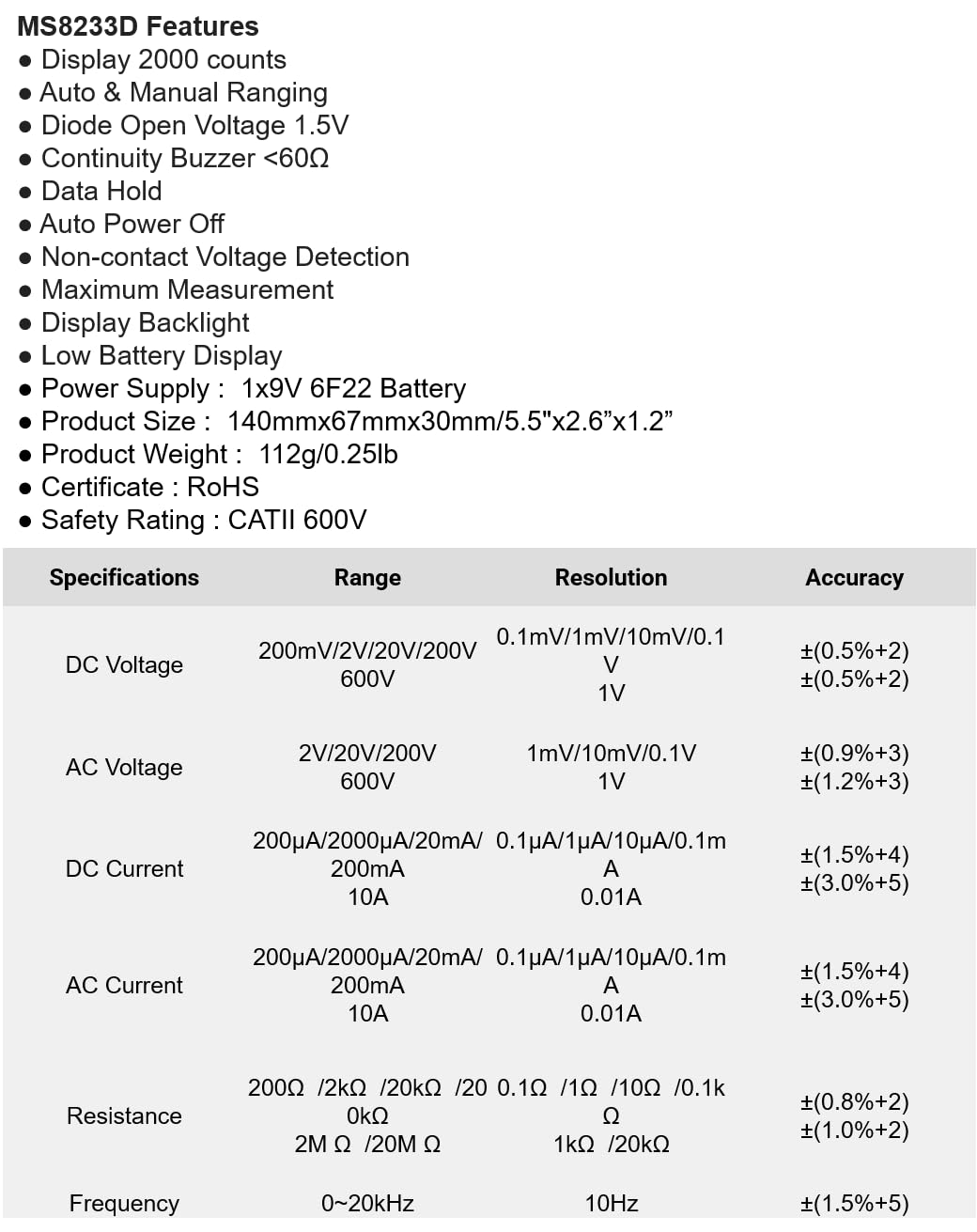
The following table details the measurement ranges, resolutions, and accuracies for the Mastech MS8233D Digital Multimeter:

Figure 3: Comprehensive specifications for the MS8233D, outlining measurement capabilities and precision.
| Kenmerk | Spesifikasie |
|---|---|
| Vertoon | 2000 tellings |
| DC Voltage | 200mV / 2V / 20V / 200V / 600V |
| AC Voltage | 2V / 20V / 200V / 600V |
| DC Stroom | 200µA / 2000µA / 20mA / 200mA / 10A |
| WS-stroom | 200µA / 2000µA / 20mA / 200mA / 10A |
| Weerstand | 200Ω / 2kΩ / 20kΩ / 200kΩ / 2MΩ / 20MΩ |
| Frekwensie | 0-20kHz |
| Diode Oop Voltage | 1.5 V |
| Kontinuïteit Buzzer | <60Ω |
| Kragtoevoer | 1x 9V 6F22 Battery |
| Produk afmetings | 140mm x 67mm x 30mm (5.5 "x 2.6" x 1.2 ") |
| Produk Gewig | 112 g (0.25 lb) |
| Veiligheidsgradering | CATII 600V |
| Sertifiserings | CE, RoHS |
Waarborg en Ondersteuning
Vir waarborginligting en tegniese ondersteuning, verwys asseblief na die dokumentasie wat saam met u aankoop verskaf is of kontak die verkoper/vervaardiger direk. Bewaar u aankoopbewys as bewys van aankoop vir enige waarborgeise.