
SENTRY HPXBTA1000
SENTRY BT Pro Sq Headset User Manual
Model: HPXBTA1000
1. Inleiding
Welcome to the user manual for your new SENTRY BT Pro Sq Headset with Active Noise Canceling. This manual provides essential information on setting up, operating, maintaining, and troubleshooting your headset to ensure optimal performance and longevity. Please read this manual thoroughly before using the product.
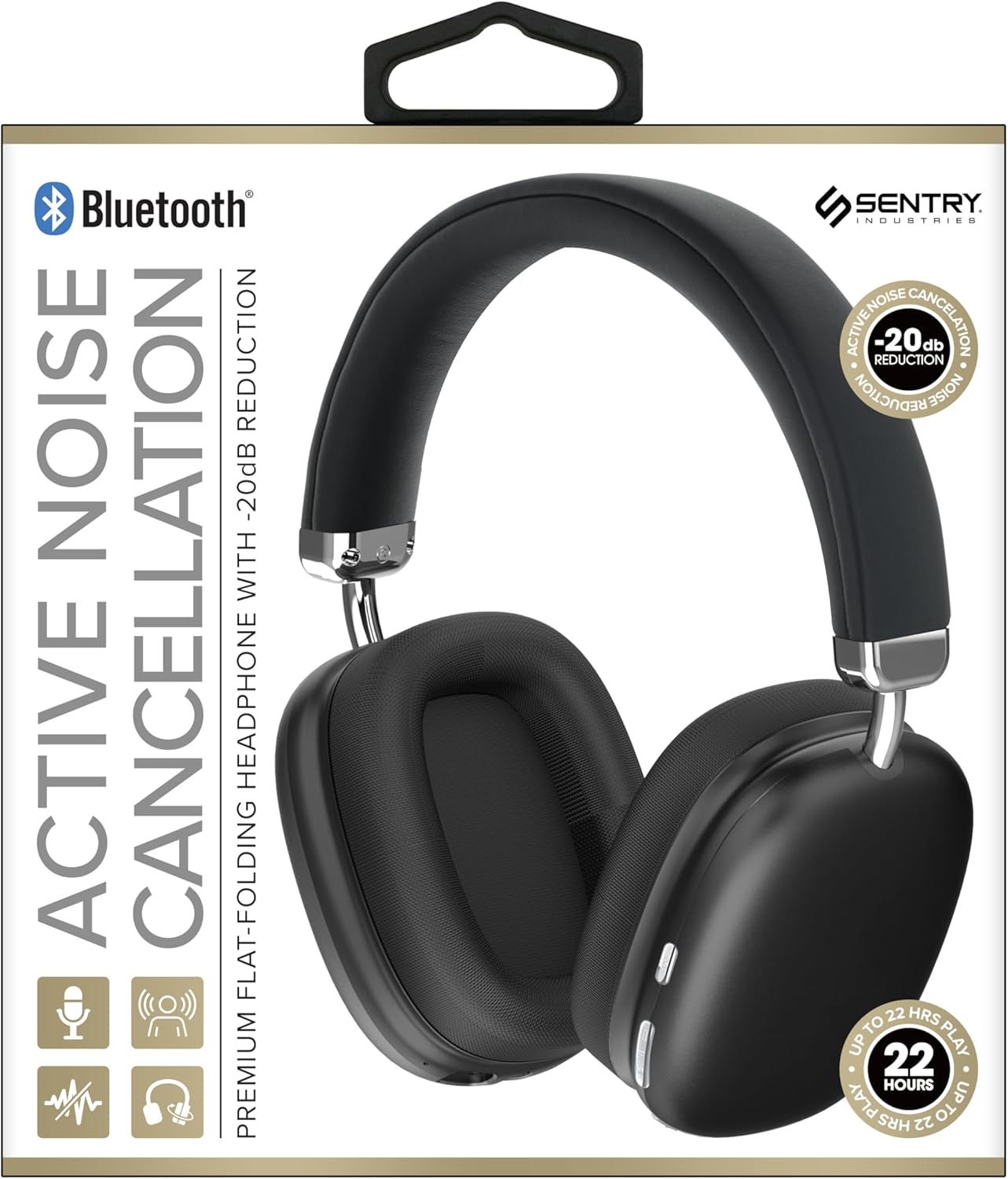
This image displays the SENTRY BT Pro Sq Headset in black, highlighting its over-ear design, adjustable headband, and the control buttons located on the earcups. The packaging indicates features such as Bluetooth connectivity, Active Noise Cancellation with -20dB reduction, and up to 22 hours of play time.
2. Belangrike veiligheidsinligting
To ensure safe and proper operation, please observe the following guidelines:
- Moenie die oorfone blootstel aan uiterste temperature, humiditeit of korrosiewe stowwe nie.
- Vermy om die headset te laat val of aan harde impakte bloot te stel.
- Moenie die oorfone self uitmekaar haal of probeer herstel nie. Dit sal die waarborg ongeldig maak.
- Clean the headset with a soft, dry cloth only. Do not use liquid cleaners.
- Langdurige luister teen hoë volumevlakke kan gehoorskade veroorsaak. Verstel die volume na 'n veilige vlak.
- Do not use the headset in situations where inability to hear ambient sounds could be dangerous (e.g., driving, cycling, walking in traffic).
3. Pakketinhoud
Kontroleer asseblief die pakket vir die volgende items:
- SENTRY BT Pro Sq Headset
- USB-laaikabel
- Gebruikershandleiding
4. Produk verbyview
The SENTRY BT Pro Sq Headset features an over-ear design with soft ear pads for comfort and noise isolation. It includes an adjustable folding headband for portability. Key components include:
- Oorkopies: House the audio drivers and provide passive noise isolation.
- Hoofband: Adjustable for a comfortable fit, designed to fold for compact storage.
- Beheerknoppies: Located on the earcups for power, volume, track control, and Active Noise Cancellation (ANC).
- Mikrofoon: Ingebou vir handvrye oproepe.
- Laaipoort: Vir die koppeling van die USB-laaikabel.
Refer to the product image in the Introduction section for visual identification of these components.
5. Opstelling
5.1 Laai die oorfone
- Koppel die klein punt van die USB-laaikabel aan die laaipoort op die headset.
- Koppel die groter punt van die USB-laaikabel aan 'n USB-kragadapter (nie ingesluit nie) of 'n rekenaar se USB-poort.
- The LED indicator on the headset will illuminate to show charging status. It will change color or turn off when fully charged.
- 'n Volle lading neem gewoonlik ongeveer 2-3 uur.
5.2 Pairing with Bluetooth Devices
Before using the headset wirelessly, you must pair it with your Bluetooth-enabled device (smartphone, laptop, tablet, smart speaker, gaming console).
- Maak seker dat die headset ten volle gelaai is.
- With the headset powered off, press and hold the Power button for approximately 5-7 seconds until the LED indicator flashes rapidly, indicating pairing mode.
- On your Bluetooth device, enable Bluetooth and search for new devices.
- Select "SENTRY BT Pro Sq" (or similar name) from the list of available devices.
- Once paired, the LED indicator on the headset will stop flashing and may turn solid blue or off, depending on the model.
- Die oorfone sal outomaties probeer om weer aan die laaste gekoppelde toestel te koppel wanneer dit aangeskakel word.
6. Bedryfsinstruksies
6.1 Krag aan/af
- Krag aan: Press and hold the Power button for 2-3 seconds. The LED indicator will light up.
- Skakel af: Press and hold the Power button for 3-4 seconds. The LED indicator will turn off.
6.2 Aktiewe geraaskansellasie (ANC)
The headset features Active Noise Cancellation to reduce ambient noise.
- Aktiveer ANC: Locate the ANC button (if separate) or press the designated control. The ANC indicator light will turn on.
- Deaktiveer ANC: Druk weer die ANC-knoppie. Die ANC-aanwyserliggie sal afskakel.
6.3 Media Control (Touch Control)
Control your audio playback directly from the headset:
- Speel/pouse: Single tap the multi-function button.
- Volume op: Tap the Volume Up button.
- Volume af: Tap the Volume Down button.
- Volgende snit: Double tap the multi-function button.
- Vorige snit: Triple tap the multi-function button.
6.4 Oproepbestuur
Manage phone calls with the built-in microphone:
- Beantwoord oproep: Single tap the multi-function button when a call comes in.
- Beëindig oproep: Single tap the multi-function button during a call.
- Verwerp oproep: Press and hold the multi-function button for 2 seconds when a call comes in.
7. Onderhoud en versorging
- Skoonmaak: Wipe the headset with a soft, dry, lint-free cloth. Do not use abrasive cleaners, alcohol, or chemical solvents.
- Berging: When not in use, store the headset in a cool, dry place, away from direct sunlight and extreme temperatures. Utilize the folding headband feature for compact storage.
- Batterysorg: To preserve battery life, charge the headset regularly, even if not used for extended periods. Avoid fully discharging the battery frequently.
- Vermy water: The headset is not waterproof. Keep it away from water and moisture.
8. Probleemoplossing
Indien u probleme met u oorfone ondervind, verwys asseblief na die volgende algemene probleme en oplossings:
| Probleem | Moontlike Oplossing |
|---|---|
| Die oorfone skakel nie aan nie. | Ensure the headset is fully charged. Connect to a power source and allow it to charge for at least 30 minutes before attempting to power on again. |
| Kan nie met Bluetooth-toestel saambind nie. | Ensure the headset is in pairing mode (LED flashing rapidly). Make sure Bluetooth is enabled on your device and it is within range (10 meters). Try restarting both the headset and your device. |
| Geen klank van headset nie. | Check the volume level on both the headset and your connected device. Ensure the headset is properly paired and connected. Try playing audio from a different application or device. |
| Aktiewe geraasonderdrukking (ANC) is nie effektief nie. | Ensure ANC is activated. Make sure the earcups are properly sealed around your ears. ANC is most effective against low-frequency, constant noise. |
| Mikrofoon werk nie. | Ensure the headset is connected and selected as the input device on your computer or smartphone. Check privacy settings on your device that might restrict microphone access. |
9. Spesifikasies
| Kenmerk | Detail |
|---|---|
| Model Naam | HPXBTA1000 |
| Verbindingstegnologie | Draadloos (Bluetooth) |
| Geraasbeheer | Aktiewe geraaskansellasie |
| Oorplasing | Oor Oor |
| Vormfaktor | Oor Oor |
| Tipe beheer | Mediabeheer, Aanraking |
| Frekwensiereeks | 20 Hz tot 20,000 XNUMX Hz |
| Tipe oudiobestuurder | Dinamiese bestuurder |
| Versoenbare toestelle | Smartphones, Laptops, Tablets, Smart Speakers, Gaming Consoles |
| Kleur | Swart |
| Item gewig | 1.2 pond |
| UPC | 080068501503 |
| Vervaardiger | SENTRY |
10. Waarborg en Ondersteuning
SENTRY products are designed and manufactured to the highest quality standards. For information regarding warranty coverage, technical support, or service inquiries, please refer to the warranty card included with your product or visit the official SENTRY webwebwerf. Bewaar asseblief u bewys van aankoop vir waarborgeise.