
Digihome PTDR55UHDS7
Digihome SMART 4K LED TV User Manual
Model: PTDR55UHDS7
55" Ultra HD HDR Freeview Speel
Inleiding
Thank you for choosing the Digihome SMART 4K LED TV. This manual provides essential information for setting up, operating, and maintaining your new television. Featuring a 55-inch 4K Ultra HD display with HDR technology, built-in SMART apps, and Freeview Play, your TV offers a comprehensive entertainment experience. Please read this manual thoroughly before using your TV to ensure proper operation and safety.
1. Opstelling
1.1 Uitpak
Carefully remove the TV and all accessories from the packaging. Retain the packaging for future transport or if servicing is required. Ensure all components listed below are present:
- Digihome 55" 4K LED TV
- Afstandbeheer
- Kragkabel
- TV Stand Components (if not pre-assembled)
- Gebruikershandleiding (hierdie dokument)
1.2 Staanmontering (Opsioneel)
If your TV requires stand assembly, follow these steps:
- Plaas die TV met die gesig na onder op 'n sagte, plat oppervlak om skermskade te voorkom.
- Rig die staanderkomponente met die monteringsgate aan die onderkant van die TV.
- Maak die staander vas met die meegeleverde skroewe. Moenie te styf vasdraai nie.
Alternatively, the TV can be wall-mounted using a compatible VESA wall mount (sold separately). Refer to the wall mount's instructions for installation.
1.3 Aansluitkrag
Plug the power cable firmly into the TV's power input, then plug the other end into a suitable wall socket. The TV will enter standby mode.
1.4 Eksterne Toestelle Koppel
Your Digihome TV offers multiple connectivity options:
- HDMI: For connecting Blu-ray players, game consoles, set-top boxes, etc. Your TV supports multiple HDMI inputs.
- Antenna/Aerial: Connect a terrestrial antenna cable for Freeview kanale.
- USB: Vir die koppeling van USB-bergingstoestelle om media te speel.
- Ethernet (LAN): Vir 'n bedrade internetverbinding.
- Optiese oudio-uit: For connecting to a soundbar or home cinema system.
Maak seker dat alle kabels stewig gekoppel is voordat u die TV aanskakel.
1.5 Aanvanklike Opstellingsassistent
Wanneer die TV vir die eerste keer aangeskakel word, sal dit jou deur 'n aanvanklike opstellingsassistent lei:
- Taalkeuse: Kies die taal wat u verkies.
- Region/Country: Select your region for correct channel tuning.
- Netwerkopstelling: Connect to your Wi-Fi network or use a wired Ethernet connection. This is essential for Smart TV features and Freeview Speel.
- Kanaalskandering: Die TV sal outomaties soek vir beskikbare gratisview channels. This may take several minutes.
- Bepalings en voorwaardes: Accept the terms and conditions to proceed with Smart TV features.
2. Gebruik u TV
2.1 Afstandbeheer oorview
The included remote control allows full navigation and control of your Digihome TV. Familiarize yourself with the button layout for easy operation.
2.2 Basiese Funksies
- Krag: Press the power button on the remote to turn the TV on or off (standby mode).
- Volume: Gebruik die VOL +/- knoppies om die volume aan te pas.
- Kanaal: Gebruik die CH +/- knoppies om kanale te verander.
- Demp: Druk die DEM knoppie om die klank tydelik stil te maak.
- Bron/Invoer: Druk die BRON button to select input sources (HDMI 1, HDMI 2, TV, etc.).
2.3 Smart TV Features and Freeview Speel
Your Digihome TV comes equipped with a range of Smart TV applications and Freeview Play functionality. To access these features, ensure your TV is connected to the internet.
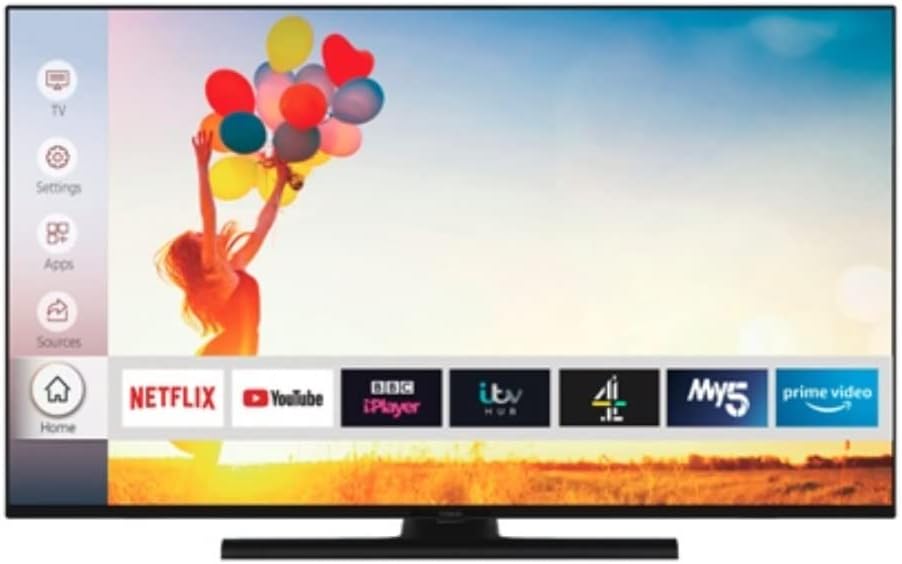
Image: The Digihome Smart TV home screen, displaying a user-friendly interface with quick access to popular streaming applications such as Netflix, YouTube, BBC iPlayer, ITV Hub, My5, and Prime Video. A navigation menu is visible on the left side, including options for TV, Settings, Apps, and Sources.
- Toegang tot toepassings: Druk die TUIS or SLIM button on your remote to open the Smart TV portal. Here you can find pre-installed apps like Netflix, YouTube, BBC iPlayer, ITV Hub, My5, and Prime Video.
- Gratisview Speel: Gratisview Play combines live TV with catch-up services from BBC iPlayer, ITV Hub, All 4, My5, and UKTV Play. You can scroll back through the TV guide to watch programmes you've missed.
- Internet blaai: A web browser may be available for general internet surfing.
2.4 Instellingskieslys
Druk die SPYSKAART or INSTELLINGS button on your remote to access the TV's settings. Here you can adjust:
- Prentinstellings: Brightness, Contrast, Colour, Sharpness, Picture Mode (Standard, Dynamic, Movie, etc.), HDR settings.
- Klankinstellings: Volume, Sound Mode (Standard, Music, Movie, etc.), Equalizer, Digital Audio Out.
- Kanaalinstellings: Channel Scan, Channel List, Parental Control.
- Netwerkinstellings: Wi-Fi connection, Wired connection, Network status.
- Stelselinstellings: Language, Time, Sleep Timer, Software Update, Factory Reset.
3. Onderhoud
3.1 Maak jou TV skoon
Om die voorkoms en werkverrigting van jou TV te behou:
- Skerm: Vee die skerm liggies af met 'n sagte, droë, pluisvrye lap. Vir hardnekkige merke, vee dit effens af.ampen the cloth with water or a screen-specific cleaning solution (do not spray directly onto the screen). Avoid using abrasive cleaners or solvents.
- TV-liggaam: Vee die TV-raam en -staander af met 'n sagte, droë lap.
- Ontkoppel altyd die TV uit die kragtoevoer voordat u dit skoonmaak.
3.2 Sagteware-opdaterings
Your TV may receive software updates to improve performance and add new features. It is recommended to keep your TV connected to the internet to receive these updates automatically. You can also check for updates manually via the System Settings menu.
4. Probleemoplossing
If you encounter issues with your TV, please refer to the following common problems and solutions before contacting support.
| Probleem | Moontlike oorsaak/oplossing |
|---|---|
| Geen krag | Ensure the power cable is securely plugged into the TV and the wall outlet. Check if the wall outlet is working. Try pressing the power button on the TV itself. |
| Geen Beeld / Geen Klank | Check the selected input source (e.g., HDMI 1, TV). Ensure external devices are powered on and connected correctly. For TV channels, perform a channel scan. Check volume levels and mute status. |
| Swak beeldkwaliteit | Check antenna connection for Freeview. For external devices, ensure high-quality cables are used. Adjust picture settings (brightness, contrast, sharpness). |
| Smart Features Not Working / No Internet | Check network cable or Wi-Fi connection. Restart your router/modem. Re-enter Wi-Fi password in TV settings. Ensure network settings are correct. |
| Afstandbeheer reageer nie | Kontroleer en vervang batterye. Maak seker daar is geen obstruksies tussen die afstandbeheerder en die TV se IR-sensor nie. |
If the problem persists after trying these solutions, please refer to the Support section.
5. Spesifikasies
Key technical specifications for the Digihome PTDR55UHDS7 55" 4K LED TV:
| Model Naam | PTDR55UHDS7 |
| Skerm grootte | 55 duim |
| Vertoon tegnologie | LED |
| Resolusie | 4K Ultra HD (3840 2160 x XNUMX XNUMX) |
| HDR Ondersteuning | Ja |
| Ondersteunde internetdienste | Gratisview Play, SMART apps (Netflix, YouTube, etc.) |
| Verbindingstegnologie | HDMI, USB, Ethernet (LAN), Wi-Fi |
| Aspekverhouding | 16:9 |
| Ingesluit komponente | Afstandbeheer |
| Produkafmetings (B x D x H) | 124 x 24 x 75 cm (met staander) |
| Vervaardiger | Digihome |
6. Waarborg en Ondersteuning
This product is sold as a "Renewed" item. For specific warranty information, please refer to the terms and conditions provided by the seller at the time of purchase. Typically, renewed products come with a limited warranty from the seller or a third-party refurbisher.
For technical support, troubleshooting assistance beyond this manual, or warranty claims, please contact the seller or the Amazon Renewed support channel through which you purchased this product. Have your purchase details and the TV's model number (PTDR55UHDS7) ready when contacting support.