
1. Inleiding
This manual provides essential information for the installation, operation, and maintenance of your elero JA Soft Blind Actuator, model JA 06 Soft 6 Nm. This electronic tubular motor is designed to automate roller shutters and blinds, enhancing convenience and security in your home.
Key features of the elero JA Soft actuator include:
- Adjustable relief mechanism.
- Silent soft brake for smooth operation.
- Intelligent force measurement for obstacle detection.
- Connection cable with a 0.3 m long Hirschmann plug.
- Suitable for plinths from 51 mm (height) x 57 mm (width).
- Mechanical limit switch for precise positioning.
The elero JA Soft actuator is developed and manufactured in Germany, ensuring high quality and reliability. It features simple programming, making installation straightforward without requiring specialized expertise.
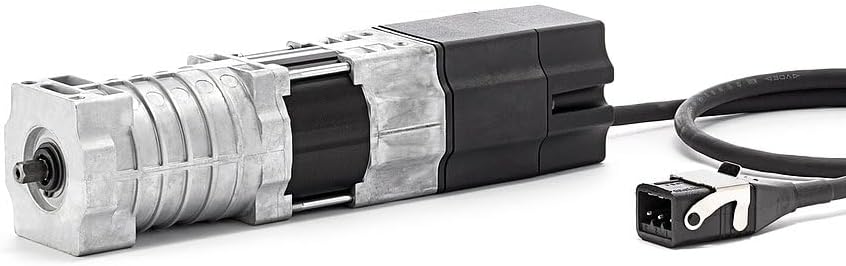
Figuur 1: Hoof view of the elero JA Soft Blind Actuator.
2. Opstelling en installering
The elero JA Soft actuator is designed for easy installation. Follow these general guidelines for mechanical and electrical connection. Always ensure power is disconnected before beginning any installation work.
2.1 Meganiese installasie
- Ensure the roller shutter or blind system is compatible with the actuator's dimensions and torque (6 Nm).
- Mount the actuator securely within the roller shutter shaft. The actuator is suitable for plinths from 51 mm (height) x 57 mm (width).
- Connect the actuator to the roller shutter shaft using appropriate adapters (not included, typically part of the roller shutter system).
2.2 Elektriese aansluiting
- Connect the actuator's 0.3 m Hirschmann plug to the corresponding power supply cable.
- Ensure all electrical connections comply with local regulations and safety standards.
- Once mechanically and electrically connected, power can be restored for programming.
2.3 Programming Limit Switches
The elero JA Soft actuator features a mechanical limit switch. Refer to the specific programming instructions provided with your control unit or by elero for setting the upper and lower end positions of your roller shutter. Simple programming ensures that no special tools or expertise are required.
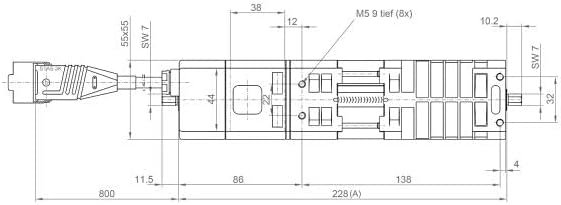
Figure 2: Technical drawing showing dimensions of the elero JA Soft Blind Actuator. This diagram is crucial for ensuring proper fit and installation.
3. Bedryfsinstruksies
Once installed and programmed, the elero JA Soft actuator operates the roller shutter or blind based on commands from your control system (e.g., wall switch, remote control, smart home system).
- Up/Down Movement: Activate the corresponding command on your control unit to move the roller shutter up or down.
- Stopfunksie: A stop command will halt the roller shutter at its current position.
- Intelligent Force Measurement: The actuator continuously monitors the force required to move the shutter. If an obstacle is detected, the motor will stop to prevent damage to the shutter or the obstacle.
- Soft Brake: The silent soft brake ensures smooth and quiet stopping at the programmed limit positions.
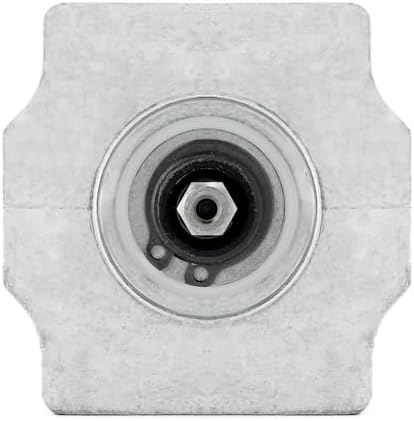
Figuur 3: Einde view of the elero JA Soft Blind Actuator, illustrating the shaft connection point.
4. Onderhoud
The elero JA Soft Blind Actuator is designed for long-term, maintenance-free operation. However, periodic checks can help ensure optimal performance.
- Skoonmaak: Keep the visible parts of the actuator and the roller shutter system clean from dust and debris. Use a soft, dry cloth. Do not use abrasive cleaners or solvents.
- Verbindingskontrole: Periodically inspect the electrical connections, especially the Hirschmann plug, to ensure they are secure and free from damage.
- Hindernisopruiming: Ensure the path of the roller shutter remains clear of any obstructions that could interfere with its movement.
No user-serviceable parts are inside the actuator. Do not attempt to open or repair the unit yourself, as this may void the warranty and pose a safety risk.
5. Probleemoplossing
If you encounter issues with your elero JA Soft actuator, refer to the following common troubleshooting steps:
- Aktuator reageer nie:
- Check the power supply to the actuator.
- Verify that the Hirschmann plug is securely connected.
- Ensure the control unit (switch, remote) is functioning correctly.
- Shutter Stops Unexpectedly:
- The intelligent force measurement system may have detected an obstacle. Check the shutter's path for any obstructions.
- The actuator includes protection against freezing. If operating in extremely cold conditions, ensure the shutter is not frozen in place.
- Shutter Does Not Reach Limit Positions:
- The mechanical limit switches may need to be reprogrammed. Refer to the programming instructions.
If the problem persists after attempting these steps, contact qualified technical support.
6. Spesifikasies
| Vervaardiger | elero GmbH |
| Item Modelnommer | JA-Soft |
| Produkafmetings (L x B x H) | 40 x 6 x 6 cm |
| Grootte | JA 06 Soft 6 Nm |
| Kleur | Swart |
| Ingesluit komponente | Blinde aktuator |
| ASIN | B0CY2P9CK4 |
| Kenmerke | Adjustable relief, silent soft brake, intelligent force measurement, 0.3m Hirschmann connector cable, suitable for plinths from 51(h) x 57(w) mm, mechanical limit switch. |
7. Waarborg en Ondersteuning
Waarborginligting: Specific warranty terms and conditions for the elero JA Soft Blind Actuator are provided by the manufacturer, elero GmbH, or your point of purchase. Please retain your proof of purchase for warranty claims. Information regarding spare parts availability is not provided in the product details.
Tegniese ondersteuning: For technical assistance, troubleshooting beyond the scope of this manual, or inquiries regarding spare parts, please contact your seller (TESO Elementetechnik) or the manufacturer, elero GmbH. Contact details can typically be found on their official websites or your purchase documentation.


