
Inleiding
This manual provides detailed instructions for the setup, operation, and maintenance of your MageGee SKY 87 75% Mechanical Gaming Keyboard. Designed for both gaming and office use, this compact 87-key keyboard features tactile brown switches, ice blue LED backlighting, and broad compatibility.
1. Opstelling
1.1 Pakketinhoud
- MageGee SKY 87 Mechanical Gaming Keyboard
- USB-A Cable (Wired Connection)
- Keycap Puller (for maintenance)
1.2 Die sleutelbord koppel
The MageGee SKY 87 keyboard uses a wired USB-A connection. To connect:
- Plug the USB-A cable into the USB port on the keyboard.
- Connect the other end of the USB-A cable to an available USB port on your computer (PC, Mac, or laptop).
- Die sleutelbord is plug-and-play en behoort outomaties deur jou bedryfstelsel herken te word.
2. Bedryfsinstruksies
2.1 Backlighting Control
The keyboard features ice blue LED backlighting with multiple modes and adjustable settings.
- Change Backlighting Mode: Druk Fn + PrtSc to cycle through 20 preset ice blue backlighting modes.
- Pas Helderheid aan: Druk Fn + ↑ (Pyltjie op) to increase brightness, and Fn + ↓ (Pyltjie af) helderheid te verminder.
- Adjust Flowing Speed: Druk Fn + - to decrease flowing speed, and Fn + = to increase flowing speed (for dynamic modes).

Image: The MageGee SKY 87 keyboard showcasing its vibrant ice blue LED backlighting and customizable light effects.
2.2 Tactile Brown Switches
The keyboard is equipped with tactile brown switches, offering a balanced typing experience with a noticeable bump without a loud click, suitable for both typing and gaming.

Beeld: 'n Nabyskoot view of the keyboard demonstrating the tactile brown switches and a keycap puller for easy removal.
2.3 Ergonomic Design and Side Lighting
The keyboard features stepped keycaps and a two-stage adjustable stand for ergonomic comfort. Additionally, an ice blue LED light strip on the bottom provides enhanced visual effects.

Image: The keyboard highlighting its distinctive ice blue side lighting, which enhances the aesthetic in low-light conditions.

Image: An illustration detailing the two-step adjustable keyboard feet, allowing users to set the keyboard at high or low angles for personalized comfort.
2.4 Compact TKL Layout (87 Keys)
The 75% Tenkeyless (TKL) design provides a compact footprint with 87 keys, including independent arrow keys, saving desk space while retaining essential functionality.
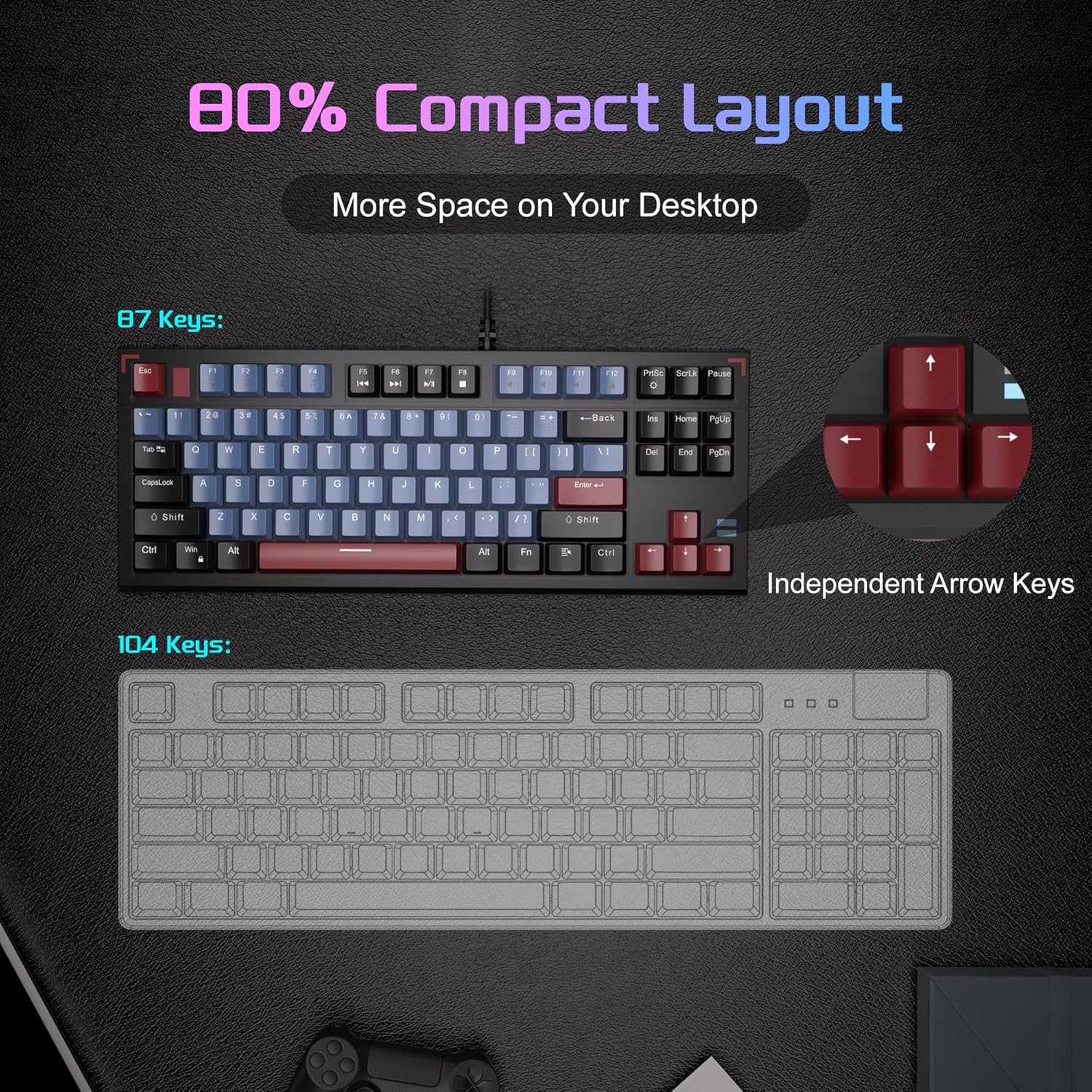
Image: A visual comparison illustrating the compact 87-key layout of the MageGee SKY 87 keyboard next to a standard 104-key keyboard, emphasizing space-saving benefits.
2.5 N-Key Rollover (Anti-Ghosting)
The keyboard supports 100% N-key rollover, meaning all keys can be pressed simultaneously without conflict, ensuring every keystroke is registered accurately during intense gaming or fast typing.

Image: A diagram showing how multiple key presses are registered simultaneously without ghosting, highlighting the N-key rollover feature.
2.6 Multimedia-kortpaaie
Access various multimedia functions using the Fn key in combination with the F-keys.
| Function Key Combination | Beskrywing |
|---|---|
| Fn + F1 | My rekenaar |
| Fn + F2 | Soek |
| Fn + F3 | Sakrekenaar |
| Fn + F4 | Mediaspeler |
| Fn + F5 | Vorige Snit |
| Fn + F6 | Volgende Snit |
| Fn + F7 | Speel / Pouse |
| Fn + F8 | Stop |
| Fn + F9 | Demp |
| Fn + F10 | Volume af |
| Fn + F11 | Volume op |
| Fn + F12 | Sluit skerm |

Image: The keyboard layout highlighting the F-keys and their corresponding multimedia functions when used with the Fn key.
3. Onderhoud
3.1 Skoonmaak van die sleutelbord
To ensure optimal performance and longevity, regular cleaning is recommended.
- Ontkoppel die sleutelbord van jou rekenaar voordat jy dit skoonmaak.
- Gebruik 'n sagte borsel of saamgeperste lug om stof en puin tussen die sleutelkappe te verwyder.
- Vir hardnekkige vuiligheid, vee die sleutelbordkappe en sleutelbordoppervlak liggies af met 'n effens damp, pluisvrye lap. Vermy oormatige vog.
- Moenie harde chemikalieë of skuurmiddels gebruik nie.
3.2 Keycap Removal and Replacement
Die ingeslote sleutelhouer kan gebruik word om sleutelhouers te verwyder en te vervang vir skoonmaak of aanpassing.
- Gently attach the keycap puller to the keycap you wish to remove.
- Trek reguit op met egalige druk totdat die sleuteldop van die skakelaar loskom.
- Om te vervang, belyn die sleuteldop met die skakelaarsteel en druk stewig af totdat dit in plek klik.

Image: The keyboard with some keycaps removed, illustrating the possibility of customization or deep cleaning.
4. Probleemoplossing
If you encounter issues with your MageGee SKY 87 keyboard, refer to the following common solutions:
- Sleutelbord reageer nie:
- Maak seker dat die USB-kabel stewig aan beide die sleutelbord en die rekenaar gekoppel is.
- Probeer om die sleutelbord in 'n ander USB-poort op jou rekenaar te koppel.
- Herbegin jou rekenaar.
- Agterbeligting werk nie of is verkeerd:
- Check if the brightness is set too low (Fn + ↑/↓).
- Cycle through lighting modes using Fn + PrtSc.
- Spesifieke sleutels werk nie:
- Remove the keycap and check for any obstructions or debris around the switch.
- As die probleem voortduur, kontak kliëntediens.
5. Spesifikasies
| Kenmerk | Detail |
|---|---|
| Handelsmerk | MageGee |
| Modelnommer | HEMEL 87 |
| Verbindingstegnologie | USB-A (Bedraad) |
| Sleutelbordbeskrywing | Meganies |
| Skakel Tipe | Tactile Brown Switches |
| Aantal sleutels | 87 |
| Sleutelborduitleg | QWERTY |
| Agterlig | Ice Blue LED (Single Color) |
| Spesiale kenmerke | Backlit, Ergonomic, Multimedia Keys, Portable |
| Versoenbare toestelle | Laptop, PC (Windows, Mac) |
| Produkafmetings (L x B x H) | 14.37" x 5.51" x 1.69" |
| Materiaal | Akrielnitril Butadieen Styreen (ABS) |
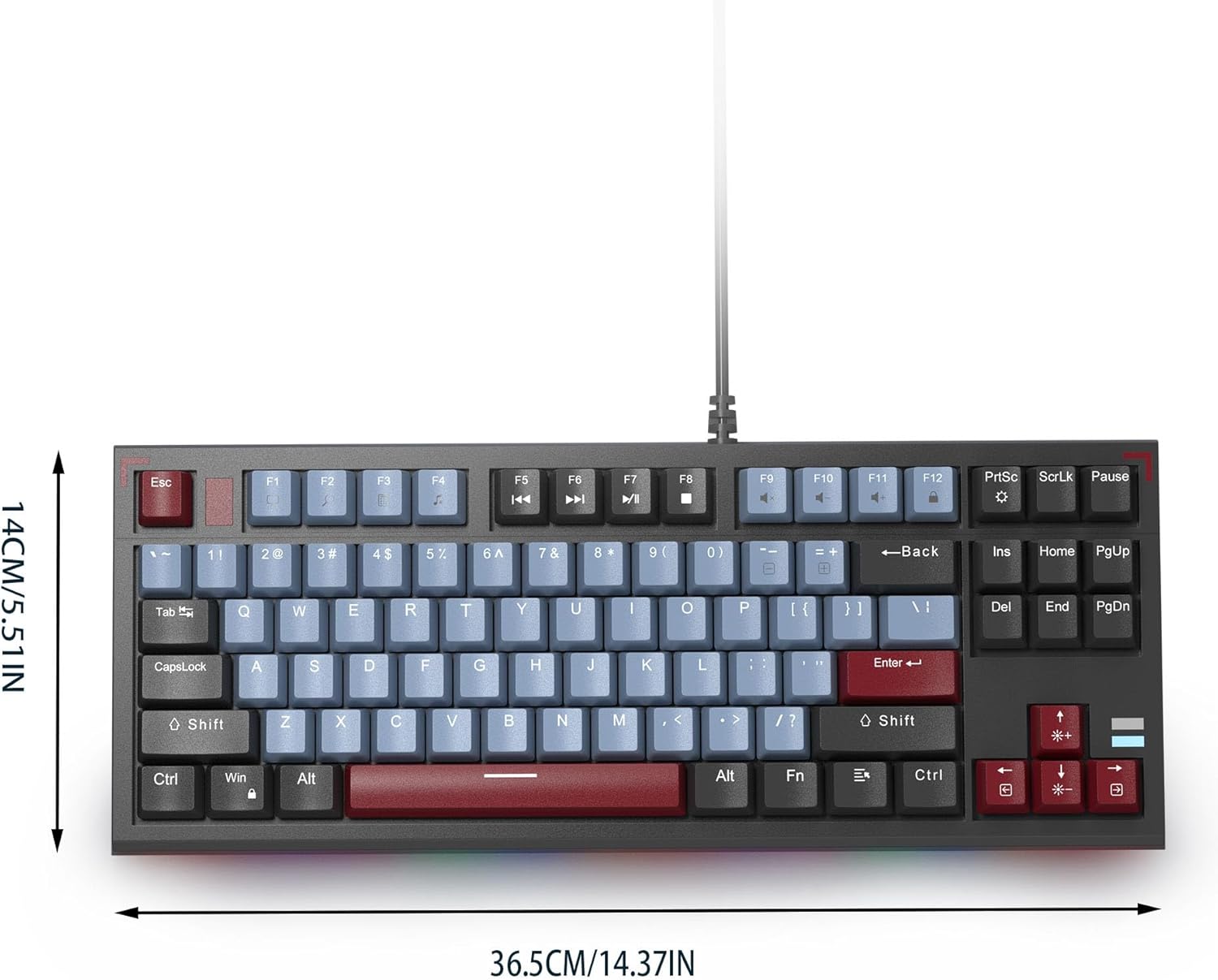
Image: The MageGee SKY 87 keyboard with its physical dimensions clearly indicated.
6. Waarborg en Ondersteuning
For warranty information and technical support, please refer to the official MageGee webwebwerf of kontak hul kliëntediens direk. Bewaar u aankoopbewys vir waarborgeise.