
1. Inleiding
The OSD Audio DAC-X200 is a powerful 2-channel Class D stereo amplifier designed to deliver high-fidelity audio. It features a built-in Hi-Res 24bit/192khz DAC, offering superior digital audio conversion. With versatile input options including USB, Optical, and RCA, and A/B speaker switching, this amplifier is suitable for various home audio setups, from driving bookshelf speakers to powering floorstanding units.
2. Veiligheidsinstruksies
- Kragbron: Koppel die eenheid slegs aan die gespesifiseerde kragtoevoervolumetage.
- Ventilasie: Verseker voldoende ventilasie. Moenie ventilasie-openinge blokkeer nie.
- Water en vog: Moenie die eenheid aan reën, vog of oormatige humiditeit blootstel nie.
- Hittebronne: Hou die eenheid weg van hittebronne soos verkoelers, hitteregisters, stowe of ander hitteproduserende toestelle.
- Skoonmaak: Maak slegs skoon met 'n droë lap.
- Diens: Moenie probeer om hierdie produk self te onderhou nie. Verwys alle diens na gekwalifiseerde dienspersoneel.
- Plasing: Place the unit on a stable, flat surface. Avoid placing heavy objects on top of the amplewendiger.
3. Pakketinhoud
Verifieer dat alle items in die pakket teenwoordig is:
- OSD Audio DAC-X200 Amplewendiger
- Vinnige Begingids
- Kragkabel
- Afstandbeheerder (indien ingesluit by jou model)
4. Produk verbyview
4.1 Voorpaneel
The front panel provides access to essential controls for daily operation.

Figuur 4.1: Voorkant view of the DAC-X200 amplifier, showing the power button, speaker selectors, balance, and volume controls.

Figuur 4.2: Detail of the front panel, highlighting the Power button and Speaker A/B selection buttons.

Figuur 4.3: Detail of the front panel, showing the Balance and Volume control knobs.
4.2 Agterpaneel
The rear panel houses all input and output connections for audio sources and speakers.
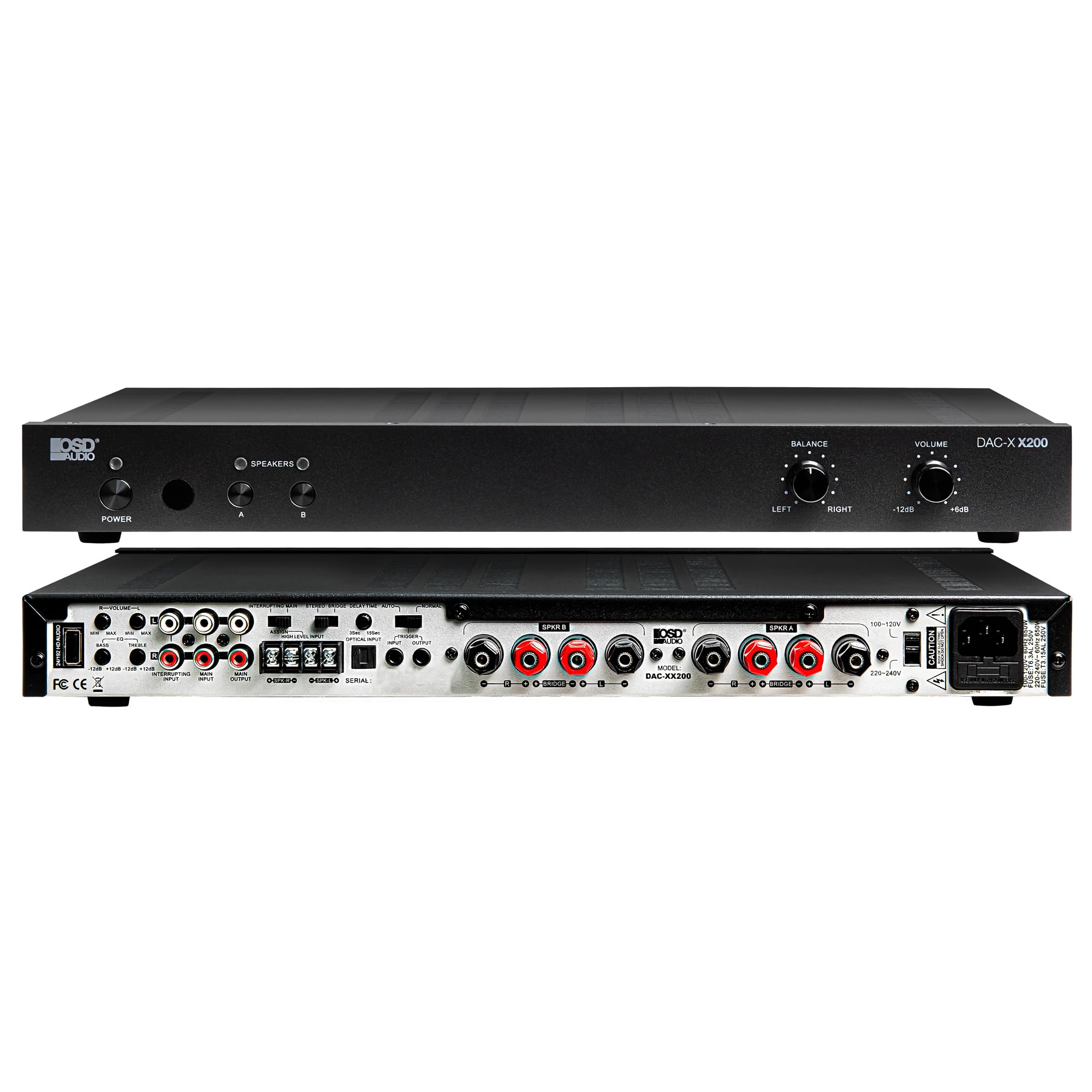
Figuur 4.4: Agter view of the DAC-X200 amplifier, displaying various audio inputs (USB, Optical, RCA), speaker outputs, and power input.

Figuur 4.5: Detail of the rear panel inputs, including USB, Optical, and RCA connections.

Figuur 4.6: Detail of the rear panel speaker output terminals for Speaker A and Speaker B.
5. Opstelling
5.1 Plasing
Place the DAC-X200 on a flat, stable surface with adequate space around it for ventilation. Avoid enclosed cabinets or areas with poor airflow to prevent overheating.
5.2 Koppel luidsprekers
- Verseker die amplifier is powered off and unplugged.
- Koppel jou passiewe luidsprekers aan die SPREKER A en/of SPREKER B terminals on the rear panel. Observe correct polarity (+ to + and - to -).
- For optimal performance, use high-quality speaker wire.
5.3 Verbinding van klankbronne
The DAC-X200 supports multiple input types:
- USB-invoer: Connect a computer or other USB audio source using a Type A to Type A USB 2.0 cable.
- Optiese invoer: Connect digital audio sources like TVs or CD players using an optical cable.
- RCA-insette: Connect analog audio sources such as music streamers, turntables (with a pre-amp), or other devices using RCA cables.
5.4 Kragverbinding
After all audio and speaker connections are made, connect the supplied power cable to the amplifier's power inlet and then to a suitable AC power outlet.
6. Bedryfsinstruksies
6.1 Krag aan/af
Druk die KRAG knoppie op die voorpaneel om die ampdie kragaanwyser aan of af. Die kragaanwyserliggie sal brand wanneer die eenheid aan is.
6.2 Invoerkeuse
The DAC-X200 features smart source switching, automatically detecting and switching to an active input. If multiple inputs are active, you may need to manually select the desired input using the remote control (if applicable) or by cycling through inputs.
6.3 Volumebeheer
Pas die algehele uitvoervolume aan met behulp van die VOLUME knob on the front panel. Rotate clockwise to increase volume and counter-clockwise to decrease it.
6.4 Toonkontroles
Gebruik die BALANS knob to adjust the left/right channel balance. The DAC-X200 also includes bass and treble adjustment knobs (located on the rear panel or accessible via remote, depending on model variation) to fine-tune the sound to your preference or room acoustics.
6.5 A/B Speaker Switching
Druk die A or B buttons on the front panel to select which set of speakers (Speaker A, Speaker B, or both) are active. This allows for multi-room audio configurations.
7. Onderhoud
- Skoonmaak: Gebruik 'n sagte, droë lap om die buitekant van die ampMoenie vloeibare skoonmaakmiddels of aërosols gebruik nie.
- Ventilasie: Kontroleer gereeld dat die ventilasie-openinge vry van stof en puin is.
- Berging: Indien u die eenheid vir 'n lang tydperk bêre, trek die stekker uit die stopcontact en bêre dit op 'n koel, droë plek.
8. Probleemoplossing
| Probleem | Moontlike oorsaak | Oplossing |
|---|---|---|
| Geen krag nie | Kragkabel nie gekoppel nie; Kragaansluiting nie aktief nie; Amplewendiger af. | Check power cable connection; Test power outlet; Press the Power button. |
| Geen klank nie | Incorrect input selected; Speaker cables loose; Volume too low; Speakers A/B not selected. | Select correct input; Check speaker connections; Increase volume; Ensure Speaker A or B is active. |
| Verwronge klank | Input signal too high; Speaker impedance mismatch; Faulty cable. | Reduce source volume; Verify speaker impedance (8̣ or 4̣); Replace audio cables. |
| Input not switching automatically | Multiple active sources; Specific source not detected. | Manually select input; Ensure only one source is playing if auto-switching is desired. |
9. Spesifikasies
- Model: DAC-X200
- Uitset krag: 100W RMS per channel at 8̣; 225W RMS per channel at 4̣; 450W bridged mono
- Aantal kanale: 2
- DAC: Hi-Res 24bit/192khz, DSD formats supported
- Insette: USB, Optical, RCA
- Speaker Zones: A/B Switching
- Afmetings (L x B x H): 16.7 x 10 x 2 duim
- Materiaal tipe: Plastiek
- UPC: 810074881173
10. Waarborginligting
OSD Audio products are designed for reliability and performance. This product is covered by a limited warranty against defects in materials and workmanship. Please refer to the official OSD Audio webwebwerf of u aankoopdokumentasie vir spesifieke waarborgbepalings en -voorwaardes, insluitend duur- en dekkingsbesonderhede. Bewaar u bewys van aankoop vir waarborgeise.
11. Ondersteuning
For technical assistance, troubleshooting not covered in this manual, or service inquiries, please contact OSD Audio customer support. You can find contact information, FAQs, and additional resources on the official OSD Audio webwebwerf.
Webwebwerf: www.osdaudio.com