
1. Inleiding
The Pronomic DX-50 USB MKII is a professional 4-channel DJ mixer designed for a wide range of applications, including discos, parties, restaurants, and presentations. Its user-friendly design ensures that both experienced and less experienced users can fully utilize its features. This manual provides detailed instructions for setting up, operating, and maintaining your mixer.
Key features include a recording function, integrated Bluetooth interface, USB player with transport controls, and multiple input channels.
2. Belangrike veiligheidsinstruksies
- Lees instruksies: Read all safety and operating instructions before using the product.
- Behou instruksies: Bewaar die veiligheids- en bedryfsinstruksies vir toekomstige verwysing.
- Let op waarskuwings: Volg alle waarskuwings op die produk en in die gebruiksinstruksies.
- Volg instruksies: Volg alle bedryfs- en gebruiksinstruksies.
- Water en vog: Do not use this apparatus near water (e.g., bathtub, washbowl, kitchen sink, laundry tub, wet basement, or swimming pool).
- Ventilasie: Moenie enige ventilasie-openinge blokkeer nie. Installeer volgens die vervaardiger se instruksies.
- Hitte: Moenie naby enige hittebronne soos verkoelers, hitteregisters, stowe of ander toerusting (insluitend ampversterkers) wat hitte produseer.
- Kragbronne: Use only power sources specified by the manufacturer.
- Kragkoordbeskerming: Beskerm die kragkoord teen geloop of vasgeknyp, veral by proppe, geriefshouers en die punt waar dit uit die apparaat kom.
- Skoonmaak: Maak slegs skoon met 'n droë lap.
- Diens: Moenie probeer om hierdie produk self te versien nie, aangesien die oopmaak of verwydering van deksels jou kan blootstel aan gevaarlike voltage of ander gevare. Verwys alle diens na gekwalifiseerde dienspersoneel.
3. Pakketinhoud
Please check that all items listed below are included in your package. If any items are missing or damaged, contact your dealer immediately.
- Pronomic DX-50 USB MKII DJ Mixer
- Power Adapter (AC 12V)
- USB Stick (32 GB, if included in your specific bundle)
- Gebruikershandleiding (hierdie dokument)
4. Produk verbyview
Familiarize yourself with the various controls and connections on your DX-50 USB MKII mixer.
4.1 Voorpaneelkontroles
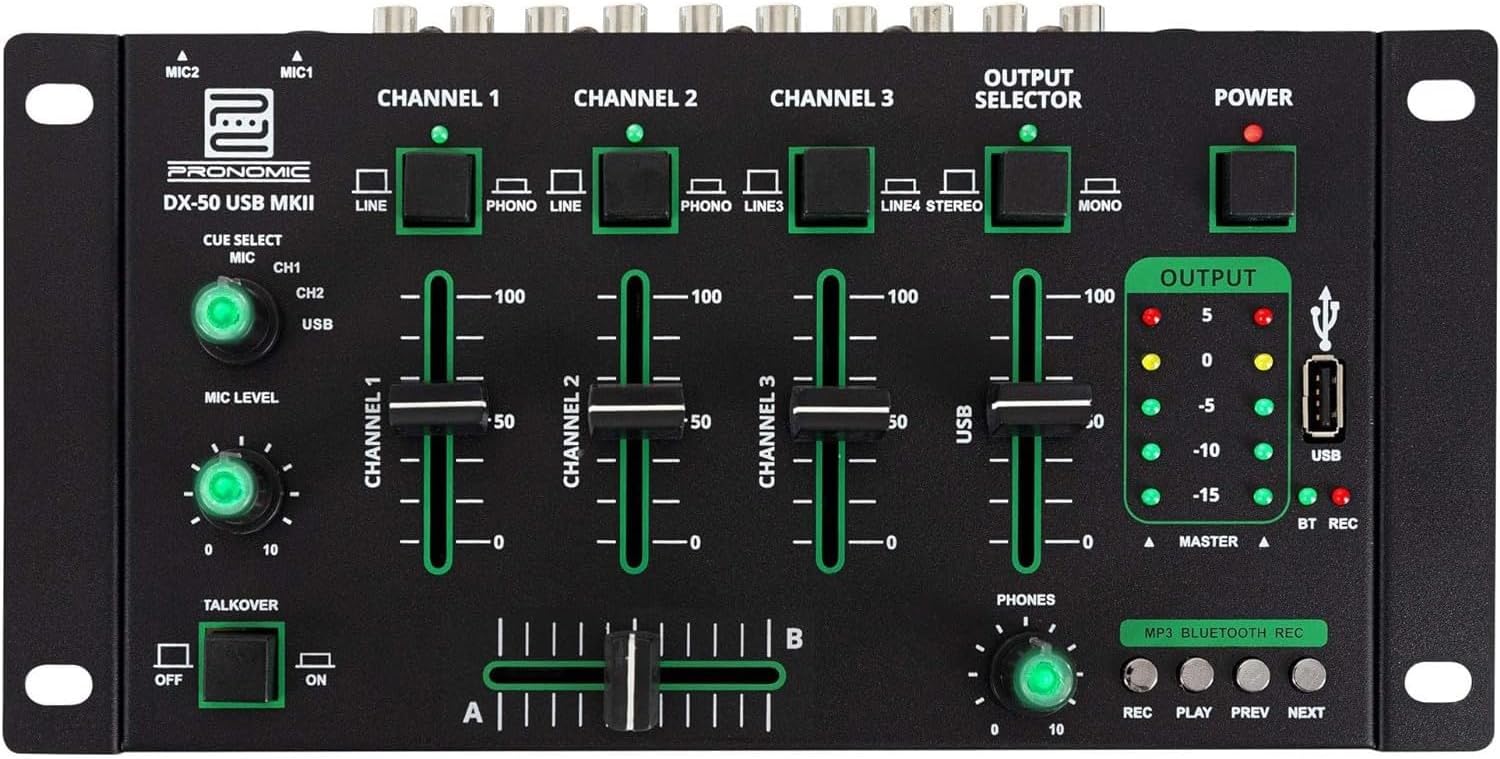
- MIC 1/2 Inputs: Koppel mikrofone.
- Channel 1-4 Input Selectors: Switch between LINE, PHONO, or USB/Bluetooth inputs for each channel.
- Channel Faders: Adjust the volume level for each channel.
- CUE Select Buttons: Route specific channels to the headphone output for monitoring.
- MIC Level Knob: Adjust the volume of the microphone inputs.
- Talkover Switch: Activates the talkover function, which automatically lowers music volume when speaking into the microphone.
- Output Selector: Choose between Stereo or Mono master output.
- Krag skakelaar: Skakel die menger aan/af.
- Uitsetvlakmeters: LED indicators showing the master output level.
- USB-poort: Connect a USB drive for MP3 playback and recording.
- MP3/Bluetooth/REC Player Controls: Buttons for Play/Pause, Previous, Next, and Record functions for the integrated player.
- Foonvlakknop: Verstel die volume van die koptelefoonuitvoer.
- Crossfader (A/B): Blends between channels assigned to A and B.
4.2 Agterpaneelverbindings

- AC 12V Power Input: Koppel die meegeleverde kragadapter hier aan.
- FONE Uitvoer: 6.3 mm-aansluiting om oorfone aan te sluit.
- MASTER OUT L/R (RCA): Connect to your main ampverligter of aangedrewe luidsprekers.
- Channel 1 & 2 Inputs (RCA Line/Phono): Connect turntables (Phono) or other line-level devices (CD players, media players). Use the front panel selector to switch.
- Channel 3 & 4 Inputs (RCA Line): Connect line-level devices.
- MIC 1 & 2 Inputs (6.3mm Jack): Koppel mikrofone.
5. Opstelling
Follow these steps to set up your Pronomic DX-50 USB MKII mixer:
- Kragverbinding: Ensure the mixer's power switch is in the OFF position. Connect the supplied AC 12V power adapter to the "AC 12V" input on the rear panel of the mixer. Plug the adapter into a suitable power outlet.
- Master Output Connection: Connect the "MASTER OUT L/R" RCA outputs on the rear panel to the inputs of your ampverligter of aangedrewe luidsprekers.
- Invoertoestelverbinding:
- Draaitafels: Connect turntables to the "CHANNEL 1" or "CHANNEL 2" RCA inputs. Set the corresponding input selector on the front panel to "PHONO".
- CD Players/Line Devices: Connect CD players, media players, or other line-level devices to "CHANNEL 1", "CHANNEL 2", "CHANNEL 3", or "CHANNEL 4" RCA inputs. Set the corresponding input selector on the front panel to "LINE".
- Mikrofone: Connect microphones to the "MIC 1" or "MIC 2" 6.3mm jack inputs on the rear panel.
- Koptelefoonaansluiting: Connect your headphones to the "PHONES" 6.3mm jack on the rear panel.
- USB Drive (Optional): If using a USB drive for playback or recording, insert it into the "USB" port on the front panel.
- Krag aan: Once all connections are made, switch the mixer's power switch to the ON position. The power indicator LED will illuminate.
6. Bedryfsinstruksies
6.1 Basiese Mengsel
- Kies invoer: For each channel, use the input selector switch (LINE/PHONO/USB/BT) to choose the desired audio source.
- Adjust Channel Volume: Use the vertical faders for each channel to adjust its individual volume level.
- Meester Uitset: Monitor the "OUTPUT" LED meters and adjust the master volume knob (if present, otherwise rely on channel faders and amplifier volume) to achieve a suitable overall output level without clipping.
- Crossfader: Use the crossfader to smoothly transition between channels assigned to A and B. Channels 1 and 2 are typically assigned to the crossfader.
6.2 Gebruik van mikrofoon
- Connect your microphone to one of the MIC inputs on the rear panel.
- Adjust the "MIC LEVEL" knob on the front panel to control the microphone's volume.
- Talkover Function: Activate the "TALKOVER" switch to automatically reduce the volume of the music when you speak into the microphone. This is useful for announcements.
6.3 USB-terugspeel en -opname
- USB-weergawe: Plaas 'n USB-stasie wat MP3 bevat files into the "USB" port. Select "USB" as the input source for the dedicated USB channel. Use the "PLAY/PAUSE", "PREV", and "NEXT" buttons to control playback.
- USB-opname: Press the "REC" button to start recording the master output to the connected USB drive. Press "REC" again to stop recording. Ensure your USB drive has sufficient free space and is formatted correctly (FAT32 is commonly supported).
6.4 Bluetooth-konnektiwiteit
- Aktiveer Bluetooth: Select "BT" as the input source for the dedicated Bluetooth channel. The mixer will enter pairing mode.
- Koppel toestel: On your Bluetooth-enabled device (smartphone, tablet, etc.), search for available Bluetooth devices. Select "Pronomic DX-50 USB MKII" (or similar name) from the list to pair.
- Speel oudio: Once paired, you can play audio from your device through the mixer. Control playback from your device or using the mixer's transport controls (if supported by your device).
6.5 Monitering met oorfone
- Connect headphones to the "PHONES" output.
- Use the "CUE SELECT" buttons to choose which channels you want to monitor in your headphones without affecting the main output.
- Adjust the "PHONES" level knob to set your desired headphone volume.
7. Onderhoud
- Skoonmaak: Disconnect the power before cleaning. Use a soft, dry cloth to wipe the surface of the mixer. Do not use liquid cleaners, aerosols, or solvents.
- Berging: Bêre die menger op 'n koel, droë plek weg van direkte sonlig en uiterste temperature.
- Versorging van die fader en knoppie: Avoid excessive force when operating faders and knobs. Periodically check for dust or debris accumulation around moving parts.
- Kabelbestuur: Ensure cables are not kinked or strained, which can lead to damage.
8. Probleemoplossing
| Probleem | Moontlike oorsaak | Oplossing |
|---|---|---|
| Geen krag nie | Power adapter not connected; Power switch off; Faulty power outlet. | Check power adapter connection; Ensure power switch is ON; Try a different power outlet. |
| No sound from main output | Master volume too low; Amplifier/speakers off or disconnected; Incorrect input selection; Channel faders down. | Increase master volume; Check amplifier/speaker connections and power; Verify correct input selected for channels; Raise channel faders. |
| Geen geluid van die koptelefoon nie | Headphone volume too low; Headphones not connected; No CUE selected. | Increase PHONES level; Connect headphones properly; Press CUE button for desired channel. |
| Bluetooth saambind nie | Menger nie in paringsmodus nie; Toestel te ver; Interferensie. | Ensure BT input is selected; Bring device closer; Restart mixer and device. |
| USB-terugspeel werk nie | USB drive not inserted correctly; Incorrect file format; USB drive not formatted correctly. | Re-insert USB drive; Ensure files are MP3; Format USB drive to FAT32. |
9. Spesifikasies
| Model | Pronomic DX-50 USB MKII |
| Aantal kanale | 4 |
| Verbindingstegnologie | Bluetooth, USB |
| Oudio-invoer | RCA (line/phono), 6.3mm microphone, Bluetooth, USB |
| Uitset Connector Tipe | RCA (Master Out), 6.3mm (Phones) |
| Kragbron | Electric Cable (AC 12V adapter) |
| Dimensions (without corner brackets and controls) | 222 x 129 x 28 mm (Breedte x Diepte x Hoogte) |
| Total Dimensions (with corner brackets and controls) | 267 x 136 x 51 mm (Breedte x Diepte x Hoogte) |
| Gewig | 790 g |
10. Waarborg en Ondersteuning
Vir waarborginligting en tegniese ondersteuning, verwys asseblief na die dokumentasie wat saam met u aankoop verskaf is of kontak u kleinhandelaar. Bewaar u bewys van aankoop vir enige waarborgeise.
For further assistance, you may also visit the official Pronomic webwebwerf of kontak hul kliëntediensafdeling.