
1. Inleiding
This manual provides essential information for the safe and efficient operation of your Sharp GX-BT190 Portable Bluetooth Speaker. Please read it thoroughly before using the device and retain it for future reference.
2. Veiligheidsinligting
- Moenie die luidspreker blootstel aan uiterste temperature, direkte sonlig of hoë humiditeit nie.
- Moenie die luidspreker uitmekaar haal, herstel of wysig nie. Dit kan die waarborg ongeldig maak en veiligheidsrisiko's inhou.
- Ensure the charging port cover is securely closed when using the speaker near water to maintain its IP67 rating.
- Gebruik slegs die meegeleverde laaikabel of 'n gesertifiseerde ekwivalent.
- Hou die luidspreker weg van kinders en troeteldiere.
- Vermy om vir lang tye op hoë volume vlakke te luister om gehoorskade te voorkom.
3. Pakketinhoud
- Sharp GX-BT190 Portable Bluetooth Speaker
- USB-laaikabel
- Lanyard
- Instruksie Handleiding
4. Produk verbyview

Voorkant view of the Sharp GX-BT190 speaker, showing the central speaker grille with the Sharp logo and the LED light ring.

Kant view of the Sharp GX-BT190 speaker, highlighting the textured speaker grille and the integrated lanyard.
Agter view of the Sharp GX-BT190 speaker, showing the control buttons and the sealed charging port cover.
Kontroles en aanwysers:
- Kragknoppie: Druk en hou om aan/af te skakel.
- Volume op / Volgende snit-knoppie (+): Druk kort vir volume op, druk lank vir die volgende snit.
- Volume Verlaag / Vorige Liedjie Knoppie (-): Druk kort om volume te verlaag, druk lank vir die vorige snit.
- Play/Pause / Call Button (►||): Short press to play/pause, answer/end calls. Long press to reject calls.
- Mode / Light Button (M): Short press to cycle through LED light modes. Long press to turn off LED lights.
- USB-C-laaipoort: For charging the speaker. Ensure the rubber cover is sealed when not charging.
- LED-aanwyser: Displays charging status and Bluetooth pairing status.
5. Opstelling
5.1 Laai die luidspreker
- Open the rubber cover on the back of the speaker to access the USB-C charging port.
- Koppel die meegeleverde USB-laaikabel aan die luidspreker se USB-C-poort.
- Koppel die ander kant van die USB-kabel aan 'n USB-kragadapter (nie ingesluit nie) of 'n rekenaar se USB-poort.
- The LED indicator will illuminate during charging and turn off once fully charged.
- Close the rubber cover securely after charging to maintain the speaker's waterproof rating.
5.2 Aan-/afskakel
- Om aan te skakel: Press and hold the Power button for approximately 3 seconds. You will hear an audible prompt, and the LED indicator will flash.
- Om af te skakel: Press and hold the Power button for approximately 3 seconds. You will hear an audible prompt, and the LED indicator will turn off.
5.3 Bluetooth -koppeling
- Ensure the speaker is powered on and the LED indicator is flashing, indicating it is in pairing mode.
- Aktiveer Bluetooth op jou mobiele toestel en soek vir beskikbare toestelle.
- Select "GX-BT190" from the list of devices.
- Sodra dit gekoppel is, sal die LED-aanwyser ophou flikker en konstant bly, en jy sal 'n bevestigingstoon hoor.
- Die luidspreker sal outomaties weer aan die laaste gekoppelde toestel koppel wanneer dit aangeskakel word, indien die toestel binne bereik is en Bluetooth geaktiveer is.
5.4 Ware Draadlose Stereo (TWS) Paring
TWS allows you to pair two GX-BT190 speakers together for a stereo audio experience.

Two Sharp GX-BT190 speakers, one red and one blue, positioned together, illustrating the True Wireless Stereo (TWS) pairing feature.
- Ensure both GX-BT190 speakers are powered on and not connected to any Bluetooth device.
- On one of the speakers (this will be the primary speaker), double-press the Power button. The speaker will enter TWS pairing mode.
- The two speakers will automatically search for and connect to each other. You will hear a confirmation tone once TWS pairing is successful.
- Once TWS paired, connect your mobile device to the primary speaker via Bluetooth as described in section 5.3.
- To disconnect TWS, double-press the Power button on either speaker.
6. Bedryf
6.1 Speel oudio
- Speel/pouse: Druk kort op die Speel/Pause-knoppie.
- Volume op: Druk kort op die '+'-knoppie.
- Volume af: Druk kort op die '-' knoppie.
- Volgende snit: Druk die '+'-knoppie lank.
- Vorige snit: Druk die '-' knoppie lank.
6.2 Handvrye oproepe
- Beantwoord oproep: Druk kort op die Speel/Pause-knoppie wanneer 'n inkomende oproep lui.
- Beëindig oproep: Druk kort op die Speel/Pause-knoppie tydens 'n oproep.
- Verwerp oproep: Druk die Speel/Pause-knoppie lank wanneer 'n inkomende oproep lui.
6.3 LED Mood Lights
- Short press the 'M' (Mode/Light) button to cycle through the 6 available LED mood light modes.
- Long press the 'M' button to turn off the LED lights.
6.4 Waterproof and Dustproof Usage (IP67)

The Sharp GX-BT190 speaker partially submerged in water, demonstrating its IP67 waterproof and dustproof capabilities.
The GX-BT190 speaker is rated IP67, meaning it is protected from dust ingress and can withstand immersion in water up to 1 meter for 30 minutes. To ensure this protection:
- Always ensure the rubber cover for the charging port is fully and securely sealed before exposing the speaker to water or dust.
- Do not intentionally submerge the speaker for extended periods or beyond the specified depth.
- Vee die luidspreker droog met 'n sagte lap voordat dit gelaai word nadat dit aan water blootgestel is.
7. Onderhoud
7.1 Skoonmaak
- Vee die luidspreker af met 'n sagte, damp lap.
- Moenie skuurmiddels, alkohol of chemiese oplosmiddels gebruik nie.
- Ensure the speaker is dry before charging or storing.
7.2 Berging
- Bêre die luidspreker op 'n koel, droë plek weg van direkte sonlig en uiterste temperature.
- Indien dit vir 'n lang tydperk gestoor word, laai die battery gereeld (bv. elke 3 maande) om die battery se gesondheid te handhaaf.
8. Probleemoplossing
| Probleem | Oplossing |
|---|---|
| Luidspreker skakel nie aan nie. | Maak seker dat die battery gelaai is. Koppel die luidspreker aan 'n kragbron met die USB-kabel. |
| Kan nie via Bluetooth koppel nie. | Ensure the speaker is in pairing mode (LED flashing). Turn off and on Bluetooth on your device. Move the speaker closer to your device. Clear previous Bluetooth connections on your device. |
| Geen geluid of lae volume nie. | Increase the volume on both the speaker and your connected device. Ensure the speaker is properly paired. |
| Swak klankgehalte. | Move the speaker closer to your device. Ensure there are no obstructions between the speaker and your device. Try playing a different audio source. |
| TWS-paring misluk. | Ensure both speakers are GX-BT190 models and are not connected to any other Bluetooth device. Try powering both speakers off and on, then re-attempt TWS pairing. |
9. Spesifikasies

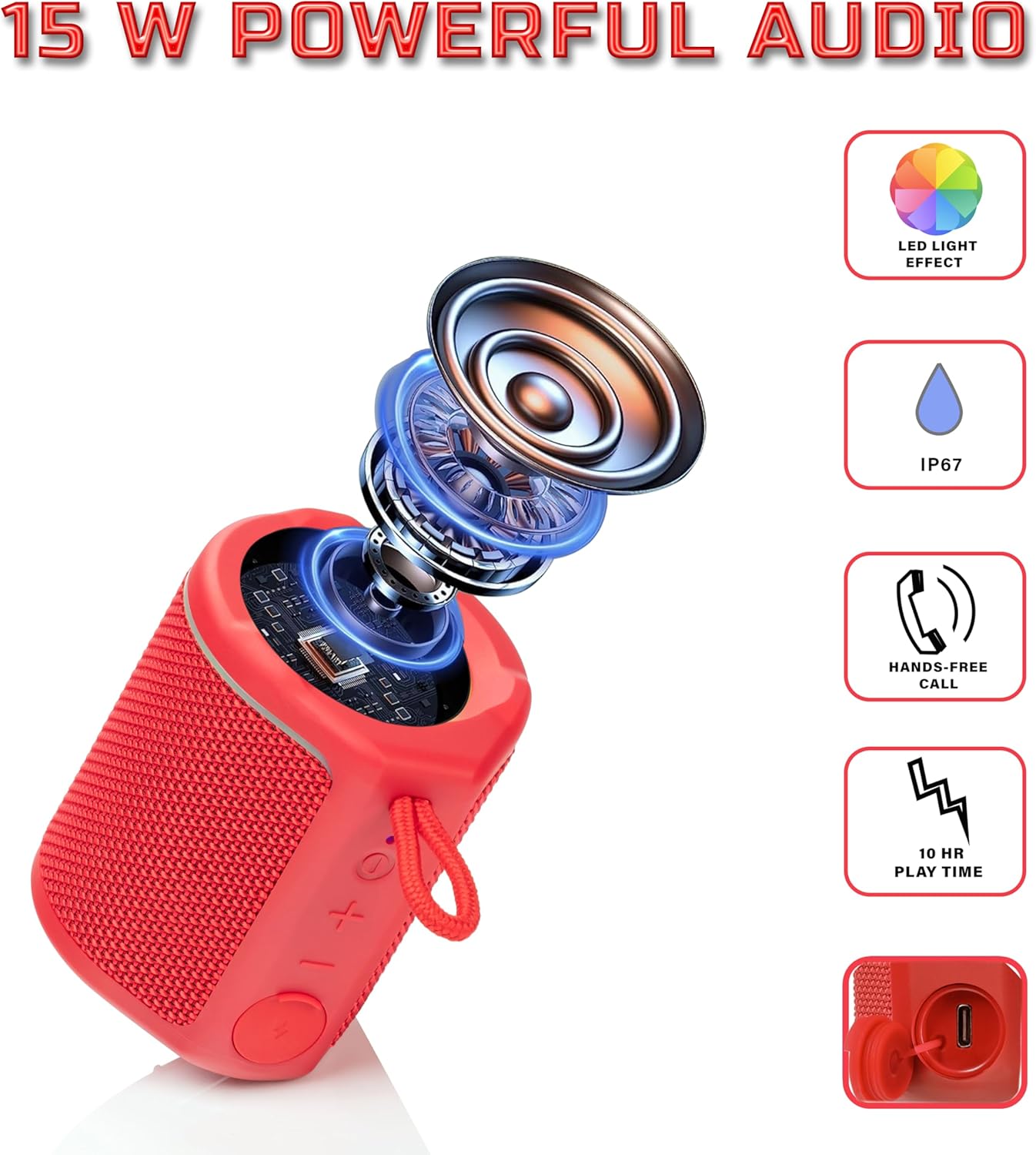
Diagram illustrating the internal components of the Sharp GX-BT190 speaker, including the speaker driver, and highlighting features like LED light effect, IP67 rating, hands-free call function, and battery life.
| Kenmerk | Detail |
|---|---|
| Modelnommer | GX-BT190 |
| Verbindingstegnologie | Bluetooth |
| Luidspreker Maksimum uitsetkrag | 10 Watt |
| Waterdigte gradering | IP67 |
| Batterylewe | Tot 15 ure |
| Battery Tipe | 1 litiumioon (ingesluit) |
| Battery kapasiteit | 1200 mAh |
| Produk Afmetings (D x B x H) | 7.5 x 7.5 x 7.5 cm (ongeveer) |
| Item gewig | 226.8 g (8 onse) |
| Wireless Range | Tot 33 voet |
| Bykomende kenmerke | LED Light, True Wireless Stereo (TWS), Hands-Free Calling |
10. Waarborg
The Sharp GX-BT190 Portable Bluetooth Speaker comes with a 1-Year Limited Warranty from the date of purchase. This warranty covers manufacturing defects under normal use. It does not cover damage caused by misuse, accidents, unauthorized modifications, or normal wear and tear. Please retain your proof of purchase for warranty claims.
11. Ondersteuning
For technical assistance, warranty inquiries, or further information regarding your Sharp GX-BT190 speaker, please contact Sharp Inc. customer support:
- Vervaardiger kontak: Sharp Inc
- Telefoon: 1-800-BE-SKERP