
1. Inleiding
The HIKMICRO ECO-V Handheld Thermography Camera is a versatile thermal imaging device designed for various professional applications. It offers thermal, bi-spectrum image fusion, and visible light modes to meet diverse business needs. This manual provides essential information for the safe and effective operation of your ECO-V camera.
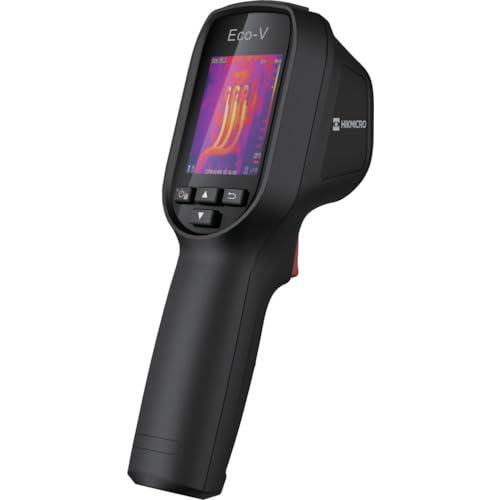
Figure 1: HIKMICRO ECO-V Handheld Thermography Camera
2. Veiligheidsinligting
Lees en verstaan asseblief alle veiligheidswaarskuwings en instruksies voordat u hierdie produk gebruik. Versuim om hierdie instruksies te volg, kan lei tot elektriese skok, brand of ernstige besering.
Algemene veiligheidsmaatreëls
- Moenie die toestel in plofbare atmosfere gebruik nie, soos in die teenwoordigheid van vlambare vloeistowwe, gasse of stof.
- Hou die toestel weg van water en ander vloeistowwe.
- Moenie probeer om die toestel oop te maak of te wysig nie. Verwys alle diens na gekwalifiseerde personeel.
- Use only HIKMICRO-approved accessories.
- Avoid direct exposure of the thermal lens to strong light sources (e.g., sun, laser) as this may damage the detector.
Batteryveiligheid
- The device contains a built-in Lithium-ion battery. Do not expose the battery to excessive heat, direct sunlight, or fire.
- Moenie die battery deurboor, oopmaak of uitmekaar haal nie.
- Charge the battery only with the provided USB cable and a compatible power adapter.
- Gooi batterye weg volgens plaaslike regulasies.
3. Pakketinhoud
The HIKMICRO ECO-V package includes the following items:
- HIKMICRO Handheld Thermography Camera ECO-V
- USB Type-C kabel
- Vinnige Begingids (nie eksplisiet genoem nie, maar standaard)
- Calibration Certificate (not explicitly mentioned but standard)
Video 3.1: Unboxing the HIKMICRO M-Series (similar to ECO-V, showing typical package contents and device appearance).
4. Toestel oorview
Familiarize yourself with the physical components and interface of your HIKMICRO ECO-V camera.
Voorkoms en koppelvlak
The ECO-V features a compact, ergonomic design for comfortable handheld use. Key components include the thermal lens, optical lens, laser indicator, white light, trigger button, navigation buttons, and a 2.4-inch display.
Video 4.1: This video demonstrates the physical appearance and interface of a HIKMICRO M-Series camera, which shares similar design elements and interface components with the ECO-V.
5. Opstelling
5.1 Laai die toestel
Before initial use, fully charge the device's built-in Lithium-ion battery.
- Connect the provided USB Type-C cable to the device's USB port.
- Connect the other end of the USB cable to a compatible power adapter (5V2A recommended) and plug it into a power outlet.
- The charging indicator will show red during charging and turn green when fully charged.
Video 5.1: This HIKMICRO ECO operation video demonstrates the charging process for the device.
5.2 Krag aan/af
To power on the device, press and hold the power button for more than 6 seconds. To power off, press and hold the power button again until the device shuts down.
Video 5.2: This HIKMICRO ECO operation video demonstrates how to power on the device.
6. Bedryfsinstruksies
This section covers the basic and advanced operational features of your ECO-V camera.
6.1 Image Capture and Display
To capture a thermal image, aim the camera at the target and press the trigger button. The captured image will be saved to the internal EMMC storage. To view saved images, navigate to the 'Albums' section in the menu.
Video 6.1: This HIKMICRO ECO operation video demonstrates image capture and viewing saved snapshots.
6.2 Meetgereedskap
The ECO-V provides various measurement tools to analyze thermal images:
- Hot Spot: Automatically identifies and displays the highest temperature point.
- Cold Spot: Automatically identifies and displays the lowest temperature point.
- Sentrumplek: Wys die temperatuur in die middel van die skerm.
Video 6.2: This HIKMICRO ECO operation video demonstrates the use of measurement tools like hot, cold, and center spots.
6.3 SuperIR Image Enhancement
SuperIR technology enhances the thermal image resolution, providing more detail for analysis. You can enable or disable this feature in the settings menu.
Video 6.3: This HIKMICRO ECO operation video demonstrates how to enable and use the SuperIR image enhancement feature.
6.4 Beeldmodusse
The ECO-V supports multiple image modes for different inspection needs:
- Termies: Wys slegs die termiese beeld.
- Fusie: Blends the thermal and visible light images for enhanced detail.
- PIP (Picture-in-Picture): Overlays a smaller thermal image on a visible light image.
- Opties: Displays only the visible light image.
Video 6.4: This HIKMICRO B10S product video demonstrates switching between different image modes, including Thermal, Fusion, PIP, and Optical.
6.5 Parallax Correction
When using fusion modes, adjust the parallax correction based on the distance to the target to ensure accurate alignment between thermal and visible images.
Video 6.5: This HIKMICRO B10S product video demonstrates how to adjust parallax correction for accurate image fusion.
6.6 Palette Adjustment
Select from various color palettes (e.g., White Hot, Black Hot, Rainbow, Ironbow) to visualize temperature differences more effectively. This can be adjusted in the settings menu.
Video 6.6: This HIKMICRO B10S product video demonstrates how to adjust color palettes.
6.7 Emissivity and Distance Settings
For accurate temperature measurements, it is crucial to set the correct emissivity value for the target material and the distance to the target. Refer to the general emissivity reference table in the specifications section.
Video 6.7: This HIKMICRO ECO operation video demonstrates setting emissivity and distance for accurate temperature readings.
6.8 Laserwyser
The built-in laser pointer helps to precisely identify the measurement target. It can be enabled or disabled in the settings menu.
Video 6.8: This HIKMICRO ECO operation video demonstrates how to enable and use the laser pointer.
6.9 Hoë temperatuur alarm
Set a high temperature alarm threshold to be notified when temperatures exceed a predefined limit. This feature is useful for identifying potential overheating issues.
Video 6.9: This HIKMICRO B10S product video demonstrates how to set a high temperature alarm.
6.10 Hotspot Connection
The ECO-V can connect to a mobile device via Wi-Fi hotspot for live viewing and data transfer. Enable the Wi-Fi hotspot function in the device settings and connect your mobile device.
Video 6.10: This HIKMICRO M-Series video demonstrates how to establish a hotspot connection with a mobile device.
6.11 HIKMICRO Viewer App Connection
Download the HIKMICRO Viewer app on your mobile device to access live view, manage images and videos, and generate reports. Connect the device to your phone via Wi-Fi.
Video 6.11: This HIKMICRO Pocket series video demonstrates connecting the device to the HIKMICRO Viewer app for various functions.
7. Onderhoud
7.1 Skoonmaak
- Vee die toestel se liggaam af met 'n sagte, damp lap. Moenie skuur skoonmaakmiddels of oplosmiddels gebruik nie.
- Gently clean the lenses with a lens cleaning cloth. Avoid touching the lens surface with bare hands.
7.2 Berging
- Bêre die toestel op 'n koel, droë plek, weg van direkte sonlig en uiterste temperature.
- Indien dit vir 'n lang tydperk gestoor word, maak seker dat die battery gedeeltelik gelaai is (ongeveer 50%) en laai dit elke paar maande op om die battery se gesondheid te handhaaf.
8. Probleemoplossing
If you encounter issues with your HIKMICRO ECO-V, refer to the following common problems and solutions:
| Probleem | Moontlike oorsaak | Oplossing |
|---|---|---|
| Toestel skakel nie aan nie | Lae battery; Toestelwanfunksie | Charge the battery; Contact support |
| Onakkurate temperatuurlesings | Incorrect emissivity/distance settings; Dirty lens | Adjust emissivity/distance; Clean the lens |
| Cannot connect to Wi-Fi hotspot | Incorrect password; Hotspot not enabled | Verify password; Enable hotspot in settings |
9. Spesifikasies
Detailed technical specifications for the HIKMICRO ECO-V camera:
| Kenmerk | Spesifikasie |
|---|---|
| Model | ECO-V |
| Measurement Temperature Range | -20°C tot 550°C |
| Minimum Temperature Display | 0.1°C |
| Veld van View (FOV) | 50° × 50° |
| Ruimtelike resolusie (IFOV) | 8.89 mrad |
| Bedryfstemperatuurreeks | -10°C tot 50°C |
| Bergingstemperatuurreeks | -40°C tot 70°C |
| Vertoon grootte | 2.4 duim |
| Kragbron | Ingeboude litium-ioon battery |
| Battery bedryfstyd | 8 uur |
| Wi-Fi | Nie beskikbaar nie |
| Beskermingsvlak | IP54 |
| Koppelvlak | USB Tipe-C |
| Pixel toonhoogte | 12μm |
| Measuring Wavelength | 7.5-14μm |
| Netd | < 40 mK (@ 25°C, F#=1.0) |
| Brandpuntsafstand | 1.35 mm |
| Diafragma | F1.0 |
| Minimum fokusafstand | 0.1 m (0.33 voet) |
| Raamtempo | 25Hz |
| Fokusstelsel | Fokusvry |
| Opname Media | EMMC (4GB) |
| Beeldbergingskapasiteit | 30,000 beelde |
| Beeld File Formaat | BMP (includes measurement data) |
| Termiese beeldresolusie | 96×96 (9,216 pixels) |
| Visible Image Resolution | 640×480 |
| Akkuraatheid | ±2°C or ±2% (whichever is greater), when ambient temperature is 15°C to 35°C and target temperature is 0°C or above. |
| Materiaal | Polikarbonaat, ABS-hars |
| Gewig | 360g |
General Emissivity Reference
| Materiaal | emissiwiteit |
|---|---|
| Menslike vel | 0.98 |
| PCB | 0.91 |
| Sementbeton | 0.95 |
| Keramiek | 0.92 |
| Rubber | 0.95 |
| Verf | 0.93 |
| Hout | 0.85 |
| Baksteen | 0.96 |
| Sand | 0.90 |
| Grond | 0.92 |
| Katoen | 0.98 |
| Karton | 0.90 |
| Witskrif | 0.96 |
| Water | 0.96 |
10. Waarborg en Ondersteuning
HIKMICRO products are covered by a limited warranty. For detailed warranty terms and conditions, please refer to the official HIKMICRO webwebwerf of kontak u plaaslike verspreider.
Kliënte ondersteuning
If you require technical assistance, troubleshooting, or have questions about your ECO-V camera, please contact HIKMICRO customer support through their official webwebwerf of die kontakinligting wat in u produkverpakking verskaf word.