
1. Inleiding
Welcome to the user manual for your ZOMBIES CAT Transformers TF-T06 Wireless Earbuds. This guide provides detailed instructions on how to set up, operate, maintain, and troubleshoot your new earbuds. Please read this manual carefully to ensure optimal performance and longevity of your device.
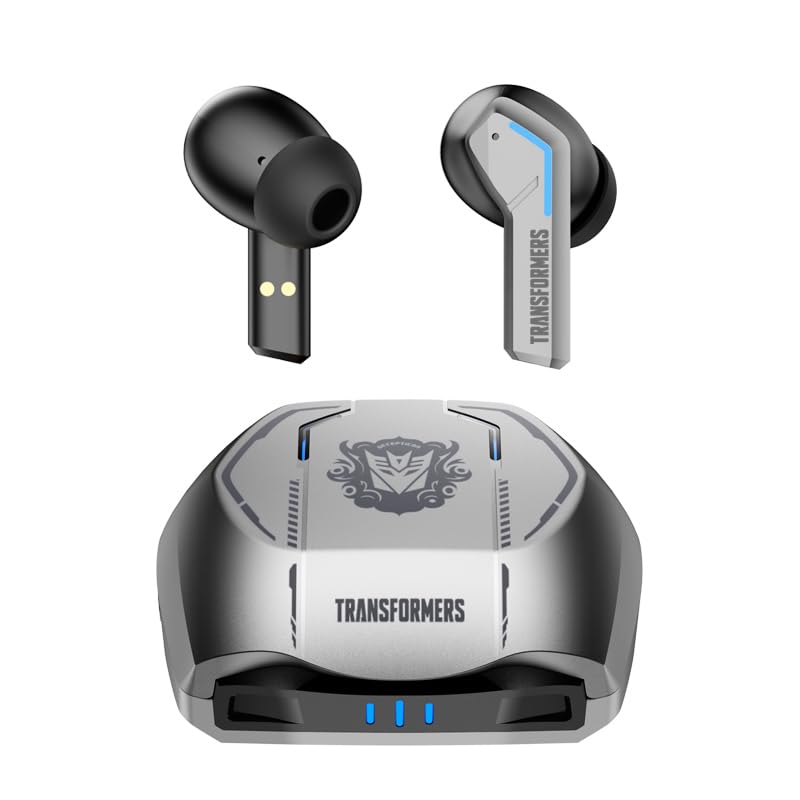
Image 1.1: The Transformers TF-T06 Wireless Earbuds and their charging case.
2. Pakketinhoud
Verifieer dat alle items in jou pakket teenwoordig is:
- Transformers In-Ear Headphones (2 units)
- Earbuds Charging Case (1 unit)
- Tipe-C-laaikabel (1 eenheid)
- Gebruikershandleiding (Hierdie dokument)

Image 2.1: The TF-T06 Earbuds, charging case, and packaging.
3. Produk verbyview
3.1 Earbud Design and Ergonomics
The TF-T06 earbuds are designed for a comfortable and secure fit within the ear, ensuring stability during various activities. Their lightweight and skin-friendly construction allows for extended wear without discomfort.

Image 3.1: An earbud shown in an ear, highlighting its ergonomic design for comfortable wear.
3.2 Slim aanraakkontroles
Each earbud features a touch-sensitive area for controlling various functions without needing to access your connected device. The controls are intuitive and responsive.

Image 3.2: Visual representation of the smart touch control functions on the earbuds.
- Speel/pouse: Enkele tik op enige van die oordopjes.
- Volgende snit: Dubbeltik op die regteroorfone.
- Vorige snit: Dubbeltik op die linker oordopje.
- Volume op: Tik drie keer op die regteroorfone.
- Volume af: Tik drie keer op die linker oordopje.
- Beantwoord/beëindig oproep: Tik een keer op enige oordopje tydens 'n inkomende oproep of aktiewe oproep.
- Verwerp oproep: Druk en hou enige oordopjes vir 2 sekondes in tydens 'n inkomende oproep.
- Aktiveer stemassistent: Druk en hou enige oordopjes vir 2 sekondes in (wanneer jy nie aan die oproep is nie).
4. Opstelling
4.1 Laai die oordopjes en houer
Laai die oordopjes en die laaikassie volledig voor die eerste gebruik.
- Plaas die oorfone in die laaikas. Maak seker dat hulle korrek geplaas is; magnetiese kontakte sal hulle in plek hou.
- Connect the Type-C charging cable to the charging port on the case and the other end to a USB power adapter (not included).
- The indicator lights on the charging case will illuminate to show charging status. A full charge typically takes approximately 3 hours for the case.
- Once fully charged, disconnect the charging cable. The earbuds will charge automatically when placed in the powered case.
4.2 Initial Pairing with a Device
Die TF-T06-oordopjes bied eenstap-paring vir gerief.
- Maak die laaikas oop. Die oorfone sal outomaties aanskakel en in paringsmodus gaan.
- Navigeer na die Bluetooth-instellings op jou slimfoon, tablet of ander Bluetooth-geaktiveerde toestel.
- Soek vir beskikbare toestelle en kies "TF-T06" uit die lys.
- Sodra dit gekoppel is, sal jy 'n hoorbare bevestiging hoor, en die oorfone sal gereed wees vir gebruik.

Image 4.1: The earbuds in their open charging case, indicating they are ready for Bluetooth pairing.
Let wel: After the initial pairing, the earbuds will automatically connect to the last paired device when removed from the charging case, provided Bluetooth is enabled on the device and it is within range.
5. Bedryfsinstruksies
5.1 Krag aan/af
- Krag aan: Maak die laaikas oop, of druk en hou die aanraakarea op beide oordopjes vir 3 sekondes in.
- Skakel af: Plaas die oordopjes terug in die laaikas en maak die deksel toe, of druk en hou die aanraakarea op beide oordopjes vir 5 sekondes in.
5.2 Musiekweergawe
Use the smart touch controls as described in Section 3.2 to manage your music.
5.3 Oproepbestuur
Handle incoming and active calls using the smart touch controls as described in Section 3.2. The built-in ENC noise-cancelling microphone ensures clear communication.
5.4 Stemassistent
Activate your device's voice assistant (e.g., Siri, Google Assistant) by pressing and holding the touch area on either earbud for 2 seconds (when not on a call).
5.5 Klankkwaliteit
The TF-T06 earbuds feature 10mm double-layer diaphragm drivers, delivering powerful bass, clear midrange, and bright treble for a high-fidelity audio experience.

Image 5.1: An illustration of the 10mm dynamic driver, responsible for the earbud's sound quality.
6. Onderhoud
- Skoonmaak: Maak die oorfone en laaikas gereeld skoon met 'n sagte, droë, pluisvrye lap. Moenie skuurmiddels of oplosmiddels gebruik nie.
- Waterweerstand: The earbuds have an IPX4 waterproof rating, meaning they are resistant to splashing water and sweat. Do not submerge them in water or expose them to heavy rain. Ensure they are dry before placing them back in the charging case.
- Berging: Wanneer dit nie gebruik word nie, bêre die oorfone in hul laaikassie om hulle te beskerm en gelaai te hou. Bêre op 'n koel, droë plek weg van uiterste temperature.
- Batterysorg: Om die batterylewe te verleng, vermy om die oorfone en laaikas gereeld heeltemal te ontlaai. Laai hulle gereeld, selfs al word hulle nie voortdurend gebruik nie.
7. Probleemoplossing
If you encounter issues with your TF-T06 earbuds, refer to the following common solutions:
- Oordopjes koppel nie:
- Maak seker dat beide oordopjes gelaai is.
- Skakel Bluetooth op jou toestel af en skakel dit weer aan.
- Forget "TF-T06" in your device's Bluetooth settings and attempt to pair again.
- Herbegin jou toestel.
- Slegs een oordoppie werk:
- Maak seker dat beide oordopjes gelaai is.
- Place both earbuds back into the charging case, close the lid, wait a few seconds, then open the lid and remove them.
- Probeer om die oordopjes terug te stel (verwys na spesifieke terugstelinstruksies indien beskikbaar in 'n aparte vinnige begingids, of probeer om die toestel te vergeet en weer te koppel).
- Geen geluid of lae volume:
- Check the volume level on both your earbuds and your connected device.
- Maak seker dat die oorfone behoorlik aan jou toestel gekoppel is.
- Maak enige puin van die oorfone se luidsprekermaas skoon.
- Laai kwessies:
- Maak seker dat die laaikabel stewig aan beide die kas en die kragbron gekoppel is.
- Probeer 'n ander laaikabel of kragadapter.
- Maak die laaikontakte op die oordopjes en binne-in die houer skoon.
8. Spesifikasies
| Model Naam | TF-T0602 |
| Handelsmerk | ZOMBIES CAT |
| Verbindingstegnologie | Draadloos (Bluetooth 5.3) |
| Bluetooth weergawe | 5.3 |
| Tipe oudiobestuurder | Dinamiese drywer (10 mm) |
| Batterylewe (Totaal met omhulsel) | Tot 30 ure |
| Oordop Speeltyd (Enkele Lading) | 3-4 uur |
| Laai tyd | Approx. 3 Hours (Case) |
| Beheer metode | Raak |
| Waterweerstandvlak | IPX4 (waterdig) |
| Geraasonderdrukking | ENC (Environmental Noise Cancellation) Mic |
| Versoenbare toestelle | Most Bluetooth-enabled devices (smartphones, tablets, laptops, smartwatches) |
| Maksimum bedryfsafstand | 10 meter |
| Item gewig | 132 g |
| Produk afmetings | 3.3 x 2.18 x 1.83 cm |
9. Waarborg en Ondersteuning
Vir waarborginligting en kliëntediens, verwys asseblief na die dokumentasie wat by die aankooppunt verskaf is of kontak u kleinhandelaar. Bewaar u bewys van aankoop vir enige waarborgeise.