
1. Inleiding
Thank you for choosing the CREWORKS 38x38cm Digital Control Heat Press Machine. This manual provides essential information for the safe and efficient operation, maintenance, and troubleshooting of your new heat press. Please read these instructions thoroughly before use and retain them for future reference.
2. Veiligheidsinstruksies
- Always connect the machine to a grounded power outlet.
- Keep hands and clothing clear of the heating plate during operation to prevent burns. The machine operates at high temperatures.
- Do not operate the machine in wet conditions or with wet hands.
- Verseker voldoende ventilasie in die werkarea.
- Ontkoppel die masjien van die kragbron wanneer dit nie gebruik word nie of voor skoonmaak en onderhoud.
- Moenie probeer om die masjien self te wysig of te herstel nie. Kontak gekwalifiseerde dienspersoneel vir hulp.
- The machine features an automatic shut-off after 30 minutes of inactivity for enhanced safety.
3. Produkkomponente
Familiarize yourself with the main parts of your heat press machine:
- Hanteer: For opening and closing the heating plate.
- Drukverstellingsknop: To set the desired pressure for transfers.
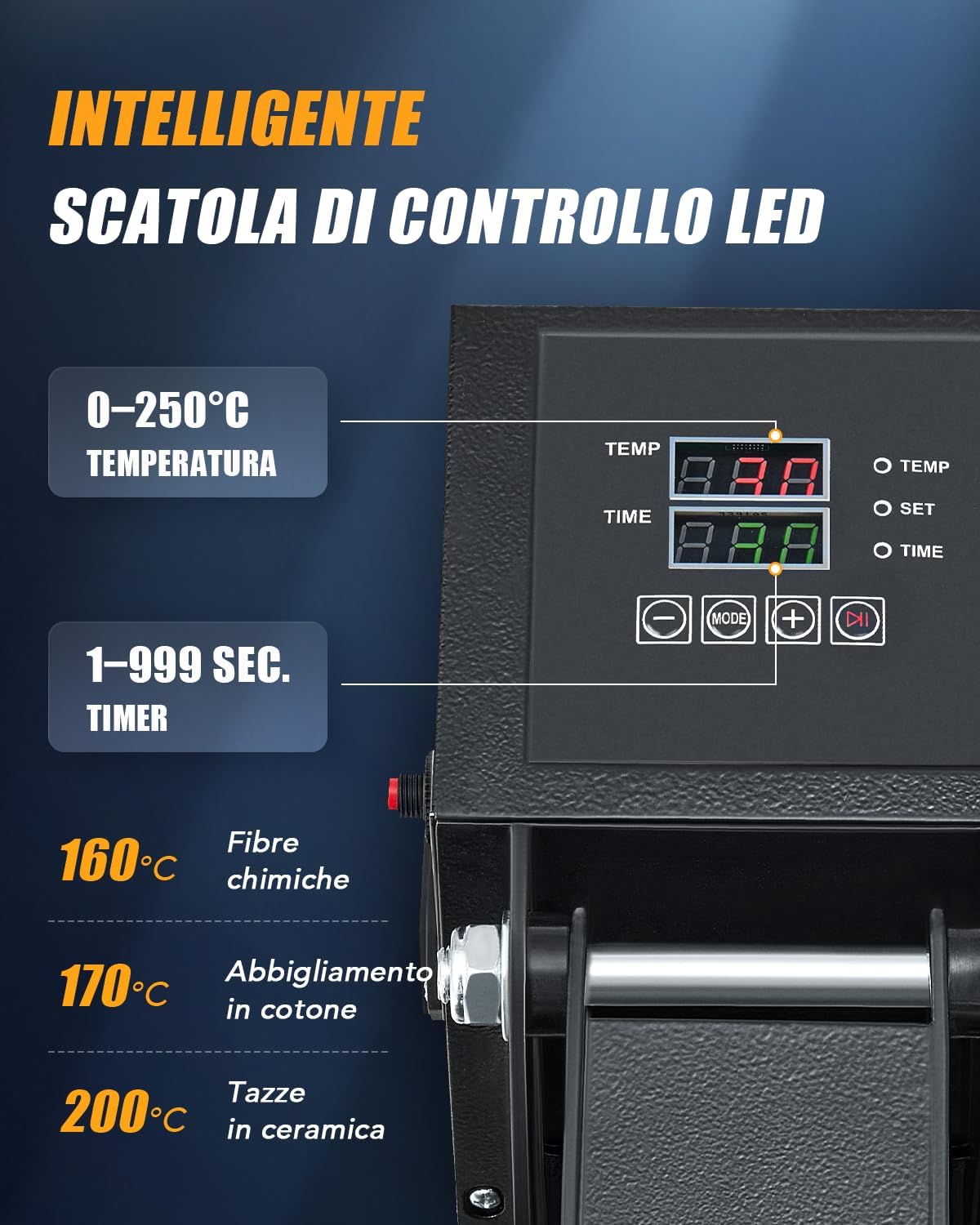
- Digital Control Display: Shows and allows adjustment of temperature and time.
- Verhittingsplaat: The upper plate that heats up and applies pressure.
- Heat-Resistant Mat: Placed on the base plate to protect materials.
- Pull-out Base Plate: The lower plate where items are placed, designed to slide out for easy loading.
- Krag skakelaar: To turn the machine on/off.

4. Opstelling
- Pak uit: Verwyder alle komponente versigtig uit die verpakking.
- Plasing: Place the heat press on a stable, heat-resistant surface in a well-ventilated area. Ensure there is enough space around the machine for safe operation.
- Kragverbinding: Koppel die kragkabel aan 'n geaarde elektriese aansluiting.
- Aanvanklike inspeksie: Before first use, inspect the machine for any visible damage.
5. Bedryfsinstruksies
5.1. Beheerpaneel verbyview
The digital control panel allows precise adjustment of temperature and time:

- Temperatuurinstelling: Adjustable from 0-250°C (0-480°F). Use the '+' and '-' buttons to set the desired temperature.
- Tyd instelling: Adjustable from 1-999 seconds. Use the '+' and '-' buttons to set the desired time.
- Modusknoppie: To switch between temperature and time settings.
5.2. Aanpassing van druk
The pressure adjustment knob on top of the heating plate allows you to customize the pressing force for different materials and transfer types.

- Draai kloksgewys om druk te verhoog.
- Draai antikloksgewys om die druk te verminder.
5.3. Heat Transfer Process
- Skakel die masjien aan met die kragskakelaar.
- Set the desired temperature and time using the digital control panel. Allow the machine to preheat until the set temperature is reached.
- Pull out the base plate using the handle.
- Place your material (e.g., T-shirt) onto the heat-resistant mat on the pull-out base. Ensure it is flat and smooth.
- Position your transfer design (e.g., HTV, sublimation paper) onto the material.
- Slide the base plate back into position.
- Lower the heating plate using the handle until it locks into place, applying pressure.
- The timer will start automatically. Once the time elapses, the machine will beep.
- Lift the heating plate using the handle.
- Carefully pull out the base plate and remove your transferred item. Be cautious as the item will be hot.
5.4. Veelsydige toepassings
This heat press is suitable for various items and materials:

5.5. Even Heat Distribution
The machine features dual heating tubes for efficient and uniform heat transfer across the entire 38x38cm plate.

5.6. Amptelike Produkvideo
6. Onderhoud
- Skoonmaak: Ensure the machine is unplugged and completely cooled before cleaning. Wipe the heating plate with a soft, damp lap. Moenie skuur skoonmaakmiddels of oplosmiddels gebruik nie.
- Berging: Bêre die hittepers in 'n droë, stofvrye omgewing wanneer dit nie gebruik word nie.
- Gereelde tjeks: Kontroleer gereeld alle skroewe en verbindings om te verseker dat hulle stewig vas is.
7. Probleemoplossing
| Probleem | Moontlike oorsaak | Oplossing |
|---|---|---|
| Masjien skakel nie aan nie | Kragkabel nie gekoppel nie; Skakel af; Probleem met die stopcontact | Check power cord connection; Turn on power switch; Test outlet with another device |
| Uneven heat transfer | Incorrect pressure; Heating plate not fully closed; Faulty heating element | Adjust pressure knob; Ensure plate is fully closed; Contact support if issue persists |
| Design not adhering | Incorrect temperature/time; Insufficient pressure; Wrong material type | Adjust temperature/time settings; Increase pressure; Verify material compatibility with transfer type |
8. Spesifikasies
| Kenmerk | Detail |
|---|---|
| Model | 38x38cm Heat Press |
| Handelsmerk | BEMANNINGE |
| Krag | 1400 W |
| Platen Grootte | 38x38 cm |
| Temperatuurreeks | 0-250°C (0-480°F) |
| Timer reeks | 1-999 sekondes |
| Afmetings (L x B x H) | 38.5 x 42 x 46.5 cm |
| Gewig | 17 kg |
| Materiaal samestelling | Metal, Aluminum, Silicone |

9. Waarborg en Ondersteuning
Vir waarborginligting en kliëntediens, verwys asseblief na die aankoopdokumentasie of kontak u kleinhandelaar. Bewaar u bewys van aankoop vir enige waarborgeise.