
Inleiding
Welcome to the SENTRY Ultra-Light Bluetooth Earbuds user manual. These earbuds are designed to provide a seamless and immersive audio experience, perfect for active lifestyles. With an ultra-light design, LED power display, and intelligent touch controls, you can enjoy high-quality sound and convenient operation. Please read this manual carefully to ensure proper use and maintenance of your new earbuds.
Pakketinhoud
- SENTRY Ultra-Light Bluetooth Earbuds (Left and Right)
- Draagbare laaikas
- USB-laaikabel
- Gebruikershandleiding
Produk Kenmerke
- LED-kragskerm: Transparent design on the charging case allows real-time battery monitoring.
- Kompakte ontwerp: Ultra-compact and space-saving, making them highly portable.
- Bass Acoustic Design: Advanced dynamic drivers deliver crystal-clear audio with enhanced bass and treble.
- Intelligente raakkontroles: Effortlessly manage volume, music tracks, calls, and voice assistants.
- Stable Connections: Advanced Bluetooth technology ensures lag-free and reliable performance.
Produk verbyview
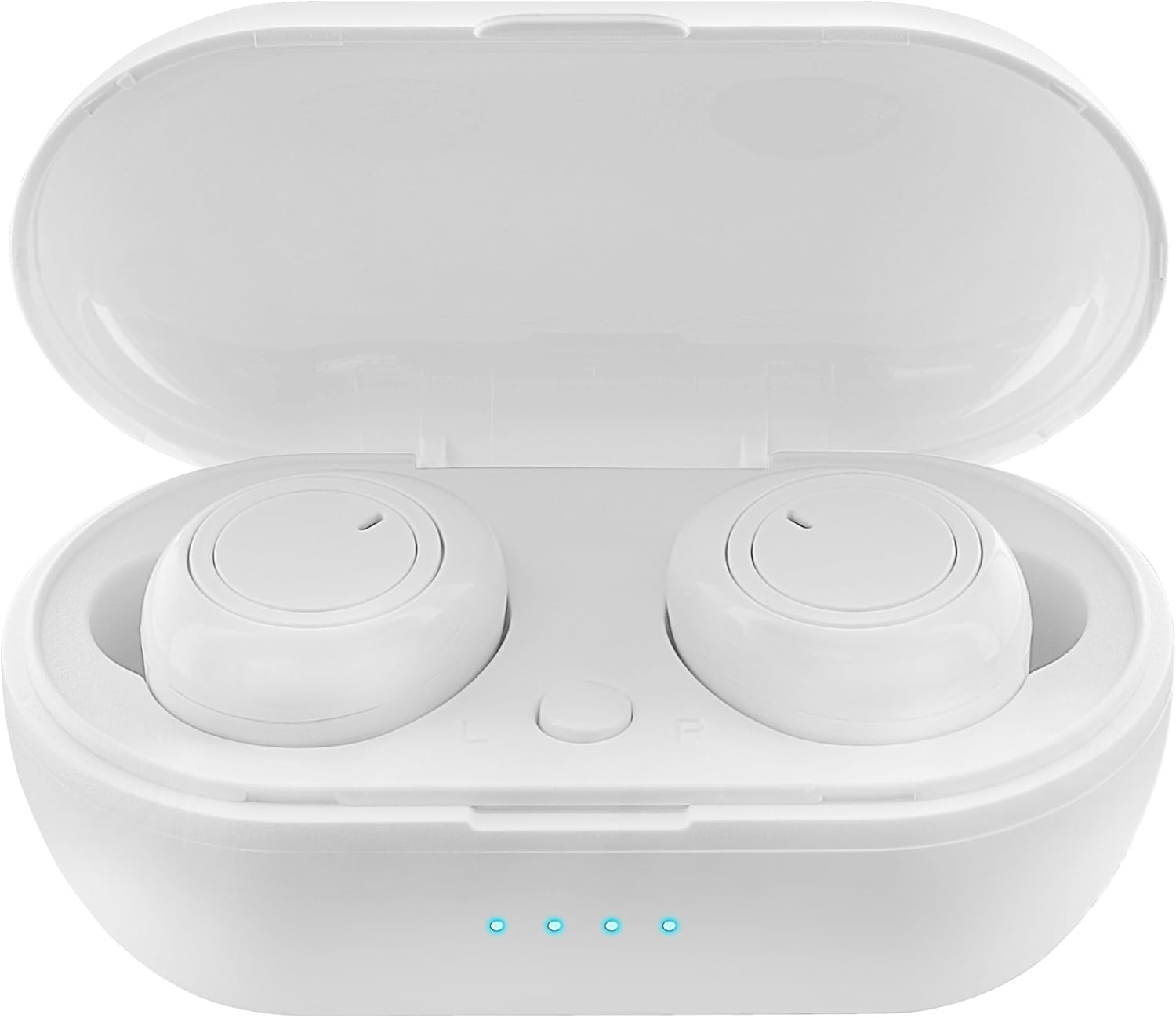
Figure 1: Earbuds in Charging Case with LED Indicators. The charging case features a transparent lid and three blue LED lights indicating battery status.

Figure 2: Individual Earbuds (Front View). Each earbud features a circular touch control area for easy operation.

Figure 3: Individual Earbuds (Side View). The ergonomic design ensures a comfortable and secure fit in the ear.
Opstelling
1. Laai die oordopjes en houer
- Plaas die oorfone in die laaikas. Maak seker dat hulle korrek geplaas is.
- Koppel die USB-laaikabel aan die laaipoort op die kas en aan 'n kragbron (bv. USB-muuradapter, rekenaar se USB-poort).
- The LED display on the charging case will indicate the charging status. A full charge is indicated when all lights are solid.
- Allow approximately 1-2 hours for a full charge of both earbuds and the case.
2. Koppeling met jou toestel
- Maak die laaikas oop. Die oorfone sal outomaties in paringsmodus gaan (aangedui deur flikkerende liggies op die oorfone).
- Gaan na die Bluetooth-instellings op jou slimfoon of Bluetooth-geaktiveerde toestel.
- Soek vir new devices and select "SENTRY Earbuds" (or similar name) from the list.
- Once connected, the earbud lights will stop flashing, and you will hear a confirmation tone.
- Die oorfone sal outomaties weer aan die laaste gekoppelde toestel koppel wanneer dit uit die houer gehaal word, indien Bluetooth op die toestel geaktiveer is.
Bedryfsinstruksies
Your SENTRY Ultra-Light Bluetooth Earbuds feature intelligent touch controls for easy management of your audio and calls.
| Funksie | Aksie |
|---|---|
| Speel/Pause Musiek | Enkele tik op enige van die oordopjes |
| Volgende Snit | Dubbeltik op die regter-oorfone |
| Vorige Snit | Dubbeltik op die linker oordopje |
| Beantwoord/beëindig oproep | Enkele tik op enige van die oordopjes |
| Verwerp oproep | Druk en hou enige oordopjes vir 2 sekondes |
| Aktiveer stemassistent | Drie keer tik op enige oordopjes |
| Volume op | Press and hold Right earbud |
| Volume af | Press and hold Left earbud |
Onderhoud
- Skoonmaak: Gebruik 'n sagte, droë, pluisvrye lap om die oorfone en laaikas skoon te maak. Moenie harde chemikalieë of skuurmiddels gebruik nie.
- Berging: Wanneer dit nie gebruik word nie, bêre die oorfone in hul laaikassie om hulle te beskerm en gelaai te hou. Bêre op 'n koel, droë plek weg van direkte sonlig en uiterste temperature.
- Batterysorg: Om die batterylewe te verleng, vermy om die oorfone en laaikas gereeld heeltemal te ontlaai. Laai hulle gereeld, selfs al word hulle nie voortdurend gebruik nie.
- Waterweerstand: Hierdie oorfone is nie waterbestand nie. Vermy blootstelling aan water, sweet of hoë humiditeit.
Probleemoplossing
- Oordopjes koppel nie: Maak seker dat beide oorfone gelaai is. Plaas hulle terug in die houer, maak die deksel toe en maak dit dan weer oop om weer in paringsmodus te gaan. Gaan jou toestel se Bluetooth-instellings na en probeer om weer te koppel.
- Slegs een oordoppie werk: Try placing both earbuds back in the charging case, closing the lid, and then taking them out again. This often re-syncs them.
- Geen klank nie: Kontroleer die volumevlak op beide jou toestel en die oorfone. Maak seker dat die oorfone behoorlik aan jou toestel gekoppel is.
- Laai kwessies: Ensure the charging cable is securely connected to both the case and the power source. Try a different USB port or charger. Clean the charging contacts on the earbuds and inside the case.
- Swak klank kwaliteit: Ensure the earbuds are properly seated in your ears. Try cleaning any debris from the earbud grilles.
Spesifikasies
| Kenmerk | Detail |
|---|---|
| Model Naam | 5002-407 |
| Verbindingstegnologie | Draadloos (Bluetooth) |
| Draadlose kommunikasietegnologie | Bluetooth |
| Ouderdomsreeks (beskrywing) | Volwasse |
| Laai tyd | Approximately 1-2 Hours (for earbuds and case) |
| Versoenbare toestelle | Smartphones, Apple Devices |
| Tipe beheer | Mediabeheer |
| Kabelkenmerk | Sonder kabel |
| Waterweerstandvlak | Nie waterbestand nie |
| Frekwensiereeks | 20Hz - 20kHz |
| Beheer metode | Raak |
| Batterylewe | Tot 12 uur (met laaikas) |
| Tipe oudiobestuurder | Dinamiese bestuurder |
| Draagtas Kleur | Wit |
| Oorstukvorm | Gerond |
| Handelsmerk | SENTRY |
| Kleur | Wit |
| Oorplasing | In Oor |
| Vormfaktor | In Oor |
| Geraasbeheer | Geen |
Waarborg en Ondersteuning
SENTRY products are designed for reliability and performance. For information regarding warranty coverage and customer support, please refer to the warranty card included with your product or visit the official SENTRY webwerf. U kan ook die SENTRY Store on Amazon vir bykomende produkinligting en ondersteuningsbronne.