
Inleiding
This manual provides essential instructions for the proper setup, operation, and maintenance of your 3nStar PTA0157-432 All-in-One POS System. Please read this manual thoroughly before using the device to ensure optimal performance and longevity.
Veiligheidsinligting
Observe the following safety precautions to prevent damage to the device or injury to yourself and others:
- Moenie die toestel aan water of oormatige vog blootstel nie.
- Vermy om die toestel naby hittebronne of in direkte sonlig te plaas.
- Gebruik slegs die meegeleverde WS-adapter.
- Moenie probeer om die toestel self oop te maak of te herstel nie. Verwys alle diens na gekwalifiseerde personeel.
- Verseker behoorlike ventilasie rondom die toestel tydens werking.
Pakketinhoud
Verifieer dat alle items in die pakket teenwoordig is:
- 3nStar PTA0157-432 All-in-One POS System
- AC Adapter
- Gebruikershandleiding (hierdie dokument)
Produk verbyview
The 3nStar PTA0157-432 is a 15.6-inch All-in-One Point of Sale system designed for various business environments. It features a 10-point capacitive touchscreen, runs on Android 11, and is powered by a Quad-Core processor with 4GB RAM and 32GB storage. Integrated Wi-Fi and Bluetooth connectivity are also included.

Figuur 1: Voorkant view of the 3nStar PTA0157-432 All-in-One POS System, showcasing the 15.6-inch display and integrated stand.

Figure 2: A user interacting with the 10-point capacitive touchscreen of the POS system, demonstrating its touch responsiveness.

Figuur 3: Agter view of the 3nStar POS System, showing the ventilation slots and the sturdy integrated stand.
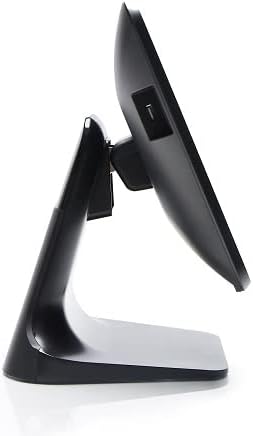
Figuur 4: Syprofile of the 3nStar POS System, highlighting its slim design and adjustable screen angle.
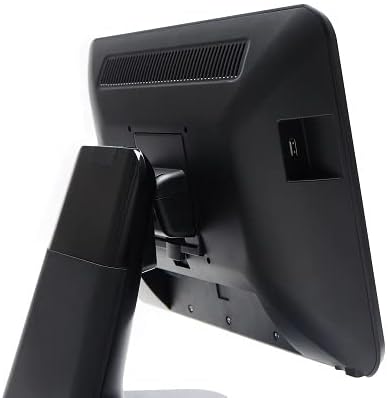
Figuur 5: Agterkant view of the 3nStar POS System, illustrating the location of various connectivity ports for peripherals.
Opstelling
- Pak die stelsel uit: Carefully remove the POS system and all accessories from the packaging.
- Position the System: Place the POS system on a stable, flat surface, ensuring adequate ventilation around the device.
- Koppel krag: Connect the AC adapter to the power input port on the back of the POS system, then plug the adapter into a standard electrical outlet.
- Aanvanklike krag aan: Press the power button, usually located on the side or back of the display. The system will boot up to the Android 11 operating system.
- Aanvanklike konfigurasie: Follow the on-screen prompts to complete the initial Android setup, including language selection, Wi-Fi connection, and Google account setup (optional).
- Koppel randapparatuur: Connect any necessary peripherals such as barcode scanners, receipt printers, or cash drawers to the available USB or other designated ports. Refer to the peripheral's manual for specific connection instructions.
Bedryfsinstruksies
The 3nStar PTA0157-432 operates on Android 11, providing a familiar and intuitive user experience.
Basiese navigasie
- Raakskerm: Use your fingers to tap, swipe, pinch, and zoom on the 15.6-inch capacitive display.
- Tuisskerm: Access your installed applications and widgets from the main home screen.
- App-laai: Swipe up from the bottom of the screen or tap the app drawer icon to view alle geïnstalleerde toepassings.
- Kennisgewings: Vee van die bokant van die skerm af om toegang tot kennisgewings en kitsinstellings te verkry.
Koppel tans aan Wi-Fi
- Gaan na Instellings > Netwerk en internet > Wi-Fi.
- Wi-Fi wissel On.
- Kies die verlangde netwerk uit die lys en voer die wagwoord in indien gevra.
Koppel Bluetooth-toestelle
- Gaan na Instellings > Gekoppelde toestelle > Verbindingsvoorkeure > Bluetooth.
- Wissel Bluetooth On.
- Maak seker dat jou Bluetooth-toestel in paringsmodus is.
- Kies die toestel uit die lys om te koppel.
Using POS Software
The system is designed to run various Android-compatible Point of Sale applications. Install your preferred POS software from the Google Play Store or other trusted sources. Refer to your specific POS software's documentation for detailed usage instructions.
Onderhoud
Maak die toestel skoon
- Skerm: Gebruik 'n sagte, pluisvrye lap effens dampened with water or a screen cleaner specifically designed for electronic displays. Do not spray cleaner directly onto the screen.
- Liggaam: Vee die buite-oppervlaktes af met 'n sagte, droë lap. Vermy skuurmiddels of oplosmiddels.
- Ventilasie: Ensure ventilation slots are free from dust and debris to prevent overheating. Use compressed air if necessary.
Sagteware-opdaterings
Regularly check for and install system updates for Android 11 to ensure optimal performance, security, and compatibility. Go to Instellings > Stelsel > Stelselopdatering.
Bergingsbestuur
Monitor the 32GB internal storage to ensure sufficient space for applications and data. Delete unnecessary files or uninstall unused applications to free up space. Go to Instellings > Berging.
Probleemoplossing
| Probleem | Moontlike oorsaak | Oplossing |
|---|---|---|
| Toestel skakel nie aan nie. | Power cable not connected properly; AC adapter malfunction. | Ensure the AC adapter is securely connected to the device and a working power outlet. Test the outlet with another device. |
| Die raakskerm reageer nie. | Software glitch; screen dirty; physical damage. | Restart the device. Clean the screen with a soft cloth. If the issue persists, contact support. |
| Wi-Fi-verbindingsprobleme. | Verkeerde wagwoord; buite bereik; routerprobleem. | Verify Wi-Fi password. Ensure the device is within range of the router. Restart the router and the POS system. |
| Peripheral (e.g., printer) not detected. | Incorrect connection; driver issue; peripheral not powered on. | Check physical connections. Ensure the peripheral is powered on. Install necessary drivers or apps for the peripheral. Restart the POS system. |
Spesifikasies
| Kenmerk | Detail |
|---|---|
| Modelnommer | PTA0157-432 |
| Bedryfstelsel | Android 11 |
| Skerm grootte | 15.6 duim |
| Skermresolusie | 1920 x 1080 piksels |
| Raakskerm | 10-point Capacitive |
| Verwerker | Quad-Core (Rockchip 3568, 2 GHz) |
| RAM | 4 GB LPDDR4 |
| Berging | 32GB SSD (Flash Memory) |
| Grafika | Geïntegreerde grafika |
| Konnektiwiteit | Wi-Fi, Bluetooth |
| Produkafmetings (LxBxH) | 10 x 13 x 16 duim |
| Item gewig | 11 pond |
| Kleur | Swart |
Waarborg en Ondersteuning
For warranty information, technical support, or service inquiries, please refer to the official 3nStar webwebwerf of kontak u gemagtigde herverkoper. Bewaar u aankoopbewys as bewys van aankoop vir waarborgeise.
Online resources and frequently asked questions may be available on the manufacturer's support page: 3nStar Support