
CAMECHO CAMA3041A3MI2
CAMECHO Android 13 Car Radio (Model CAMA3041A3MI2) User Manual
Omvattende instruksies vir installasie, werking en onderhoud.
Inleiding
This manual provides detailed instructions for the installation, operation, and maintenance of your CAMECHO Android 13 Car Radio. Please read this manual thoroughly before using the product to ensure proper functionality and safety. This unit features a 9-inch capacitive touchscreen, Android 13 operating system, 2GB RAM, 64GB ROM, built-in Wireless Carplay & Android Auto, GPS, WiFi, Bluetooth, FM/RDS radio, and supports steering wheel control and a rear view kamera.
Voertuigversoenbaarheid
This CAMECHO car radio is designed for specific Volkswagen, Skoda, and Seat models. Please refer to the compatibility chart below to ensure your vehicle is supported. The image also illustrates the visual transformation from a standard car console to one with the CAMECHO unit installed.

Prent: Compatibility chart for various Volkswagen, Skoda, and Seat models, including Golf, Polo, Passat, Octavia, and Leon. The image also displays a comparison of the car console before and after the CAMECHO car radio installation.
Versoenbare modelle:
Vir Volkswagen
- Amarok (2010-2013)
- Caddy (2003-2013)
- Golf V (2003-2008)
- Golf VI (2008-2013)
- Golf Plus (2003-2013)
- Golf Cabriolet (2011-2013)
- Golf Wagon (2010-2013)
- Golf GTI (2010-2012)
- Golf R (2010-2013)
- Golf Estate (2009-2012)
- Passat (2005-2013)
- Passat Estate (2005-2013)
- Passat Sedan (2006-2013)
- Passat Wagon (2007-2013)
- Passat Alltrack (2012-2013)
- Passat CC (2008-2013)
- Jetta (2005, 2007-2013)
- Jetta GLI (2006-2013)
- Touran (2003-2013)
- Tiguan (2007-2013)
- Sharan (2010-2013)
- Scirocco (2008-2013)
- EOS (2006-2013)
- WT5 Transporter (2010-2014)
- Polo (2009-2013)
- Polo Sedan (2012-2013)
- Polo V 6R (2009-2013)
- New Beetle 2 (2011-2013)
- Rabbit (2007-2013)
- T5 Transporter (2010-2013)
- WT5 Caravelle 2010 Multivan T5 (2010-2013)
- Beetle (2011-2013)
For Skoda
- Octavia Limousine (2004-2006)
- Octavia II III (to 2010)
- Octavia Combi (2004-2006)
- Octavia (2009-2012)
- Fabia Limousine (2004-2008)
- Fabia (2011-2013)
- Roomster (2006-2010)
- Patrick (2004-2008)
- Superb (2008-2013)
- Yeti (2009-2015)
For Seat
- Altea (2004, 2005, 2007-2012)
- Altea XL (2007-2013)
- Leon (2006-2013)
- Toledo (2004-2015)
- Alhambra (2010-2016)
Sleutel produk kenmerke
- Android 13-stelsel: Equipped with the latest Android 13 operating system, 4-core processor, 2GB RAM, and 64GB ROM for fast and smooth performance.
- 9-duim kapasitiewe aanraakskerm: High-resolution 1024x600 display for clear visuals and responsive touch control.
- Draadlose Carplay en Android Auto: Seamlessly integrate your smartphone for navigation, music, messages, and voice control (Siri/Google Assistant) via Bluetooth and WiFi.
- GPS-navigasie: Supports offline maps (e.g., Here Wego) and online navigation via WiFi connection, allowing access to Play Store apps like YouTube and Facebook.
- Agter View Ondersteuning vir kamera: Includes an AHD rear camera with waterproof, 170° wide-angle, and night vision capabilities. Automatically displays the camera feed when reversing.
- Stuurwielbeheer (SWC): Compatible with original steering wheel buttons for convenient and safe operation of radio functions.
- Bluetooth-verbinding: Built-in Bluetooth with an external microphone for hands-free calling, music streaming, and phonebook synchronization.
- FM/RDS-radio: High-quality FM/RDS radio tuner with 18 preset channels.
- HiFi Audio Effect: Features an equalizer for customized audio output.
- Gesplete skermfunksie: Allows running two applications simultaneously on the screen.
Opstelling en installasie
Installation of the CAMECHO Android 13 Car Radio requires technical knowledge and experience with car electronics. It is highly recommended to have the unit installed by a qualified professional to ensure correct wiring and avoid damage to your vehicle or the product.
Algemene installasie stappe:
- Voorbereiding: Disconnect the vehicle's battery before starting any electrical work.
- Verwyder ou eenheid: Carefully remove your existing car radio and trim panels.
- Koppel bedrading: Connect the provided power cables, RCA cables, USB cables, GPS antenna, and camera input to the corresponding ports on the new unit and your vehicle's wiring harness. The included Canbus decoder ensures compatibility with your vehicle's systems, including steering wheel controls.
- Installeer agterkamera (opsioneel): If installing the rear camera, route the camera cable from the back of the vehicle to the head unit and connect it to the camera input.
- Monteer Eenheid: Securely mount the CAMECHO car radio into the dashboard opening.
- Herkoppel battery: Koppel die voertuig se battery weer aan.
- Initial Power On & Test: Turn on the ignition and power on the unit. Test all functions, including audio, touchscreen, GPS, Bluetooth, and camera.
For detailed wiring diagrams and specific vehicle instructions, please consult a professional installer or refer to vehicle-specific resources.
Bedryfsinstruksies
1. Wireless Carplay & Android Auto
Connect your smartphone to the car radio via Bluetooth and WiFi to activate Wireless Carplay or Android Auto. This allows safe access to your phone's navigation, music, messages, and other features while driving. Voice control (Siri for Apple Carplay, Google Assistant for Android Auto) is supported for hands-free operation.

Prent: Visual representation of Apple Carplay and Android Auto interfaces, demonstrating their appearance and functionality on the car radio display.
2. GPS Navigation & WiFi
The unit supports GPS navigation with pre-installed offline maps (e.g., Here Wego). Connect to a WiFi network (e.g., via your phone's hotspot) to download online maps from the Play Store, browse the internet, and access various applications like YouTube and Facebook.

Prent: The car radio screen showing GPS navigation in action, along with icons for various online applications accessible via WiFi.
3. Bluetooth Hands-Free & Music
Pair your smartphone via Bluetooth for hands-free calling and audio streaming. The external microphone ensures clear call quality. You can access your phonebook and stream music directly to the car radio.

Prent: A composite image showing the Bluetooth calling interface, music streaming, FM/RDS radio tuning, and the HiFi equalizer settings on the car radio.
4. FM/RDS Radio
Tune into your favorite FM radio stations. The RDS (Radio Data System) feature provides additional information like station name and song title where available. You can save up to 18 preset channels.
5. Stuurwielbeheer (SWC)
The unit supports your vehicle's original steering wheel controls. After installation, you may need to configure the SWC settings in the radio's menu to map the buttons correctly. This allows you to control volume, switch tracks, answer calls, and more without taking your hands off the wheel.

Prent: The car radio interface displaying options for configuring steering wheel controls and a view of the rear camera feed with parking guidelines.
6. Agter View Kamera
When the vehicle is shifted into reverse gear, the car radio automatically displays the feed from the included AHD rear camera. The camera features a waterproof design, 170° wide-angle view, and night vision for enhanced safety during parking maneuvers.
7. HiFi Audio Effect
Utilize the built-in equalizer to customize your audio experience. Adjust bass, treble, and other sound parameters to achieve your preferred sound profile.
8. Split Screen Funksie
The split screen feature allows you to run two applications simultaneously on the 9-inch display. For example, you can have navigation open on one side and music playback on the other.

Prent: A visual representation of the split screen function, demonstrating how the car radio display can be divided to show two different applications simultaneously.
Onderhoud
- Skerm skoonmaak: Gebruik 'n sagte, pluisvrye lap effens dampened with water or a screen cleaner specifically designed for electronics. Avoid harsh chemicals or abrasive materials.
- Algemene skoonmaak: Keep the unit free from dust and debris. Use a soft, dry cloth for general cleaning.
- Sagteware-opdaterings: Kontroleer gereeld vir sagteware-opdaterings deur die eenheid se instellingskieslys of die vervaardiger se webwebwerf om optimale werkverrigting en toegang tot nuwe funksies te verseker.
- Vermy uiterste temperature: Do not expose the unit to extreme temperatures or direct sunlight for prolonged periods, as this can affect its lifespan and performance.
Probleemoplossing
If you encounter issues with your CAMECHO car radio, please refer to the following common troubleshooting steps:
- Geen krag:
- Kontroleer alle kragverbindings en sekerings.
- Maak seker dat die voertuig se battery behoorlik gekoppel en gelaai is.
- Geen klank:
- Verifieer luidsprekerverbindings.
- Check volume levels and mute settings.
- Maak seker dat die korrekte klankbron gekies is.
- Raakskerm reageer nie:
- Restart the unit by turning off the vehicle's ignition and restarting.
- Perform a factory reset if the issue persists (note: this will erase all custom settings).
- GPS werk nie:
- Maak seker dat die GPS-antenna behoorlik gekoppel is en 'n duidelike view van die lug.
- Check GPS settings in the unit's menu.
- Bluetooth-verbindingsprobleme:
- Maak seker dat Bluetooth op beide die motorradio en jou slimfoon geaktiveer is.
- Delete previous pairings and try pairing again.
- Ensure your phone is within range.
- Agterkamera vertoon nie:
- Check the camera's power and video connections.
- Ensure the reverse gear signal wire is correctly connected.
Indien hierdie stappe nie die probleem oplos nie, kontak asseblief kliëntediens vir verdere hulp.
Spesifikasies
| Kenmerk | Detail |
|---|---|
| Modelnommer | CAMA3041A3MI2 |
| Bedryfstelsel | Android 13 |
| RAM | 2 GB |
| ROM | 64 GB |
| Skerm grootte | 9 duim |
| Skermresolusie | 1024x600 |
| Verbindingstegnologie | Bluetooth, WiFi |
| Tipe beheerder | Handbeheer |
| Spesiale kenmerke | Built-in Bluetooth, Lane assistance |
| Versoenbare toestelle | Slimfoon |
| Connector Tipe | RCA |
| Klankuitvoermodus | Stereo |
| Aantal kanale | 4 |
| Uitset krag | 180 Watt |
| Pakket afmetings | 28.1 x 21.1 x 10.9 cm |
| Item gewig | 1.25 kg |
Pakketinhoud
The following items are included in your CAMECHO Android 13 Car Radio package:
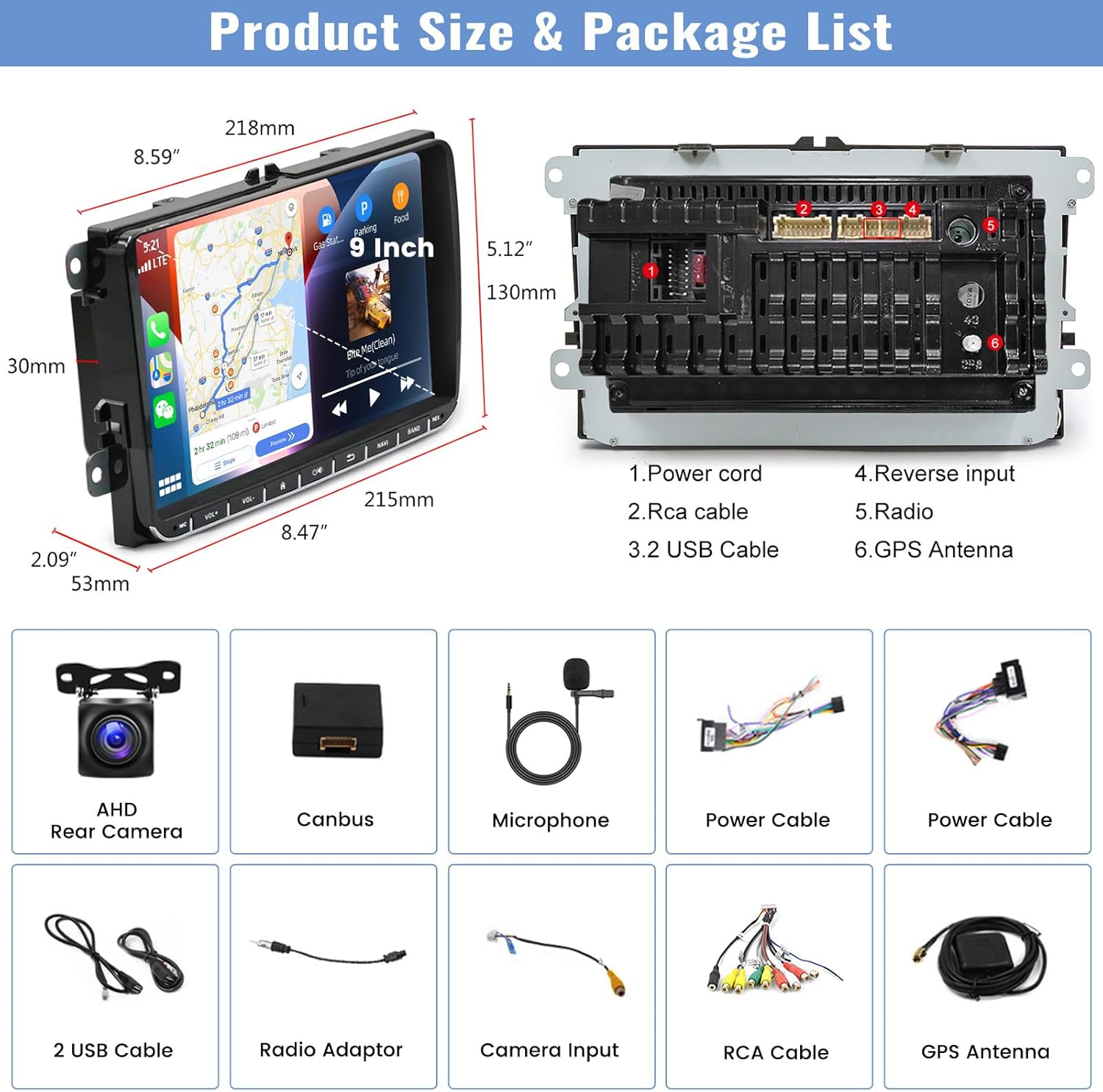
Prent: An illustration detailing the dimensions of the 9-inch car radio unit and a comprehensive list of all accessories included in the package.
- CAMECHO 9-inch Android 13 Car Radio Unit
- AHD Rear Camera
- Canbus-dekodeerder
- Eksterne mikrofoon
- Power Cable (x2, likely different types for compatibility)
- 2 USB kabels
- Radio Adaptor
- Kamera-invoerkabel
- RCA Cable Set
- GPS-antenne
Waarborg en Ondersteuning
Your CAMECHO Android 13 Car Radio comes with a 1 jaar waarborg vanaf die aankoopdatum. Hierdie waarborg dek vervaardigingsdefekte en wanfunksies onder normale gebruik.
For warranty claims, technical support, or any questions regarding the product, please contact CAMECHO customer service through the retailer where you purchased the product or visit the official CAMECHO website for contact information. Please have your model number (CAMA3041A3MI2) and proof of purchase ready when contacting support.