
1. Produk verbyview
The VIMIN VM-S250501M is a 2.5G Web Managed Ethernet Switch designed for high-performance network environments. It features five 2.5 Gigabit RJ45 ports and one 10 Gigabit SFP+ port, providing flexible connectivity options for various devices. This switch supports multiple speeds (100Mbps, 1Gbps, 2.5Gbps) with intelligent auto-negotiation, making it suitable for 2.5G NAS, gaming PCs, WiFi 6 routers, and 4K video streaming. It incorporates essential Layer 2 management features such as Link Aggregation, IGMP Snooping, Quality of Service (QoS), and VLAN support, all accessible through a user-friendly web-based graphical interface.
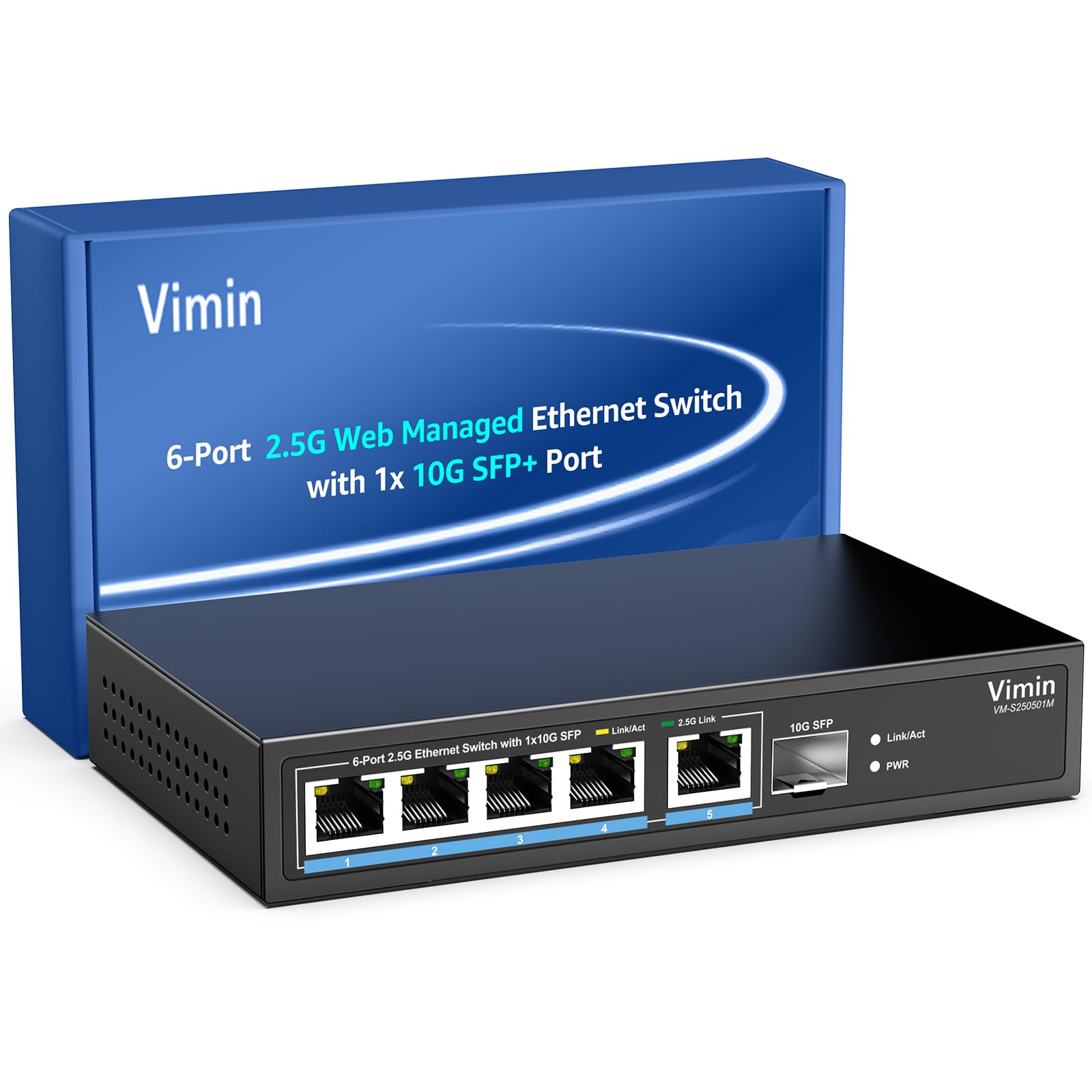
Figuur 1: Voorkant view of the VIMIN VM-S250501M switch, showing the 2.5G RJ45 ports, 10G SFP+ port, and LED indicators.

Figure 2: Illustration highlighting the durability, high compatibility, and versatility of the switch.
2. Opstelinstruksies
2.1 Pakketinhoud
Verifieer dat die volgende items in jou pakket ingesluit is:
- 1 x VIMIN VM-S250501M 2.5G Web Bestuurde Ethernet-skakelaar
- 1 x kragadapter
- 1 x Gebruikershandleiding

Figure 3: The switch, power cable, and user manual are included in the package.
2.2 Fisiese installasie
The switch can be placed on a desktop or mounted on a wall. Ensure proper ventilation around the device.
- Werkskermplasing: Plaas die skakelaar op 'n plat, stabiele oppervlak.
- Muurmontering: The switch features two mounting holes at the base for wall installation. Use appropriate screws (not included) to secure the device to a wall.
2.3 Aansluitkrag
- Connect the power adapter to the DC 12V/1A power port on the rear panel of the switch.
- Steek die ander kant van die kragadapter in 'n standaard elektriese aansluiting.
- The Power LED indicator on the front panel will illuminate when the switch is powered on.
2.4 Netwerktoestelle koppel
Connect your network devices (e.g., computers, NAS, routers, access points) to the switch using appropriate Ethernet cables.
- RJ45-poorte (1-5): Use Category 5e (Cat5e) or Category 6 (Cat6) UTP cables for optimal performance with 1G/2.5G connections. For 100Mbps, Cat5 cables are sufficient.
- SFP+ Port (6): Insert a compatible 1G/2.5G/10G SFP+ optical fiber module (not included) into the SFP+ slot, then connect a fiber optic cable.

Figure 4: Illustrates connecting devices to the switch and recommended cable types for different speeds.
3. Bediening van die skakelaar
3.1 LED-aanwysers
Die LED's op die voorpaneel verskaf intydse statusinligting:
- 5*2.5G Ports (RJ45):
- Yellow: Indicates a 10/100/1000Mbps link or activity.
- Green: Indicates a 2.5Gbps link.
- 1*10G SFP (SFP+ Port):
- Green: Indicates a 1G/2.5G/10G link.
- Flashing: Indicates data transmission.
- PWR (krag):
- Aan: Die toestel is aangeskakel.
- Af: Die toestel is afgeskakel.

Figure 5: Detailed explanation of the LED indicators on the switch.
3.2 Toegang tot die Web Bestuurskoppelvlak
The switch can be configured and managed via a web-based graphical user interface (GUI).
- Ensure your computer is connected to one of the switch's RJ45 ports.
- Maak oop a web blaaier (bv. Chrome, Firefox, Edge).
- In the address bar, enter the default IP address: 192.168.1.199.
- Druk Enter. 'n Aanmeldbladsy sal verskyn.
- Enter the default username and password:
- Gebruikersnaam: admin
- Wagwoord: admin
- Click "Log In" to access the management interface.
Dit word aanbeveel om die verstekwagwoord na die aanvanklike aanmelding vir sekuriteitsdoeleindes te verander.

Figure 6: Screenshot of the web management interface login page.
3.3 Basic Management Features
Die web interface provides access to various Layer 2 management functions:
- Skakelaggregasie: Combine multiple physical links into a single logical link for increased bandwidth and redundancy. Supports static link aggregation.
- Jumbo raam: Support for larger Ethernet frames (up to 12KB) to improve network efficiency for large data transfers.
- VLAN (Virtuele Plaaslike Area Netwerk): Segment your network into smaller, isolated broadcast domains. Supports up to 32 VLANs (on 4K VLAN IDs), MTU/Port/802.1Q VLAN.
- Gehalte van diens (QoS): Prioritize network traffic to ensure critical applications receive sufficient bandwidth. Supports port-based, 802.1p, and DSCP priority, with 4 priority queues, rate limiting, and storm control.
- IGMP Snuffel: Optimize multicast traffic delivery, preventing unnecessary flooding of multicast packets to all ports.
- Poortspieëling: Copy traffic from one or more source ports to a destination port for network monitoring and analysis.
- Kabeltoets: A diagnostic tool to check the status and length of connected Ethernet cables.

Figuur 7: oorview of the basic management features available through the web koppelvlak.
4. Onderhoud
4.1 Algemene sorg
- Keep the switch in a cool, dry environment, away from direct sunlight, heat sources, and moisture.
- Verseker voldoende lugvloei rondom die toestel om oorverhitting te voorkom.
- Clean the exterior of the switch with a soft, dry cloth. Do not use liquid cleaners or aerosols.
4.2 Firmware-opdaterings
Periodically check the VIMIN official website for firmware updates. Firmware updates can provide new features, performance improvements, and security enhancements. Follow the instructions provided with the firmware update package carefully.
4.3 Herstel van die toestel
If the switch is not functioning correctly or you forget the login credentials, you can reset it to factory default settings. Locate the "Reset" button on the rear panel of the switch. With the switch powered on, use a paperclip or a similar pointed object to press and hold the Reset button for approximately 5-10 seconds until the LEDs flash, then release. The switch will restart with factory default settings.
5. Probleemoplossing
5.1 Geen krag
- Maak seker dat die kragadapter stewig aan beide die skakelaar en 'n werkende elektriese aansluiting gekoppel is.
- Verifieer dat die kragaansluiting funksioneel is deur 'n ander toestel in te prop.
- Kontroleer die kragadapter vir enige sigbare skade.
5.2 No Link/Connectivity
- Kontroleer die Ethernet-kabels wat aan die skakelaar en jou toestelle gekoppel is. Maak seker dat hulle stewig ingeprop en nie beskadig is nie.
- Verify the Link/Act LEDs on the switch for the connected ports. If they are off, there might be a cable issue or the connected device is not powered on/configured correctly.
- Try using a different Ethernet cable or port.
- Maak seker dat die gekoppelde toestel se netwerkadapter geaktiveer en korrek gekonfigureer is.
5.3 Stadige netwerkspoed
- Ensure you are using Cat5e or Cat6 cables for 1G/2.5G connections. Lower category cables may limit speed.
- Check the Link/Act LED color for the connected port. A yellow LED on a 2.5G port indicates a 1G or lower connection.
- Verify that your connected devices (e.g., network card, NAS) support 2.5G or 10G speeds.
- Check for network congestion or high traffic on your network.
- Consider updating the switch firmware.
5.4 Kan nie toegang kry nie Web Koppelvlak
- Ensure your computer is on the same network segment as the switch. The default IP is 192.168.1.199, so your computer's IP should be in the 192.168.1.x range (e.g., 192.168.1.100) with a subnet mask of 255.255.255.0.
- Verify that the Ethernet cable is properly connected and the Link/Act LED is on.
- Maak jou blaaier se kasgeheue skoon of probeer 'n ander blaaier.
- If you have changed the switch's IP address and forgotten it, or forgotten the login password, perform a factory reset (refer to Section 4.3).
6. Spesifikasies
| Model | VM-S250501M |
| Standaarde | IEEE 802.3/802.3u/802.3ab/802.3bz/802.3x/802.3cb |
| Hawens | 5 x 10/100/1000/2500 Mbps RJ45, 1 x 10G SFP+ slot |
| Skakelkapasiteit | 45 Gbps |
| MAC-adrestabel | 4K |
| Pakkie-aanstuurkoers | 33.48 Mpps |
| Jumbo-raam | 12 KB |
| Pakkiebuffer | 8 Mbit |
| Kragtoevoer | 12V/1A GS |
| Network Cable (Max 100m) |
|
| Montagemetode | Desktop and Wall Mount |
| Bedryfstemperatuur | 0℃ ~ 45℃ (32℉ ~ 113℉) |
| Bergingstemperatuur | -40℃ ~ 70℃ (-40℉ ~ 158℉) |
| Bedryfshumiditeit | 10% ~ 90% nie-kondenserend |
| Berging Humiditeit | 5% ~ 95% nie-kondenserend |
| Gewig | 380 g |
| Afmetings (L x B x H) | 160 x 95 x 30 mm (6.3 x 3.7 x 1.2 duim) |
| Behuisingsmateriaal | Metaal |
| Kleur | Swart |
7. Waarborg en Ondersteuning
7.1 Produkwaarborg
The VIMIN VM-S250501M 2.5G Web Managed Ethernet Switch comes with a een jaar waarborg vanaf die aankoopdatum. Hierdie waarborg dek vervaardigingsdefekte en verseker dat die produk aan die gespesifiseerde prestasiestandaarde voldoen onder normale gebruik. Bewaar asseblief u bewys van aankoop vir waarborgeise.
7.2 Tegniese Ondersteuning
VIMIN provides leeftyd tegniese ondersteuning for this product. If you encounter any issues or have questions regarding the setup, operation, or troubleshooting of your switch, please contact our support team.
Kontakinligting:
- E-pos: support@vimintech.com
Figure 8: VIMIN support information, including email contact.