
1. Inleiding
The INNOCN 40C1R is a 40-inch Ultrawide WQHD (3440 x 1440p) monitor designed to enhance your computing and gaming experience. Featuring a 144Hz refresh rate and AMD FreeSync Premium, it delivers smooth visuals. The monitor boasts HDR400 support, 95% DCI-P3 color gamut, and 500 Nits IPS display for vibrant and accurate colors. Its versatile connectivity options and ergonomic design make it suitable for various applications, from professional tasks to immersive gaming.

Image 1: The INNOCN 40C1R Ultrawide Monitor set up on a desk, showcasing its immersive display during a gaming session.
2. Pakketinhoud
Maak seker dat alle items in die pakket teenwoordig is:
- INNOCN 40C1R Monitor
- Basis
- Power Cable (US Power Adapter)
- USB B-kabel
- DP Cable (DisplayPort)
- HDMI kabel
- USB C-kabel
- Gebruikershandleiding
- Kleurkalibrasieverslag

Image 2: A visual representation of the INNOCN 40C1R monitor and its accompanying accessories, including various cables and the stand components.
3. Opstelling en samestelling
Volg hierdie stappe om jou monitor te monteer en op te stel:
- Heg die staanderbasis aan die staandernek vas.
- Connect the assembled stand to the back of the monitor. The stand is designed for easy attachment and secure locking.
- For alternative mounting, the monitor supports VESA 100x100mm mounting standards.

Image 3: This diagram highlights the monitor's adjustable stand, showing its capabilities for height adjustment (120mm/4.72"), swivel (±30°), tilt (5°–15°), and VESA 100x100mm compatibility.
4. Konnektiwiteit
The INNOCN 40C1R offers a variety of ports for broad compatibility:
- 1 x DisplayPort (DP 1.4): Supports up to 144Hz refresh rate.
- 1 x USB Tipe-C: Delivers powerful connectivity (up to 90W power delivery) and supports video input (Max 60Hz).
- 2 x HDMI (HDMI 2.0): Supports up to 100Hz refresh rate.
- 1 x 3.5MM Audio Jack: Vir eksterne oudiotoestelle.
These ports allow direct connection to various devices such as laptops, Macs, phones, tablets, and gaming consoles (e.g., Switch, PS5/4/3, Xbox Series).
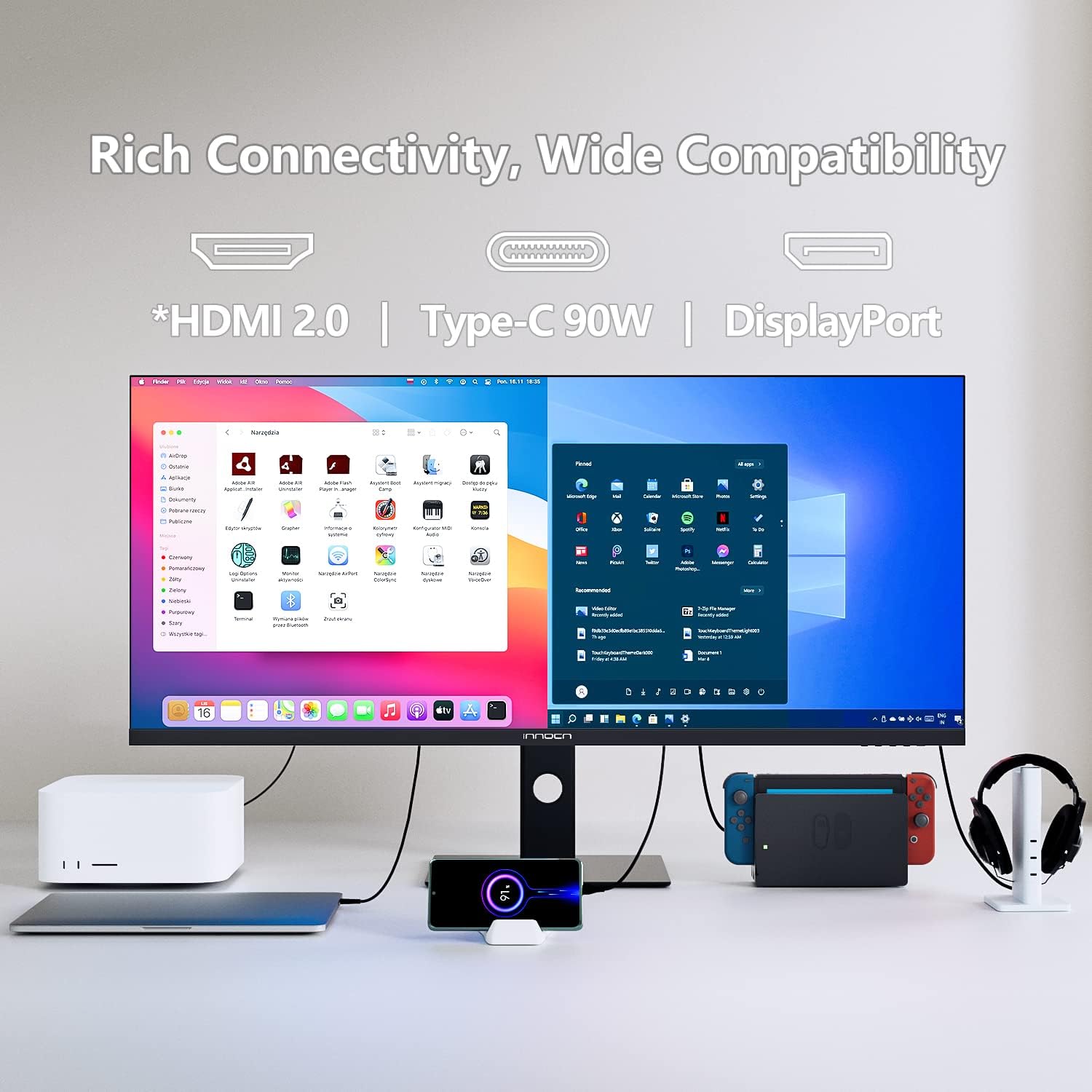
Image 4: The back of the monitor displaying the array of input ports, including USB-C, HDMI, DisplayPort, and an audio jack, highlighting its extensive compatibility.
5. Bedien die monitor
Skermskerm- (OSD) kontroles
The monitor's controls are located on the bottom right bezel. Pressing the home button once will bring up a legend for the buttons. Pressing it a second time will bring up the main OSD menu, allowing you to tailor various settings.
Prent-in-prent (PIP) en Prent-vir-prent (PBP)
The 40C1R supports PBP/PIP technology, enabling enhanced productivity for multi-tasking. You can display content from multiple input devices simultaneously on the screen. Available modes include:
- PIP-modus: Vertoon een invoerbron in 'n kleiner venster bo 'n ander.
- PBP 2Win 11: Splits the screen into two sections, ideal for Windows 11 multitasking.
- PBP (Phone1/Phone2): Allows connecting and displaying content from two mobile devices.

Image 5: The monitor showcasing its split-screen capability, displaying content from a laptop and a smartphone simultaneously, demonstrating its multi-input functionality.
Speleienskappe
Optimize your gaming experience with dedicated settings:
- Spelmodusse: Vooraf gedefinieerde profiles for RTS/RPG, FPS Arena, and MOBA Arena.
- Aanpasbare sinkronisering: On/Off toggle for smoother gameplay.
- Reaksie Tyd: Adjust to Fast for reduced motion blur.
- Herlaaitempo: Set to 144Hz (via DP) or 100Hz (via HDMI) for fluid visuals.
- Game Crosshair: On/Off toggle for an on-screen crosshair.

Image 6: A visual comparison demonstrating the effect of AMD FreeSync Premium, showing a clear and smooth frame when enabled versus screen tearing when disabled.
Professionele instellings
For creative professionals, the monitor offers various color profiles and adjustments:
- Kleurmodusse: Standard, sRGB, Adobe, Uniformity.
- gamma: Adjustable settings.
- CT Settings: Natural and other options.
- Sharpness, Shadow Balance, Hue, Saturation, Dynamic Brightness: Fine-tune these settings for optimal visual output.

Image 7: The monitor showcasing its ability to display true-to-life colors with a 95% DCI-P3 color gamut, ideal for creative tasks like photo and video editing.
6. Ergonomiese Aanpassings
The monitor's stand provides comprehensive ergonomic adjustments for comfortable viewing:
- Hoogte verstelling: Up to 120mm (4.72 inches).
- Draai: ±30 degrees.
- Kantel: 5 tot 15 grade.
These adjustments help you find the optimal viewing angle and reduce strain during prolonged use.
7. Oogsorgtegnologie
The INNOCN 40C1R incorporates eye-care technologies to ensure comfort during long viewing or gaming sessions:
- Lae blou lig: Verminder skadelike blou lig-emissies.
- Flikkervrye tegnologie: Minimizes screen flickering to prevent eye fatigue.
These features are TÜV Rheinland certified, ensuring a comfortable and safe visual experience.

Image 8: A visual breakdown of the monitor's eye-care features, comparing a screen with flicker, a screen with general eye-care, and a screen with blue light reduction.
8. Spesifikasies
| Kenmerk | Beskrywing |
|---|---|
| Skerm grootte | 40 duim |
| Resolusie | WQHD (3440 x 1440 Pixels) |
| Aspekverhouding | 21:9 |
| Herlaaitempo | 144Hz (DP), 100Hz (HDMI) |
| Reaksie Tyd | 1 ms (MPRT) |
| Paneel tipe | IPS |
| Helderheid | 500 netjies |
| Kleur Omvang | 95% DCI-P3 |
| HDR Ondersteuning | VESA DisplayHDR 400 |
| Aanpasbare sinkronisering | AMD FreeSync Premium |
| Konnektiwiteit | 1x DP 1.4, 1x USB-C (90W PD), 2x HDMI 2.0, 1x 3.5mm Audio Jack |
| Ingeboude luidsprekers | Ja |
| Ergonomie | Height, Swivel, Tilt Adjustable |
| VESA Mount | 100x100 mm |
| Produk afmetings | 11.42 x 38.98 x 23.23 duim |
| Item gewig | 34.6 pond |
9. Probleemoplossing
If you encounter any issues with your INNOCN 40C1R monitor, please refer to the following common troubleshooting tips:
- Geen skerm: Ensure all cables (power, DisplayPort/HDMI/USB-C) are securely connected. Verify the correct input source is selected in the OSD menu.
- Flikkerende skerm: Check cable connections. Ensure your graphics card drivers are up to date. Try adjusting the refresh rate in your computer's display settings.
- Geen oudio nie: Confirm the audio cable (if used) is connected. Check monitor and computer volume settings. Ensure the correct audio output device is selected on your computer.
- Beeldkwaliteitkwessies: Adjust brightness, contrast, and color settings via the OSD menu. Ensure your display resolution is set to the native 3440x1440p.
- Staanverstellings: If the stand is stiff, ensure no locking mechanisms are engaged. Apply gentle, even pressure when adjusting.
For further assistance, please contact INNOCN customer support.
10. Waarborg en Ondersteuning
INNOCN is committed to providing excellent customer service:
- 30 Days Free Return: Geniet gemoedsrus met 'n 30-dae terugkeerbeleid.
- 12 Months Coverage: Die produk word gedek deur 'n 12-maande waarborg.
- 24 Hours Specialist Support: Access to specialist support within 24 hours for any technical queries.

Image 9: An illustration summarizing INNOCN's customer support offerings, including 24-hour specialist support, 30-day free returns, and 12-month product coverage.
11. Amptelike produkvideo's
INNOCN 40 Inch Ultrawide Monitor - 40C1R Overview
Video 1: 'n Amptelike oorview video from INNOCN showcasing the features and design of the 40C1R Ultrawide Monitor.


