
1. Inleiding
This manual provides detailed instructions for the safe and efficient operation of your Xprinter XP-P323B Portable Thermal Printer. Please read this manual thoroughly before using the device to ensure proper functionality and to prevent damage. The XP-P323B is designed for printing receipts and labels, offering portability and high-speed capabilities for various business needs.
2. Veiligheidsinligting
- Do not expose the printer to water or excessive moisture.
- Avoid dropping the printer or subjecting it to strong impacts.
- Gebruik slegs die gespesifiseerde kragadapter en bykomstighede.
- Keep the printer away from heat sources and direct sunlight.
- Moenie probeer om die drukker self uitmekaar te haal of te herstel nie. Kontak gekwalifiseerde dienspersoneel.
- Verseker behoorlike ventilasie tydens werking.
3. Pakketinhoud
Verifieer dat alle items in die pakket teenwoordig is:
- Xprinter XP-P323B Portable Thermal Printer
- Power Adapter (not explicitly listed but standard)
- USB Cable (not explicitly listed but standard)
- Sample Thermal Paper Roll (not explicitly listed but standard)
- Gebruikershandleiding (hierdie dokument)
4. Produk verbyview
The Xprinter XP-P323B is a compact and efficient thermal printer designed for various printing tasks. It supports NV logo download and picture printing (BMP format), along with concentration adjustment for print quality.
4.1. Drukkerkomponente

Figuur 1: Voorkant view of the Xprinter XP-P323B Portable Thermal Printer, showing the power button, display, and a sample label being printed.
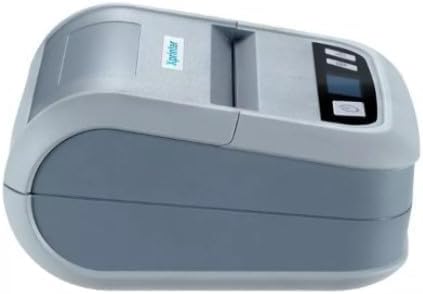
Figuur 2: Kant view of the Xprinter XP-P323B, highlighting its compact design and the Xprinter logo.
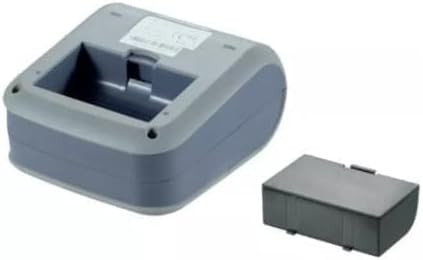
Figuur 3: Onderkant view of the Xprinter XP-P323B, showing the base and the removable battery compartment.
5. Opstelling
5.1. Laai die battery
- Connect the power adapter to the printer's charging port.
- Steek die kragadapter in 'n muuraansluiting.
- The charging indicator light will illuminate. Allow the printer to charge fully before first use.
5.2. Loading Thermal Paper/Labels
- Open the paper compartment cover by gently pushing the release latch.
- Insert the thermal paper roll with the printing surface facing the print head. Ensure the roll is seated correctly.
- Pull a small amount of paper out past the print head.
- Maak die papierkompartementdeksel stewig toe totdat dit in plek klik.
5.3. Verbinding met 'n toestel
The XP-P323B supports USB and Bluetooth connectivity.
5.3.1. USB-verbinding
- Koppel die drukker aan jou rekenaar met die meegeleverde USB-kabel.
- Install the necessary printer drivers (available from the Xprinter website or included software).
5.3.2. Bluetooth Connection (for Smartphones/iOS)
- Maak seker dat die drukker aangeskakel is.
- On your smartphone or iOS device, go to Bluetooth settings and enable Bluetooth.
- Soek vir available devices and select 'XP-P323B' (or similar name).
- Enter the pairing PIN if prompted (refer to printer documentation for default PIN, often '0000' or '1234').
- Once paired, you can use a compatible printing application to send print jobs.
6. Bediening van die drukker
6.1. Basiese Drukwerk
- Ensure the printer is connected to your device and has paper loaded.
- Open the document or image you wish to print on your connected device.
- Select the print option within your application.
- Choose 'XP-P323B' as the printer.
- Adjust print settings as needed (e.g., paper size, print quality).
- Begin die druktaak.
6.2. NV Logo and Picture Printing
The printer supports downloading and printing NV (Non-Volatile) logos and BMP format pictures. This functionality typically requires specific software or commands. Refer to the advanced programming guide or software documentation for detailed instructions on how to upload and print custom logos or images.
6.3. Adjusting Print Concentration
Print concentration can be adjusted to optimize print quality. This setting is usually accessible through the printer driver software on a computer or within the settings of a compatible mobile printing application. Consult your software's help section for specific steps.
7. Onderhoud
7.1. Maak die drukker skoon
- Buitekant: Vee die buitekant van die drukker af met 'n sagte, damp lap. Moenie harde chemikalieë of skuur skoonmaakmiddels gebruik nie.
- Drukkop: The thermal print head should be cleaned periodically to ensure optimal print quality. Use a cotton swab lightly dampened with isopropyl alcohol. Gently wipe the print head surface. Allow it to dry completely before closing the cover and resuming operation.
- Papierpad: Verwyder enige papierstof of puin uit die papierpad met 'n sagte borsel of saamgeperste lug.
7.2. Berging
When not in use for extended periods, store the printer in a cool, dry place, away from direct sunlight and extreme temperatures. Remove the paper roll if storing for a very long time to prevent dust accumulation.
8. Probleemoplossing
| Probleem | Moontlike oorsaak | Oplossing |
|---|---|---|
| Drukker skakel nie aan nie | Low battery; Power adapter not connected; Faulty power adapter | Charge the battery; Ensure power adapter is securely connected; Try a different power outlet or adapter |
| Geen drukwerkuitvoer nie | No paper; Paper loaded incorrectly; Printer not connected; Driver issue | Load paper correctly; Re-establish connection; Reinstall printer drivers |
| Swak drukkwaliteit | Dirty print head; Low print concentration; Low battery | Clean the print head; Adjust print concentration in software; Charge the battery |
| Bluetooth-verbinding misluk | Bluetooth off on device; Incorrect pairing PIN; Printer out of range | Enable Bluetooth; Re-enter correct PIN; Move device closer to printer |
9. Spesifikasies
| Handelsmerk | Xprinter |
| Modelnommer | XP-P323B |
| Itemafmetings (D x B x H) | 15D x 7W x 10H sentimeter |
| Verbindingstegnologie | USB |
| Drukkertegnologie | Termies |
| Spesiale kenmerke | Draagbaar |
| Kleur | Grys |
| Versoenbare toestelle | Slimfone |
| Tipe beheerder | iOS |
| Maksimum mediagrootte | 4 x 6 duim |
| Druk Media | Etikette |
| Papiergrootte | 4 x 6 duim |
| Drukker Uitset | Monochroom |
| Maksimum drukspoed (swart en wit) | 40 mm/s (estimated from context) |
| Item gewig | 300 gram |
10. Waarborg en Ondersteuning
For warranty information and technical support, please refer to the warranty card included with your product or visit the official Xprinter webwebwerf. Bewaar u aankoopbewys as bewys van aankoop vir waarborgeise.