
1. Inleiding
This manual provides detailed instructions for the safe and effective operation of your AquilaPro KL02100 Laser Measuring Tool. Please read this manual thoroughly before using the device to ensure proper functionality and to prevent potential hazards. This device is designed for accurate distance measurement in various applications.
2. Veiligheidsinligting
WARNING: Laser Radiation. Do not stare into beam. Class II Laser Product.
- The AquilaPro KL02100 emits a visible laser beam with a power output of less than 1mW.
- Avoid direct eye exposure to the laser beam. Never point the laser at people or animals.
- Do not disassemble or modify the device. Unauthorized modifications can result in hazardous laser radiation exposure.
- Hou die toestel buite bereik van kinders.
- Gebruik slegs soos beskryf in hierdie handleiding.
3. Produk verbyview
The AquilaPro KL02100 is a compact and versatile laser distance meter. Familiarize yourself with its components and display.
3.1 Toestelkomponente
The device features a durable aluminium casing, an HD display, and intuitive buttons for various functions.

Beeld: Voorkant view of the AquilaPro KL02100 Laser Measuring Tool.
3.2 Display and Button Layout
The device's display provides measurement readings and status indicators. The buttons control power, measurement functions, unit switching, and reference point selection.

Beeld: Gedetailleerd view of the AquilaPro KL02100 display and button functions. Labels indicate 'screen', 'Single measurement / Unit switch', 'Addition / subtraction measurement', 'Funtion / Front/rear reference', 'History / Preset value setting', and 'Power / Backlight button'.
4. Opstelling
4.1 Laai die toestel
The AquilaPro KL02100 features a built-in Lithium-Ion battery and is USB rechargeable. Connect the device to a standard USB power source using the provided cable. The battery indicator on the display will show charging status.
4.2 Krag aan/af
- Om aan te skakel: Druk die Krag / Agterlig-knoppie (
 ) briefly.
 - Om af te skakel: Druk en hou die Krag / Agterlig-knoppie for approximately 3 seconds. The device will also automatically power off after a period of inactivity to conserve battery.
5. Bedryfsinstruksies
5.1 Basic Measurement (Single Measurement)
- Skakel die toestel aan.
- Rig die laserstraal op die teikenoppervlak.
- Druk die Single measurement / Unit switch button () once. The measurement will be displayed instantly.
5.2 Deurlopende meting
- Druk en hou die Single measurement / Unit switch button (
 ) for approximately 2 seconds. The device will enter continuous measurement mode, displaying real-time distance updates as you move.
 - Druk die Single measurement / Unit switch button again to exit continuous measurement.
5.3 Eenheidskakeling
To change the measurement unit (meters, inches, feet), briefly press the Single measurement / Unit switch button () while the device is idle (not actively measuring). The unit will cycle through m, in, ft.
5.4 Benchmark Switching (Front/Rear Datum)
The device allows you to select the measurement reference point: either from the front edge of the device or the rear edge. This is crucial for accurate measurements depending on your placement of the tool.

Image: Illustration of front and rear datum points for measurement. The device can measure from its front edge or its rear edge.
To switch the benchmark, press the Function / Front/rear reference button () briefly. An icon on the display will indicate the currently selected reference point.
5.5 Meervoudige meetmodusse
The AquilaPro KL02100 supports various measurement functions for different applications.

Image: Visual representation of the different measurement modes available on the device, including single, continuous, area, volume, Pythagorean, and addition/subtraction.
To cycle through measurement modes, press the Function / Front/rear reference button () repeatedly until the desired mode icon appears on the display.
- Lengtemeting: Standard single or continuous measurement.
- Oppervlaktemeting: Meet twee sye (lengte en breedte) om die oppervlakte te bereken.
- Volumemeting: Measure three sides (length, width, height) to calculate the volume.
- Pythagorean Measurement (Indirect Measurement): Used to calculate inaccessible distances (e.g., height of a building) by measuring two or three other distances. Follow the on-screen prompts for each segment measurement.
- Optelling/Aftrekking: Add or subtract measurements.
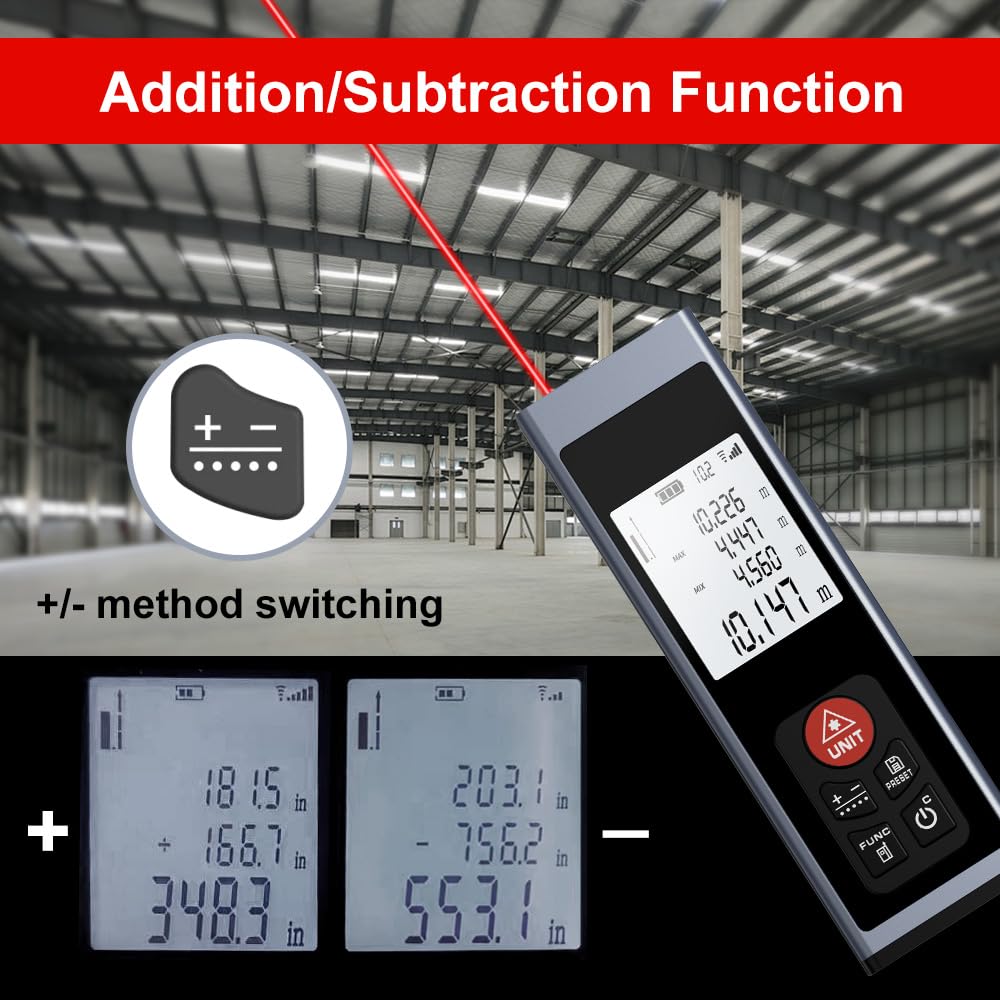
Image: The device display illustrating the addition and subtraction functions, showing how multiple measurements are combined or differentiated.
5.6 Field Measurement
The real-time measurement mode allows for on-the-go calculations from walls and various surfaces as you move, providing dynamic distance updates.

Image: A hand holding the AquilaPro KL02100, demonstrating its use for field measurements with the laser beam active.
6. Onderhoud
- Skoonmaak: Gebruik 'n sagte, damp lap om die toestel skoon te maak. Moenie skuurmiddels of oplosmiddels gebruik nie. Gee spesiale aandag daaraan om die laserlens skoon te hou vir akkurate metings.
- Berging: Bêre die toestel op 'n koel, droë plek, weg van direkte sonlig en uiterste temperature.
- Battery: Laai die battery gereeld, selfs al word die toestel nie gereeld gebruik nie, om die battery se gesondheid te handhaaf.
7. Probleemoplossing
| Probleem | Moontlike oorsaak | Oplossing |
|---|---|---|
| Toestel skakel nie aan nie | Lae battery; Toestelwanfunksie | Charge the battery; Contact support if issue persists |
| Onakkurate metings | Dirty laser lens; Incorrect benchmark setting; Unstable surface | Clean the laser lens; Verify benchmark (front/rear); Ensure stable measurement surface |
| Laserstraal nie sigbaar nie | Bright ambient light; Device malfunction | Use in lower light conditions; Contact support |
8. Spesifikasies
- Handelsmerk: AquilaPro
- Modelnommer: KL02100
- Meetreeks: 328 voet (100 m)
- Akkuraatheid: ±0.078 inch (2mm)
- Eenhede: Meters (m), Inches (in), Feet (ft)
- Laser klas: Klas II, <1mW
- Battery tipe: Lithium-Ion (Rechargeable via USB)
- Materiaal: Aluminium
- Item gewig: 25 gram
- Produk afmetings: 28L x 15W x 86H Millimeters
- Waterweerstandvlak: IP54
- Ingesluit komponente: Lanyard
9. Waarborg en Ondersteuning
For warranty information and technical support, please refer to the documentation provided at the point of purchase or contact AquilaPro customer service. Keep your purchase receipt as proof of purchase.