
Inleiding
This manual provides essential information for setting up, operating, and maintaining your XIAOMI Poco X6 5G smartphone. The Poco X6 5G is designed to deliver a high-performance mobile experience, featuring a powerful Snapdragon 7s Gen 2 processor, a vibrant 6.67-inch CrystalRes 120Hz Flow AMOLED display, a versatile 64MP triple camera system with Optical Image Stabilization (OIS), and a long-lasting 5100mAh battery with 67W turbo charging capabilities.

Beeld: Voor en agter view of the XIAOMI Poco X6 5G smartphone in blue. The front displays a vibrant screen, and the rear features a triple camera module.
Wat is in die boks
Upon unboxing your XIAOMI Poco X6 5G, please verify that all the following items are included:
- XIAOMI Poco X6 5G Smartphone
- Kragadapter
- USB-kabel (tipe-C)
- Telefoonkas
- Vinnige motorlaaier
- SIM -uitwerperhulpmiddel
- Vinnige Begingids / Veiligheidsinligting
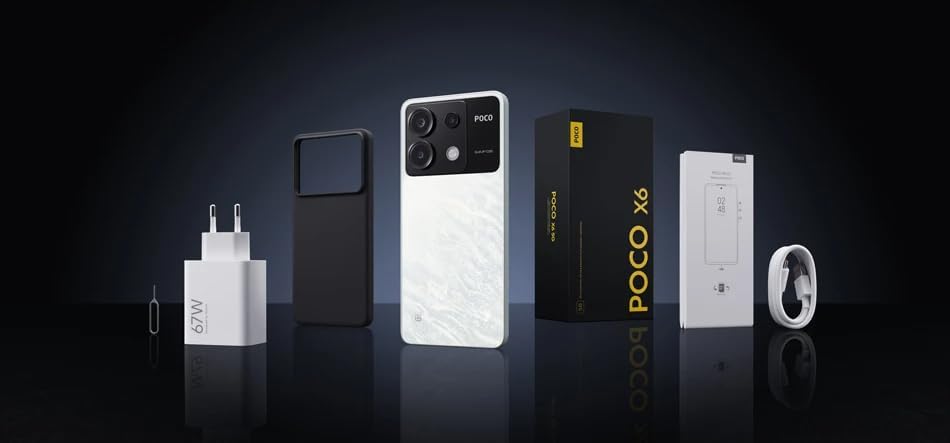
Image: Contents of the XIAOMI Poco X6 5G retail box. Visible items include the smartphone, a power adapter, a USB cable, a protective phone case, and documentation.
Opstelling
1. Plaas die SIM-kaart
- Vind die SIM-kaartlaai aan die kant van jou toestel.
- Insert the provided SIM ejector tool into the small hole on the SIM tray and press gently until the tray pops out.
- Place your Nano-SIM card(s) into the designated slots on the tray. The Poco X6 5G supports dual Nano-SIM cards. Let wel: This device does not support MicroSD cards.
- Plaas die SIM-kaartlaai versigtig terug in die foon.
2. Aanvanklike aanskakeling en opstelling
- Press and hold the Power button (usually on the right side) until the XIAOMI logo appears.
- Volg die aanwysings op die skerm om die aanvanklike opstelling te voltooi:
- Kies jou taal en streek.
- Koppel aan 'n Wi-Fi-netwerk vir vinniger opstelling en sagteware-opdaterings.
- Review and accept the User Agreement and Privacy Policy.
- Sign in with your Google account or create a new one. This is essential for downloading apps from the Google Play Store.
- Stel skermslot op (PIN, patroon, wagwoord, vingerafdruk of gesigsontsluiting).
- Choose your preferred settings for Google services and other features.
- Sodra die opstelling voltooi is, is jou toestel gereed vir gebruik.
Bedien jou toestel
Vertoon
The Poco X6 5G features a 6.67-inch CrystalRes 1.5K Flow AMOLED DotDisplay with a resolution of 2712 × 1220 pixels (446 PPI). It offers a 120Hz refresh rate for smooth scrolling and gaming, and a peak brightness of 1800 nits for excellent visibility even in bright sunlight. The display is protected by Corning Gorilla Glass Victus for enhanced durability.
Kamerastelsel
Die toestel is toegerus met 'n veelsydige drievoudige kamerastelsel:
- 64MP Hoofkamera: f/1.79 aperture, 1.4µm large pixel (4-in-1), with Optical Image Stabilization (OIS) for clear photos and stable videos.
- 8MP ultrawye kamera: f/2.2 aperture, 118° Field of View (FOV) vir die vasvang van breër tonele.
- 2MP Makrokamera: f/2.4 aperture for detailed close-up shots.
Video recording capabilities include 4K at 30fps, 1080p at 30fps/60fps, and 720p at 30fps. The camera also supports features like Short film, Slow motion, and Time-lapse.
Prestasie
Aangedryf deur die Qualcomm Snapdragon 7s Gen 2 processor, built on an advanced 4nm process, the Poco X6 5G delivers efficient and powerful performance for demanding applications and gaming. It features an octa-core CPU up to 2.4GHz and an Adreno GPU.
Battery en laai
Die toestel sluit 'n 5100mAh (typ) battery, providing extended usage times. It supports 67W turbo-laai, allowing for rapid recharging of the device. A compatible 67W charger is included in the box.
Konnektiwiteit
The Poco X6 5G supports 5G and 4G LTE networks globally (check compatibility with your carrier). It features Wi-Fi Protocol 802.11a/b/g/n/ac, Bluetooth 5.2, GPS (L1), GLONASS (G1), Beidou (B1), Galileo (E1), QZSS (L1), and an Infrared (IR) blaster.
Oudio
Enjoy immersive audio with dual speakers, Dolby Atmos certification, Hi-Res Audio certification, and Hi-Res Wireless Audio certification. A 3.5 mm koptelefoonaansluiting is ook beskikbaar.
Onderhoud
Algemene Sorg
- Skoonmaak: Gebruik 'n sagte, pluisvrye lap om die skerm en liggaam skoon te maak. Vermy skuurmiddels of harde chemikalieë.
- Temperatuur: Operate the device within recommended temperature ranges. Avoid extreme heat or cold, which can affect battery life and performance.
- Waterweerstand: The Poco X6 5G is not rated for water resistance. Avoid exposing it to liquids.
- Beskerming: Use the provided phone case and consider a screen protector to prevent scratches and damage.
Sagteware-opdaterings
Kontroleer gereeld vir sagteware-opdaterings en installeer dit om te verseker dat jou toestel die nuutste kenmerke, sekuriteitsopdaterings en werkverrigtingverbeterings het. Jy kan gewoonlik hierdie opsie vind in Instellings > Meer oor foon > MIUI-weergawe.
Probleemoplossing
If you encounter issues with your Poco X6 5G, try the following common troubleshooting steps:
- Toestel reageer nie: Druk en hou die aan/af-knoppie vir ongeveer 10-15 sekondes in om 'n herbegin te forseer.
- Network Issues (No Signal/Data):
- Maak seker dat die SIM-kaart korrek ingesit is.
- Kontroleer of vliegtuigmodus af is.
- Herbegin die toestel.
- Verify your carrier settings and plan.
- Battery dreineer vinnig:
- Verminder die helderheid van die skerm.
- Maak ongebruikte programme toe wat in die agtergrond loop.
- Deaktiveer onnodige funksies soos GPS, Bluetooth of Wi-Fi wanneer dit nie gebruik word nie.
- Gaan batteryverbruik in Instellings na om kraghonger programme te identifiseer.
- Programme wat vasval of vries:
- Clear the app's cache and data (Settings > Apps > Manage apps > [App Name] > Clear data).
- Dateer die toepassing op na die nuutste weergawe vanaf die Google Play Winkel.
- Deïnstalleer en installeer die toepassing weer.
- Oorverhitting:
- Avoid using the phone while charging, especially during heavy tasks.
- Maak agtergrondprogramme toe.
- Verminder die helderheid van die skerm.
- If the device becomes excessively hot, power it off and let it cool down.
- Fabrieksherstel (Laaste uitweg): Indien probleme voortduur, kan u 'n fabrieksherstel oorweeg. Waarskuwing: Dit sal alle data op jou foon uitvee. Rugsteun belangrike data voordat jy voortgaan. Gaan na Instellings > Oor foon > Fabrieksterugstelling.
Spesifikasies
Key technical specifications for the XIAOMI Poco X6 5G:
| Model Naam | POCO X6 |
| Bedryfstelsel | MIUI 13, gebaseer op Android 11 |
| Verwerker | Qualcomm Snapdragon 7s Gen 2 (Octa-core, up to 2.4GHz) |
| Vertoon | 6.67-inch CrystalRes 1.5K Flow AMOLED DotDisplay, 2712 × 1220, 120Hz Refresh Rate, 1800 nits peak brightness, Corning Gorilla Glass Victus |
| RAM | 8 GB |
| Interne berging | 256 GB |
| Agterste kamera | 64MP Main (OIS) + 8MP Ultra-Wide + 2MP Macro |
| Battery kapasiteit | 5100 mAh (tipies) |
| Laai | 67W Turbo-laai |
| Konnektiwiteit | 5G, 4G LTE, Wi-Fi (802.11a/b/g/n/ac), Bluetooth 5.2, GPS, GLONASS, Beidou, Galileo, QZSS, Infrared |
| Oudio | Dubbele luidsprekers, 3.5 mm-koptelefoonaansluiting, Dolby Atmos, hoë-resolusie-klank |
| Sensors | Nabyheidsensor, Omgewingsligsensor, Versnellingsmeter, Elektroniese kompas, IR-blaster, Giroskoop, X-as lineêre vibrasiemotor |
| Afmetings | 7.28 x 3.66 x 2.32 duim (Pakketafmetings) |
| Gewig | 1.12 pond (item gewig) |
Waarborg en Ondersteuning
Your XIAOMI Poco X6 5G is covered by a limited manufacturer's warranty. Please refer to the warranty card included in your product packaging for specific terms and conditions, including warranty period and coverage details. For technical support, service, or further inquiries, please visit the official XIAOMI support webwebwerf of kontak hul kliëntediens. Bewaar u bewys van aankoop vir waarborgeise.
Official XIAOMI Support: www.mi.com/global/support