
Inleiding
Thank you for choosing the RAZEAK Portable 60% Mechanical Gaming Keyboard. This manual provides detailed instructions for the proper setup, operation, and maintenance of your new keyboard. Please read this manual thoroughly before use to ensure optimal performance and longevity of your device.
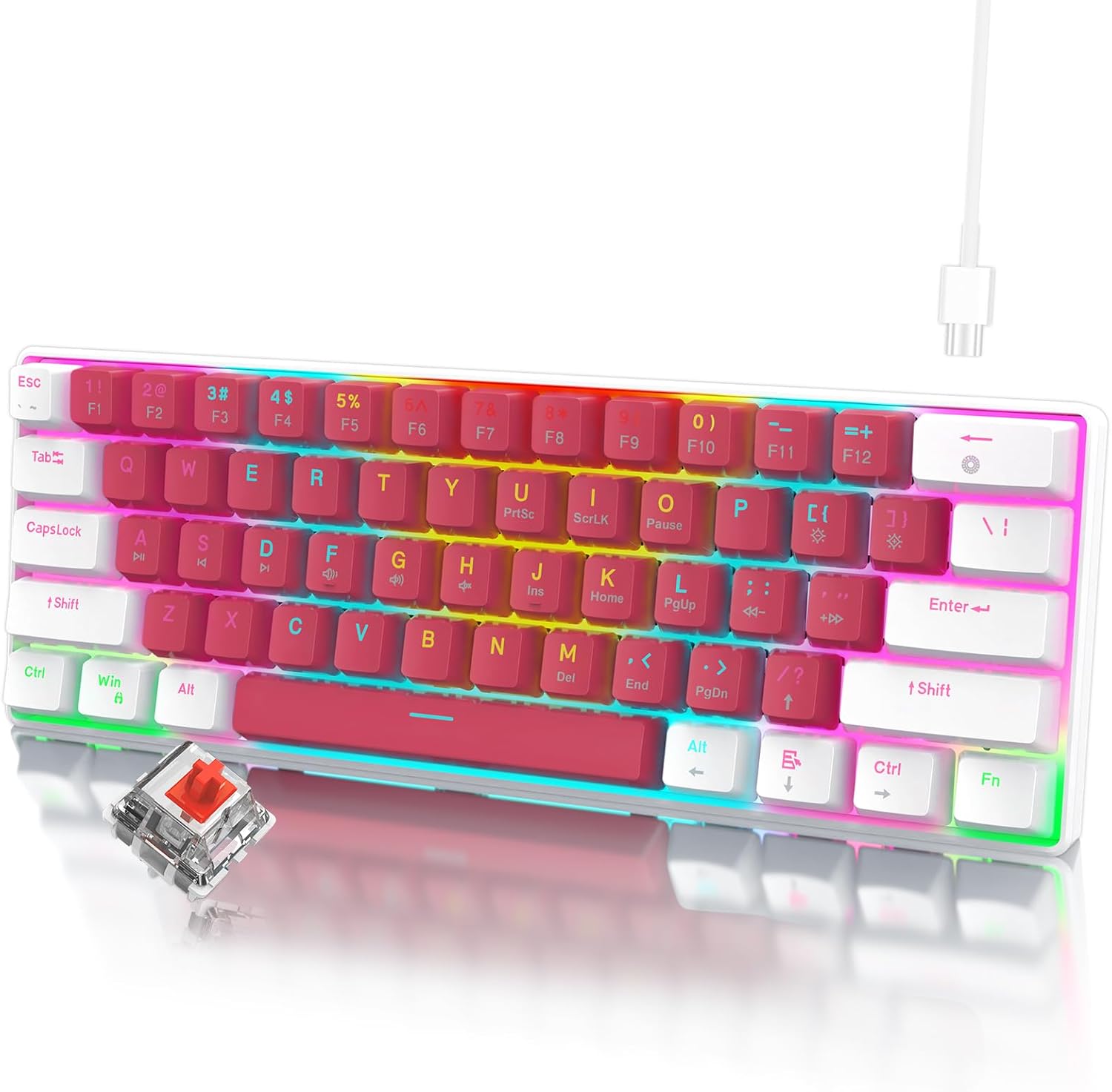
Image: The RAZEAK Portable 60% Mechanical Gaming Keyboard in Pink-White, showcasing its compact design and included USB-C cable. A single red switch is visible in the foreground.
Opstelgids
1. Pakketinhoud
Maak seker dat alle items in die pakket teenwoordig is:
- RAZEAK Portable 60% Mechanical Gaming Keyboard
- USB-C-kabel
2. Koppel die sleutelbord
- Locate the USB-C port on the back or side of the keyboard.
- Koppel die een kant van die meegeleverde USB-C-kabel aan die sleutelbord se USB-C-poort.
- Connect the other end of the USB-C cable to an available USB port on your computer (Windows PC or Laptop).
- The keyboard will be automatically recognized by your operating system. No additional drivers are typically required for basic functionality.
Bedryfsinstruksies
Kompakte 60% uitleg
The RAZEAK keyboard features a compact 60% layout with 61 keys, designed to save desk space while retaining full functionality through key combinations. Many standard keys (e.g., F-keys, navigation keys) are accessed via the Function (Fn) key.

Image: A diagram illustrating the 60% ultra-compact 61-key layout of the keyboard, highlighting its space-saving design.
Key Combinations (Fn Key Functions)
To access secondary functions printed on the keycaps, press and hold the Fn key, then press the desired key.
- Fn + 1-0, -, =: Access F1-F12 keys.
- Fn + P, {, }, |, :, ", <, >, ?, /: Access various navigation and editing keys (e.g., Print Screen, Scroll Lock, Pause, Insert, Home, Page Up, Delete, End, Page Down).
- Fn + W, A, S, D: Swap arrow key functions with W, A, S, D for gaming.
- Consult the keycap legends for specific secondary functions.
N-sleutel omrol
The keyboard features N-Key Rollover (NKRO), meaning all 61 keys can be pressed simultaneously and registered correctly. This prevents ghosting and ensures precise input, especially beneficial for fast-paced gaming.
Agtergrondbeligtingsbeheer
The keyboard offers multi-colored LED backlighting with 19 different modes. Use the following key combinations to adjust the lighting:
- Fn + \ |: Cycle through 19 backlight modes.
- Fn + [ {: Verminder die helderheid van die agterlig.
- Fn + ] }Verhoog die helderheid van die agterlig.
- Fn + ; :: Decrease backlight speed/animation.
- Fn + ' ": Increase backlight speed/animation.

Beeld: 'n Nabyskoot view of the keyboard highlighting the backlit key legends and the Red mechanical switches visible beneath the keycaps.
Ergonomiese ontwerp
The keyboard features ergonomic curved keycaps and two adjustable height angles to suit different user preferences and promote comfortable typing during extended use.

Beeld: 'n Syprofile of the RAZEAK keyboard demonstrating its ergonomic high and low key design and adjustable feet for varied typing angles.
Onderhoud
Maak die sleutelbord skoon
Gereelde skoonmaak help om die sleutelbord se voorkoms en funksionaliteit te behou.
- Ontkoppel die sleutelbord van jou rekenaar voordat jy dit skoonmaak.
- Gebruik 'n sagte, pluisvrye lap liggies dampmet water of 'n sagte skoonmaakoplossing afgevee om die sleutelkappe en oppervlak af te vee.
- Vir stof en puin tussen sleutels, gebruik saamgeperste lug.
- Vermy die gebruik van harde chemikalieë, skuurmiddels of die spuit van vloeistowwe direk op die sleutelbord.
Sleutelkapversorging
The dual-color injection molded keycaps are designed for durability and to prevent legends from fading. If you need to remove keycaps for deeper cleaning or replacement, use a keycap puller to avoid damage.
Probleemoplossing
If you encounter issues with your RAZEAK keyboard, refer to the following common solutions:
- Sleutelbord reageer nie:
- Maak seker dat die USB-C-kabel stewig aan beide die sleutelbord en die rekenaar gekoppel is.
- Probeer om die sleutelbord aan 'n ander USB-poort op jou rekenaar te koppel.
- Disconnect and reconnect the USB-C cable.
- Herbegin jou rekenaar.
- Agterbeligting werk nie of is verkeerd:
- Check if the backlight brightness is set to maximum using Fn + ] }.
- Blaai deur agtergrondmodusse met behulp van Fn + \ | to see if it resolves the issue.
- Spesifieke sleutels werk nie:
- Maak seker dat geen rommel onder die sleuteldop vasgevang is nie.
- If using secondary functions, ensure you are pressing the Fn sleutel gelyktydig.
Spesifikasies
| Modelnommer | X44-WTRD-RS_W |
| Produk afmetings | 11.5 x 4.02 x 1.57 duim |
| Item gewig | 1.39 pond |
| Vervaardiger | WINSTAR TECHNOLOGY INDUSTRIAL LIMITED |
| Versoenbare toestelle | Windows-toestelle |
| Verbindingstegnologie | USB-C |
| Sleutelbordbeskrywing | Speletjies, Meganies |
| Spesiale kenmerk | Portable, Backlit |
| Kleur | Pienk-Wit |
| Ondersteuning vir agtergrondbeligtingkleur | RGB |
| Materiaal | Plastiek |
| Ingesluit komponente | USB kabel |
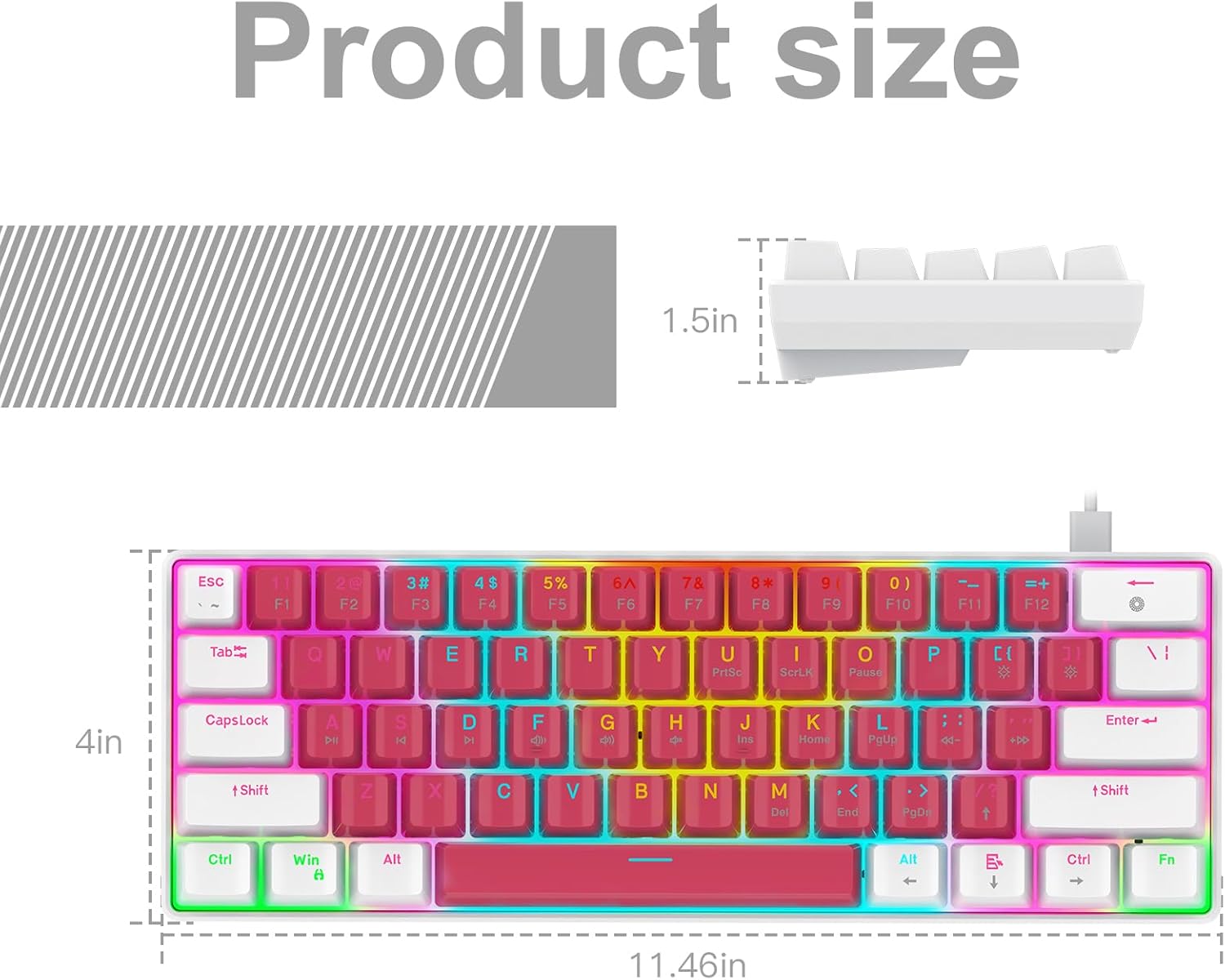
Image: A technical diagram illustrating the product dimensions (length, width, height) of the RAZEAK Portable 60% Mechanical Gaming Keyboard.
Waarborg inligting
Specific warranty details for the RAZEAK Portable 60% Mechanical Gaming Keyboard are typically provided with your purchase documentation or can be found on the official RAZEAK webwebwerf. Bewaar asseblief u bewys van aankoop vir waarborgeise.
Kliënte ondersteuning
For further assistance, technical support, or inquiries regarding your RAZEAK keyboard, please visit the official RAZEAK store or contact their customer service through the details provided on their webwebwerf.
You can visit the RAZEAK store at: RAZEAK Store on Amazon