
Inleiding
This manual provides comprehensive instructions for the installation, operation, and maintenance of the Zapco HB-410-ADSP 10-Channel DSP / 8-Channel Class D Amplifier. The HB-410-ADSP is designed to integrate advanced digital sound processing with efficient amplification, offering a versatile solution for car audio systems. Please read this manual thoroughly before using the device to ensure proper functionality and longevity.

Prent: Voorkant view of the Zapco HB-410-ADSP ampverligter, wysasing sy kompakte ontwerp en handelsmerk.
Kenmerke en spesifikasies
Sleutel kenmerke:
- 10-Channel Digital Sound Processor (DSP): Equipped with a 31-band equalizer for precise audio tuning.
- 8-kanaal Klas D Amplewendiger: Delivers 70 Watts (Max) per channel.
- Invoeropsies: Includes 4-channel high-level inputs and 2-channel RCA inputs for versatile source connectivity.
- Uitsetopsies: Features 10-channel RCA outputs for system expansion.
- Plug & Play-versoenbaarheid: Designed for straightforward integration into existing audio systems.
- Bluetooth 5.1 Streaming: Enables wireless audio playback from compatible devices.
- Geïntegreerde musiekspeler: Supports various audio formats including MP2, MP3, MP4, WMA, APE, FLAC, AAC, M4A, WAV, AIF, and AIFC.
- DSP Control Tools: Accessible via PC software and a dedicated mobile application.
Tegniese spesifikasies:
| Modelnommer | HB-410-ADSP |
| Amplewendiger Krag | 8 x 70 Watt (Max) |
| Aantal kanale | 10 (DSP), 8 (Amplewendiger) |
| Produkafmetings (L x B x H) | 160 mm x 115 mm x 45 mm (6.3 x 4.53 x 1.77 duim) |
| Gewig | Ongeveer 6 pond |
| Montage tipe | Oppervlakmontering |
| Bluetooth weergawe | 5.1 |
| Ondersteunde oudioformate | MP2, MP3, MP4, WMA, APE, FLAC, AAC, M4A, WAV, AIF, AIFC |
Opstelling en installasie
Behoorlike installasie is noodsaaklik vir optimale werkverrigting. Dit word aanbeveel dat die installasie deur 'n gekwalifiseerde professionele persoon uitgevoer word. Maak seker dat die voertuig se battery ontkoppel is voordat enige bedrading begin word.
Verbinding verbyview:
- Kragverbindings: Connect the +12V, GND, and REM (Remote Turn-On) wires to the appropriate terminals.
- Hoëvlak-insette: Use the 4-channel high-level inputs for direct connection to factory head unit speaker outputs.
- RCA-insette: Utilize the 2-channel RCA inputs for aftermarket head units or other audio sources.
- RCA-uitsette: The 10-channel RCA outputs allow for connection to additional amplifiers or external audio processors.
- Luidsprekeruitsette: Connect your speakers to the designated speaker output terminals.
- PC USB: Connect to a computer for DSP software control and configuration.

Prent: Gedetailleerd view of the Zapco HB-410-ADSP's input and output terminals, including RCA, high-level, power, and USB connections.
Bedryfsinstruksies
The HB-410-ADSP offers extensive control over your audio system through its Digital Sound Processor and integrated features.
Digital Sound Processor (DSP) Control:
The DSP can be configured using either a PC application or a mobile application. Both interfaces provide access to the 31-band equalizer and other DSP tools for fine-tuning your audio.
- PC sagteware: Koppel die amplifier to your computer via the PC USB port. Install the Zapco DSP software to access the full graphical user interface (GUI) for detailed adjustments.
- Mobiele toepassing: Download the Zapco Harmony DSP mobile application from your device's app store. Connect via Bluetooth to control basic DSP functions and the integrated music player.
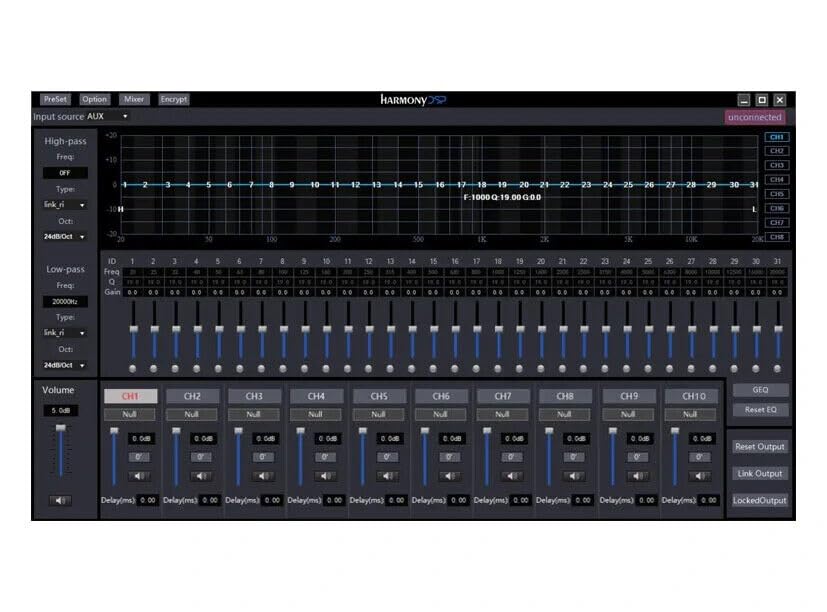
Prent: Screenshot of the Zapco Harmony DSP PC software, showing the 31-band equalizer and channel controls for precise audio tuning.
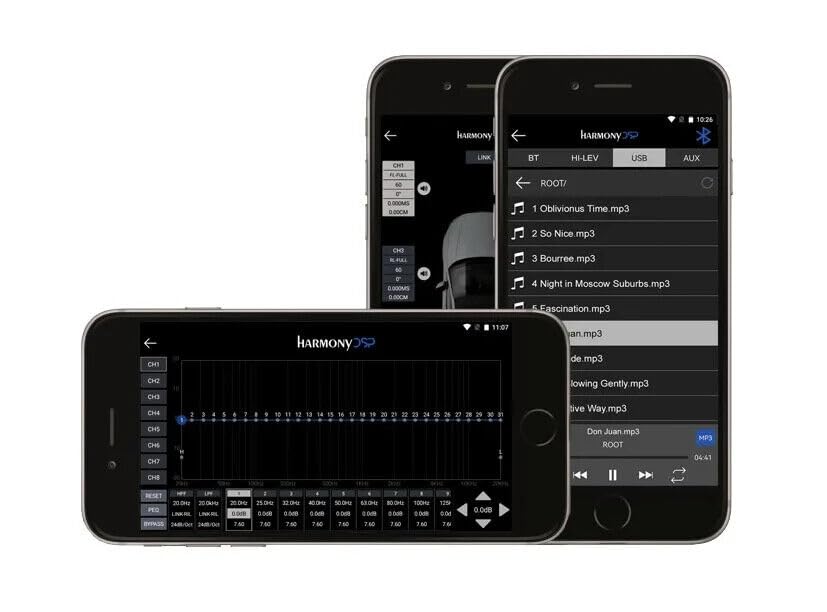
Prent: Screenshots of the Zapco Harmony DSP mobile application on a smartphone, illustrating the interface for Bluetooth streaming and DSP adjustments.
Bluetooth-stroming:
To stream audio wirelessly, enable Bluetooth on your mobile device and pair it with the HB-410-ADSP. The device name will typically appear as "Zapco HB-410-ADSP" or similar. Once paired, you can play audio from your device through the amplewendiger.
Geïntegreerde musiekspeler:
Die amplifier includes a built-in music player that supports various file formats. You can manage and play music files directly through the mobile application.
Onderhoud
The Zapco HB-410-ADSP is designed for durability and requires minimal maintenance. Follow these guidelines to ensure its continued performance:
- Skoonmaak: Gebruik 'n sagte, droë lap om die buitekant van die amplifier. Avoid using harsh chemicals or abrasive cleaners.
- Ventilasie: Maak seker dat die amplifier's ventilation openings are not obstructed to prevent overheating.
- Verbindings: Kontroleer gereeld alle bedradingsverbindings om te verseker dat hulle stewig en vry van korrosie is.
- Omgewing: Installeer die amplifier in a location that is protected from excessive moisture, dust, and extreme temperatures.
Probleemoplossing
If you encounter issues with your Zapco HB-410-ADSP, refer to the following common problems and solutions:
- Geen krag:
- Check all power connections (+12V, GND, REM) for proper contact and voltage.
- Verify that the vehicle's battery is charged.
- Inspekteer enige inlynsekerings vir kontinuïteit.
- Geen oudio-uitvoer nie:
- Ensure all input and output cables are securely connected.
- Check the source device (head unit, phone) for audio output.
- Verify DSP settings; ensure channels are not muted or gain is not set too low.
- Confirm speaker connections are correct and speakers are functional.
- Verwronge oudio:
- Verminder die insetwins as die sein afsny.
- Kontroleer luidsprekerimpedansie-versoenbaarheid met die amplewendiger.
- Review DSP equalizer and crossover settings for anomalies.
- Mobile App Issues (Input/Output Mapping):
- Some users have reported inconsistencies with input channel mapping to outputs when using the mobile application. If precise mapping is required, it is recommended to use the PC software for configuration.
- Ensure the mobile app is updated to the latest version.
- Bluetooth-verbindingsprobleme:
- Verseker die amplifier is in pairing mode or discoverable.
- Delete previous pairings on your mobile device and re-attempt pairing.
- Move the mobile device closer to the amplifier to rule out range issues.
Waarborg en Ondersteuning
For warranty information, please refer to the documentation provided with your purchase or visit the official Zapco website. If you require technical assistance or have questions not covered in this manual, please contact Zapco customer support through their official channels.
Aanlyn hulpbronne: For additional support and software downloads, visit the Zapco Store on Amazon or the official Zapco webwebwerf.