
Inleiding
This manual provides detailed instructions for the safe and effective use of your pxton 666S two-way radio. Please read this manual thoroughly before operating the device to ensure optimal performance and to prevent damage. The pxton 666S is a reliable communication device designed for various applications, featuring 16 memory channels, 165 privacy codes, and multiple functions for enhanced usability.
Wat is in die boks

Image: Contents of the pxton PX-666S walkie talkie package, including two radios, chargers, batteries, belt clips, earphones, and a user manual.
- 2 x pxton 666S Two-Way Radios
- 2 x USB Charging Docks
- 2 x 1500mAh litiumbatterye
- 2 x Lanyards
- 2 x gordelklemme
- 2 x Oorfone
- 1 x Gebruikershandleiding
Produk verbyview
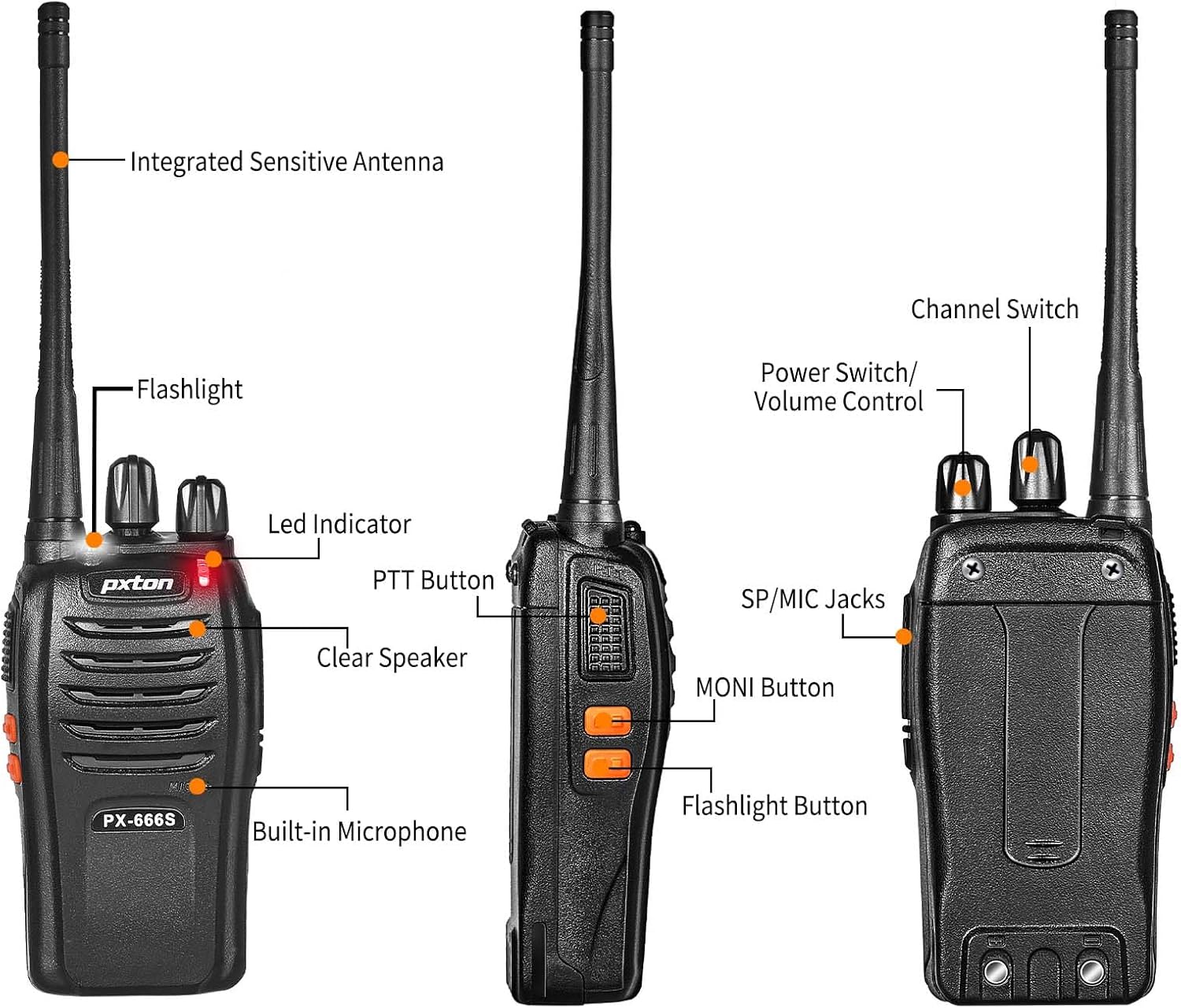
Image: Detailed diagram showing the labeled parts and controls of the pxton PX-666S two-way radio.
Onderdele en kontroles:
- Integrated Sensitive Antenna: Vir die oordrag en ontvangs van seine.
- Flitslig: Ingeboude LED-lig vir beligting.
- LED-aanwyser: Displays operational status (e.g., transmitting, receiving, charging).
- PTT-knoppie (Druk-om-te-praat): Druk en hou om te stuur, laat los om te ontvang.
- Clear Speaker: Vir oudio-uitvoer.
- Ingeboude mikrofoon: Vir steminvoer.
- Kanaalskakelaar: Draaiknop om kommunikasiekanale (1-16) te kies.
- Kragskakelaar/volumebeheer: Draaiknop om die radio aan/af te skakel en die volume te verstel.
- SP/MIC Jacks: Ports for connecting external speaker/microphone or earpiece.
- MONI Button (Monitor): Used to temporarily disable squelch for weak signals.
- Flitslig-knoppie: Aktiveer die LED-flitslig.

Image: A pxton PX-666S walkie talkie shown next to a smartphone for size comparison, indicating its compact dimensions.
Opstelling
1. Battery Installasie
The pxton 666S uses a 1500mAh Li-ion battery. To install:
- Maak seker dat die radio afgeskakel is.
- Vind die battery kompartement op die agterkant van die radio.
- Align the battery with the compartment's contacts.
- Druk die battery liggies in plek totdat dit stewig klik.

Prent: View of the pxton PX-666S battery compartment and the 1500mAh Li-ion battery, detailing battery life expectations.
2. Laai die battery
Before first use, fully charge the battery. A full charge typically takes 3-4 hours.
- Plaas die radio (met die battery geïnstalleer) in die laaidok.
- Connect the USB charging dock to a power source.
- The LED indicator on the radio or charging dock will show charging status (e.g., red for charging, green for fully charged).
- Once fully charged, remove the radio from the dock.
3. Aanheg van bykomstighede
- Gordelklem: Attach the belt clip to the back of the radio for convenient carrying.
- Oortelefoon: Plug the earphone into the SP/MIC jacks for private listening and hands-free operation.
Bedryfsinstruksies
1. Aan/Af en Volumebeheer
Draai die Kragskakelaar/volumebeheer knob clockwise to turn the radio on. Continue rotating clockwise to increase the volume. Rotate counter-clockwise to decrease volume and turn the radio off.
2. Kanaalkeuse
Draai die Kanaalskakelaar knob to select one of the 16 available memory channels. Ensure all radios in your group are set to the same channel for communication.
3. Uitsending en Ontvang (PTT)
- Om oordra, druk en hou die PTT-knoppie. Speak clearly into the microphone. The LED indicator will typically glow red.
- Om ontvang, los die PTT-knoppie. The LED indicator will typically glow green when receiving a signal.
4. VOX Function (Voice Operated Transmission)
The VOX function allows for hands-free transmission. When activated, the radio will automatically transmit when it detects your voice, without needing to press the PTT button. The pxton 666S offers 5 levels of VOX sensitivity adjustment.

Image: A firefighter demonstrating the hands-free communication capability using the VOX function of the pxton walkie talkie.
5. Flitslig
Druk die Flitslig-knoppie to turn the built-in LED flashlight on or off. This is useful for low-light conditions.

Image: The pxton PX-666S walkie talkie's flashlight illuminating a dark camping scene, highlighting its utility.
6. Monitoring (MONI)
Druk en hou die MONI Button to temporarily disable the squelch function. This allows you to listen to very weak signals that might otherwise be blocked by the squelch, or to check if a channel is clear before transmitting.
7. Skandering
The scanning function allows the radio to automatically scan through all channels to detect active transmissions. Refer to the full user manual for specific instructions on activating and managing the scan feature.
8. Noodalarm
The radio includes an emergency alarm feature. Consult the detailed user manual for activation and deactivation procedures for this function.
9. Noise Reduction and Automatic Squelch
These features work to reduce background noise and automatically mute the speaker when no signal is present, ensuring clearer communication and a more pleasant listening experience.
10. TOT (Tydsbeperking)
The Time-Out Timer prevents any single user from occupying a channel for too long by automatically stopping transmission after a preset period. This helps manage channel usage efficiently.
11. Kommunikasiebereik
The actual communication range can vary significantly based on terrain, obstructions, and electromagnetic interference.
- Open Areas (e.g., flat terrain, mountain peaks): Up to 3 miles.
- Suburban/Countryside: Approximately 1.2 miles.
- City Limits (with buildings and obstructions): Approximately 0.6 miles.

Image: Visual representation of the pxton PX-666S walkie talkie's communication range across different environments: open, suburban, and urban.
Onderhoud
1. Batteryversorging
- Vermy oorlaai of heeltemal leegmaak van die battery.
- Berg batterye op 'n koel, droë plek wanneer dit nie gebruik word nie.
- Indien die radio nie vir 'n lang tydperk gebruik gaan word nie, verwyder die battery.
2. Skoonmaak
- Vee die radio af met 'n sagte, damp lap. Moenie harde chemikalieë of skuur skoonmaakmiddels gebruik nie.
- Maak seker dat die radio droog is voor gebruik of laai.
3. Berging
Store the radio in a dry, dust-free environment away from extreme temperatures. The radio features a rugged PC+ABS durable material for anti-fall and anti-vibration protection, contributing to a longer service life.

Image: A close-up of the pxton PX-666S walkie talkie resting on rocks, emphasizing its durable and rugged construction.
Probleemoplossing
| Probleem | Moontlike oorsaak | Oplossing |
|---|---|---|
| Geen krag nie | Battery laag of nie korrek geïnstalleer nie. | Laai die battery of installeer dit korrek weer. |
| Kan nie oordra of ontvang nie | Verkeerde kanaal, buite bereik, of lae battery. | Verify channel selection, move closer to other radios, or charge battery. |
| Swak klank kwaliteit | Volume too low/high, interference, or out of range. | Adjust volume, move to a different location, or check for obstructions. |
| Radio continuously transmits (VOX) | VOX sensitivity too high or background noise. | Adjust VOX sensitivity to a lower level or disable VOX. |
Spesifikasies
- Modelnommer: PX-666S-0001
- Handelsmerk: pxton
- Frekwensiereeks: UHF
- Aantal kanale: 16
- Battery: 1500mAh Litiumioon (ingesluit)
- Voltage: 3.7 Volt
- Maksimum praatbereik: 3 Miles (open areas)
- Item gewig: 1.41 pond
- Produk afmetings: 9.9 x 2.2 x 6.9 duim
- Spesiale kenmerke: Automatic Squelch, Battery Saver Mode, Long Range, Rechargeable, Voice Operated Transmission (VOX), Flashlight
- Waterweerstandvlak: Waterbestand
- FCC ID: 2AX68GTR8
Waarborg en Ondersteuning
Your pxton 666S two-way radio comes with a 30-day unconditional return policy en lifetime after-sales service. If you encounter any issues or require assistance, please contact pxton customer support. We are committed to providing support and resolving any concerns you may have.