
Inleiding
Dankie vir die aankoopasing the CHiQ U55QG7L QLED TV. This manual provides essential information for setting up, operating, and maintaining your new television. Please read these instructions carefully before using the product and retain them for future reference.

The CHiQ U55QG7L QLED TV features Android 11, 4K HDR, and a frameless design, offering an immersive viewondervinding.
Veiligheidsinligting
Om veilige werking te verseker en skade te voorkom, neem die volgende veiligheidsmaatreëls in ag:
- Moenie die TV aan reën of vog blootstel nie.
- Verseker behoorlike ventilasie; moenie ventilasie-openinge blokkeer nie.
- Moenie die TV op 'n onstabiele trollie, staander, driepoot, hakie of tafel plaas nie.
- Beskerm die kragkabel teen geloop of vasgeknyp.
- Ontkoppel die TV tydens weerligstorms of wanneer dit vir lang tye nie gebruik word nie.
- Verwys alle diens na gekwalifiseerde dienspersoneel.
Pakketinhoud
Verifieer dat alle items in die pakket teenwoordig is:
- CHiQ U55QG7L QLED TV
- Afstandbeheer
- TV-staander (2 stukke)
- Skroewe vir Staanmontering
- Kragkabel
- Gebruikershandleiding (hierdie dokument)
Opstelling
Bevestiging van die staander
- Plaas die TV versigtig met die gesig na onder op 'n sagte, plat oppervlak om skermskade te voorkom.
- Rig elke staanderstuk met die ooreenstemmende gleuwe aan die onderkant van die TV.
- Bevestig die staanplekke met die meegeleverde skroewe.
Muurmontering (opsioneel)
The TV is compatible with VESA standard wall mounts. For wall mounting, remove the stands and use appropriate VESA-compliant hardware (not included). Consult a professional for installation.
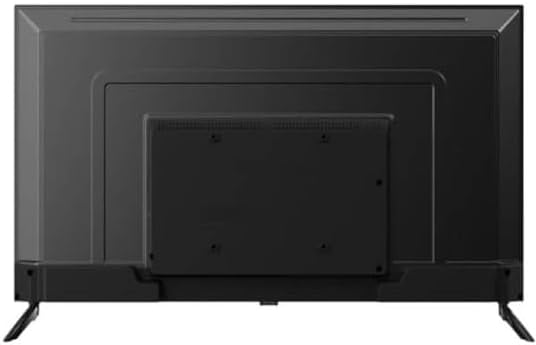
Agter view of the CHiQ U55QG7L QLED TV, showing mounting points for the stand or wall bracket.
Verbind randapparatuur
Connect external devices such as set-top boxes, gaming consoles, or Blu-ray players to the HDMI ports. Use the USB ports for media playback or connecting USB devices. Connect your antenna cable to the RF input for terrestrial TV channels.
Aanvanklike Aanskakel- en Opstellingsassistent
After connecting the power cable, press the power button on the remote control. The TV will guide you through the initial setup process, including language selection, network connection (Wi-Fi), and Google account sign-in for Android TV features.
Bedryf
Afstandsbediening oorview
The remote control allows you to navigate the TV's functions. Key buttons typically include:
- Krag: Skakel die TV aan/af.
- Invoer: Selects the input source (HDMI, TV, USB).
- Volume +/-: Pas die volumevlak aan.
- Kanaal +/-: Verander TV-kanale.
- Tuis: Kry toegang tot die Android TV-tuisskerm.
- Navigation (Up/Down/Left/Right) & OK: Vir menu-navigasie en -keuse.
- Agter: Keer terug na die vorige skerm.
- Google Assistent: Aktiveer stembeheer.
Slim TV-kenmerke
The CHiQ U55QG7L runs on Android TV, providing access to a wide range of streaming services and applications via the Google Play Store. Use the Google Assistant for voice commands and smart home integration.
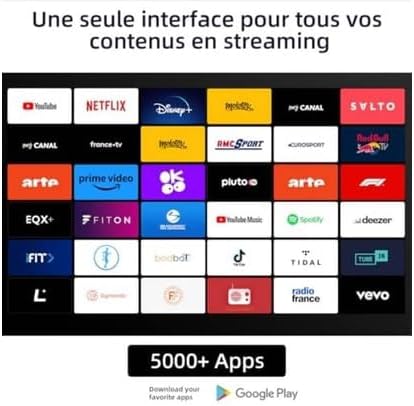
A display of various streaming applications available on the CHiQ U55QG7L QLED TV, including YouTube, Netflix, Disney+, and Prime Video.
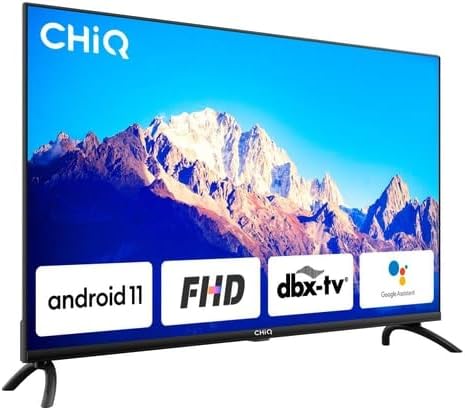
The CHiQ U55QG7L QLED TV showcasing key features like Android 11, FHD compatibility, dbx-tv audio, and integrated Google Assistant.
Beeld- en klankinstellings
Access the TV's settings menu to customize picture and sound. Adjust brightness, contrast, color, and sharpness. Select from various sound modes (e.g., Standard, Movie, Music) or customize equalizer settings. The TV supports HDR and Dolby Vision for enhanced visual quality and Dolby Audio and dbx-tv for superior sound.

A vibrant image demonstrating the enhanced picture quality of the CHiQ U55QG7L QLED TV with 4K, HDR, and Dolby Vision technologies.
Onderhoud
Maak die skerm skoon
Vee die skerm liggies af met 'n sagte, droë, pluisvrye lap. Vir hardnekkige merke, vee dit effens af.ampMaak die lap skoon met water of 'n gespesialiseerde skermreiniger. Moet nooit vloeistof direk op die skerm spuit nie.
Algemene Sorg
Avoid placing the TV in direct sunlight or near heat sources. Ensure adequate air circulation around the TV. Do not place heavy objects on top of the TV.
Probleemoplossing
As jy probleme met jou TV ondervind, raadpleeg die volgende algemene oplossings:
- Geen krag: Check if the power cable is securely connected and the power outlet is functional.
- Geen Beeld/Klank: Verifieer dat die korrekte invoerbron gekies is. Kontroleer eksterne toestelverbindings.
- Afstandbeheer werk nie: Vervang batterye. Maak seker daar is geen obstruksies tussen die afstandbeheerder en die TV se IR-sensor nie.
- Swak beeldkwaliteit: Check antenna connection or internet speed for streaming content. Adjust picture settings.
- Geen internetverbinding nie: Restart your router. Check Wi-Fi settings on the TV.
Spesifikasies
| Modelnommer | 100015647 |
| Tipe vertoon | QLED |
| Skerm grootte | 55 duim (139 cm) |
| Resolusie | 4K UHD (3840 2160 x XNUMX XNUMX) |
| HDR Ondersteuning | HDR, Dolby Vision |
| Kleure | 1.07 biljoen kleure |
| Bedryfstelsel | Android 11 |
| Geheue | 2 GB RAM, 16 GB ROM |
| Konnektiwiteit | 2.4/5GHz Wi-Fi |
| Oudio Tegnologie | Dolby Audio, dbx-tv |
| Gewig | 15.5 kilogram |
| Energiedoeltreffendheidklas | G (84 kWh/1000h) |

The energy efficiency label for the CHiQ U55QG7L QLED TV, indicating an energy class G rating and 84 kWh/1000h consumption.

A collage highlighting key specifications of the CHiQ U55QG7L QLED TV, including QLED, 4K HDR, 1.07 Billion Colors, Android TV OS, 2.4/5GHz Wi-Fi, 2GB RAM + 16GB ROM, frameless design, dbx-tv, and Dolby Audio.
Waarborg en Ondersteuning
For warranty information and technical support, please refer to the warranty card included with your product or visit the official CHiQ website. Do not attempt to repair the TV yourself, as this may void your warranty.