
1. Inleiding en oorview
This manual provides essential instructions for the safe and efficient use of your Maxcom MM135L Basic Mobile Phone. The MM135L is designed for straightforward communication, featuring a user-friendly interface, large keys, and a 1.77-inch screen. It supports 2G networks and includes dual SIM capability, an SOS button for emergencies, and convenient USB-C charging. Please read this manual thoroughly before operating the device.
2. Pakketinhoud
Verifieer dat alle items in die pakket teenwoordig is:
- Maxcom MM135L Mobile Phone
- Battery (Lithium-Ion, 600 mAh)
- USB kabel
- SIM Skinkbord Ejector
- Gebruikershandleiding (hierdie dokument)
3. Toesteluitleg
Familiarize yourself with the physical components of your Maxcom MM135L phone.
Figuur 3.1: Agter view of the Maxcom MM135L phone, showing the blue textured back cover, Maxcom logo, and speaker grille at the top.

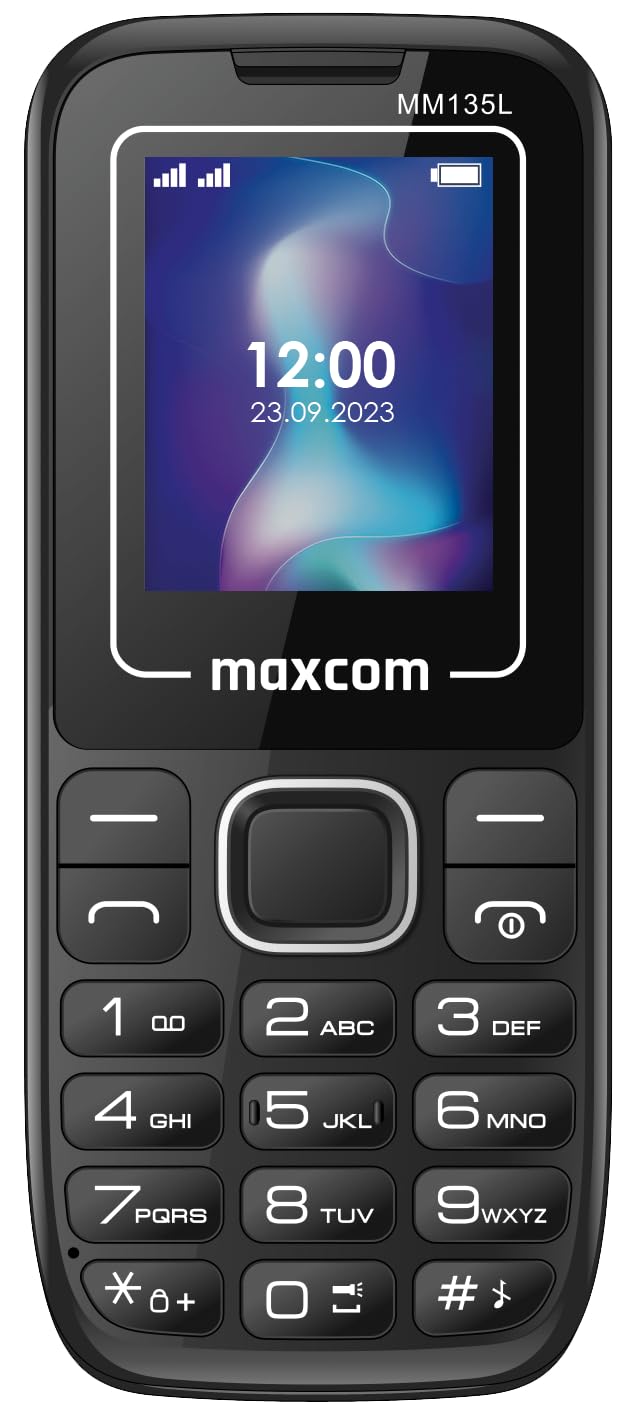
Figuur 3.2: Voorkant view of the Maxcom MM135L phone, displaying the screen, large numeric keypad, and call/end buttons.

Figure 3.3: Bottom edge of the phone, featuring the USB-C charging port and a 3.5mm headphone jack.

Figure 3.4: Top edge of the phone, highlighting the integrated flashlight.
Sleutelkomponente:
- Vertoon skerm: 1.77-inch LCD for clear text and call information.
- Numeriese sleutelbord: Large, tactile buttons for easy dialing and texting.
- Oproep/Beëindig-knoppies: Dedicated buttons for managing calls.
- Navigasiesleutels: Vir menu-navigasie.
- SOS-knoppie: Located on the rear for emergency calls (refer to Figure 3.1).
- Flitslig: Integrated at the top of the device (refer to Figure 3.4).
- USB-C-poort: For charging the device (refer to Figure 3.3).
- Koptelefoonaansluiting: 3.5mm port for audio accessories (refer to Figure 3.3).
4. Opstelling
4.1 Battery installasie
- Verwyder die agterkant van die foon versigtig.
- Rig die batterykontakte met die terminale binne die batterykompartement.
- Druk die battery liggies in plek.
- Plaas die agterste deksel terug en maak seker dat dit stewig klik.
4.2 Simkaart installasie
The Maxcom MM135L supports dual SIM cards.
- With the phone powered off and the back cover removed, locate the SIM card slots.
- Insert your SIM card(s) into the designated slot(s) with the gold contacts facing down, following the orientation indicated on the phone.
- Maak seker dat die SIM-kaart(e) volledig ingesit is.
- Replace the back cover and battery.
4.3 Laai die foon
The phone uses a USB-C port for charging.
- Connect the USB-C cable to the charging port at the bottom of the phone (refer to Figure 3.3).
- Koppel die ander kant van die USB-kabel aan 'n versoenbare USB-kragadapter of 'n rekenaar se USB-poort.
- Die battery-aanwyser op die skerm sal die laaistatus wys.
- Ontkoppel die laaier sodra die battery ten volle gelaai is.
Let wel: For optimal battery life, fully charge the phone before first use.
5. Bedryfsinstruksies
5.1 Krag aan/af
- Om aan te skakel: Druk en hou die Call/Power knoppie totdat die skerm verlig.
- Om af te skakel: Druk en hou die Einde/krag button until the power off options appear, then confirm.
5.2 Maak en ontvang oproepe
- Om 'n oproep te maak: Voer die telefoonnommer in met behulp van die sleutelbord en druk die Bel knoppie.
- Om 'n oproep te beantwoord: Druk die Bel knoppie wanneer die telefoon lui.
- Om 'n oproep te beëindig: Druk die Einde knoppie.
5.3 Stuur en ontvang van boodskappe
- Navigate to the "Messages" menu using the navigation keys.
- Select "Create New Message" to compose an SMS.
- Voer die ontvanger se nommer en jou boodskap in en stuur dit dan.
- Received messages will appear in the "Inbox".
5.4 Using the SOS Button
The SOS button is located on the rear of the phone. It is designed for emergency situations.
- Om te aktiveer: Press and hold the SOS button for several seconds.
- The phone will automatically sound an alarm and send emergency SMS messages to pre-set contacts.
- It will then automatically call the saved emergency contacts in a loop until a call is answered.
- Ensure emergency contacts are properly configured in the phone settings.
5.5 Flitsligfunksie
The built-in flashlight can be activated for convenience.
- Refer to the phone's specific settings or a dedicated side button for flashlight activation. Typically, a long press on a designated key or a side switch controls it.
6. Onderhoud
- Skoonmaak: Gebruik 'n sagte, droë lap om die foon se oppervlak skoon te maak. Vermy vloeibare skoonmaakmiddels.
- Batterysorg: Moenie die battery aan uiterste temperature blootstel nie. Vermy dit om die battery gereeld heeltemal te ontlaai.
- Berging: Bêre die foon op 'n koel, droë plek wanneer dit nie vir lang tye gebruik word nie.
- Waterweerstand: Hierdie foon is nie waterbestand nie. Vermy blootstelling aan vloeistowwe.
7. Probleemoplossing
| Probleem | Moontlike Oplossing |
|---|---|
| Foon skakel nie aan nie. | Maak seker dat die battery korrek geïnstalleer en gelaai is. Koppel die laaier en probeer weer. |
| Kan nie oproepe maak of ontvang nie. | Check if the SIM card is properly inserted and activated. Verify network signal strength. Contact your service provider if issues persist. |
| Battery laai nie. | Ensure the USB-C cable and charger are securely connected and functional. Try a different charging cable or adapter. |
| SOS-knoppie werk nie. | Verify that emergency contacts are saved in the phone's settings. Ensure the phone has network coverage. |
| Swak oproepkwaliteit. | Move to an area with better network reception. Check the speaker and microphone for obstructions. |
8. Spesifikasies
| Kenmerk | Detail |
|---|---|
| Model Naam | MM135L |
| Skerm grootte | 1.77 duim |
| Tipe vertoon | LCD |
| Resolusie | 128 x 160 |
| Sellulêre Tegnologie | 2G |
| SIM Ondersteuning | Dubbele SIM |
| Battery Tipe | Litium-ioon |
| Battery kapasiteit | 600 mAh |
| Laaipoort | USB-C |
| Afmetings (L x B x H) | 7 x 14 x 3.5 cm |
| Gewig | 60 g |
| Spesiale kenmerke | SOS Button, Flashlight, Expandable Memory, Fast Charging Support |
9. Waarborg en Ondersteuning
For warranty information, technical support, or service inquiries, please refer to the warranty card included with your product or contact Maxcom customer service directly. Keep your proof of purchase for warranty claims.