
VTech ES2050
VTech ES2050 DECT Koordlose Telefoon Gebruikershandleiding
Model: ES2050
1. Produk verbyview
The VTech ES2050 is a DECT cordless phone designed for home and office use, featuring an integrated digital answering machine, call blocking capabilities, and enhanced audio functions. This manual provides detailed instructions for setting up, operating, and maintaining your phone.

The VTech ES2050 DECT Cordless Phone with its base unit, showcasing the handset's backlit display and keypad, and the base unit's answering machine controls.

The VTech ES2050 DECT Cordless Phone positioned in a contemporary living space, highlighting its sleek design and integration into a home environment.

Illustration of the VTech ES2050's Nuisance Call Blocker feature, showing how it helps prevent unwanted calls from ringing through. Up to 100 numbers can be blacklisted.

The VTech ES2050's Digital Answering System, capable of recording up to 30 minutes of messages, with a digital message counter on the base unit.

Depiction of the VTech ES2050's easy one-touch features, including Mute/Alarm, adjustable ring volume and melodies, and a high-quality handsfree speakerphone.

Visual representation of the VTech ES2050's Volume Booster function, which amplifies incoming sounds for enhanced clarity and loudness, beneficial for hearing-impaired users.

The VTech ES2050 handset with its backlit display and keypad illuminated, demonstrating improved visibility in low-light conditions.

A composite image illustrating key features: 100 name and number phonebook, calling numbers displayed with 20 call list records, 10 last number redial, and up to 18 hours talk time / 250 hours standby time.
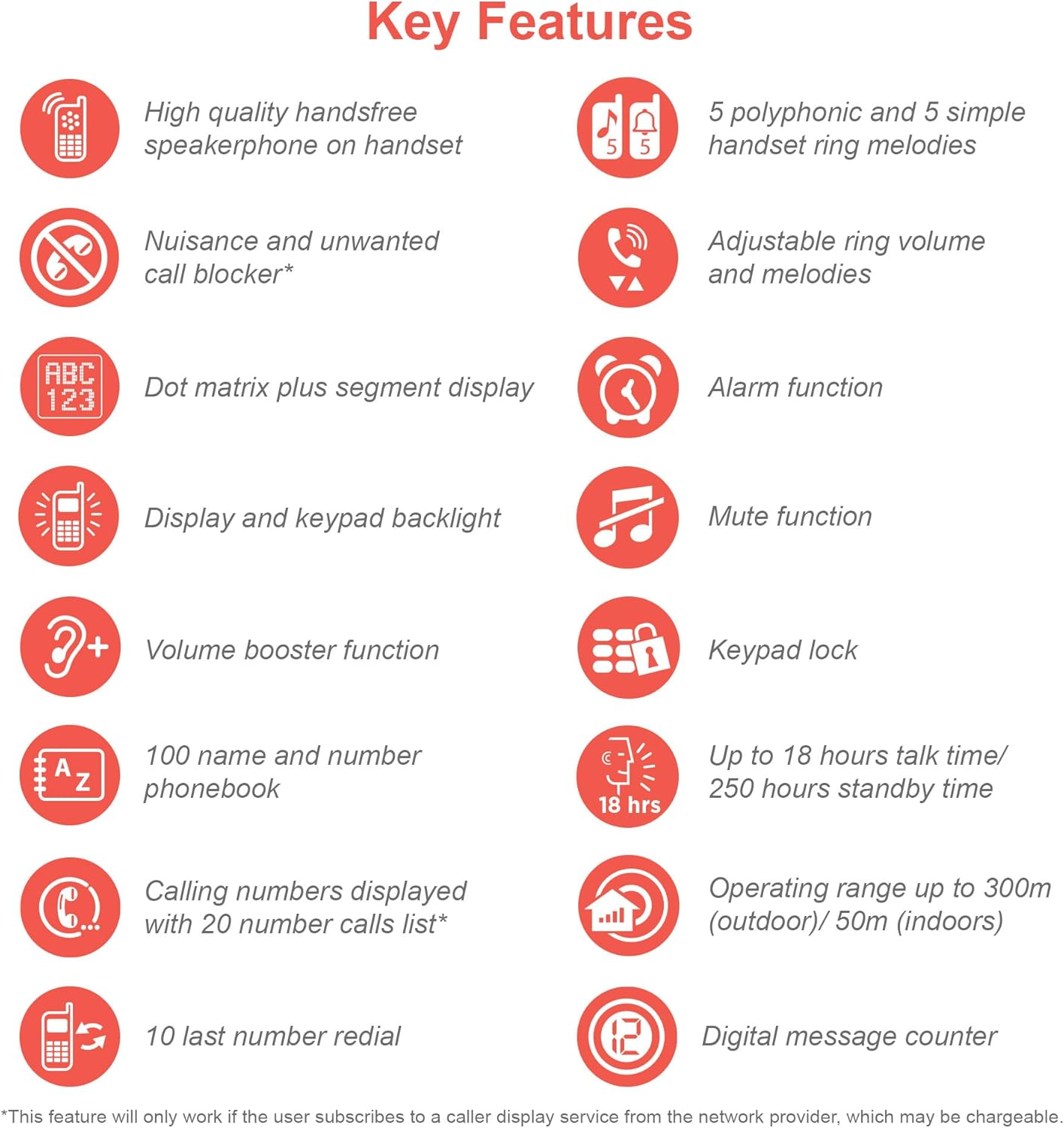
An infographic summarizing the VTech ES2050's key features, including speakerphone, call blocker, polyphonic ringtones, alarm, mute, keypad lock, volume booster, phonebook, call list, redial, talk time, operating range, and digital message counter.
Sleutel kenmerke:
- Digitale antwoordmasjien: 30 minutes recording time.
- Nuisance Call Blocker: Block up to 100 blacklisted numbers.
- Volume Booster: Amplifies incoming sounds for enhanced clarity.
- Lang batterylewe: Up to 18 hours talk time / 250 hours standby time.
- Verligte skerm en sleutelbord: Maklik viewin dowwe lig.
- Handsfree Speakerphone: High-quality speakerphone on handset.
- Telefoon boek: 100 name and number capacity.
- Spoedskakel: 3 speed dial numbers.
- ECO -modus: For reduced power consumption.
- Oproeper-ID / Oproepwagtende: Stores 20 records.
- Herhaal: 10 last number redial.
- Alarm funksie: Integrated alarm.
- Demp-funksie: For privacy during calls.
- Toetsenbordslot: Prevents accidental dialing.
2. Wat is in die boks
Voordat jy begin, maak seker dat alle komponente teenwoordig is:
- 1 Basis Eenheid
- 1 koordlose selfoon
- 1 Charger (for handset)
- 1 Battery Pack (2 AAA batteries included)
- Telefoon lyn koord
- Vinnige Begingids (verwys na hierdie handleiding vir volledige besonderhede)
3. Opstelgids
3.1. Battery installasie en laai
- Locate the battery compartment cover on the back of the handset. Slide it open.
- Koppel die batterypak se prop stewig aan die sok binne-in die kompartement.
- Place the 2 AAA batteries (included) into the compartment, ensuring correct polarity (+ and -).
- Plaas die deksel van die batterykompartement terug.
- Place the handset on the base unit or charger. The charging indicator light on the handset should illuminate.
- Laat die handset vir ten minste 16 uur laai voor die eerste gebruik om volle batterykapasiteit te verseker.
3.2. Die basiseenheid koppel
- Koppel die een kant van die telefoonlynkoord aan die TEL LINE-aansluiting aan die agterkant van die basiseenheid.
- Koppel die ander kant van die telefoonlynkoord aan jou telefoonmuuraansluiting.
- Steek die klein punt van die kragadapter in die POWER-aansluiting aan die agterkant van die basiseenheid.
- Steek die groot punt van die kragadapter in 'n standaard elektriese aansluiting.
- Ensure all cables are securely connected and routed to prevent tripping hazards.
3.3. Aanvanklike Opstelling (Datum en Tyd)
After the handset is charged, you will need to set the date and time. Follow the on-screen prompts on the handset display. If prompted multiple times, ensure each step is confirmed before proceeding.
- Druk die MENU / OK knoppie.
- Navigeer na Datum & Tyd met behulp van die pyltjie sleutels.
- Druk MENU / OK te kies.
- Voer die huidige datum en tyd in met behulp van die sleutelbord.
- Druk MENU / OK te red.
4. Bedryfsinstruksies
4.1. Maak en Ontvang Oproepe
- Om 'n oproep te maak: Neem die handtelefoon op of druk op die PRAAT button. Dial the number.
- Om 'n oproep te ontvang: Wanneer die telefoon lui, tel die handset op of druk die PRAAT knoppie.
- Om 'n oproep te beëindig: Place the handset back on the base unit/charger or press the EINDE knoppie.
4.2. Gebruik van die luidsprekerfoon
Druk tydens 'n oproep op die SPREKER button to activate the handsfree speakerphone. Press it again to switch back to the handset earpiece.
4.3. Digitale antwoordmasjien
- Boodskappe speel: Op die basiseenheid, druk SPEEL/STOP.
- Vee boodskappe uit: Druk tydens boodskapterugspeel SKEE op die basis-eenheid.
- Opname van Uitgaande Boodskap (OGM): Refer to the handset menu for OGM recording options.
4.4. Nuisance Call Blocker
This feature allows you to block unwanted calls. You can add numbers to a blacklist.
- To Block a Number from Call History: Access the Call History, select the number, and choose the "Block" option.
- To Manually Add a Number to Blacklist: Navigate to the Call Blocker menu in the handset settings and add the number.
- The phone can store up to 100 blacklisted numbers.
4.5. Volume Booster
Om amplify the incoming sound during a call, press the HOOGSTUK button (often marked with a speaker icon or "+") on the handset. Press it again to deactivate.
4.6. Telefoonboek en Snelkieslys
- Kontakte byvoeg: Access the Phonebook menu, select "Add New Entry", and enter the name and number.
- Skakel vanaf telefoonboek: Druk die TELEFOON BOEK button, scroll to the desired contact, and press PRAAT.
- Spoedskakel: Assign frequently called numbers to speed dial keys (e.g., 1, 2, 3). Refer to the handset menu for speed dial setup.
4.7. ECO-modus
The phone automatically enters ECO mode when the handset is close to the base unit, reducing power consumption and transmission power. This mode is indicated by an ECO icon on the display.
5. Onderhoud
- Skoonmaak: Vee die foon en basiseenheid af met 'n sagte, damp lap. Moenie skuur skoonmaakmiddels of oplosmiddels gebruik nie.
- Batterysorg: For optimal battery life, avoid overcharging by leaving the handset off the charger for extended periods once fully charged. If the phone will not be used for a long time, remove the batteries.
- Ligging: Plaas die basiseenheid op 'n sentrale plek weg van ander elektroniese toestelle wat steuring kan veroorsaak.
6. Probleemoplossing
If you experience issues with your VTech ES2050 phone, try the following solutions:
| Probleem | Moontlike Oplossing |
|---|---|
| Geen kiestoon / Kan nie oproepe maak of ontvang nie. |
|
| Swak klankgehalte / Statiese ruis. |
|
| Antwoordmasjien neem nie boodskappe op nie. |
|
| Handset display is blank or unresponsive. |
|
| Difficulty with menu navigation or settings. |
|
7. Spesifikasies
| Kenmerk | Detail |
|---|---|
| Modelnommer | ES2050 |
| Telefoon tipe | Koordlose DECT |
| Tipe antwoordstelsel | Digitaal |
| Opname kapasiteit | 30 minute |
| Foongesprekstyd | Tot 18 ure |
| Foon se bystandtyd | Tot 250 ure |
| Batterye | 2 AAA-batterye (ingesluit) |
| Kragbron | Battery aangedrewe |
| Oproepertipe | Enkel sleutelbord |
| Versoenbare toestelle | Standard Landline Telephone Networks |
| Kleur | Swart |
| Vervaardiger | VTech |
| Land van oorsprong | China |
8. Waarborg en Ondersteuning
Vir waarborginligting en tegniese ondersteuning, verwys asseblief na die amptelike VTech-bladsy. webwebwerf of kontak VTech-kliëntediens. Bewaar u aankoopbewys as bewys van aankoop.
Vervaardiger: VTech
For the most up-to-date support resources, visit the VTech support page or refer to the contact information provided with your product packaging.