
glo 10189920
glo HYPER PRO Device User Manual
Model: 10189920
1. Inleiding
The glo HYPER PRO is an advanced tobacco heating device designed to provide an enhanced experience. It features an EasyView LED display for monitoring device status, a TasteSelect selector for choosing between Standard and Boost modes, and HeatBoost technology for consistent intensity. The device also includes fast charging capabilities and extended battery life.
Important Safety Notice: This product is not risk-free and contains nicotine, which is addictive.
2. Veiligheidswaarskuwings
- This product, when used with its intended tobacco sticks, is not risk-free and delivers nicotine, a highly addictive substance.
- The device itself does not contain tobacco sticks, liquids, pre-filled cartridges, or refills. These must be purchased separately.
- The glo HYPER PRO operates without combustion, producing zero ash and less odor compared to traditional cigarettes.
- Always read the label, warnings, and instructions provided on the product packaging before use. Information on the packaging may differ from online descriptions.
- Hou buite bereik van kinders en troeteldiere.
- Moenie die toestel blootstel aan uiterste temperature, direkte sonlig of water nie.
- Use only the charging cable provided or a certified USB-C cable with a compatible power adapter.
3. Pakketinhoud
Please check that your glo HYPER PRO package contains the following items:
- glo HYPER PRO Device
- USB-C-laaikabel
- Skoonmaak Borsel
- Gebruikershandleiding (hierdie dokument)
4. Toestel oorview
Familiarize yourself with the components of your glo HYPER PRO device.
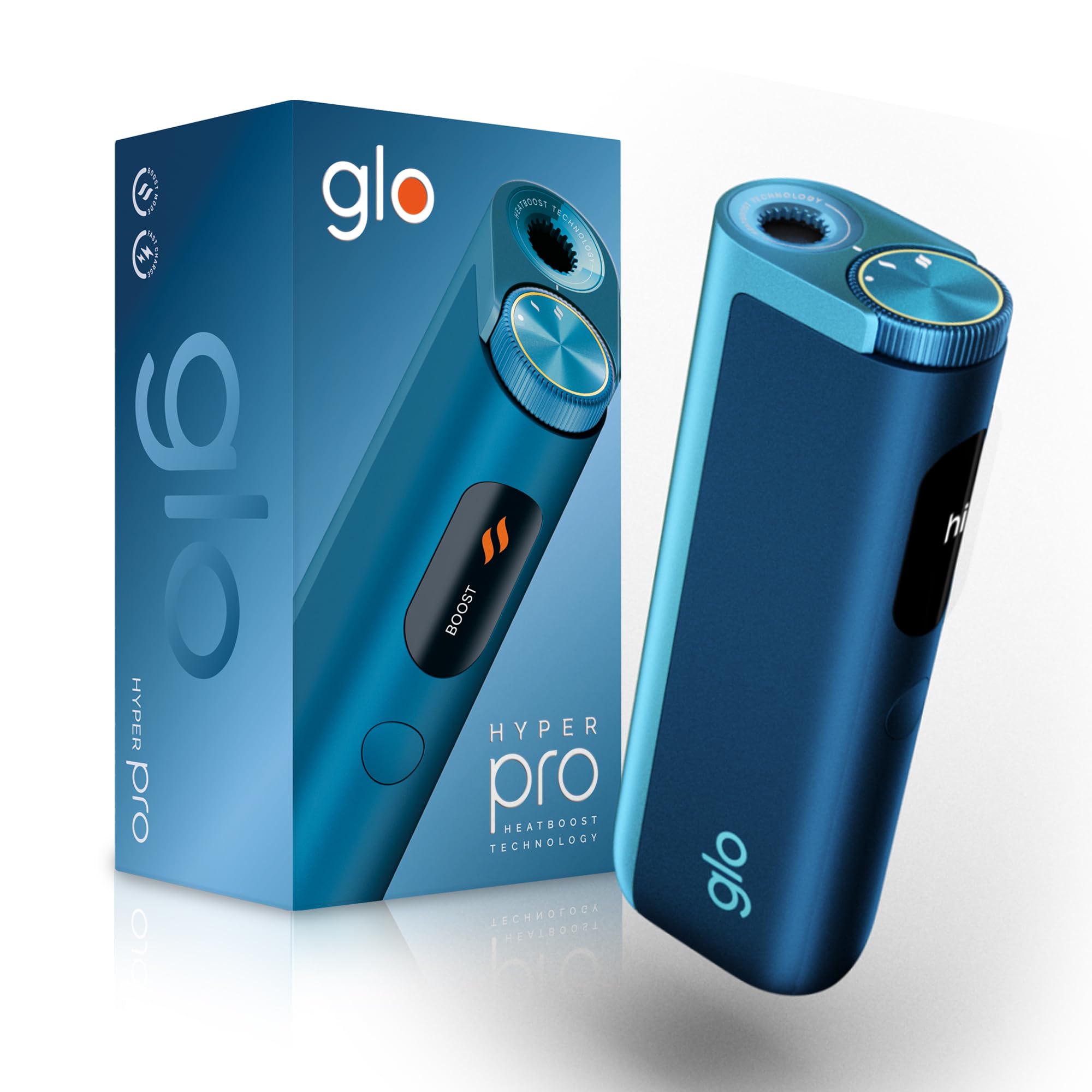
This image displays the glo HYPER PRO device in blue, highlighting its compact dimensions (96.4mm height, 36.5mm width) and weight (92 grams). Key features such as Boost Mode, EasyView Display, and Fast Charge are indicated.
- Verhittingskamer: Where the tobacco stick is inserted.
- TasteSelect Selector: Button to switch between Standard and Boost modes.
- MaklikView LED skerm: Shows selected mode, session progress, and battery status.
- USB-C-poort: Vir die laai van die toestel.
5. Aanvanklike Opstelling
5.1 Laai die toestel
Before first use, fully charge your glo HYPER PRO device. The device features fast charging and extended battery life.
- Connect the USB-C charging cable to the device's USB-C port.
- Plug the other end of the cable into a compatible USB power adapter.
- Die MaklikeView LED display will indicate the charging progress.
- Sodra dit ten volle gelaai is, ontkoppel die toestel van die laaier.
5.2 Eerste gebruik
To turn on the device for the first time:
- Press the TasteSelect button 5 times rapidly.
- The device will vibrate and the EasyView LED display will illuminate, indicating it is ready for use.
6. Bedryf die Toestel
6.1 Inserting a Tobacco Stick
Ensure the device is clean before inserting a tobacco stick.
- Gently insert a compatible tobacco stick into the heating chamber at the top of the device.
- Do not force the stick.
6.2 Selecting a Mode (Standard or Boost)
The TasteSelect selector allows you to choose your preferred intensity.

This image illustrates two glo HYPER PRO devices, demonstrating the selection between Standard and Boost intensity modes.
- Standaardmodus: For a balanced experience. Press and hold the TasteSelect button until the device vibrates once.
- Boostmodus: For superior intensity, featuring HeatBoost technology. Press and hold the TasteSelect button until the device vibrates twice.
Die MaklikeView LED display will show the selected mode and the heating progress.
6.3 Starting a Session
- After inserting the tobacco stick and selecting your mode, the device will begin heating.
- Die MaklikeView LED display will show a countdown or progress indicator.
- The device will vibrate when it is ready for use.
- Once the session is complete, the device will vibrate again and the display will turn off.
6.4 Ending a Session
Na die sessie:
- Remove the used tobacco stick from the heating chamber.
- Dispose of the used stick responsibly.
- Laat die toestel afkoel voordat dit skoongemaak of gestoor word.
7. Onderhoud en Skoonmaak
Regular cleaning ensures optimal performance and longevity of your glo HYPER PRO device.
7.1 Cleaning the Heating Chamber
- Ensure the device is turned off and completely cool before cleaning.
- Use the provided cleaning brush to gently remove any tobacco residue from the heating chamber.
- Avoid using water or liquid cleaners directly on the heating element.
- For stubborn residue, a dry cotton swab can be used carefully.
7.2 Eksterne skoonmaak
Wipe the exterior of the device with a soft, dry cloth as needed.
8. Probleemoplossing
If you encounter issues with your glo HYPER PRO, refer to the following common problems and solutions:
| Probleem | Moontlike oorsaak | Oplossing |
|---|---|---|
| Toestel skakel nie aan nie | Lae of geen batterylading | Laai die toestel volledig met die meegeleverde USB-C-kabel. |
| Toestel verhit nie | Tobacco stick not inserted correctly; Device malfunction | Ensure the tobacco stick is fully and correctly inserted. Try restarting the device. If the issue persists, contact customer support. |
| Laai is stadig of werk nie | Faulty cable or adapter; Dirty charging port | Check the USB-C cable and power adapter for damage. Try a different compatible cable/adapter. Clean the charging port gently with a dry, soft brush. |
| LED-skerm werk nie | Toestel wanfunksie | Probeer om die toestel te herbegin. Kontak kliëntediens as die probleem voortduur. |
9. Spesifikasies
| Kenmerk | Detail |
|---|---|
| Handelsmerk | glo |
| Modelnommer | 10189920 |
| Afmetings (LxBxH) | 9.6 x 3.6 x 2.1 cm |
| Gewig | 150 gram |
| Battery kapasiteit | 2580 mAh (litiumioon) |
| Laaipoort | USB-C |
| Spesiale kenmerk | Kompakte ontwerp |
| Vervaardiger | Nicoventures Trading Limited |
10. Waarborg en Ondersteuning
10.1 Waarborginligting
For detailed warranty information, please refer to the warranty card included in your product packaging or visit the official glo webwebwerf. Waarborgbepalings en -voorwaardes kan per streek verskil.
10.2 Kliëntediens
If you have any questions, require assistance, or need to report an issue with your glo HYPER PRO device, please contact glo customer support through their official webwebwerf of die kontakbesonderhede wat in u produkdokumentasie verskaf word.
Ask a question about this manual
Ask about setup, troubleshooting, compatibility, parts, safety, or missing instructions. Manuals+ will review the question and use this page’s manual context to help answer it.