
Inleiding
This manual provides essential information for the safe and efficient assembly, operation, and maintenance of your ErGear Electric Standing Desk with Drawers, Model EGESD38V-US. Please read all instructions carefully before use and retain this manual for future reference.
Veiligheidsinligting
To ensure safe operation and prevent damage, observe the following guidelines:
- Verseker behoorlike montering volgens die verskafde instruksies.
- Moenie die maksimum gewigslimiet van 132 pond oorskry nie.
- Anchor the desk if using at maximum height for enhanced stability.
- Hou kinders en troeteldiere weg van die lessenaar tydens hoogteverstelling.
- Ensure no obstacles are in the path of the desk during movement to prevent collisions.
Produk Kenmerke
Your ErGear Electric Standing Desk is designed with several features to enhance your workspace:
- Ultimate Stability: Crafted with automotive-grade cold-rolled steel and a powerful motor tested to withstand 50,000 lift cycles, ensuring durable and reliable support for up to 176 lbs of weight.
- C-Clamp Mount Compatible: Designed with an extended 2.95″ rear edge, compatible with C-clamp monitor mounts on the top platform. Monitors can also be placed directly on the stand to elevate screens closer to eye level.
- Customize Your Height: Features a wide adjustable height range from 28″ to 47″ tall, allowing easy switching between sitting and standing work positions.
- Triple Desktop Storage: Boasts a deeper 27.3″ desktop with two drawers for concealed storage. Includes an open storage cubicle for keyboard, mouse, and accessories, and an integrated monitor riser.
- Loaded with Ergonomic Features: Includes 4 custom height presets for one-press adjustment. Raised anti-drop edges keep items secure, and advanced anti-collision detection helps avoid damage during height adjustment.
Produk afmetings
Refer to the diagram below for detailed product dimensions.
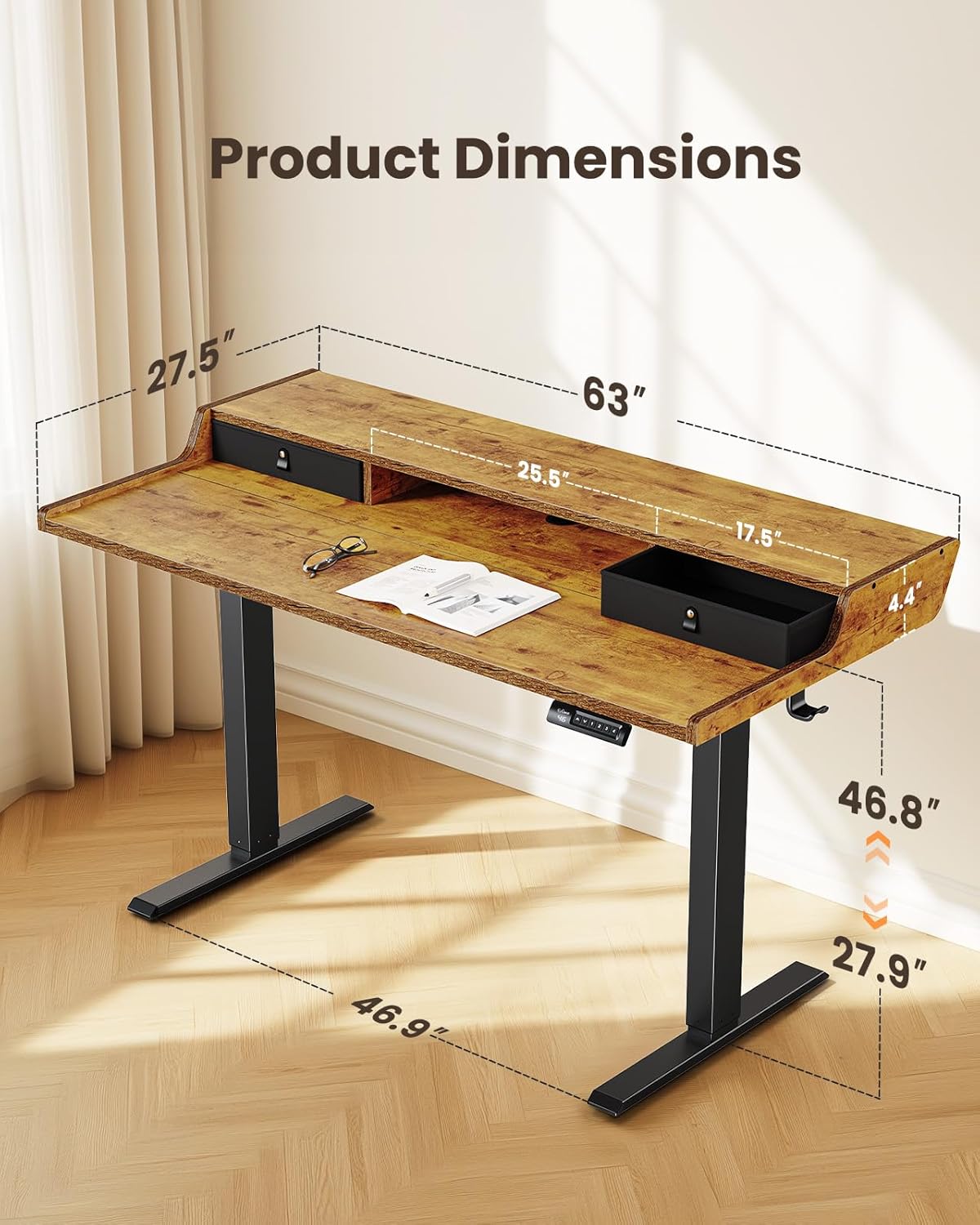
- Item afmetings: 28 x 63 x 28.3 duim (Diepte x Breedte x Hoogte)
- Minimum hoogte: 28 duim
- Maksimum hoogte: 47 duim
- Tafelblad dikte: 15 millimeter
- Werkoppervlak Diagonale lengte: 70.71 duim
Opstelling en samestelling
Follow these steps to assemble your ErGear Electric Standing Desk. For a visual guide, please refer to the assembly video below.
Monteerstappe:
- Verskafde onderdele en hardeware: Unpack all components and verify against the parts list in your physical manual. Ensure all parts are present and undamaged before proceeding.
- Step 1: Assembling the Frame: Attach the motor and crossbar to the desk legs using the provided screws. Ensure all connections are secure.
- Step 2: Assembling the Top Stand: Secure the side supports to the main monitor stand panel using the dowels and screws.
- Step 3: Assembling the Desktop: Connect the two main desktop panels using the wooden dowels and metal plates. Press firmly to ensure no gap remains between the panels. Attach the side panels of the desktop.
- Step 4: Attaching the Desktop to the Frame: Carefully place the assembled desktop onto the frame. Align the screw holes and secure the desktop to the frame using the provided screws. Attach the headphone hook.
- Step 5: Connecting the Cables: Connect the motor cables to the control box. Route the cables neatly using the cable management grommets and ties. Insert the cable hole cover.
- Step 6: Attaching the Drawers: Place the fabric drawers into their designated slots on the desktop.
Bedryfsinstruksies
Your ErGear Electric Standing Desk features an intuitive control panel for easy height adjustment and preset management.
Hoogte verstelling:
- Use the up (▲) and down (▼) arrows on the control panel to manually adjust the desk height.
- The desk has a wide adjustable height range from 28 inches to 47 inches.
Vooraf ingestelde hoogtes:
The desk offers 4 custom height presets for quick transitions between your preferred sitting and standing positions.
- Om 'n voorafinstelling in te stel: Adjust the desk to your desired height. Press the 'M' button, then press one of the number buttons (1, 2, 3, or 4) within 3 seconds. The height is now saved to that preset.
- To Use a Preset: Simply press the corresponding number button (1, 2, 3, or 4) to automatically move the desk to the saved height.

Anti-botsing opsporing:
The desk is equipped with advanced anti-collision detection. If the desk encounters an obstacle during height adjustment, it will automatically stop and reverse slightly to prevent damage to the desk or surrounding objects.
Onderhoud
Regular maintenance ensures the longevity and optimal performance of your standing desk:
- Skoonmaak: Vee die lessenaaroppervlak af met 'n sagte, damp lap. Vermy skuur skoonmakers of harde chemikalieë wat die afwerking kan beskadig.
- Kabelbestuur: Kontroleer en organiseer kabels gereeld om te verhoed dat hulle verstrengel raak of inmeng met die beweging van die lessenaar.
- Bevestigingsmiddels: Ensure all screws and fasteners are tight. Retighten if necessary to maintain stability.
- Motorinspeksie: If you notice any unusual noises or irregular movement, discontinue use and contact customer support.
Probleemoplossing
If you encounter issues with your ErGear Electric Standing Desk, refer to the following common solutions:
- Lessenaar beweeg nie: Check if the power cord is securely plugged into both the desk and the wall outlet. Ensure no cables are pinched or disconnected.
- Foutkode op vertoon: Refer to your physical manual for specific error code meanings and troubleshooting steps. Often, unplugging the desk for 10 seconds and plugging it back in can reset the system.
- Ongelyke beweging: Ensure the desk is placed on a level surface. Check that all leg components are securely fastened.
- Anti-Collision Triggered Frequently: Ensure there are no objects under or above the desk that could interfere with its movement.
- Geraas tydens werking: A slight motor hum is normal. Excessive or unusual noise may indicate an issue; contact customer support.
If problems persist after attempting these steps, please contact ErGear customer support.
Spesifikasies
| Spesifikasie | Waarde |
|---|---|
| Handelsmerk | ErGear |
| Modelnommer | EGESD38V-US |
| Vorm | Reghoekig |
| Kleur | Vintagen Bruin |
| Basis materiaal | Metaal |
| Aantal laaie | 2 |
| Aanbevole gebruike | Kantoor, speletjies |
| Meubels Been Materiaal | Gemanipuleerde hout |
| Grootte | 63 x 28 duim |
| Top Kleur | Bruin |
| Basiskleur | Bruin |
| Ingesluit komponente | Gaming Desk, Dedicated Monitor Stand, Built-in Drawers, Storage Shelf |
| Vereiste samestelling | Ja |
| Maksimum gewig aanbeveling | 132 pond |
| Tafelblad dikte | 15 millimeter |
| Minimum Hoogte | 28 duim |
| Maksimum Hoogte | 47 duim |
| Item diepte | 28 duim |
| Raammateriaaltipe | Staal |
| Hefmeganisme | Elektries |
| Bergingsopsies | Drawers, Open Storage Cubicle |
| Aantal hoogteposisies | 4 |
| Is Elektries | Ja |
Waarborg en Ondersteuning
ErGear provides a Limited Warranty for this product. For specific details regarding the warranty period and coverage, please refer to the documentation included with your purchase.
For any questions, technical assistance, or warranty claims, please visit the official ErGear Store or contact their customer support directly.