
Inleiding
Thank you for choosing the TECNO TRUE 1 TWS Earbuds. This manual provides essential information on setting up, operating, maintaining, and troubleshooting your new earbuds. Please read it carefully before use to ensure optimal performance and longevity of your device.
The TECNO TRUE 1 TWS Earbuds are designed to deliver a superior audio experience with advanced features such as 42 dB Active Noise Cancellation, deep bass from 10mm drivers, and a long-lasting battery life of up to 45 hours with the charging case. They are also IPX5 rated for sweat, water, and dust resistance, making them suitable for various activities.
Wat is in die boks
- TECNO TRUE 1 TWS Earbuds (Left and Right)
- Laaikas
- Gebruikershandleiding
- Ear Tip Pairs (various sizes)
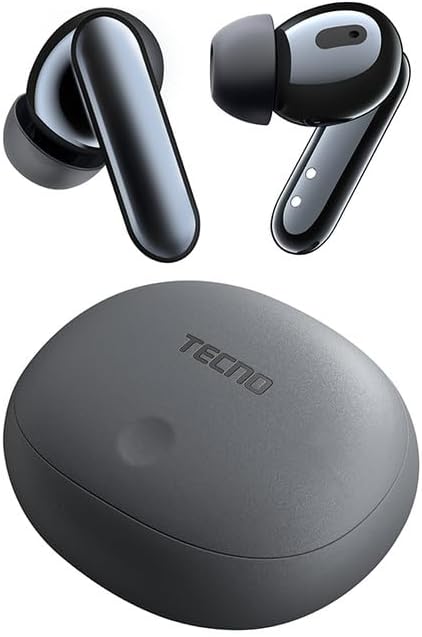
Image: The TECNO TRUE 1 TWS Earbuds and their charging case, showcasing die slanke ontwerp.
Opstelling
1. Laai die oordopjes en houer
Before first use, fully charge the earbuds and the charging case. Connect the charging case to a power source using a compatible USB cable. The indicator lights on the case will show the charging status.

Image: The TECNO TRUE 1 TWS charging case connected to a charging cable, illustrating the charging process.
Place the earbuds into the charging case. They will begin charging automatically. A full charge provides up to 6 hours of playback for the earbuds, and the case extends total playtime to 45 hours.
2. Koppeling met jou toestel
- Maak seker dat die oorfone in die laaikas is en dat die deksel oop is.
- Aktiveer Bluetooth op jou toestel (slimfoon, tablet, ens.).
- Soek vir new Bluetooth devices. The earbuds should appear as "TECNO TRUE 1" or similar.
- Select the earbuds to pair. A voice prompt will confirm successful connection.
The earbuds support pop-up connection for compatible devices, simplifying the pairing process.
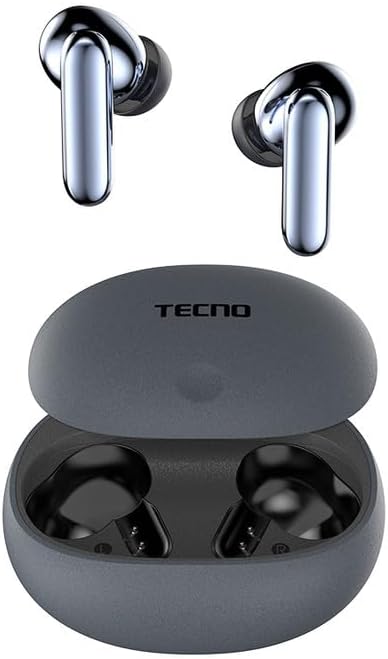
Image: The TECNO TRUE 1 TWS Earbuds resting inside their open charging case, ready for pairing.
3. Dra van die oordopjes
Gently insert the earbuds into your ear canals. Rotate them slightly to find a comfortable and secure fit. Choose the appropriate ear tip size from the included pairs for optimal sound quality and noise cancellation.
Bedryfsinstruksies
Raak kontroles
The TECNO TRUE 1 TWS Earbuds feature intuitive touch controls on each earbud. The specific functions may vary slightly based on your device and app, but common controls include:
- Enkele tik: Speel/onderbreek musiek, beantwoord/beëindig oproep.
- Dubbeltik (links/regs): Next/Previous track (may vary).
- Drievoudige tik: Aktiveer stemassistent.
- Lang pers: Switch between Active Noise Cancellation (ANC) and Transparency Mode.
Aktiewe Geraaskansellasie (ANC) en Deursigtigheidsmodus
The earbuds offer 42 dB Active Noise Cancellation to minimize ambient sounds, providing a more immersive listening experience. Transparency Mode allows you to hear your surroundings without removing the earbuds, which is useful for awareness in busy environments.
To switch between ANC and Transparency Mode, perform a long press on either earbud's touch sensor.
Onderhoud
Skoonmaak
Gereelde skoonmaak help om klankgehalte en higiëne te handhaaf:
- Gebruik 'n sagte, droë, pluisvrye lap om die oorfone en laaikas af te vee.
- Vir oordoppe, verwyder hulle van die oordopjes en maak skoon met 'n advertensie.amp cloth and mild soap if necessary. Rinse thoroughly and dry completely before reattaching.
- Verwyder enige oorsmeer of puin versigtig van die oordoppiemaas met 'n klein, sagte borseltjie of wattestokkie.
Berging
Wanneer dit nie gebruik word nie, bêre die oordopjes altyd in hul laaikassie om hulle teen stof en skade te beskerm en om hulle gelaai te hou.
Waterweerstand (IPX5)
The earbuds are IPX5 rated, meaning they are resistant to sweat and splashes of water. They are not designed for submersion in water. Avoid exposing them to heavy rain or showering with them. Ensure the earbuds and charging port are dry before charging to prevent damage.
Probleemoplossing
| Probleem | Moontlike oorsaak | Oplossing |
|---|---|---|
| Oorknoppies koppel nie | Low battery, out of range, not in pairing mode, previously paired to another device. | Charge earbuds and case. Ensure Bluetooth is on and within range. Place earbuds in case, close and reopen lid to re-enter pairing mode. Disconnect from other devices. |
| Geen klank of lae volume nie | Volume too low, earbuds not properly seated, debris in earbud mesh, connection issue. | Increase volume on device and earbuds. Adjust earbud fit. Clean earbud mesh. Re-pair earbuds. |
| Laai kwessies | Cable or adapter fault, dirty charging contacts, case battery empty. | Try a different cable/adapter. Clean charging contacts on earbuds and case. Charge the charging case. |
| ANC werk nie effektief nie | Improper fit, ear tips not sealed, very high-frequency noise. | Adjust earbud fit and try different ear tip sizes for a better seal. ANC is most effective on low-frequency sounds. |
Spesifikasies
| Kenmerk | Detail |
|---|---|
| Handelsmerk | Tegnologie |
| Model Naam | 10309821 |
| Kleur | Grys |
| Materiaal | Plastiek |
| Oorplasing | In-Oor |
| Vormfaktor | In-Oor |
| Ruisisolasie | Aktiewe geraasonderdrukking (42 dB) |
| Verbindingstegnologie | Draadloos |
| Draadlose kommunikasietegnologie | Bluetooth |
| Versoenbare toestelle | Smartphones, Tablets, Laptops, Desktop Computers, Smart Speakers |
| Spesifieke Produkgebruike | Travel, Sport |
| Waterweerstandvlak | IPX5 (Waterbestand) |
| Frekwensiereeks | 20 tot 20,000 XNUMX Hz |
| Speeltyd | Tot 6 uur (oordopjes), tot 45 uur (met laaikas) |
| Ingesluit komponente | Charging Case, User Manual, Ear Tip Pairs |
Waarborg en Ondersteuning
For warranty information and customer support, please refer to the official TECNO webwebwerf of kontak jou plaaslike kleinhandelaar. Bewaar jou bewys van aankoop vir enige waarborgeise.
Vir verdere hulp kan u die produkbladsy op Amazon.com.be or contact TECNO customer service directly.