
1. Inleiding
Dankie vir die aankoopasing the Sanyo 20W Bluetooth Speaker. This portable speaker is designed to deliver high-quality audio with versatile connectivity options. Please read this manual carefully before using the product to ensure proper operation and to maximize its lifespan. Keep this manual for future reference.
Sleutel kenmerke sluit in:
- Bluetooth 5.3 for stable wireless connection.
- 20W audio output for clear and powerful sound.
- Multiple connectivity options: Bluetooth, AUX, USB.
- MP3 playback capability.
- Karaoke function.
2. Veiligheidsinligting
Om veilige werking te verseker en skade te voorkom, neem asseblief die volgende veiligheidsmaatreëls in ag:
- Moenie die luidspreker aan water, vog of uiterste temperature blootstel nie.
- Moenie probeer om die luidspreker uitmekaar te haal of te wysig nie. Dit sal die waarborg ongeldig maak.
- Hou die luidspreker weg van hittebronne, direkte sonlig en vlambare materiale.
- Use only the specified charging cable and power adapter (if included) to charge the device.
- Maak die luidspreker skoon met 'n sagte, droë lap. Moenie skuurmiddels of oplosmiddels gebruik nie.
- Hou buite bereik van kinders.
3. Pakketinhoud
Kontroleer asseblief die pakket vir die volgende items:
- Sanyo 20W Bluetooth Speaker Unit
- USB-laaikabel
- AUX klank kabel
- Gebruikershandleiding
4. Produk verbyview
Familiarize yourself with the speaker's components:
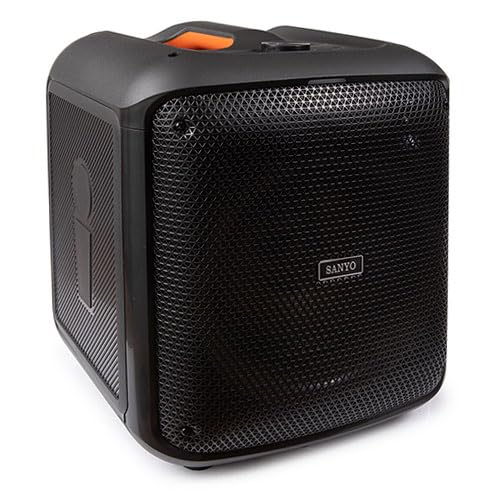
An image showing the front view of the Sanyo 20W Bluetooth Speaker, highlighting its compact design and speaker grille. The speaker appears to have a handle on top for portability.
Note: Specific button layouts and port locations may vary slightly. Refer to the image for general reference.
- Kragknoppie: Druk en hou om aan/af te skakel.
- Modusknoppie: Switch between Bluetooth, AUX, and USB modes.
- Volumebeheer: Pas volume op/af.
- Speel/Pause-knoppie: Beheer klankterugspeel.
- Vorige/Volgende Snit-knoppies: Navigeer deur spore.
- USB-poort: For MP3 playback from a USB drive.
- AUX-invoer: Vir die koppeling van eksterne oudiotoestelle via 'n 3.5 mm-klankkabel.
- Laaipoort: Vir die koppeling van die USB-laaikabel.
- Mikrofooninvoer: For karaoke function (if applicable).
5. Opstelling
5.1 Laai die luidspreker
- Koppel die klein punt van die USB-laaikabel aan die laaipoort op die luidspreker.
- Koppel die groot punt van die USB-laaikabel aan 'n USB-kragadapter (nie ingesluit nie) of 'n rekenaar se USB-poort.
- Die laai-aanwyserliggie sal brand (kleur kan verskil) om aan te dui dat die luidspreker laai.
- Sodra dit volledig gelaai is, kan die aanwyserliggie van kleur verander of afskakel. Ontkoppel die laaikabel.
5.2 Aan-/afskakel
- Om aan te skakel: Press and hold the Power button for approximately 3 seconds. You will hear an audible prompt.
- Om af te skakel: Press and hold the Power button for approximately 3 seconds. You will hear an audible prompt.
5.3 Bluetooth -koppeling
- Ensure the speaker is powered on and in Bluetooth mode. If not, press the Mode button until you hear the Bluetooth pairing prompt. The Bluetooth indicator light will flash.
- Aktiveer Bluetooth op jou mobiele toestel (slimfoon, tablet, ens.).
- Soek vir available Bluetooth devices. The speaker will appear as "Sanyo Speaker" or a similar name.
- Select the speaker from the list to pair. Once paired, you will hear a confirmation sound, and the Bluetooth indicator light will stop flashing and remain solid.
- Jy kan nou klank vanaf jou toestel deur die luidspreker speel.
Let wel: Die luidspreker sal outomaties probeer om weer met die laaste gekoppelde toestel te verbind wanneer dit aangeskakel word, indien daardie toestel se Bluetooth aktief en binne bereik is.
5.4 AUX-aansluiting
- Connect one end of the 3.5mm AUX audio cable to the AUX input port on the speaker.
- Connect the other end of the AUX audio cable to the headphone jack or audio output port of your external audio device (e.g., MP3 player, computer).
- Press the Mode button on the speaker to switch to AUX mode.
- Speel klank vanaf jou eksterne toestel.
5.5 USB-terugspeel
- Plaas 'n USB-geheuestokkie wat MP3-klank bevat files in die USB-poort op die luidspreker.
- Press the Mode button on the speaker to switch to USB mode.
- The speaker will automatically begin playing the MP3 files vanaf die USB-stasie.
6. Bedryfsinstruksies
6.1 Volumebeheer
- Volume op: Druk die Volume Op-knoppie.
- Volume af: Druk die Volume Af-knoppie.
6.2 Music Playback (Bluetooth/USB)
- Speel/pouse: Press the Play/Pause button to toggle playback.
- Volgende snit: Druk die Volgende Snit-knoppie.
- Vorige snit: Druk die Vorige Snit-knoppie.
6.3 Karaoke-funksie
If your speaker model includes a microphone input:
- Connect a compatible microphone (not included) to the microphone input port.
- Ensure music is playing via Bluetooth, AUX, or USB.
- Adjust the microphone volume and echo effects (if available on your speaker) using the dedicated controls.
7. Onderhoud
7.1 Skoonmaak
- Vee die buitekant van die luidspreker af met 'n sagte, droë, pluisvrye lap.
- Moenie vloeibare skoonmaakmiddels, aërosols of oplosmiddels gebruik nie.
- Vermy dat vog in enige openinge kom.
7.2 Berging
- Bêre die luidspreker op 'n koel, droë plek weg van direkte sonlig en uiterste temperature.
- Indien dit vir 'n lang tydperk gestoor word, laai die battery gereeld om sy gesondheid te handhaaf.
7.3 Batterysorg
- Vermy om die battery gereeld heeltemal te ontlaai.
- Moenie die luidspreker vir te lang tye aan die krag gekoppel laat nadat dit volledig gelaai is nie.
8. Probleemoplossing
| Probleem | Moontlike oorsaak | Oplossing |
|---|---|---|
| Luidspreker skakel nie aan nie. | Lae battery. | Laai die luidspreker volledig. |
| Geen klank nie. | Volume too low; incorrect mode; device not connected properly. | Increase volume; ensure correct mode (Bluetooth, AUX, USB); re-pair Bluetooth or re-connect cables. |
| Bluetooth-saambinding misluk. | Luidspreker nie in paringsmodus nie; toestel Bluetooth af; te ver van luidspreker. | Ensure speaker is in pairing mode; enable Bluetooth on device; move device closer to speaker (within 10 meters). |
| Verwronge klank. | Volume too high; weak signal; audio source issue. | Reduce volume on speaker and device; move device closer; try a different audio source. |
9. Spesifikasies
| Kenmerk | Detail |
|---|---|
| Handelsmerk | Sanyo |
| Modelnommer | 8432068023011 |
| Kraguitset | 20 Watt |
| Verbindingstegnologie | AUX, Bluetooth, USB |
| Bluetooth weergawe | 5.3 |
| Afmetings (L x B x H) | 30.5 x 33 x 38 cm (ongeveer 12 x 13 x 15 duim) |
| Item gewig | 5.46 kilogram (ongeveer 12.04 lbs) |
| Kleur | Veelkleurig |
| Aantal kanale | 2 |
| Spesiale kenmerke | Karaoke, MP3 Playback |
10. Waarborg en Ondersteuning
Sanyo products are manufactured to the highest quality standards. This product is covered by a limited warranty from the date of purchase. Please refer to the warranty card included in your package for specific terms and conditions.
For technical support, warranty claims, or further assistance, please contact Sanyo customer service through their official webwebwerf of die kontakinligting wat saam met u aankoopdokumentasie verskaf is.
Bewaar asseblief u aankoopbewys vir waarborgdoeleindes.