
1. Inleiding
Thank you for choosing the MQFORU Cordless Power Screwdriver TY002. This rechargeable electric screwdriver is designed for various household screwing and light drilling tasks. It features a pivoting handle, integrated LED lights, and comes with a comprehensive 47-piece accessory kit for versatility. Please read this manual thoroughly before use to ensure safe and efficient operation.
2. Veiligheidsinligting
WAARSKUWING: Lees alle veiligheidswaarskuwings, instruksies, illustrasies en spesifikasies wat by hierdie elektriese gereedskap voorsien word. Versuim om alle instruksies hieronder gelys te volg, kan elektriese skok, brand en/of ernstige beserings tot gevolg hê.
Algemene veiligheid van kraggereedskap
- Werksarea veiligheid: Hou die werkarea skoon en goed belig. Oorvol of donker areas nooi ongelukke uit. Moenie elektriese gereedskap in plofbare atmosfere gebruik nie, soos in die teenwoordigheid van vlambare vloeistowwe, gasse of stof.
- Elektriese veiligheid: Power tool plugs must match the outlet. Never modify the plug in any way. Do not use any adapter plugs with earthed (grounded) power tools. Avoid body contact with earthed or grounded surfaces such as pipes, radiators, ranges, and refrigerators.
- Persoonlike veiligheid: Always wear eye protection. Use hearing protection when operating for extended periods. Dress properly; do not wear loose clothing or jewelry. Keep hair and clothing away from moving parts.
- Gereedskap gebruik en versorging: Moenie die kraggereedskap forseer nie. Gebruik die korrekte kraggereedskap vir u toepassing. Ontkoppel die prop van die kragbron en/of verwyder die batterypak, indien afneembaar, van die kraggereedskap voordat u enige aanpassings maak, bykomstighede verander of kraggereedskap bêre.
Batteryveiligheid
- Herlaai slegs met die laaier wat deur die vervaardiger gespesifiseer word.
- Do not expose battery packs or tools to fire or excessive temperature. Exposure to fire or temperature above 130°C (265°F) may cause explosion.
- Volg alle laaiinstruksies en moenie die batterypak of gereedskap buite die temperatuurbereik laai wat in die instruksies gespesifiseer word nie.
3. Pakketinhoud
Verifieer dat alle items in die pakket teenwoordig is:
- 1x MQFORU Electric Screwdriver (Model TY002)
- 1x USB-laaikoord
- 1x Flexible Hex Shaft
- 28x Short Screwdriver Bits (various types and sizes)
- 8x Socket Wrenches (5-12mm)
- 4x Long Screwdriver Bits
- 2x Twist Drill Bits
- 1x Sleeve Connecting Rod
- 1x Opbergkas

Beeld: Oorview of the 47-in-1 screwdriver set components, including the screwdriver, charging cable, various bits, sockets, flexible shaft, and storage case.
4. Produkkenmerke
- High Torque & Speed: Maximum torque of 3.5 N·m (30 in-lbs) and a no-load speed of 220-250 RPM for efficient screwing and light drilling.
- Quick Change Magnetic Chuck: Allows for easy and rapid replacement of screwdriver bits and accessories.
- Draaiende handvatsel: The handle can be adjusted to two positions (straight or pistol grip) by pressing the lock button, enabling access to confined spaces.
- Geïntegreerde LED-lig: A front LED light illuminates the work area, useful in dark environments. It can also function as a small flashlight.
- Vorentoe/Agtertoe skakelaar: Simple switch for driving screws in or out.
- Herlaaibare battery: Built-in 3.6V 1300mAh Lithium-Ion battery for cordless operation.
- USB-laai: Convenient charging via USB micro cable, compatible with various USB power sources.
- Omvattende bykomstighede stel: Includes 47 pieces of commonly used screwdriver bits, socket wrenches, and drill bits.
Kenmerk hoogtepunte

Image: The screwdriver demonstrating its 2-position pivoting handle for versatile use.

Image: The integrated LED light illuminating a dark work area, enhancing visibility.

Image: Close-up of the 1/4-inch quick magnetic chuck, showing a bit securely held in place.
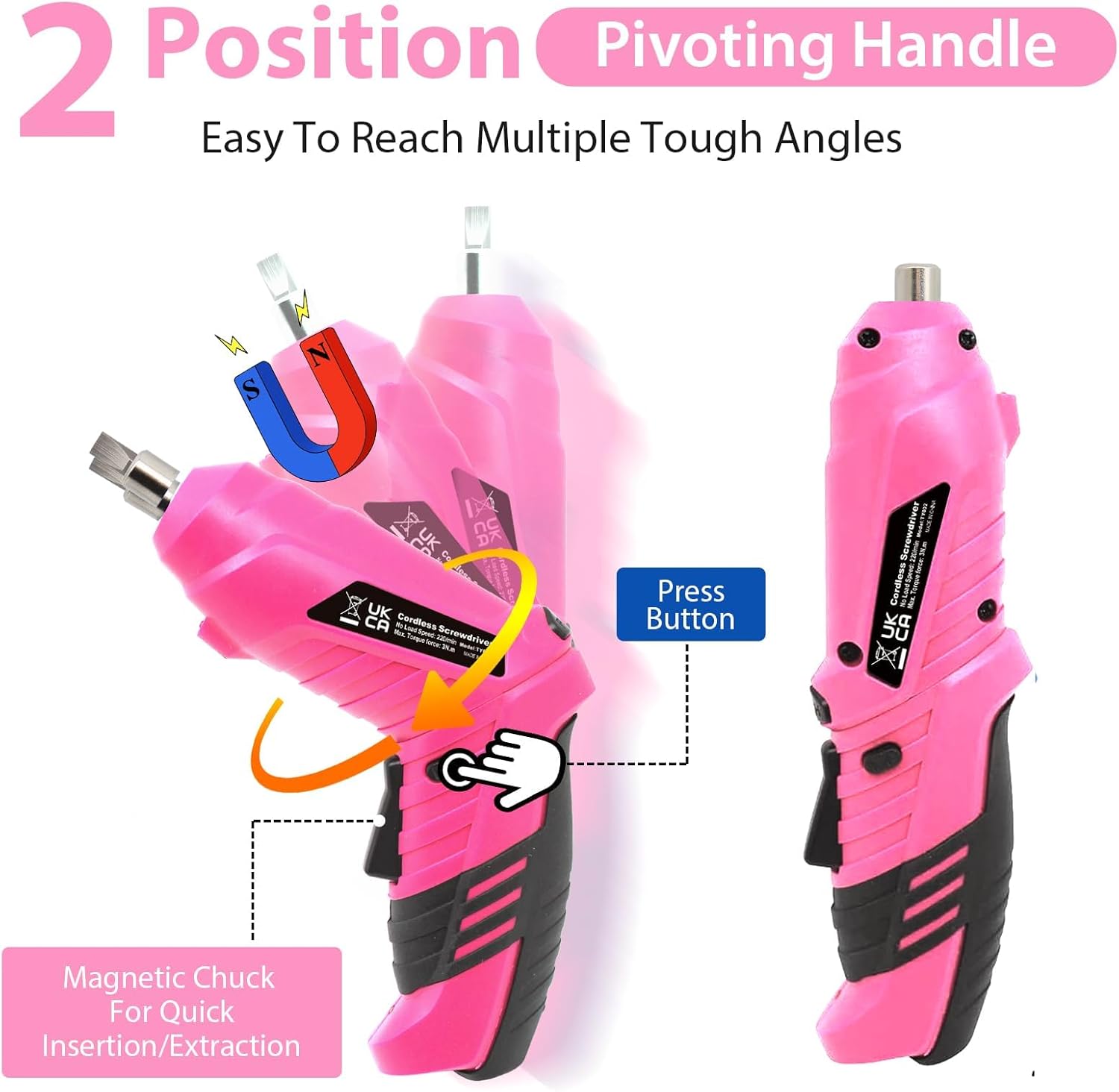
Image: Diagram illustrating the powerful internal motor of the screwdriver.
5. Opstelling
5.1 Aanvanklike laai
Before first use, fully charge the screwdriver's battery. Refer to Section 7 for detailed charging instructions.
5.2 Inserting/Changing Bits
- Ensure the screwdriver is off and the forward/reverse switch is in the locked (middle) position.
- Select the appropriate screwdriver bit, socket, or drill bit for your task.
- Insert the hex shank of the bit directly into the magnetic chuck until it is securely seated. The magnetic chuck will hold the bit firmly.
- Om 'n bietjie te verwyder, trek dit eenvoudig reguit uit die boorkop.
5.3 Adjusting the Pivoting Handle
- Locate the lock button on the side of the screwdriver handle.
- Druk en hou die sluitknoppie.
- Rotate the handle to your desired position (straight or pistol grip).
- Release the lock button to secure the handle in place. Ensure it clicks into position.
6. Bedryfsinstruksies
6.1 Aan-/afskakeling en rigtingbeheer
- Forward (Screwing In): Push the forward/reverse switch to the left (when viewed from the back of the tool) to engage clockwise rotation.
- Reverse (Screwing Out): Push the forward/reverse switch to the right to engage counter-clockwise rotation.
- Lock (Off): Position the switch in the middle to lock the tool and prevent accidental activation.
- To operate, select the desired direction, then press the trigger switch. Release the trigger to stop.
6.2 Gebruik van die LED-werklig
The LED light automatically activates when the trigger switch is pressed, illuminating the work area. It turns off when the trigger is released.
6.3 Using the Flexible Hex Shaft
For reaching screws in awkward or tight angles, attach the flexible hex shaft to the screwdriver's chuck. Then, insert the desired bit into the end of the flexible shaft.

Image: A person using the MQFORU cordless screwdriver to assemble a piece of furniture, demonstrating typical application.
7. Laaiinstruksies
The MQFORU Cordless Power Screwdriver is equipped with a rechargeable Lithium-Ion battery.
- Locate the USB micro charging port on the screwdriver.
- Connect the provided USB charging cable to the screwdriver's charging port.
- Connect the other end of the USB cable to a suitable USB power source, such as a computer USB port, a power bank, a car charger, or a USB wall adapter (not included).
- The battery indicator light (if present) will show the charging status.
- 'n Volle lading neem gewoonlik 2-5 uur. Moenie die battery oorlaai nie.
- Ontkoppel die laaikabel sodra die laai voltooi is.

Image: The cordless screwdriver connected via USB cable to a laptop, illustrating the charging process.
8. Onderhoud
8.1 Skoonmaak
- Always ensure the tool is switched off and disconnected from any power source before cleaning.
- Vee die buitekant van die gereedskap af met 'n sagte, damp lap. Moenie harde chemikalieë of skuur skoonmaakmiddels gebruik nie.
- Keep ventilation openings clear of dust and debris to prevent overheating.
8.2 Berging
- Store the screwdriver and its accessories in the provided storage case.
- Bêre op 'n droë plek, weg van direkte sonlig en uiterste temperature.
- Hou buite bereik van kinders.
9. Probleemoplossing
| Probleem | Moontlike oorsaak | Oplossing |
|---|---|---|
| Skroewedraaier skakel nie aan nie. | Battery is depleted. Forward/reverse switch is in the locked position. | Charge the battery. Move the forward/reverse switch to the forward or reverse position. |
| Battery laai nie. | Charging cable or adapter is faulty. Charging port is dirty. | Try a different USB cable or power adapter. Clean the charging port gently. Ensure connections are secure. |
| Bit is not holding securely in the chuck. | Bit is not fully inserted. Chuck is damaged. | Push the bit firmly into the magnetic chuck. If the problem persists, contact support. |
| Verminderde krag of spoed. | Low battery charge. Overloading the tool. | Recharge the battery. Do not apply excessive force; allow the tool to work at its own pace. |
10. Spesifikasies
| Spesifikasie | Detail |
|---|---|
| Handelsmerk | MQFORU |
| Modelnommer | TY002 |
| Kragbron | Battery aangedrewe |
| Battery Tipe | Litiumioon |
| Battery Voltage | 3.6 Volt |
| Battery kapasiteit | 1300 mAh |
| Geen laai spoed | 220-250 XNUMX RPM |
| Max Torque | 3.5 N·m (30 in-lbs) |
| Laai tyd | 2-5 uur |
| Chuck tipe | 1/4" Quick Magnetic Hex Chuck |
| Materiaal | High Carbon Steel, Acrylonitrile Butadiene Styrene (ABS) |
| Produk afmetings | 9.45"L x 2.56"H |
| Item gewig | 2.09 pond |
| Spesiale kenmerke | Pivoting Handle, LED Light, Ergonomic Design |
11. Waarborg en Ondersteuning
For warranty information or technical support, please contact MQFORU customer service through the retailer where the product was purchased or visit the official MQFORU website. Please have your model number (TY002) and purchase details available when contacting support.