
Maxcom FW58
Maxcom FW58 Vanad Pro Slimhorlosie Gebruikershandleiding
Model: FW58
1. Inleiding
Thank you for choosing the Maxcom FW58 Vanad Pro Smartwatch. This manual provides essential information for setting up, operating, and maintaining your device. The FW58 Vanad Pro is designed to enhance your daily life by offering comprehensive health monitoring, seamless communication, and robust activity tracking capabilities. Its lightweight design and customizable features make it an ideal companion for both busy individuals and active sports enthusiasts.
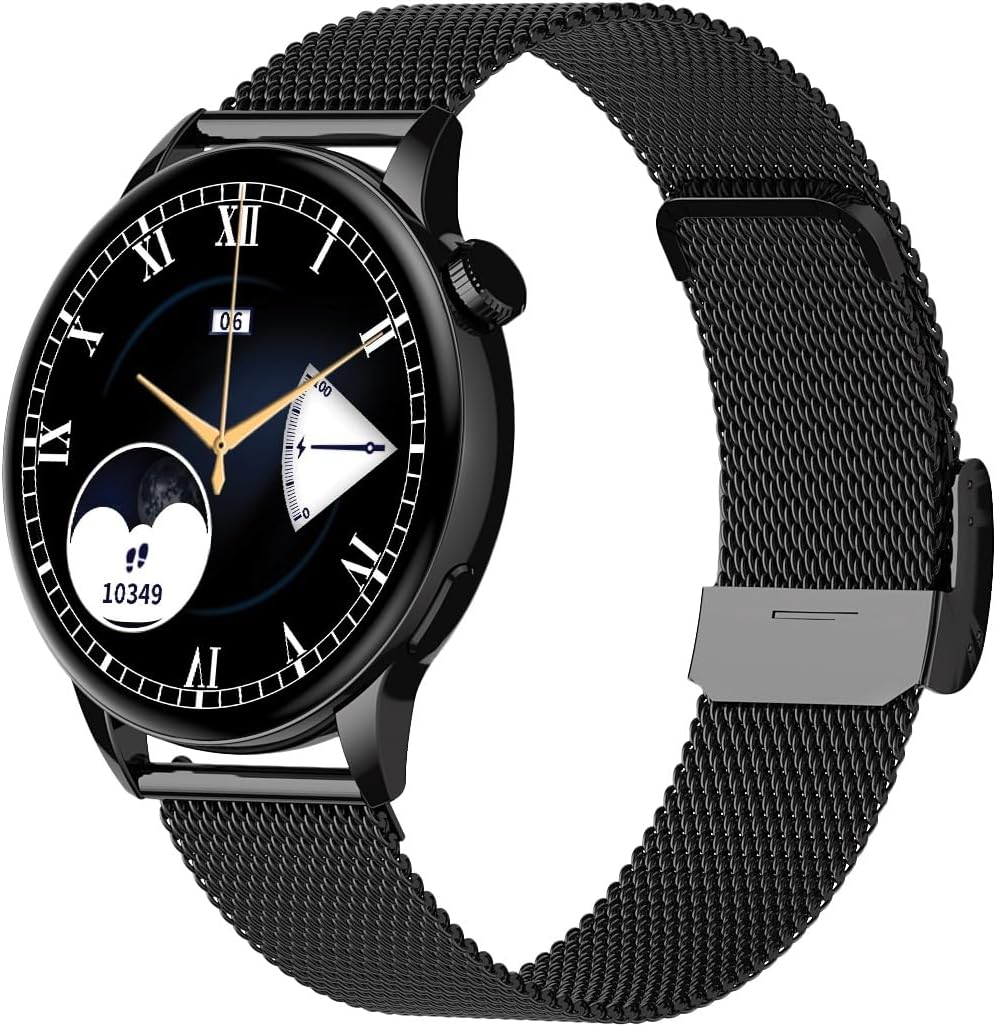
Image 1.1: Maxcom FW58 Vanad Pro Smartwatch, showcasing its elegant design with a black mesh strap and a classic watch face.
2. Opstelling
2.1. Pakketinhoud
Voordat jy begin, maak asseblief seker dat alle items in jou pakket teenwoordig is:
- Maxcom FW58 Vanad Pro Smartwatch
- Magnetiese laaikabel
- Additional Silicone Strap
- Gebruikershandleiding (hierdie dokument)
2.2. Laai die slimhorlosie
Vir optimale werkverrigting, laai jou slimhorlosie volledig voor die eerste gebruik.
- Connect the magnetic charging cable to the charging contacts on the back of the smartwatch. Ensure the pins align correctly.
- Steek die USB-punt van die kabel in 'n standaard USB-kragadapter (5V/1A aanbeveel) of 'n rekenaar se USB-poort.
- Die horlosie se skerm sal die laaistatus aandui. 'n Volle lading neem gewoonlik ongeveer 2 uur.

Prent 2.1: Agter view of the Maxcom FW58 Smartwatch, highlighting the optical sensor for health monitoring and the magnetic charging contacts.
2.3. Koppel met jou slimfoon
To unlock all features, pair your smartwatch with the dedicated Maxcom smartwatch application on your smartphone.
- Download the official Maxcom smartwatch application from your smartphone's app store (e.g., Google Play Store or Apple App Store). Soek vir "Maxcom Smartwatch" or refer to the QR code in the quick start guide if provided.
- Maak seker dat Bluetooth op jou slimfoon geaktiveer is.
- Open the Maxcom app and follow the on-screen instructions to add a new device.
- Select "FW58" from the list of available devices. Confirm the pairing request on both your phone and the smartwatch.
3. Bediening van die slimhorlosie
3.1. Basiese navigasie
The Maxcom FW58 features a responsive touchscreen and a side button/crown for navigation.
- Raakskerm: Veeg links/regs, op/af om deur spyskaarte en kenmerke te navigeer. Tik om te kies.
- Syknop/Kroon: Press to wake the screen, return to the home screen, or access the app menu. Rotate the crown (if applicable) to scroll through lists or adjust settings.

Beeld 3.1: Syprofile of the Maxcom FW58 Smartwatch, illustrating the physical crown and button for intuitive control and navigation.
3.2. Kommunikasie kenmerke
- Oproepe maak/ontvang: Once paired, you can answer incoming calls directly from your smartwatch. You can also initiate calls from your watch's call log or contacts (synced via the app).
- Kennisgewings: Receive real-time notifications for SMS messages, app alerts, emails, social media updates, and news directly on your wrist. Manage notification settings through the Maxcom app.
3.3. Gesondheidsmonitering
The smartwatch provides various health metrics to help you monitor your well-being.
- Hartklop: Continuous or on-demand heart rate monitoring.
- Bloeddruk: Measure your blood pressure (for reference only, not a medical device).
- Bloedsuurstof (SpO2): Monitor jou bloedsuurstofversadigingsvlakke.
- Slaap dop: Automatically monitors your sleep patterns, including deep sleep, light sleep, and awake times.
3.4. Activity Tracking & Sports Modes
Track your daily activity and specific workouts.
- Daaglikse aktiwiteit: Records steps taken, calories burned, and distance traveled (mileage).
- Sportmodusse: Select from various sports modes such as fitness, hiking, running, badminton, cycling, and football to track specific workout data.
3.5. Musiekbeheer
Control music playback on your connected smartphone directly from your smartwatch. Play, pause, skip tracks, and adjust volume without needing to access your phone.
3.6. Aanpassing
Personaliseer jou slimhorlosie-ervaring.
- Gesigte kyk: Choose from over 100 pre-installed watch face models or download more via the Maxcom app to match your style or mood.
- Spyskaartstyl: Customize the layout and appearance of your smartwatch menu.
- Band vervanging: Easily change between the included mesh and silicone straps to suit different occasions or activities.

Image 3.2: A digital watch face on the Maxcom FW58 Smartwatch, showing steps and heart rate data.

Image 3.3: The Maxcom FW58 Smartwatch showcasing a dynamic and colorful digital watch face option.
4. Onderhoud
4.1. Cleaning the Smartwatch
Gereelde skoonmaak help om die toestel se voorkoms en funksionaliteit te behou.
- Vee die skerm en liggaam af met 'n sagte, pluisvrye lap.
- Vir hardnekkige vlekke, effens dampMaak die lap met water skoon. Vermy die gebruik van harde chemikalieë of skuurmiddels.
- Maak die sensorarea aan die agterkant van die horlosie gereeld skoon om akkurate lesings te verseker.
4.2. Batteryversorging
Om die batterylewe te verleng:
- Vermy uiterste temperature.
- Moenie die horlosie vir lang tye heeltemal ontlaai laat nie.
- Charge the device using only the provided charging cable.
4.3. Waterbestandheid (IP67)
The Maxcom FW58 Vanad Pro Smartwatch is rated IP67, meaning it is protected against dust ingress and can withstand immersion in water up to 1 meter for up to 30 minutes. While it is suitable for daily use and splashes, it is not recommended for swimming, diving, or high-pressure water activities.
5. Probleemoplossing
As jy probleme met jou slimhorlosie ondervind, probeer die volgende oplossings:
| Probleem | Oplossing |
|---|---|
| Horlosie skakel nie aan nie | Ensure the watch is fully charged. Press and hold the side button for 5-10 seconds. |
| Kan nie met slimfoon koppel nie | Ensure Bluetooth is on. Restart both the watch and phone. Clear app cache/data. Try pairing again. |
| Onakkurate gesondheidslesings | Ensure the watch is worn snugly on your wrist. Clean the sensor area. Remain still during measurements. |
| Kennisgewings nie ontvang nie | Check app notification permissions on your phone. Ensure the watch is connected via Bluetooth. Verify notification settings within the Maxcom app. |
5.1. Fabrieksterugstelling
If problems persist, you may need to perform a factory reset. This will erase all data on the smartwatch and restore it to its original settings. Navigate to 'Settings' on your smartwatch, then look for 'System' or 'Reset' options.
6. Spesifikasies
| Kenmerk | Detail |
|---|---|
| Modelnommer | FW58 |
| Vertoon grootte | 1.5 duim |
| Batterylewe | 6-10 days (intensive use) |
| Gewig | 46g |
| Kas afmetings | 44 x 38 x 10 mm |
| Band grootte | 255 x 20 mm |
| Waterweerstand | IP67 (tot 1 meter vir 30 minute) |
| Konnektiwiteit | Bluetooth |
| Ingesluite bande | Mesh and Silicone |
7. Waarborg en Ondersteuning
7.1. Waarborginligting
Maxcom products are manufactured to the highest quality standards. For detailed warranty terms and conditions, please refer to the warranty card included with your purchase or visit the official Maxcom webwebwerf. Bewaar u bewys van aankoop vir waarborgeise.
7.2. Kliëntediens
If you require further assistance or have questions not covered in this manual, please contact Maxcom customer support:
- Webwebwerf: Visit the official Maxcom support website for FAQs, software updates, and contact forms.
- E-pos/Telefoon: Refer to the contact information provided on the Maxcom webwebwerf of jou produkverpakking.