
Inleiding
Dankie vir die aankoopasing the Huina 1/14 RC Metal Excavator Digger, Model CY1599. This remote-controlled excavator is designed to provide a realistic and engaging experience, mimicking the functions of a full-sized construction excavator. This manual provides essential information for safe operation, setup, maintenance, and troubleshooting to ensure optimal performance and longevity of your product.
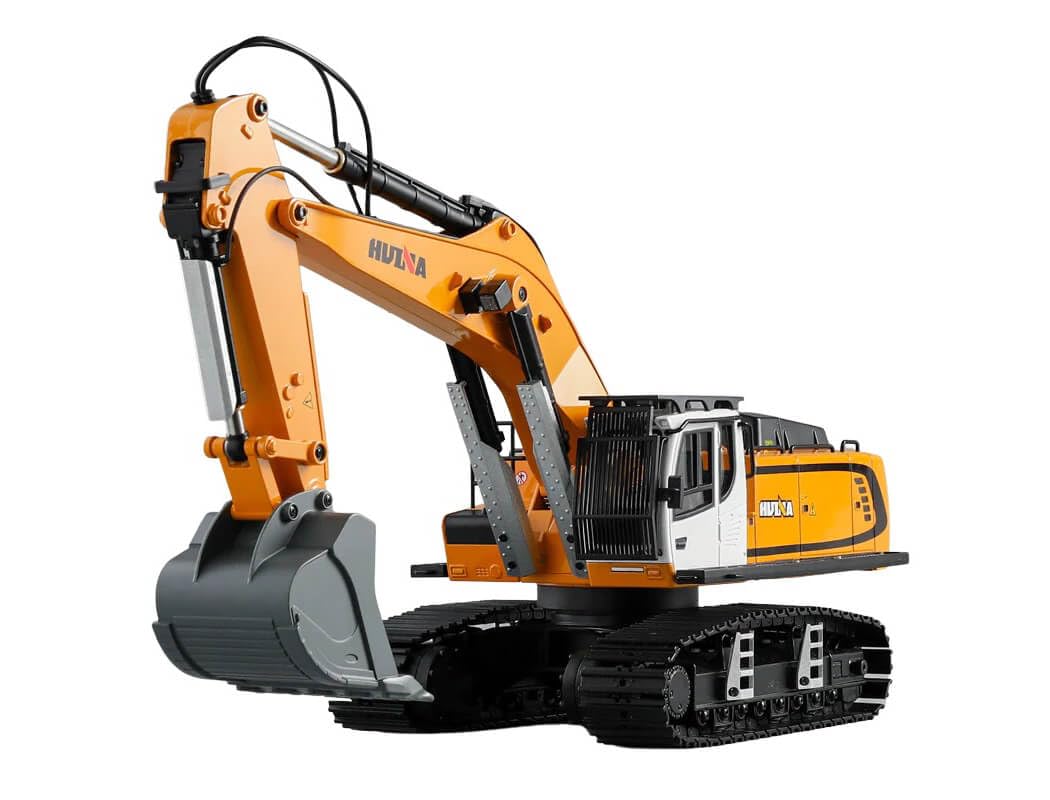
Image: The Huina 1/14 RC Metal Excavator Digger, Model CY1599, showcasing its detailed design and metal components.
Veiligheidsriglyne
Please read and understand all safety instructions before operating the excavator. Failure to follow these guidelines may result in injury or damage to the product.
- Volwasse toesig: This product is recommended for children aged 8 and above. Adult supervision is advised during operation.
- Batteryveiligheid: Use only the specified battery type and charger. Do not mix old and new batteries, or different types of batteries. Do not short-circuit, disassemble, or expose batteries to extreme temperatures or fire.
- Bedryfsomgewing: Operate the excavator in open, clear areas away from people, pets, obstacles, and water. Avoid operating near electrical wires or busy roads.
- Bewegende dele: Keep fingers, hair, and loose clothing away from moving parts such as tracks, arm, and bucket to prevent entanglement.
- Laai: Always charge batteries on a non-flammable surface and never leave charging batteries unattended.
- Berging: Remove batteries from the excavator and remote control when not in use for extended periods. Store the product in a cool, dry place.
Pakketinhoud
Verifieer dat alle komponente in die pakket teenwoordig is voordat u met die opstelling voortgaan.
- Huina 1/14 RC Metal Excavator Digger (Model CY1599)
- Afstandbeheer
- 7.4V 4400mAh Litium-ioon battery
- USB-laaikabel

Image: Contents of the Huina 1/14 RC Metal Excavator Digger package, including the excavator, remote control, battery, and USB charging cable, alongside packaging dimensions.
Opstelling
1. Charging the Excavator Battery
- Connect the 7.4V 4400mAh Lithium-ion battery to the USB charging cable.
- Steek die USB-laaikabel in 'n geskikte USB-kragadapter (nie ingesluit nie).
- The charging indicator light on the USB cable will illuminate during charging.
- Charging typically takes 300-360 minutes (5-6 hours). The indicator light will change or turn off once charging is complete.
- Ontkoppel die battery van die laaier sodra dit volledig gelaai is.
2. Installing the Excavator Battery
- Locate the battery compartment on the excavator (refer to the product diagram if available).
- Maak die batteryvakdeksel oop.
- Carefully insert the charged 7.4V 4400mAh Lithium-ion battery into the compartment, ensuring correct polarity.
- Connect the battery connector to the excavator's power port.
- Maak die batterykompartement se deksel stewig toe.
3. Installering van afstandbeheerbatterye
- Vind die batterykompartement aan die agterkant van die afstandbeheer.
- Maak die batteryvakdeksel oop.
- Insert 4 AA batteries (not included) into the compartment, observing the correct polarity (+/-).
- Maak die batterykompartement se deksel stewig toe.
Bedryfsinstruksies
1. Krag aan en paring
- Ensure both the excavator and remote control have fresh or fully charged batteries installed.
- Turn on the power switch on the excavator.
- Skakel die kragskakelaar op die afstandbeheerder aan.
- The remote control and excavator should automatically pair. An indicator light on the remote control may stop flashing or emit a sound to confirm successful pairing.
2. Basic Driving Controls
The remote control allows for precise movement of the excavator. The typical operating time on a full charge is approximately 30 minutes, with a control distance of 25+ meters.
- Vorentoe/Terug: Use the left joystick (or designated control) to move the excavator forward or backward.
- Draai links/regs: Use the left joystick (or designated control) to steer the excavator left or right while moving.
- Turret Rotation: Use specific buttons or a joystick on the remote to rotate the excavator's upper body (turret) 360 degrees left or right.
3. Excavator Arm and Bucket Controls
The excavator features independent controls for the arm and bucket, allowing for realistic digging and maneuvering.
- Main Arm Up/Down: Use the right joystick (or designated buttons) to raise or lower the main arm.
- Forearm In/Out: Use specific buttons or a joystick to extend or retract the forearm.
- Bucket Scoop/Dump: Use specific buttons or a joystick to open (dump) or close (scoop) the bucket.
4. Sound and Light Functions
The excavator is equipped with realistic sound effects and working lights to enhance the play experience. Refer to your remote control for specific buttons to activate or deactivate these features.

Beeld: Agter view of the Huina 1/14 RC Metal Excavator Digger, highlighting its robust construction.
Onderhoud
1. Skoonmaak
- After each use, especially in dusty or dirty environments, gently wipe down the excavator with a soft, dry cloth.
- Remove any debris, dirt, or sand from the tracks, arm joints, and bucket to prevent wear and tear.
- Moenie water of chemiese skoonmaakmiddels gebruik nie, aangesien dit elektroniese komponente kan beskadig.
2. Batteryversorging en -berging
- Always remove batteries from both the excavator and remote control when not in use for extended periods (e.g., more than a week).
- Store Lithium-ion batteries in a cool, dry place, away from direct sunlight and extreme temperatures.
- Do not overcharge or completely discharge Lithium-ion batteries, as this can reduce their lifespan.
3. Algemene berging
- Store the excavator and remote control in their original packaging or a protective case to prevent damage.
- Keep away from moisture and direct heat sources.
Probleemoplossing
If you encounter issues with your Huina RC Excavator, refer to the following common problems and solutions:
| Probleem | Moontlike oorsaak | Oplossing |
|---|---|---|
| Excavator does not respond to remote control. | Low battery in excavator or remote; Not paired; Power switch off. | Charge excavator battery; Replace remote control batteries; Ensure both power switches are ON; Re-pair the remote control. |
| Kort bedryfstyd. | Battery not fully charged; Old or worn-out battery. | Ensure battery is fully charged (300-360 minutes); Consider replacing the battery if it's old. |
| Excavator moves slowly or inconsistently. | Low battery; Obstruction in tracks or gears. | Charge excavator battery; Check for and remove any debris from tracks and moving parts. |
| Arm or bucket not moving correctly. | Obstruction; Mechanical issue. | Check for and remove any obstructions; Do not force movement. If issue persists, contact support. |
Tegniese spesifikasies
Detailed specifications for the Huina 1/14 RC Metal Excavator Digger CY1599:
- Model Naam: CY1599
- Skaal: 1:14
- Hoofmateriaal: Plastiek, metaal
- Kleur: Geel
- Produk afmetings: 59 x 21.5 x 24.5 cm
- Produk gewig: 8 kg
- Graafmasjienbattery: 7.4V 4400mAh Lithium-ion (1 required, included)
- Afstandbeheer battery: 4 x AA-batterye (nie ingesluit nie)
- Laai metode: USB-laaikabel
- Laai tyd: 300-360 minute
- Remote Control Time: Ongeveer 30 minute
- Afstandbeheerafstand: 25+ meters
- Spesiale kenmerke: Remote control operation, Sound effects, Lights, Independent arm/bucket controls, Load protection, Low voltage protection, High temperature protection.
- Ingesluit komponente: Remote control, USB charging cable, Lithium-ion battery

Beeld: Sykant view of the Huina 1/14 RC Metal Excavator Digger, showcasing its detailed tracks and hydraulic arm design.
Waarborg en Ondersteuning
For warranty information or technical support, please refer to the retailer where the product was purchased or visit the official Huina webwebwerf. Bewaar u aankoopbewys as bewys van aankoop vir enige waarborgeise.
This product is designed with enhanced safety features including load protection, low voltage protection, and high temperature protection to ensure stability and user peace of mind during operation.