
1. Inleiding
The PROHEAR 037 Bluetooth 5.0 Hearing Protection Headphones are designed to provide effective noise reduction while allowing for wireless audio streaming and call management. These headphones are ideal for use in noisy environments such as workshops, during lawn mowing, or snowblowing, ensuring your hearing is protected while you remain connected and entertained.
2. Veiligheidsinligting
Always prioritize your hearing safety. Ensure the headphones are worn correctly to achieve the stated Noise Reduction Rating (NRR). Prolonged exposure to noise levels above 85dB can cause permanent hearing damage.
- Ensure a proper seal around your ears for maximum noise reduction.
- Do not modify the headphones, as this may compromise their protective capabilities.
- Keep the headphones away from extreme temperatures and liquids.

3. Pakketinhoud
Upon opening your PROHEAR 037 package, you should find the following items:
- PROHEAR 037 Hearing Protection Headphones
- USB-laaikabel
- Black Leather Carry Bag
- Gebruikershandleiding (hierdie dokument)

4. Produkkenmerke
The PROHEAR 037 headphones are equipped with advanced features for superior performance and user convenience:
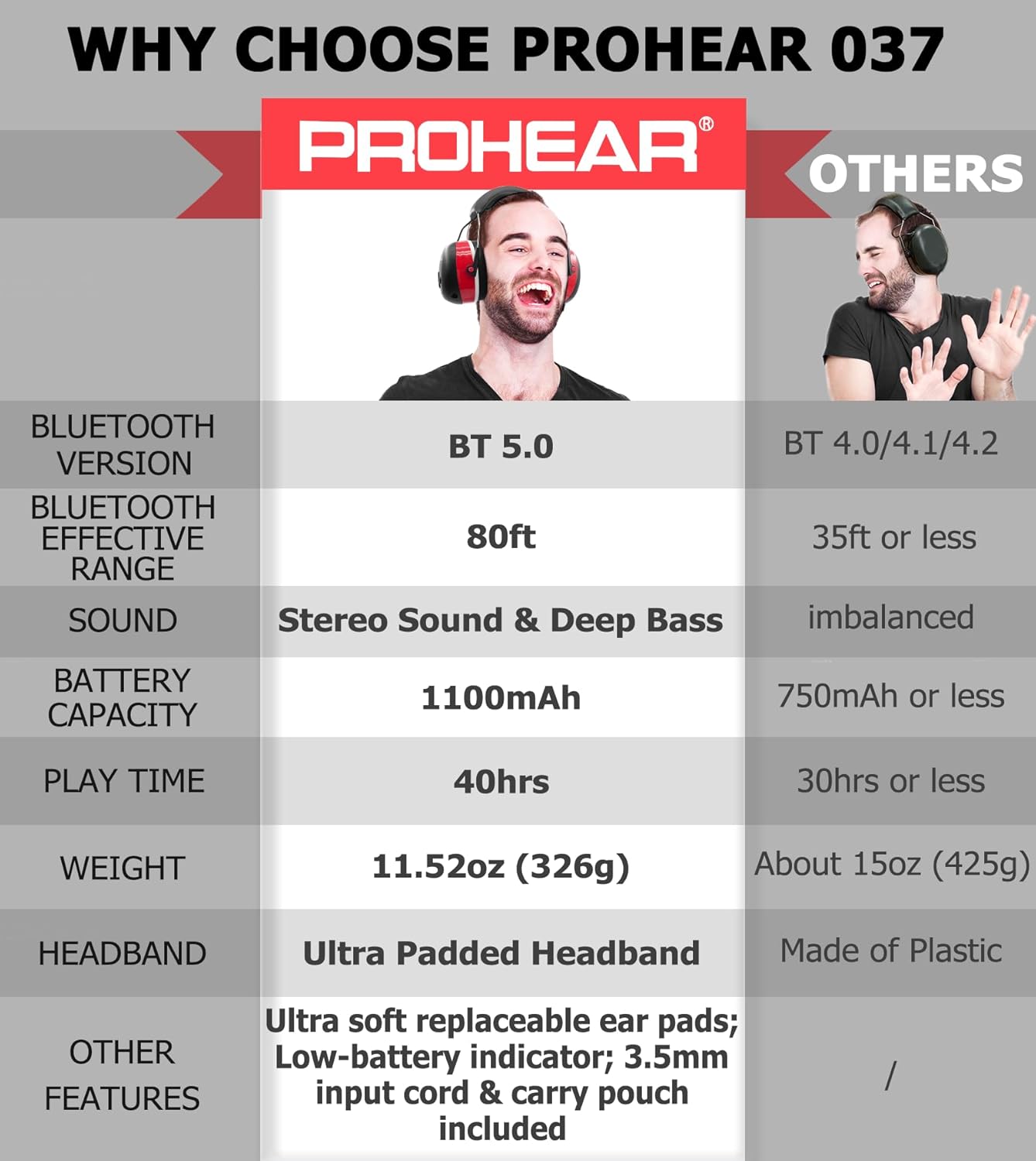
- Bluetooth 5.0 Tegnologie: Provides a stable and fast wireless connection with an effective range of up to 80 feet.
- 25dB Noise Reduction Rating (NRR): Effectively protects your hearing in loud environments.
- Hoë kwaliteit stereo klank: Enjoy clear audio for music and calls.
- Lang batterylewe: Built-in 1100mAh rechargeable lithium battery offers up to 40 hours of playtime.
- Gerieflike ontwerp: Features an ultra-padded headband and soft, breathable ear pads for extended wear.
- Maklik om te gebruik kontroles: Intuitive buttons allow for volume adjustment, track skipping, and call management without removing the muffs.
- Ingeboude mikrofoon: Vir handvrye kommunikasie.
- Bedrade modus: Includes a 3.5mm connector for continuous use even when the battery is depleted.

5. Opstelling
5.1. Laai die oorfone
Before first use, fully charge your PROHEAR 037 headphones.
- Koppel die meegeleverde USB-laaikabel aan die laaipoort op die oorfone.
- Plug the other end of the USB cable into a compatible USB power source (e.g., computer USB port, power bank, or car charger).
- Die LED-aanwyser sal die laaistatus wys (verwys na die LED-aanwyser-afdeling vir besonderhede).
- Sodra dit ten volle gelaai is, ontkoppel die laaikabel.

5.2. Bluetooth-koppeling
Om jou oorfone aan 'n Bluetooth-geaktiveerde toestel te koppel:
- Ensure the headphones are powered off. Press and hold the Power/Multi-function button until the LED indicator flashes blue and red, indicating pairing mode.
- Aktiveer Bluetooth op jou toestel (slimfoon, tablet, ens.) en soek vir beskikbare toestelle.
- Select "PROHEAR 037" from the list of devices.
- Once connected, the LED indicator will show a solid blue light.
6. Bedryfsinstruksies
6.1. Beheer oorview
The control buttons are located on the right earcup for easy access.

- Power/Multi-function Button (Center 'M' button):
- Press and hold: Power On/Off
- Enkele druk: Speel/Pauseer musiek, Beantwoord/Beëindig oproep
- Double press: Redial last number
- Triple press: Activate voice assistant (if supported by device)
- Volume Up Button ('+' button): Druk een keer om die volume te verhoog.
- Volume Down Button ('-' button): Druk een keer om die volume te verlaag.
- Next Track Button ('>' button): Single press to skip to the next song.
- Previous Track Button ('<' button): Single press to go to the previous song.
6.2. Bedrade modus
If the battery is low or you prefer a wired connection, use the included 3.5mm audio cable. Simply plug one end into the headphone's audio jack and the other into your audio device. In wired mode, controls on the headphones may be limited, and you will operate audio playback directly from your connected device.

7. Adjustability and Comfort
The PROHEAR 037 headphones are designed for a comfortable and secure fit for various head sizes.
- Kopbandverstelling: Gently slide the earcups up or down along the metal frame to adjust the headband length until the earcups comfortably cover your ears.
- Ear Pad Seal: Ensure the soft ear pads create a complete seal around your ears to maximize noise reduction. The ultra-padded headband and soft ear pads are designed to reduce pressure during long periods of wear.


8. Onderhoud
Proper care will extend the life and performance of your PROHEAR 037 headphones:
- Skoonmaak: Vee die oorskelpe en kopband af met 'n sagte, damp lap. Moenie harde chemikalieë of skuur skoonmaakmiddels gebruik nie.
- Berging: Store the headphones in the provided carry bag when not in use to protect them from dust and damage. Keep them in a cool, dry place.
- Ear Pad Replacement: The ear pads are designed to be snap-in for easy maintenance and replacement.
9. Probleemoplossing
If you encounter issues with your PROHEAR 037 headphones, try the following solutions:
- Geen krag: Ensure the headphones are fully charged. Connect them to a power source using the USB cable.
- Kan nie via Bluetooth koppel nie:
- Maak seker dat die oorfone in paringsmodus is (LED flikker blou en rooi).
- Ensure Bluetooth is enabled on your device and it is within the 80ft range.
- Vergeet die toestel van jou foon se Bluetooth-instellings en probeer weer koppel.
- Herbegin beide die oorfone en jou toestel.
- Swak klankgehalte:
- Check the Bluetooth connection strength; move closer to your device.
- Ensure the earcups form a good seal around your ears.
- Test with a different audio source or in wired mode.
- Mikrofoon werk nie: Ensure the microphone is not obstructed and the headphones are correctly oriented (microphone near your face). Check device settings for microphone input.
10. Spesifikasies
| Kenmerk | Spesifikasie |
|---|---|
| Model | PROHEAR 037 |
| Bluetooth weergawe | 5.0 |
| Geraasverminderinggradering (NRR) | 25dB |
| Battery kapasiteit | 1100mAh |
| Speeltyd | Tot 40 uur |
| Laai tyd | Ongeveer 4 uur |
| Wireless Range | Tot 80 voet |
| Gewig | 11.52 oz (326g) |
11. Waarborg en Ondersteuning
PROHEAR products are manufactured to high-quality standards. For warranty information, product support, or to inquire about replacement parts, please refer to the warranty card included in your package or visit the official PROHEAR webwebwerf. Bewaar asseblief u bewys van aankoop vir waarborgeise.